Welcome Guest ( Log In | Register )

83 Pages « < 19 20 21 22 23 > » Bottom

Outline · [ Standard ] · Linear+

Home Networking Ditch ONU, use GPON SFP on Business Grade Router, 2.5G ONU for Unifi & Maxis, NO NEED VLAN

views
     
TSAnime4000
post Mar 7 2022, 03:44 AM

Look at all my stars!!
*******
Senior Member
2,399 posts

Joined: Jul 2009
From: /dev/null


QUOTE(zarakiken @ Mar 7 2022, 03:01 AM)
Have anyone tried on PFsense router? I am planning to get a pc to do PFSense as a router. Now looking around for pcie sfp network cards. Also for the PLOAM password no way we can extract it from the huawei device?
*
You need carefully choose proper SFP PCIe Card, Intel X520 not support SFP MAC module

There is way to take out PLOAM Password, turn off Huawei ONU, disconnect fiber, turn ON Huawei ONU, login WebGUI

by default (stock) password: admin, adminHW

if your ONU has custom info, it may have different id
zarakiken
post Mar 7 2022, 04:24 AM

Getting Started
**
Junior Member
58 posts

Joined: Jul 2009
From: Somewhere in Nendoroidian land...
QUOTE(Anime4000 @ Mar 7 2022, 03:44 AM)
You need carefully choose proper SFP PCIe Card, Intel X520 not support SFP MAC module

There is way to take out PLOAM Password, turn off Huawei ONU, disconnect fiber, turn ON Huawei ONU, login WebGUI

by default (stock) password: admin, adminHW

if your ONU has custom info, it may have different id
*
Ah okok... Just notice mine is I-240G-T, Alcatel one. cant find any guides to it.
lwk523
post Mar 7 2022, 09:09 AM

Premium Q Trader
******
Senior Member
1,040 posts

Joined: Mar 2006


QUOTE(Anime4000 @ Mar 7 2022, 12:59 AM)
Nice! I will be waiting...

I also have bought RB5009
[attachmentid=11110895]

and sold EdgeRouter 12
[attachmentid=11110898]
*
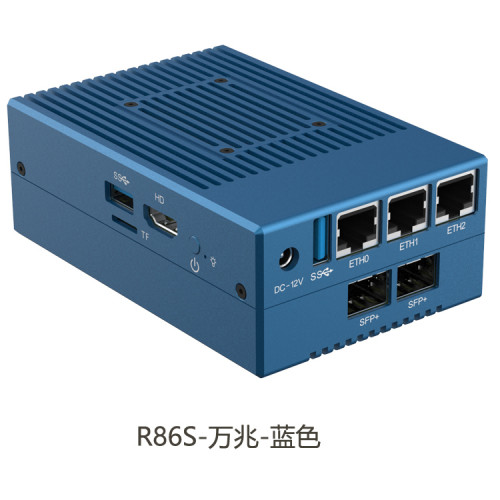
Another new stuff and good to play with .. icon_rolleyes.gif

user posted image

This mini Pc come with 1GB, 2x 2.5G port and allow you to install NAS +OpenWRT with Exsi support. That SPF+ port is for me to cucuk MA5671A

icon_rolleyes.gif

This post has been edited by lwk523: Mar 7 2022, 09:10 AM
thankyou
post Mar 7 2022, 10:14 AM

Regular
******
Senior Member
1,941 posts

Joined: Jan 2003
QUOTE(lwk523 @ Mar 7 2022, 09:09 AM)
Another new stuff and good to play with ..  icon_rolleyes.gif

user posted image

This mini Pc come with 1GB, 2x 2.5G port and allow you to install NAS +OpenWRT with Exsi support. That SPF+ port is for me to cucuk MA5671A

icon_rolleyes.gif
*
Can you share the link please? Does it support pfsense?


Update
---------

Okay found.

https://item.taobao.com/item.htm?spm=a230r....&abbucket=0&mt=

not bad... all Intel network chip.

Not sure if pfsense (BSD) solved the Intel I225-V chipset issue?

This post has been edited by thankyou: Mar 7 2022, 10:23 AM
lwk523
post Mar 7 2022, 10:36 AM

Premium Q Trader
******
Senior Member
1,040 posts

Joined: Mar 2006


QUOTE(thankyou @ Mar 7 2022, 10:14 AM)
Can you share the link please? Does it support pfsense?
Update
---------

Okay found.

https://item.taobao.com/item.htm?spm=a230r....&abbucket=0&mt=

not bad... all Intel network chip.

Not sure if pfsense (BSD) solved the Intel I225-V chipset issue?
*
Yeah .


But only (OCP Mezz Qlogic BCM57810) SPF card can push huawei MA5671A to support 2.5G speed... Maybe Anime4000 can fix it for us whistling.gif

https://www.ebay.com/itm/154575953819

This post has been edited by lwk523: Mar 7 2022, 10:37 AM
TSAnime4000
post Mar 7 2022, 01:17 PM

Look at all my stars!!
*******
Senior Member
2,399 posts

Joined: Jul 2009
From: /dev/null


QUOTE(zarakiken @ Mar 7 2022, 04:24 AM)
Ah okok... Just notice mine is I-240G-T, Alcatel one. cant find any guides to it.
*
another way is kill that ONU by simply jam piece a paper into fiber hole, call TM tell ONU broken, when tech arrive, ask him PLOAM Password

QUOTE(lwk523 @ Mar 7 2022, 09:09 AM)
Another new stuff and good to play with ..  icon_rolleyes.gif

user posted image

This mini Pc come with 1GB, 2x 2.5G port and allow you to install NAS +OpenWRT with Exsi support. That SPF+ port is for me to cucuk MA5671A

icon_rolleyes.gif
*
Yea, currently I experiment RTL9601C since SoC support HiSGMII 2.5GbE, need tweak the driver to make it support

Because (Hisense LTE3415-SCA+) RTL9601B support HiSGMII 2.5GbE

I looking MA5671A, found CM5671A saying a replace for MA5671A
YoungMan
post Mar 12 2022, 06:51 PM

Look at all my stars!!
*******
Senior Member
6,815 posts

Joined: Oct 2008
From: Kuala Lumpur


QUOTE(Anime4000 @ Feb 27 2022, 08:43 PM)
have you try:
tmadmin, Adm@XXXX

X is last 4 Mac address digit in upper case
*
Update: manage to login to my ZTE F620 BTU with the Adm@xxxx. I was just browsing every pages to try and make sense of what's around, and also downloaded a copy of backup settings. Since I'm on Digi fibre, what I notice:
1. For LAN 1 is tagged with VLAN 400, 500, 600 as well as the TR-069 (can't remember what vlan).
2. LAN 2 is only tagged with VLAN 629 for Digi fibre while Lan 3 and 4 is empty.
3. Saw that the TR-069 page has username and password. Is that the same as OLT password?
4. What happen if I turn off the TR-069, since I saw the option to enable/disable it in the GUI?
5. is the port information like speed cap etc actually set on the OLT or somewhere inside BTU that will be override by OMCY? I'm just curious as sometimes for downgrade/upgrade they still need to send technician although our router clearly can support the speed.
Not planning to replace the ONU for now, but just to play around and understand it.
PRSXFENG
post Mar 12 2022, 07:48 PM

Look at all my stars!!
*******
Senior Member
2,608 posts

Joined: Nov 2020


QUOTE(YoungMan @ Mar 12 2022, 06:51 PM)
Update: manage to login to my ZTE F620 BTU with the Adm@xxxx. I was just browsing every pages to try and make sense of what's around, and also downloaded a copy of backup settings. Since I'm on Digi fibre, what I notice:
1. For LAN 1 is tagged with VLAN 400, 500, 600 as well as the TR-069 (can't remember what vlan).
2. LAN 2 is only tagged with VLAN 629 for Digi fibre while Lan 3 and 4 is empty.
3. Saw that the TR-069 page has username and password. Is that the same as OLT password?
4. What happen if I turn off the TR-069, since I saw the option to enable/disable it in the GUI?
5. is the port information like speed cap etc actually set on the OLT or somewhere inside BTU that will be override by OMCY? I'm just curious as sometimes for downgrade/upgrade they still need to send technician although our router clearly can support the speed.
Not planning to replace the ONU for now, but just to play around and understand it.
*
1. sounds like vlans for unifi
2. expected, rarely lan4 could be used for hypptv I heard
3. dont think so
4. it's for them to remotely change settings, you will also find TR-069 on your router, somtimes called CWMP or other names
5. supposedly it's OLT send commands to the BTU to tell it to limit speed
YoungMan
post Mar 12 2022, 08:02 PM

Look at all my stars!!
*******
Senior Member
6,815 posts

Joined: Oct 2008
From: Kuala Lumpur


QUOTE(PRSXFENG @ Mar 12 2022, 08:48 PM)
1. sounds like vlans for unifi
2. expected, rarely lan4 could be used for hypptv I heard
3. dont think so
4. it's for them to remotely change settings, you will also find TR-069 on your router, somtimes called CWMP or other names
5. supposedly it's OLT send commands to the BTU to tell it to limit speed
*
I believe can use lan 4 for HyppTv. Just need to add the vlan.
The firewall on ONU is also enabled. Wouldn't that cause double filter since router already has firewall enabled?

SUSoverlimit
post Mar 14 2022, 04:49 PM

Getting Started
**
Junior Member
141 posts

Joined: Mar 2022
How are the units today? They are still issuing 1GBps crap? 10G seems like a dream
Ouru P
post Mar 21 2022, 10:44 PM

New Member
*
Probation
21 posts

Joined: Jan 2021
Hi , can help advise how to set it through fortigate when involving this DVG-5004S. currently internet working no issues. 2 phone lines running through modem also working, only additional 2 more phone line through DVG-5004S is still down.

1. I've try created vlan400 separate interface port and bridge vlan400 together with vlan500 unifi. and also set allow policy vlan400 to outgoing interface vlan500(wan)

think im still missed out something out wrong somewhere in my setup.

please help advise , thanks
TSAnime4000
post Mar 22 2022, 11:44 PM

Look at all my stars!!
*******
Senior Member
2,399 posts

Joined: Jul 2009
From: /dev/null


QUOTE(Ouru @ Mar 21 2022, 10:44 PM)
Hi , can help advise how to set it through fortigate
*
I dont know fortigate sweat.gif
TSAnime4000
post Mar 24 2022, 07:11 PM

Look at all my stars!!
*******
Senior Member
2,399 posts

Joined: Jul 2009
From: /dev/null


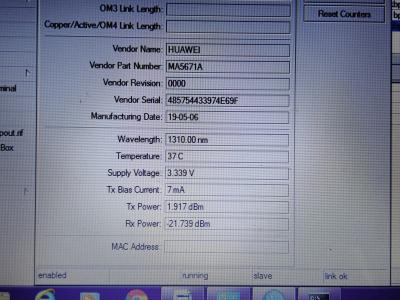
Huawei MA5671A
I received lwk523 Huawei MA5671A at 21/03/22
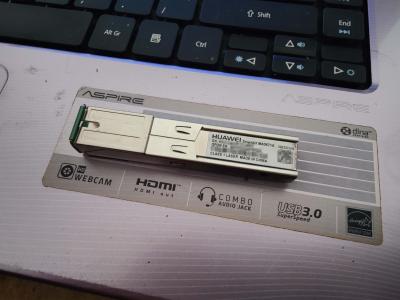
Attached Image

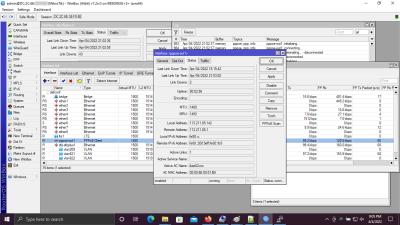
it works nicely with RB5009
Attached Image

after enter PLOAM Password and get O5 status, it didn't work with TM-Maxis even TM-Unifi...
test TM TR069 VLAN209 to check get an IP Address or not, it didn't...

this pretty new to me to discover... all commands

I also order TP-Link TL-XDR5480 from him biggrin.gif , since RB5009 SFP+ (ROS 7.1.5) not support 2.5GbE natively...

One more thing...

Huawei MA5671A using APC connector, only TIME using this, TM using UPC which is need an adapter, if not Optical reading very bad

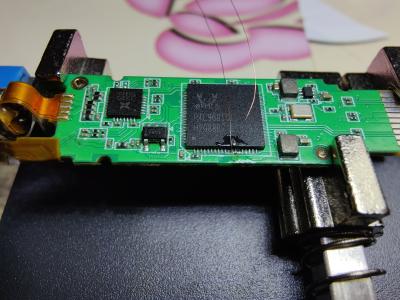
ODI DFP-34X-2C2 (Realtek)
Not soon after I received new stick, I and Gaara92 going to experiment compatibility with TM OLT (TM-Unifi not test yet)
Attached Image

It use same SoC like TWCGPON and V2801F.

GPON_PLOAM_PASSWD alone... TM OLT not provision down/up stream GEM and T-CONT even you get O5 ONU Status
Attached Image

So, I enter valid OMCI Info (Device Information) for TM OLT to accept!
CODE

flash set GPON_PLOAM_PASSWD 1234567890
flash set OMCI_FAKE_OK 1
flash set OMCI_OLT_MODE 1
flash set GPON_ONU_MODEL HG8240H
flash set PON_VENDOR_ID HWTC
flash set HW_HWVER BF9.A
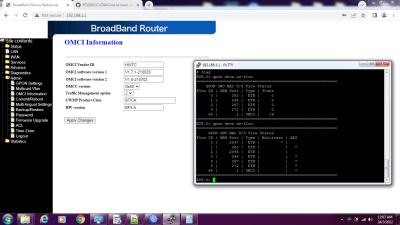
Attached Image

This stick run as Router Mode by default, changing DEVICE_TYPE 0 (Bridge) not work, it will revert back to 1 after reboot

So, need manually bridge VLAN, However... I only manage to get IP Address on VLAN 209 (TM TR069)
Attached Image

Try to bridge VLAN209,621,821,822. Only VLAN209 working...
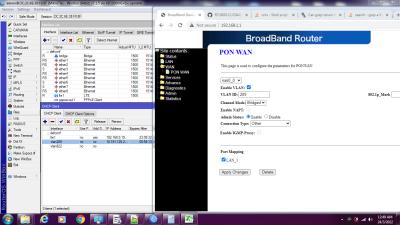
Attached Image

Port Mapping seem no effect, untick LAN_1 still manage to get IP Address from VLAN209

This post has been edited by Anime4000: Mar 24 2022, 07:16 PM

TSAnime4000
post Apr 2 2022, 04:01 PM

Look at all my stars!!
*******
Senior Member
2,399 posts

Joined: Jul 2009
From: /dev/null


Huge Update as now...

lwk523 help me bought TL-XDR5480
Attached Image
Attached Image

Link Speed for my OnePlus 9
TP-Link Archer AX20 (AX1800): 600Mbps
TP-Link Archer AX50 (AX3000): 600Mbps
TP-Link TL-XDR5480 (AX5400): 1441Mbps

I believe OnePlus 9 has 1x1 antenna???

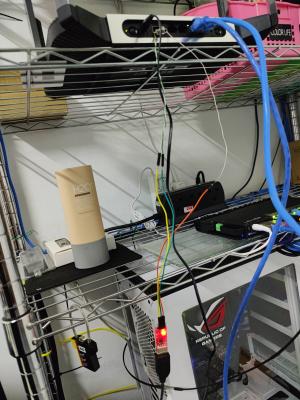
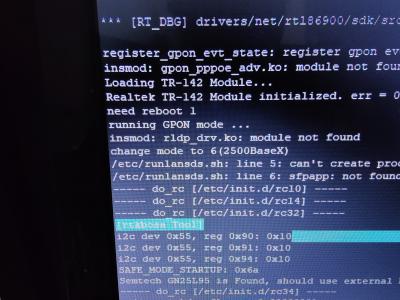
Probing UART to fix LAN_SDS_MODE
Not all router SFP support HiSGMII or 2500BaseX

Attached Image
Attached Image
Attached Image
Attached Image

Also...

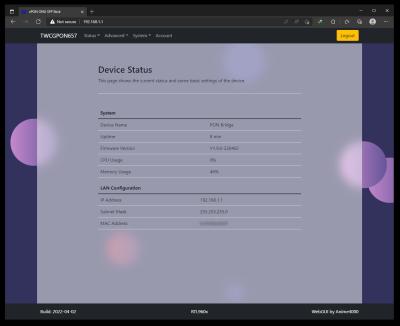
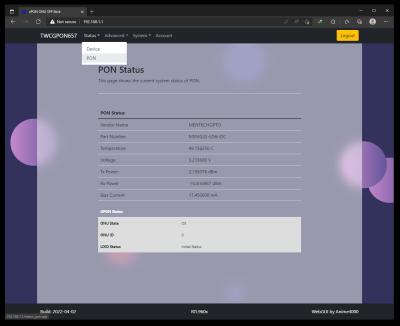
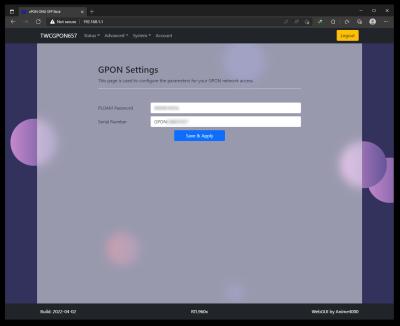
I updated WebGUI to modern HTML5
Attached Image
Attached Image
Attached Image

I not strong at Web Designing... if want to help fix JavaScript, here the repo: https://github.com/Anime4000/RTL9601C1/tree/main/WebGui

I plan to port V2801F to ODI Stick (RTL9601CI to RTL9601D)


This post has been edited by Anime4000: Apr 2 2022, 04:04 PM
TSAnime4000
post Apr 4 2022, 11:13 PM

Look at all my stars!!
*******
Senior Member
2,399 posts

Joined: Jul 2009
From: /dev/null


This my final verdict on xPON ONU SFP Stick

There are 3 SFP Stick can be use on TM Fiber
1. VSOL V2801F (Stock Firmware)
2. TWC GPON657 (C00R657V2801F_V1.9.0-220404.tar)
3. ODI DFP-34X-2C2 (M114_sfp_ODI_220304.tar)

RTL9601CI
1. VSOL V2801F
2. TWC GPON657

RTL9601D
1. ODI DFP-34X-2C2

Stick Setup
Mikrotik
1. Remove sfp1 or sfp-sfpplus1 from bridge
2. Add sfp1 or sfp-sfpplus1 IP Address 192.168.1.100/24
3. Add sfp1 or sfp-sfpplus1 into WAN Interface Group

Now you can access 192.168.1.1 via 192.168.88.0/24 network via NAT!!!

Default Password
VSOL V2801F
admin, stdONU101

TWC GPON657
admin, system

ODI DFP-34X-2C2
admin, admin


Setup for TM Fiber
Login into telnet via 192.168.1.1

Authentication:
CODE

flash set GPON_SN HWTC99887766
flash set GPON_PLOAM_FORMAT 1
flash set GPON_PLOAM_PASSWD 1234567890


Authorized Model:
CODE

flash set PON_VENDOR_ID HWTC
flash set HW_HWVER 168D.A
flash set OMCI_FAKE_OK 1


Reboot it!
CODE

reboot


Check OMCI VLAN
Login into telnet via 192.168.1.1

TM-Maxis Example:
CODE

# omcicli mib get 84
XXXXXXXXXXXXXXXXXXXXXXXXXXXXXXXXX
VlanTagFilterData
XXXXXXXXXXXXXXXXXXXXXXXXXXXXXXXXX
=================================
EntityID: 0x1202
FilterTbl[0]: PRI 0,CFI 0, VID 621
FwdOp:  0x10
NumOfEntries: 1
=================================
=================================
EntityID: 0x1203
FilterTbl[0]: PRI 0,CFI 0, VID 821
FwdOp:  0x10
NumOfEntries: 1
=================================
=================================
EntityID: 0x1204
FilterTbl[0]: PRI 0,CFI 0, VID 822
FwdOp:  0x10
NumOfEntries: 1
=================================
=================================
EntityID: 0x120b
FilterTbl[0]: PRI 0,CFI 0, VID 621
FilterTbl[2]: PRI 0,CFI 0, VID 821
FilterTbl[4]: PRI 0,CFI 0, VID 822
FwdOp:  0x10
NumOfEntries: 3
=================================
=================================
EntityID: 0xe102
FilterTbl[0]: PRI 0,CFI 0, VID 209
FwdOp:  0x10
NumOfEntries: 1
=================================
=================================
EntityID: 0xe10b
FilterTbl[0]: PRI 0,CFI 0, VID 209
FwdOp:  0x10
NumOfEntries: 1
=================================


2.5GbE Support
RB5009 did not support 2.5GbE via SFP!

Customer with 1Gbps subscription manage to get 1.7Gbps when using 2.5GbE Mode
https://www.speedtest.net/result/c/aabbfe75...c4-5fe4ca4d4999

Screenshot
ODI DFP-34X-2C2
Attached Image
Attached Image

TWC GPON657
Attached Image
Attached Image

More information can be found here: https://github.com/Anime4000/RTL9601C1

I spend my time on this since 2020!

I recommend ODI DFP-34X-2C2 because using newer SFP Body (less heat) and better SoC

This post has been edited by Anime4000: Apr 4 2022, 11:20 PM
aneip
post Apr 5 2022, 07:59 AM

Look at all my stars!!
*******
Senior Member
2,466 posts

Joined: Nov 2004


QUOTE(Anime4000 @ Apr 4 2022, 11:13 PM)
This my final verdict on xPON ONU SFP Stick

There are 3 SFP Stick can be use on TM Fiber
1. VSOL V2801F (Stock Firmware)
2. TWC GPON657 (C00R657V2801F_V1.9.0-220404.tar)
3. ODI DFP-34X-2C2 (M114_sfp_ODI_220304.tar)
TM Fiber means only Unifi? What about Other ISP ride on TM?
TSAnime4000
post Apr 5 2022, 10:01 AM

Look at all my stars!!
*******
Senior Member
2,399 posts

Joined: Jul 2009
From: /dev/null


QUOTE(aneip @ Apr 5 2022, 07:59 AM)
TM Fiber means only Unifi? What about Other ISP ride on TM?
*
if you read carefully, I wrote: "TM-Maxis Example:"

this mean works on TM Fiber with any ISP

with proper firmware, we can see how TM OLT send OMCI command to ONT:
CODE

EntityID: 0x120b
FilterTbl[0]: PRI 0,CFI 0, VID 621
FilterTbl[2]: PRI 0,CFI 0, VID 821
FilterTbl[4]: PRI 0,CFI 0, VID 822
FwdOp:  0x10
NumOfEntries: 3


That Entity Id where TM send group of VLAN to LAN 2, Firmware managed to bridge it including VLAN 209 🤣

Plan to try on Allo network with 1Gbps subscription with 2.5GbE Stick and SFP Port 🤣 see if can get more speed like guy in rome
tng55
post Apr 5 2022, 12:16 PM

Regular
******
Senior Member
1,443 posts

Joined: Sep 2021


i using tm unifi can hack speed uncapped ??
i am on 100m can hack 1gbps like 800m free
TSAnime4000
post Apr 5 2022, 02:57 PM

Look at all my stars!!
*******
Senior Member
2,399 posts

Joined: Jul 2009
From: /dev/null


QUOTE(tng55 @ Apr 5 2022, 12:16 PM)
i using tm unifi can hack speed uncapped ??
i am on 100m can hack 1gbps like 800m free
*
this not sure, only 1Gbps users can get more speed
papyrous
post Apr 5 2022, 04:54 PM

Getting Started
**
Junior Member
214 posts

Joined: May 2017
QUOTE(Anime4000 @ Apr 4 2022, 11:13 PM)
This my final verdict on xPON ONU SFP Stick

There are 3 SFP Stick can be use on TM Fiber
1. VSOL V2801F (Stock Firmware)
2. TWC GPON657 (C00R657V2801F_V1.9.0-220404.tar)
3. ODI DFP-34X-2C2 (M114_sfp_ODI_220304.tar)
for the layperson, which one is the easiest to secure and set up?


83 Pages « < 19 20 21 22 23 > » Top
 

Change to:
| Lo-Fi Version
0.0418sec    0.25    6 queries    GZIP Disabled
Time is now: 13th December 2025 - 04:11 AM