

QUOTE(miloaisdino @ Nov 1 2020, 06:25 PM)

Home Networking Ditch ONU, use GPON SFP on Business Grade Router, 2.5G ONU for Unifi & Maxis, NO NEED VLAN
|
|
 Nov 1 2020, 07:46 PM Nov 1 2020, 07:46 PM
Show posts by this member only | IPv6 | Post
#181
|
 
Senior Member
2,399 posts Joined: Jul 2009 From: /dev/null  
|
QUOTE(miloaisdino @ Nov 1 2020, 06:25 PM) |
|
|
|
|
|
Nov 1 2020, 09:23 PM
|

Senior Member
1,472 posts Joined: Apr 2005 From: SumwHeRe In MaLaYsIa 
|
QUOTE(miloaisdino @ Nov 1 2020, 06:25 PM)  This post has been edited by amirsubhi: Nov 1 2020, 09:23 PM |
|
|
Nov 13 2020, 10:43 PM
Show posts by this member only | IPv6 | Post
#183
|
|
Senior Member
2,399 posts Joined: Jul 2009 From: /dev/null
|
I crack open my Realtek ONU SFP stick, what I found:

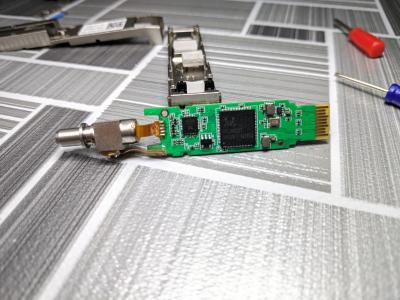
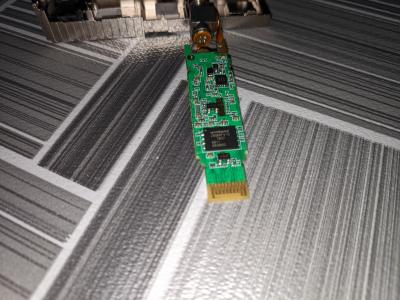
I found ODI carving inside casing, same like DFP-34G-2C2 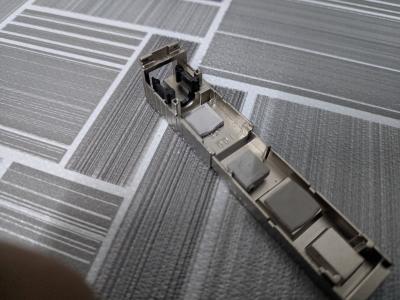
SoC: Realtek RTL9601C1 Flash: Winbond 25Q64FVIG oddly, Realtek RTL9601C1 didn't show any results on Google... |
|
|
Nov 14 2020, 04:07 PM
|

Junior Member
680 posts Joined: Sep 2010
|
Just received my mikrotik ambience!
Hopefully can get it to work. 1. maxis fiber broadband. 2. like to setup nordvpn, under one of the 5Ghz wifi, to connect to US nordvpn server.(( this network only for netflix/amazon prime via the smart TV) 3. normal 2.4ghz wifi and normal 5ghz wifi for local malaysian internet. Probably need to check out this thread and brush up my mikrotik skills. This is my first mikrotik. I have been reading about mikrotik for close to 5 years. Finally! |
|
|
Nov 22 2020, 07:55 PM
|

Junior Member
49 posts Joined: May 2011
|
anyone have the way to login to alcatel lucent i240g provided by TM?
would like to get SIP credential and trying to get more control with voip software. |
|
|
Nov 23 2020, 06:39 PM
|
|
Senior Member
1,418 posts Joined: Jul 2015
|
QUOTE(Anime4000 @ Nov 13 2020, 10:43 PM) I crack open my Realtek ONU SFP stick, what I found: https://www.google.com/search?sxsrf=ALeKk02...le-gws-wiz-serpI found ODI carving inside casing, same like DFP-34G-2C2
SoC: Realtek RTL9601C1 Flash: Winbond 25Q64FVIG oddly, Realtek RTL9601C1 didn't show any results on Google... This post has been edited by miloaisdino: Nov 23 2020, 06:40 PM |
|
|
|
|
|
Dec 14 2020, 05:55 AM
|
|
Probation
5 posts Joined: Dec 2020
|
QUOTE(Anime4000 @ Oct 25 2020, 04:56 AM) I managed to get my SFP stick working, but short lived Hi guys. It's my first post here and found this thread/forum so helpful! only one hour usable then died from overheat~ only one hour usable then died from overheat~[attachmentid=10650099] [attachmentid=10650100] [attachmentid=10650101] very sad, I have purchased a mikrotik RB760iGS and a SFP V2801F. My ISP use EPON (not GPON) Slots to get users connected to their infrastructure. First, i have Bridged all LAN Ports of Mikrotik (192.168.1.1/24) Created my isp tagged vlan 331 as sub-interface on SFP1 Created pppoe client on vlan331 interface Added NAT masquerade on Pppoe_out interface When i plug the fiber on the sfp, it says link-on and rate 1G but pppoe doesn't try to initialize at all. Tried to change / clone sfp1 mac from mikrotik terminal, to my original zte-f460 onu but doesnt work. I managed to get access to the Zte C300 olt, and added the unauthenticated ONU to the epon_olt_x/x/x slot. Now when i run "show onu all-status..." on the olt it says that ONU is UP and Authenticated! On the mikrotik IP-->Neighbors i can see my neighbors info, also the layer3 info (ip addresses). But again, pppoe doesnt initialize. I have tried to pppoe on sfp1, vlan331, create another bridge and add sfp to it and set vlan331 to use this new bridge as master interface but nothing. Can you guys help me with a detailed guide how to access the SFP WebUi or telnet? Do i need to connect the fiber first or i can access the webui without link-on? (I know this is a noob question..) My port on the olt side is configured like this: CODE interface epon-onu_x/x/x:12 admin enable property user-info My_Name ems-autocfg-request disable sla upstream fixed 100000 fixedpkt 64 assured 100000 maximum 200000 maxburst 45000 priority 0 vport 1 sla downstream maximum 300000 maxburst 16777215 vport 1 encrypt direction downstream enable switchport mode hybrid vport 1 switchport vlan 331 tag vport 1 port-location format dsl-forum vport 1 port-location sub-option remote-id name x.x.x.x vport 1 dhcp-option82 enable vport 1 dhcp-option82 trust true replace vport 1 pppoe-plus enable vport 1 pppoe-plus trust true replace vport 1 igmp fast-leave enable vport 1 Anyone can help me 😁 Thank you! |
|
|
Dec 14 2020, 12:29 PM
|

Senior Member
6,214 posts Joined: Sep 2010 From: Busan, Kr | Kuching, Swk 
|
wow.. did not realized have this thread..
 interesting experiment ongoing it seems or completed... need read from page 2 interesting experiment ongoing it seems or completed... need read from page 2 |
|
|
Dec 14 2020, 11:54 PM
|
|
Probation
5 posts Joined: Dec 2020
|
Update:
I managed to get access to the SFP WebUI and Telnet. 1) Reset Mikrotik Config to Default without any Config. 2) Bridge --> BrigdeLAN (ether1, ether2, ether3, ether4, ether5) 3) Interface List --> LAN, WAN 4) Interface List --> LAN --> BridgeLAN 5) Interface List --> WAN --> SFP1 6) IP Addresses --> BridgeLAN --> 192.168.2.1/24 7) IP Addresses --> SFP1 --> 192.168.1.1/24 8) IP Routes --> Add Route --> Dst. Address: 192.168.1.0/24 Gateway: sfp1 8-a) DAC 192.168.2.0/24 (BridgeLAN reachable) shoud be created dynamically... 9) IP --> Firewall --> NAT --> Add --> {General Tab}= Chain: srcnat, Out. Interface: sfp1 {Action Tab}= Action: Masquerade 10) Go to my windows machine --> Set IPv4 Static: IP Add: 192.168.2.5 Subnet: 255.255.255.0 Def.G: 192.168.2.1 DNS1: 192.168.2.1 11)Connect the fiber to the SFP1 and reboot the router. If i don't connect the fiber, it doesnt work! 12) Open browser and type 192.168.1.1 admin:stdONU101 13) Same username:password for the telnet too. On WebUI cannot set anything special... On telnet interface i get a dump of acutal config by typing: flash all And set the parameters: flash set OMCI_TM_OPT 0 flash set VLAN_CFG_TYPE 1 (manual) flash set VLAN_MANU_MODE 0 (transparent) suggested by @Anime4000 On the OLT Side it says Authenticated Successfuly (ONLINE). But again, PPPoE Doesn't initialize.... |
|
|
Dec 15 2020, 12:12 AM
|
|
Probation
5 posts Joined: Dec 2020
|
QUOTE(frankovlore @ Dec 14 2020, 04:54 PM) Update: Some dumps from ZTE-F460I managed to get access to the SFP WebUI and Telnet. 1) Reset Mikrotik Config to Default without any Config. 2) Bridge --> BrigdeLAN (ether1, ether2, ether3, ether4, ether5) 3) Interface List --> LAN, WAN 4) Interface List --> LAN --> BridgeLAN 5) Interface List --> WAN --> SFP1 6) IP Addresses --> BridgeLAN --> 192.168.2.1/24 7) IP Addresses --> SFP1 --> 192.168.1.1/24 8) IP Routes --> Add Route --> Dst. Address: 192.168.1.0/24 Gateway: sfp1 8-a) DAC 192.168.2.0/24 (BridgeLAN reachable) shoud be created dynamically... 9) IP --> Firewall --> NAT --> Add --> {General Tab}= Chain: srcnat, Out. Interface: sfp1 {Action Tab}= Action: Masquerade 10) Go to my windows machine --> Set IPv4 Static: IP Add: 192.168.2.5 Subnet: 255.255.255.0 Def.G: 192.168.2.1 DNS1: 192.168.2.1 11)Connect the fiber to the SFP1 and reboot the router. If i don't connect the fiber, it doesnt work! 12) Open browser and type 192.168.1.1 admin:stdONU101 13) Same username:password for the telnet too. On WebUI cannot set anything special... On telnet interface i get a dump of acutal config by typing: flash all And set the parameters: flash set OMCI_TM_OPT 0 flash set VLAN_CFG_TYPE 1 (manual) flash set VLAN_MANU_MODE 0 (transparent) suggested by @Anime4000 On the OLT Side it says Authenticated Successfuly (ONLINE). But again, PPPoE Doesn't initialize.... Attached File(s)  zte_f460_dump.txt ( 5.9k )
Number of downloads: 34
zte_f460_dump.txt ( 5.9k )
Number of downloads: 34 |
|
|
Dec 15 2020, 12:45 AM
|
|
Senior Member
2,399 posts Joined: Jul 2009 From: /dev/null
|
QUOTE(frankovlore @ Dec 14 2020, 11:54 PM) And set the parameters: flash set OMCI_TM_OPT 0 flash set VLAN_CFG_TYPE 1 (manual) flash set VLAN_MANU_MODE 0 (transparent) suggested by @Anime4000 On the OLT Side it says Authenticated Successfuly (ONLINE). But again, PPPoE Doesn't initialize.... mine need set Fake OMCI to work since ISP have explicit ONT Provisioning. my Realtek ONT Stick have the option, seem your ONT have similar functions. |
|
|
Dec 15 2020, 08:35 PM
|

Senior Member
1,144 posts Joined: Jan 2003 From: Republik Of Kelantanese
|
park
|
|
|
Dec 16 2020, 12:41 AM
|
|
Probation
5 posts Joined: Dec 2020
|
QUOTE(Anime4000 @ Dec 14 2020, 05:45 PM) Have you tried Fake OMCI to 1 ? Thank you,mine need set Fake OMCI to work since ISP have explicit ONT Provisioning. my Realtek ONT Stick have the option, seem your ONT have similar functions. Via telnet: flash set OMCI_TM_OPT 0 flash set VLAN_CFG_TYPE 1 flash set VLAN_MANU_MODE 0 flash set OMCI_FAKE_OK 1 flash set DIRECT_BRIDGE_MODE 1 flash set PON_VENDOR_ID ZTE flash set MacAddr XXXXXXXXXXXX (cloned from original zte) flash set PON_VENDOR_ID ZTE flash set EPON_ONU_MODEL F460 flash set EPON_EXTONU_MODEL ZTE flash set PON_MODE 2 (1 for GPON - 2 for EPON) Via WebUI: Changed Advanced Config Mac Address with my original ZTE F460 MAC address. Added VLANXXX to SFP PPPoE to VLANXXX And finally its working!!! !!ISP Engineer told me to clone mac becouse PPPoE accounts are binded to specific MAC...!! Thank you guys! Awesome. Now i'm thinking to watercool the SFP   Run extremely hot! Run extremely hot! |
|
|
|
|
|
Dec 16 2020, 01:12 PM
|
|
Senior Member
6,214 posts Joined: Sep 2010 From: Busan, Kr | Kuching, Swk
|
QUOTE(frankovlore @ Dec 16 2020, 12:41 AM) Thank you, whoaaa .. that caught me off guard... bind to specific MAC.. but did they tell you what MAC it is...? or they just give you MAC / the MAC was all of these while with you.? Via telnet: flash set OMCI_TM_OPT 0 flash set VLAN_CFG_TYPE 1 flash set VLAN_MANU_MODE 0 flash set OMCI_FAKE_OK 1 flash set DIRECT_BRIDGE_MODE 1 flash set PON_VENDOR_ID ZTE flash set MacAddr XXXXXXXXXXXX (cloned from original zte) flash set PON_VENDOR_ID ZTE flash set EPON_ONU_MODEL F460 flash set EPON_EXTONU_MODEL ZTE flash set PON_MODE 2 (1 for GPON - 2 for EPON) Via WebUI: Changed Advanced Config Mac Address with my original ZTE F460 MAC address. Added VLANXXX to SFP PPPoE to VLANXXX And finally its working!!! !!ISP Engineer told me to clone mac becouse PPPoE accounts are binded to specific MAC...!! Thank you guys! Awesome. Now i'm thinking to watercool the SFP Run extremely hot! |
|
|
Dec 17 2020, 01:21 AM
|
|
Probation
5 posts Joined: Dec 2020
|
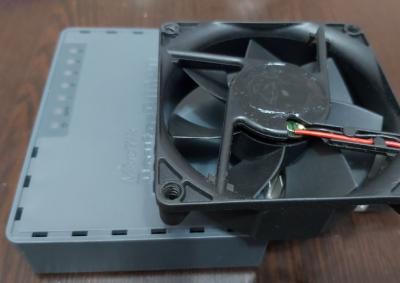
QUOTE(pandera999 @ Dec 16 2020, 06:12 AM) whoaaa .. that caught me off guard... bind to specific MAC.. but did they tell you what MAC it is...? or they just give you MAC / the MAC was all of these while with you.? The mac (onu mac) was on the back sticker of my ZTE ONU. You can get it also by telneting into it.My ISP bind 1:1 - PPPoE Account : ONU MAC And my solution for overheating: 

pandera999 liked this post
|
|
|
Dec 17 2020, 12:10 PM
|
|
Senior Member
1,472 posts Joined: Apr 2005 From: SumwHeRe In MaLaYsIa
|
QUOTE(frankovlore @ Dec 17 2020, 01:21 AM) The mac (onu mac) was on the back sticker of my ZTE ONU. You can get it also by telneting into it. hahaha that is quite extreme cooling, how about noise level?My ISP bind 1:1 - PPPoE Account : ONU MAC And my solution for overheating:
|
|
|
Dec 17 2020, 06:20 PM
Show posts by this member only | IPv6 | Post
#197
|

Senior Member
1,924 posts Joined: May 2009 From: Yokohama, JP
|
QUOTE(frankovlore @ Dec 17 2020, 01:21 AM) The mac (onu mac) was on the back sticker of my ZTE ONU. You can get it also by telneting into it. Wa..need the heat sink meh? The fan alone already more than enough My ISP bind 1:1 - PPPoE Account : ONU MAC And my solution for overheating:
Mine 10Gbps SFP runs piping hot without any active airflow, placed one noctua 20cm cool the SFP, thunderbolt 3 nvme drive, and Mac mini. No heat sink needed 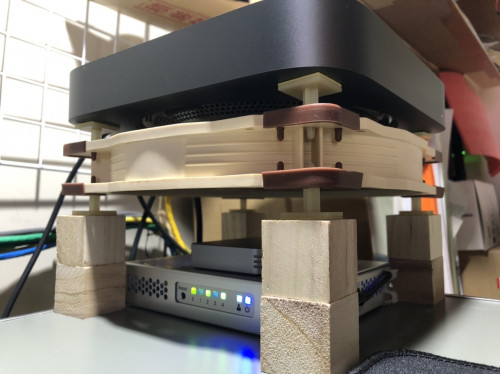 |
|
|
Dec 17 2020, 08:01 PM
|
|
Senior Member
2,399 posts Joined: Jul 2009 From: /dev/null
|
QUOTE(frankovlore @ Dec 17 2020, 01:21 AM) The mac (onu mac) was on the back sticker of my ZTE ONU. You can get it also by telneting into it. I try again with my stick again,My ISP bind 1:1 - PPPoE Account : ONU MAC And my solution for overheating:
I feel RB3011UiAS can't handle very hot SFP, even though I put heatsink I have Upgraded Maxis Fiber from 300/50 to 500/100 for higher upload speed. but I got very poor speed test performance, with Passthrough Enabled, can't achieve at least 480Mbps download sell RB3011UiAS and buy EdgeRouter 12 like thankyou |
|
|
Dec 21 2020, 10:19 PM
|
|
Senior Member
2,399 posts Joined: Jul 2009 From: /dev/null
|
Is anyone know info about Hisense LTF7221?
What Interface is look like, is there any GUI or CMD? Plan to try on 3011UiAS-RM |
|
|
Dec 25 2020, 12:37 AM
|
|
Senior Member
2,399 posts Joined: Jul 2009 From: /dev/null
|
I add some info for reference about GPON in Unifi
• Class B+ • Receiver sensitivity: -27dBm • Wavelengths: US 1310 nm, DS 1490 nm • Wavelength blocking filter (WBF) • Flexible mapping between GEM Port and TCONT • GPON: consistent with the SN or password authentication defined in G.984.3 • Bi-directional FEC • SR-DBA and NSR-DBA Class B+ Optical Power: Minimum Output Optical Power is 1.50dBm, Maximum Output Optical Power is 5dBm, Maximum Receiver Sensitivity is -28dBm, Overload Optical Power is -8dBm This post has been edited by Anime4000: Dec 25 2020, 12:40 AM |
| Change to: |  0.0312sec 0.0312sec
 0.14 0.14
 6 queries 6 queries
 GZIP Disabled GZIP Disabled
Time is now: 7th December 2025 - 12:49 AM |
 Quote
Quote