Welcome Guest ( Log In | Register )

83 Pages « < 7 8 9 10 11 > » Bottom

Outline · [ Standard ] · Linear+

Home Networking Ditch ONU, use GPON SFP on Business Grade Router, 2.5G ONU for Unifi & Maxis, NO NEED VLAN

views
     
miloaisdino
post Oct 3 2020, 06:49 PM

Regular
******
Senior Member
1,418 posts

Joined: Jul 2015
QUOTE(Anime4000 @ Oct 3 2020, 04:57 PM)
I tried your command, Mikrotik and Maxis Router can ping each other.
Yet cannot register VoIP, something happen with FQDN you said earlier.
in vlan.asp page, only 1 tag can be set, thus Internet Only.

XPON SFP ONU, V2801F using Realtek Chipset (RTL8672)
thankyou DFP-34G-2C2 seem using ZTE Chipset

Google search "stdONU101" password lead to:
https://bsnlteleservices.com/netlink-onu-co...voice-internet/
WebGUI look same
Extract via TFTP ?
*
prob because mikrotik resolved the fqdn as public ip so cant connect since public ip not accessible by vlan822? maybe set the mikrotik dhcp server to return a hardcoded maxis dns ip from vlan822 so the maxis router will resolve the fqdn as internal vlan822 ip instead?

alternative is manually create mikrotik script to up/down the ethernet facing the maxis router whenever the "state" of vlan822 changes. eg initially, the eth port dedicated to maxis router is like a regular port (dns resolution and traffic all through internet), when mikrotik successfully pings through vlan822, script "brings down" that eth port and adds it to vlan822 bridge, then bring up eth again. maxis router should obtain ip from 822 successfully as it is forced to reconnect

of course another sloppy way is to just set static dns record in the mikrotik itself to rewrite all of homegw01.maxis.com.my to the internal vlan822 ip... but then voip wont work when fibre is down!

and if configuring the ont stick, i think "service mode" voice should not be used for vlan822, just configure as if another internet vlan. because onts (at least zte) treat voice vlans as reserved for internal fxs ports (none on the stick!) and will not be transmitted to mikrotik

This post has been edited by miloaisdino: Oct 3 2020, 07:14 PM
miloaisdino
post Oct 3 2020, 07:07 PM

Regular
******
Senior Member
1,418 posts

Joined: Jul 2015
QUOTE(amirsubhi @ Oct 3 2020, 04:08 PM)
The things is GPON are quite dependent on OMCI send by the OLT, if you config on the other OLT, when you plug back to TM OLT, the OLT itself will send back the OMCI and overwrite it. except for some layer 3 configuration if necessary
*
i was thinking maybe omci could be used to read/overwrite ont login credentials or enable telnet/webui, since i doubt the olt will push the entire config (eg passwords, telnet/web acls etc) whenever the ont is connected?
TSAnime4000
post Oct 3 2020, 07:18 PM

Look at all my stars!!
*******
Senior Member
2,399 posts

Joined: Jul 2009
From: /dev/null


QUOTE(miloaisdino @ Oct 3 2020, 06:49 PM)
prob because mikrotik resolved the fqdn as public ip so cant connect since public ip not accessible by vlan822? maybe set the mikrotik dhcp server to return a hardcoded maxis dns ip from vlan822 so the maxis router will resolve the fqdn as internal vlan822 ip instead?

alternative is manually create mikrotik script to up/down the ethernet facing the maxis router whenever the "state" of vlan822 changes. eg initially, the eth port dedicated to maxis router is like a regular port (dns resolution and traffic all through internet), when mikrotik successfully pings through vlan822, script "brings down" that eth port and adds it to vlan822 bridge, then bring up eth again. maxis router should obtain ip from 822 successfully as it is forced to reconnect

of course another sloppy way is to just set static dns record in the mikrotik itself to rewrite all of homegw01.maxis.com.my to the internal vlan822 ip... but then voip wont work when fibre is down!
*
yea, ONT Stick I have not much can handle, once VLAN 621 has been bridged, other VLAN hard to bridge, thus DHCP Client request under Realtek ONT Stick take too long.

I have try many solution, none of it works.

I guess use DFP-34G-2C2 as thankyou showed to us, can make many VLAN as we like.

Afraid to ask my Japanese friend that ONT Stick he buy not really working 100%
So I need buy my own

QUOTE(miloaisdino @ Oct 3 2020, 07:07 PM)
i was thinking maybe omci could be used to read/overwrite ont login credentials or enable telnet/webui, since i doubt the olt will push the entire config (eg passwords, telnet/web acls etc) whenever the ont is connected?
*
OLT Stick is cheap, but OLT Device are not cheap, even for Ubiquiti UFiber OLT cost you near RM 5K.

If everyone willing to invest together, we can make Pirate OLT Provisioning, ONT connected to VPNed OLT biggrin.gif
miloaisdino
post Oct 3 2020, 07:48 PM

Regular
******
Senior Member
1,418 posts

Joined: Jul 2015
QUOTE(Anime4000 @ Oct 3 2020, 07:18 PM)
yea, ONT Stick I have not much can handle, once VLAN 621 has been bridged, other VLAN hard to bridge, thus DHCP Client request under Realtek ONT Stick take too long.

I have try many solution, none of it works.

I guess use DFP-34G-2C2 as thankyou showed to us, can make many VLAN as we like.

Afraid to ask my Japanese friend that ONT Stick he buy not really working 100%
So I need buy my own
OLT Stick is cheap, but OLT Device are not cheap, even for Ubiquiti UFiber OLT cost you near RM 5K.

If everyone willing to invest together, we can make Pirate OLT Provisioning, ONT connected to VPNed OLT biggrin.gif
*
theres always second-hand olt from ebay/china sites!
miloaisdino
post Oct 3 2020, 07:59 PM

Regular
******
Senior Member
1,418 posts

Joined: Jul 2015
QUOTE(Anime4000 @ Oct 3 2020, 07:18 PM)
yea, ONT Stick I have not much can handle, once VLAN 621 has been bridged, other VLAN hard to bridge, thus DHCP Client request under Realtek ONT Stick take too long.

I have try many solution, none of it works.

I guess use DFP-34G-2C2 as thankyou showed to us, can make many VLAN as we like.

Afraid to ask my Japanese friend that ONT Stick he buy not really working 100%
So I need buy my own
OLT Stick is cheap, but OLT Device are not cheap, even for Ubiquiti UFiber OLT cost you near RM 5K.

If everyone willing to invest together, we can make Pirate OLT Provisioning, ONT connected to VPNed OLT biggrin.gif
*
theres 1 last option! zte onts by default when voice vlan (eg vlan822 is set as voice vlan) on the ont, zte ont ip (192.168.1.1) acts as gateway and vlan822 is accessible through nat in the ont itself (as in can access voip vlan via ont local management subnet)! the same might be for the onu stick.
pacat
post Oct 3 2020, 08:22 PM

New Member
*
Newbie
16 posts

Joined: Aug 2006
From: bendang, paya, selut, parit, etc.


QUOTE(Anime4000 @ Oct 3 2020, 04:57 PM)
I tried your command, Mikrotik and Maxis Router can ping each other.
Yet cannot register VoIP, something happen with FQDN you said earlier.
in vlan.asp page, only 1 tag can be set, thus Internet Only.
*
Try resolve homegw01.maxis.com.my with vlan822 dns server. Is it same as public one?
CODE
/ip route add dst-address=58.71.252.3 gateway=vlan1.822
:put [:resolve domain-name=homegw01.maxis.com.my server=58.71.252.3]

Mine
CODE
:put [:resolve domain-name=homegw01.maxis.com.my]            
202.75.146.26

amirsubhi
post Oct 3 2020, 09:42 PM

The Power Is IN Your Hand!
******
Senior Member
1,472 posts

Joined: Apr 2005
From: SumwHeRe In MaLaYsIa


QUOTE(miloaisdino @ Oct 3 2020, 07:07 PM)
i was thinking maybe omci could be used to read/overwrite ont login credentials or enable telnet/webui, since i doubt the olt will push the entire config (eg passwords, telnet/web acls etc) whenever the ont is connected?
*
Whenever ONU is connected to OLT, ONU will try to register themselves using SLID/ONU password using PLOAM to OLT

From there OLT will send all the configuration back such as profile & ME etc, including UNI, T-Cont and GEM Port which may differ depend on how operator config it, every time when the ONT is registered/sync back to OLT.

As mention earlier, this does not include any layer 3 configuration which require either webui or tr069

This post has been edited by amirsubhi: Oct 3 2020, 09:47 PM
miloaisdino
post Oct 3 2020, 09:56 PM

Regular
******
Senior Member
1,418 posts

Joined: Jul 2015
QUOTE(amirsubhi @ Oct 3 2020, 09:42 PM)
Whenever ONU is connected to OLT, ONU will try to register themselves using SLID/ONU password using PLOAM to OLT

From there OLT will send all the configuration back such as profile & ME etc, including UNI, T-Cont and GEM Port which may differ depend on how operator config it, every time when the ONT is registered/sync back to OLT.

As mention earlier, this does not include any layer 3 configuration which require either webui or tr069
*
oic. so NMS cant edit local config without tr069? i thought omci could override tr069 server settings on the ONU also
thanks for the help!

This post has been edited by miloaisdino: Oct 3 2020, 10:03 PM
TSAnime4000
post Oct 5 2020, 08:51 PM

Look at all my stars!!
*******
Senior Member
2,399 posts

Joined: Jul 2009
From: /dev/null


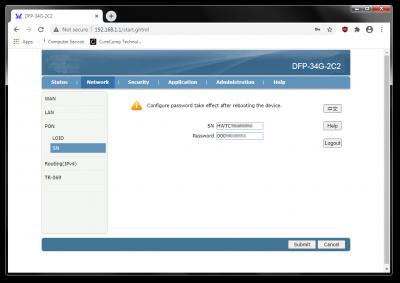
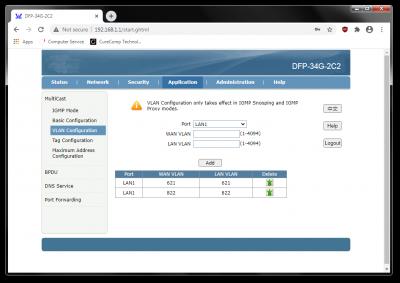
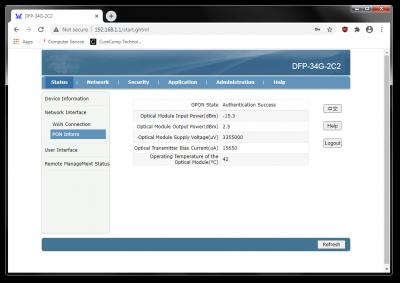
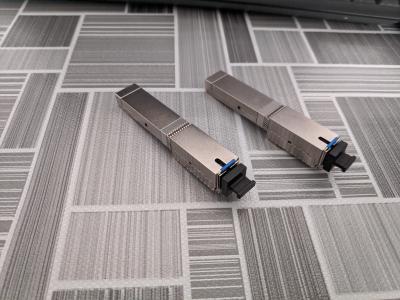
Today, I received thankyou ONT Stick for 'Education' purpose~
Attached Image
Attached Image
Attached Image
Attached Image

Unfortunately, it didn't work with Maxis riding Unifi, because has no LAN 2 (eth1) port.
VLAN Tag at Multicast menu is no required to set, this stick works same like Realtek, making full bridge.

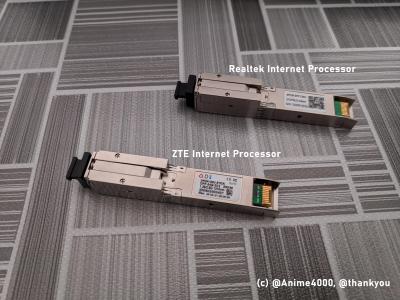
Comparison between Realtek and ZTE Stick:
Attached Image
Attached Image

Here some telnet log:
https://github.com/Anime4000/DFP-34G-2C2/bl...i_onu_stick.log

Unfortunate, the config file is encrypted & compressed?
https://github.com/Anime4000/DFP-34G-2C2/bl...ter/_config.bin

All Stick content are available here:
https://github.com/Anime4000/DFP-34G-2C2
thankyou
post Oct 20 2020, 11:07 AM

Regular
******
Senior Member
1,941 posts

Joined: Jan 2003
I don't think ER-12 is friendly for home use due to house ambient temperature...

It's running quite hot all the time... Had ordered router fan hopefully to cool it down...

RB4011 (non Wifi) is running around 40-45c most of the time

https://forum.mikrotik.com/viewtopic.php?t=147051

This post has been edited by thankyou: Oct 20 2020, 11:09 AM


Attached image(s)
Attached Image
TSAnime4000
post Oct 20 2020, 11:51 PM

Look at all my stars!!
*******
Senior Member
2,399 posts

Joined: Jul 2009
From: /dev/null


QUOTE(thankyou @ Oct 20 2020, 11:07 AM)
I don't think ER-12 is friendly for home use due to house ambient temperature...

It's running quite hot all the time... Had ordered router fan hopefully to cool it down...

RB4011 (non Wifi) is running around 40-45c most of the time

https://forum.mikrotik.com/viewtopic.php?t=147051
*
My RB3011UiAS-RM temp is 38°C

thankyou can you help what they say?
» Click to show Spoiler - click again to hide... «

Taken from: https://www.txrjy.com/thread-938218-1-1.html
wanttotree
post Oct 21 2020, 02:56 AM

On my way
****
Junior Member
677 posts

Joined: Apr 2008
QUOTE(Anime4000 @ Jun 26 2020, 10:32 PM)
See feedback that, they show have WebUI to configure ONT Authentication
Since you have ER-12, test if that works.
Also, if possible, try override OLT OMCI command or manual OMCI, try remove/adjust Hardware Speed Capping, I like to remove speed cap VLAN 621 to achieve A+ Anti Bufferbloat. let PPPoE based speed limit.

SSH Log OLT of HG8240H5, OLT Provisioning:
CODE
1981-01-01 00:01:43 [Critical][Config-Log] Terminal:OLT(-),Result:Success,Type:Set,Msg:Me[11] Inst[257] Att[5] Val[0]
1981-01-01 00:01:43 [Critical][Config-Log] Terminal:OLT(-),Result:Success,Type:Set,Msg:Me[11] Inst[258] Att[5] Val[0]
1981-01-01 00:01:43 [Critical][Config-Log] Terminal:OLT(-),Result:Success,Type:Set,Msg:Me[11] Inst[259] Att[5] Val[0]
1981-01-01 00:01:43 [Critical][Config-Log] Terminal:OLT(-),Result:Success,Type:Set,Msg:Me[11] Inst[260] Att[5] Val[0]

I also have change TM to TIME ONT, what I do simply put my ONT Authentication Password.
Maybe TM OLT have list or SN check, between new HG8240 and HG8240H5, both have same "48575443" (HWTC) SN at first 8 HEX digit,
*
The fact that you can remove ont speed cap intrigued me. Is this only can be done with third party ont? Any more details on how to do this? Can it be done with the tm default huawei ont? My unit is HG8240W. I hope to remove any sort of cap on my 100mbps viewqwest riding on tm.
thankyou
post Oct 21 2020, 12:39 PM

Regular
******
Senior Member
1,941 posts

Joined: Jan 2003
QUOTE(Anime4000 @ Oct 20 2020, 11:51 PM)
My RB3011UiAS-RM temp is 38°C

thankyou can you help what they say?
» Click to show Spoiler - click again to hide... «

Taken from: https://www.txrjy.com/thread-938218-1-1.html
*
It seems like it's all about troubleshooting the PON interface if it wouldn't establish connection...

it mentioned about port mirroring to local interface...
thankyou
post Oct 21 2020, 01:50 PM

Regular
******
Senior Member
1,941 posts

Joined: Jan 2003
Managed to reduce to ideal temperature but I have to return the fan...

1 out of the 2 fans isn't running... Will have to reorder from the same seller..


Attached thumbnail(s)
Attached Image
TSAnime4000
post Oct 22 2020, 09:02 PM

Look at all my stars!!
*******
Senior Member
2,399 posts

Joined: Jul 2009
From: /dev/null


QUOTE(thankyou @ Oct 21 2020, 12:39 PM)
It seems like it's all about troubleshooting the PON interface if it wouldn't establish connection...

it mentioned about port mirroring to local interface...
*
I tried these on your DFP-34G-2C2, didn't work.

I check between your ZTE and Realtek that I have:

ZTE:
CODE

         br0
     192.168.1.1
          |
|‾‾‾‾‾‾‾‾‾‾‾‾‾‾‾‾‾‾‾‾|
|                    |
|                    |
eth0                nbif0


Realtek:
CODE

         br0
     192.168.1.1
          |
|‾‾‾‾‾‾‾‾‾‾‾‾‾‾‾‾‾‾‾‾|
|                    |
|                    |
eth0               nas0_0


way of bridging is look identical, nbif0 for ZTE, nas0_0 for Realtek that mirror with pon0

DFP-34G-2C2 didn't work with Maxis, I didn't find a way to fake OMCI_OK command like Realtek did.

this seem have same interface:
https://blog.csdn.net/weixin_42353331/artic...tails/100063969

This post has been edited by Anime4000: Oct 22 2020, 09:10 PM
TSAnime4000
post Oct 25 2020, 11:56 AM

Look at all my stars!!
*******
Senior Member
2,399 posts

Joined: Jul 2009
From: /dev/null


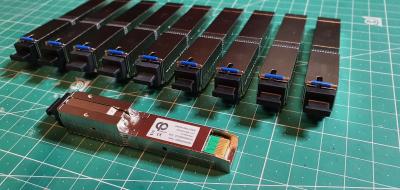
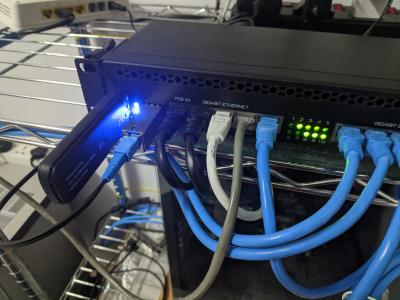
I managed to get my SFP stick working, but short lived sad.gif only one hour usable then died from overheat~
Attached Image
Attached Image
Attached Image

very sad,
TSAnime4000
post Oct 26 2020, 10:19 PM

Look at all my stars!!
*******
Senior Member
2,399 posts

Joined: Jul 2009
From: /dev/null


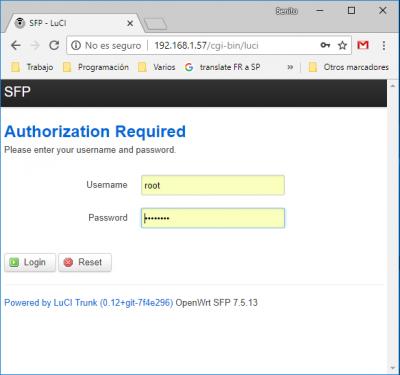
Today I found some GPON SFP that using Open Source Firmware (OpenWrt SFP)
Attached Image
Attached Image

on this page: https://www.facebook.com/CarlitoxxPro/

what I found, it has more control than stock firmware, can Realtek/ZTE flashed to OpenWRT?
Gaara92
post Oct 30 2020, 02:14 AM

Herald
****
Junior Member
612 posts

Joined: Mar 2008


Anyone here have tried the GPON SFP with TIME broadband?
miloaisdino
post Oct 30 2020, 10:35 AM

Regular
******
Senior Member
1,418 posts

Joined: Jul 2015
QUOTE(Anime4000 @ Oct 25 2020, 11:56 AM)
I managed to get my SFP stick working, but short lived sad.gif only one hour usable then died from overheat~

Attached Image
Attached Image
Attached Image

very sad,
*
maybe try attaching a mini heatsink with zip tie and cpu thermal paste?
miloaisdino
post Nov 1 2020, 06:25 PM

Regular
******
Senior Member
1,418 posts

Joined: Jul 2015
QUOTE(miloaisdino @ Oct 30 2020, 10:35 AM)
maybe try attaching a mini heatsink with zip tie and cpu thermal paste?
*
user posted image

83 Pages « < 7 8 9 10 11 > » Top
 

Change to:
| Lo-Fi Version
0.0279sec    0.67    6 queries    GZIP Disabled
Time is now: 7th December 2025 - 11:59 AM