Welcome Guest ( Log In | Register )

Bump Topic Topic Closed RSS Feed
377 Pages « < 202 203 204 205 206 > » Bottom

Outline · [ Standard ] · Linear+

Unifi Official TM UniFi High Speed Broadband Thread V38, READ 1ST PAGE FOR TURBO SPEED INFO!

views
     
ideaplus
post May 20 2020, 01:49 PM

Enthusiast
*****
Junior Member
915 posts

Joined: Nov 2014
Very long time looking forward to fibre connection, finally saw dp box installed at my opposite house pole and i decided to take some survey from here, since so many experts in lyn biggrin.gif

Package: Unifi 300Mbps (2 ipad, 5 smartphone, 2 laptops, 1 desktop, and might add tv box and wireless cctv in future) So i think 100Mbps probably no enough for my scenario, right?

As what i know from here, TM sure provide the all-in-one modem+router, which lousy. My house is just single terrace house which about 22x70
1. Should i change to TP Link A9 for future proof?
2. Or use TP Link Deco series for better wifi coverage?
3. Or use TP-Link Easy Smart Switch + another wifi router?

I heard TM will provide fibre service priority to those Streamyx subscriber. For those non Streamyx subscriber, TM might put them hold until further notice. Is this statement true? Unluckily, i'm the one who cancelled Streamyx service few years ago as only 2Mbps available during that time.

Sorry for so many questions tongue.gif

Thanks for any reply in advance
SUSCandy12
post May 20 2020, 02:18 PM

Regular
******
Senior Member
1,878 posts

Joined: Apr 2019
Why TM's standard installation no more these 2 components?

Last time during early HSBB launch got why now don't have? Government subsidy sudah pakai habis?

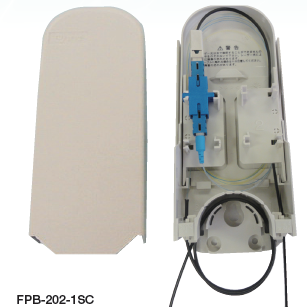
user posted image

user posted image

user posted image

If cable breaks and damaged very susah of during MCO, need to call technician to come and incur extra repair charges.

Why cannot do setup like in Japan, mostly DIY?
Installer only come setup until FWS(wall socket), check the line is litted then finish work.

ONT(fibre modem), wireless router, dect phone and TV box courier directly to customer as DIY kits.

Like this one, Softbank ISP on NTT West wholesale network.


If patch cable(between FWS and ONT) broke, go out buy from off the shelf and ownself replace.
If inside cable from damarcation box to FWS broken, call 3rd party line man to replace or replace yourself.
If outdoor cable from FDP(white box) on pole to demarcation box black colored line broken call telecom company to replace outside the house.

Why so cheap and lousy work pull the black cable directly from outside FDP to the fibre modem directly?
Wan
post May 20 2020, 02:25 PM

Glory Hunter
Group Icon
Elite
4,174 posts

Joined: Jan 2003
From: Gua


Lulz.
Komplen 24/7
sHawTY
post May 20 2020, 02:29 PM

Frequent Reporter
********
All Stars
14,909 posts

Joined: Jul 2005

Gula gula sedang bekerja keras whistling.gif

This post has been edited by sHawTY: May 20 2020, 02:40 PM
SUSCandy12
post May 20 2020, 03:08 PM

Regular
******
Senior Member
1,878 posts

Joined: Apr 2019
QUOTE(Wan @ May 20 2020, 02:25 PM)
Lulz.
Komplen 24/7
*
Better than minum kopi all the time wut.

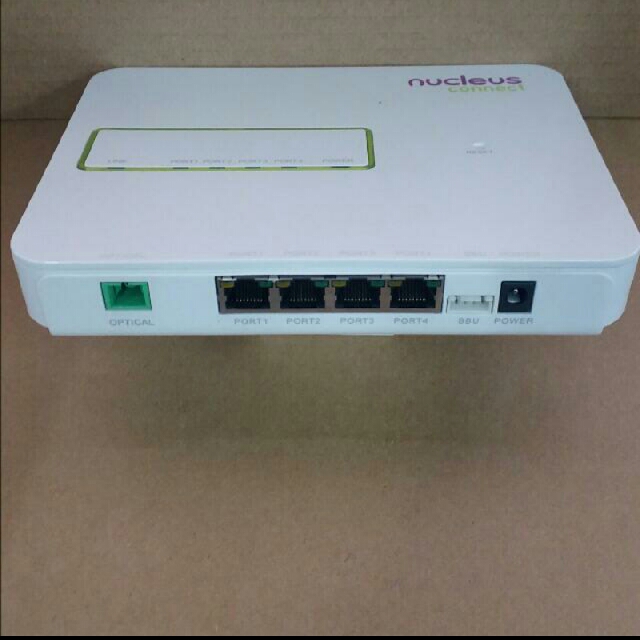
Why TM Wholesale use 4-port router with phone port only exclusive for own Unifi's fixed line?
Why not like Nucleus Connect in SG got 4x GE ports where all RSPs treated equally and must only provide their phone through their own supplied routers?

user posted image

user posted image

MCMC don't know unfair practice going on?How to call itself national HSBB network when only favor own ISP?

Why must the modem and ONT inventory handled by installers? Cannot let customer DIY their own ONT(fibre modem) and routers?

Why? Why? So that can charge customers every time cable broken with visits and give more opportunity for "priviledged" to make money?

Look how Japanese subscribers install their own DIY fibre modem and ISP supplied routers themselves?
MCO also not scared can DIY with installation kit or replace patch cable from FWS to fibre modem on their own.


This post has been edited by Candy12: May 20 2020, 03:11 PM
JuneResources
post May 20 2020, 05:28 PM

ONE Stop Resources
*******
Senior Member
4,168 posts

Joined: Mar 2012
From: Kuala Lumpur


QUOTE(christina1 @ May 18 2020, 09:25 PM)
RM 79 for 100Mbps is worth it....
*
OMG man!! I see something potential.
Feel weird "starting from" RM79/mth?

What starting from? Need add on?
ohhpian
post May 20 2020, 05:41 PM

New Member
*
Junior Member
13 posts

Joined: Dec 2013
Hi guys, im having tought week. My internet going dc many times, already inform CS bout this, they just reset the port. The problem comes back. I also feel the modem and router quite hot, wifi signal is good, just internet connection will dc every 5min so on. Any help?
steventan85
post May 20 2020, 05:42 PM

Look at all my stars!!
*******
Senior Member
6,447 posts

Joined: Jan 2006
QUOTE(Candy12 @ May 20 2020, 03:08 PM)
Better than minum kopi all the time wut.

Why TM Wholesale use 4-port router with phone port only exclusive for own Unifi's fixed line?
Why not like Nucleus Connect in SG got 4x GE ports where all RSPs treated equally and must only provide their phone through their own supplied routers?

user posted image

user posted image

MCMC don't know unfair practice going on?How to call itself national HSBB network when only favor own ISP?

Why must the modem and ONT inventory handled by installers? Cannot let customer DIY their own ONT(fibre modem) and routers?

Why? Why? So that can charge customers every time cable broken with visits and give more opportunity for "priviledged" to make money?

Look how Japanese subscribers install their own DIY fibre modem and ISP supplied routers themselves?
MCO also not scared can DIY with installation kit or replace patch cable from FWS to fibre modem on their own.


*
what cable broken ? u mean the FWS to ONT cable ? that 1 u can easily go shopee buy la... less than RM30... aiyo...

for ONT , i prefer they provide me . i using for 5yrs and never breakdown....

for router , u can go get outside from RM95-Rm1k .... no one force u to use TM's router at all....

so what is so difficult ?

how frequent ONT will breakdown , my ONT never off for 5yrs also.

i dont see any problem at all ...in Msia history ,only 1x got MCO ..aiyo...pls la, make ur life happy a bit ..dont always complain...

This post has been edited by steventan85: May 20 2020, 05:44 PM
xxboxx
post May 20 2020, 07:42 PM

The mind is for having ideas, not holding them
*******
Senior Member
5,261 posts

Joined: Oct 2004
From: J@Y B33


QUOTE(cba5566 @ May 18 2020, 05:58 PM)
50M plan , upload 10M or 20M ?

My 30M plan upload 10M always not enough ...

imagine u need to upload 3 torrent files at the same ....  sweat.gif
*
You can seed 10Mbps? Any other thing to do except port forward?
Somehow my seed only until 40KBps sweat.gif
I thought TM throttle upload.
xCryptik
post May 20 2020, 08:54 PM

On my way
****
Junior Member
584 posts

Joined: May 2013
QUOTE(xxboxx @ May 20 2020, 08:42 PM)
You can seed 10Mbps? Any other thing to do except port forward?
Somehow my seed only until 40KBps sweat.gif
I thought TM throttle upload.
*
Seeding works well. I'm running 50+ seeds. No throttle at all but it's all private torrent.
xxboxx
post May 21 2020, 08:36 AM

The mind is for having ideas, not holding them
*******
Senior Member
5,261 posts

Joined: Oct 2004
From: J@Y B33


QUOTE(xCryptik @ May 20 2020, 08:54 PM)
Seeding works well. I'm running 50+ seeds. No throttle at all but it's all private torrent.
*
Hey thanks for the info. Maybe my setup have something wrong.
cba5566
post May 21 2020, 11:44 AM

Casual
***
Junior Member
422 posts

Joined: Mar 2010
QUOTE(xxboxx @ May 21 2020, 08:36 AM)
Hey thanks for the info. Maybe my setup have something wrong.
*
Download the bitcomet software.

Run the program ... if the lower right hand side , "port opened" show green color

then the port forward is success.If show yellow color then it is failed port forward.

Not all peerers u can upload and connect to them especially peerer from jp , kr

or even cn . Upload to local peerers usually no problem.
xxboxx
post May 21 2020, 12:07 PM

The mind is for having ideas, not holding them
*******
Senior Member
5,261 posts

Joined: Oct 2004
From: J@Y B33


QUOTE(cba5566 @ May 21 2020, 11:44 AM)
Download the bitcomet software.

Run the program ... if the lower right hand side , "port opened" show green color

then the port forward is success.If show yellow color then it is failed port forward.

Not all peerers u can upload and connect to them especially peerer from jp , kr

or even cn . Upload to local peerers usually no problem.
*
It is green color.
Mostly is international peer, so maybe that's why can't upload.
You know any that have many local peer? so I can try it.
PC_CHEAH
post May 21 2020, 12:45 PM

Getting Started
**
Junior Member
67 posts

Joined: Jun 2015


Hi, I've received a SMS that TM offers 50mbps for RM99.
I live in PPR air panas and I'm currently using VDSL2 that is only 30mbps. + IPTV.
Just asking that if my location is entitled to this upgrade?

ckseng
post May 21 2020, 01:05 PM

Casual
***
Junior Member
328 posts

Joined: Jan 2003


QUOTE(PC_CHEAH @ May 21 2020, 12:45 PM)
Hi, I've received a SMS that TM offers 50mbps for RM99.
I live in PPR air panas and I'm currently using VDSL2 that is only 30mbps. + IPTV.
Just asking that if my location is entitled to this upgrade?
*
I also received this sms. I also live in condo where using VDSL2. I wonder anyone know what is the upload speed for this 50mbps upgrade.
misspinky
post May 21 2020, 01:11 PM

Casual
***
Junior Member
309 posts

Joined: Jul 2012


QUOTE(ckseng @ May 21 2020, 02:05 PM)
I also received this sms. I also live in condo where using VDSL2. I wonder anyone know what is the upload speed for this 50mbps upgrade.
*
upload speed either 10 or 20Mbps, mostly 20Mbps. My neighbour using 50Mbps package from 30Mbps, but he is special case. By the way, that is in landed area but at low cost terrace area.
misspinky
post May 21 2020, 01:18 PM

Casual
***
Junior Member
309 posts

Joined: Jul 2012


QUOTE(Morning_Star @ May 20 2020, 12:40 PM)
Has anyone tried the AX routers from Huawei / Honor ?
And how it compares in quality/speed/stability vs Asus AX3000 ?

https://shop.huawei.com/my/product/huawei-wifi-ws5200-router

https://www.soyacincau.com/2020/05/19/honor...ess-than-rm200/
*
for sure asus win for long terms in many aspects even though the price is higher.
SUSpakji
post May 21 2020, 01:19 PM

Regular
******
Senior Member
1,386 posts

Joined: Nov 2012


QUOTE(ohhpian @ May 20 2020, 05:41 PM)
Hi guys, im having tought week. My internet going dc many times, already inform CS bout this, they just reset the port. The problem comes back. I also feel the modem and router quite hot, wifi signal is good, just internet connection will dc every 5min so on. Any help?
*
you still use netis then will get alot trouble that you getting dc many times

i use ASUS Router never dc almost stable

confirm you are use Netis orange color router free by tm that is crap
misspinky
post May 21 2020, 01:27 PM

Casual
***
Junior Member
309 posts

Joined: Jul 2012


QUOTE(steamaccseller16 @ May 18 2020, 10:09 PM)
user posted image

Anyone get this?
*
will be fishy either price will reverted to original after 24Months or 1 year, or for new subscribers only or for certain selected area only. 100Mbps & 30Mbps existing users might burn if this package really launch soon. Price not bad for both of speed.
PC_CHEAH
post May 21 2020, 01:45 PM

Getting Started
**
Junior Member
67 posts

Joined: Jun 2015


QUOTE(ckseng @ May 21 2020, 01:05 PM)
I also received this sms. I also live in condo where using VDSL2. I wonder anyone know what is the upload speed for this 50mbps upgrade.
*
I think it's 10mbps upload

377 Pages « < 202 203 204 205 206 > » Top
Topic ClosedOptions
 

Change to:
| Lo-Fi Version
0.0202sec    0.38    6 queries    GZIP Disabled
Time is now: 8th December 2025 - 01:59 PM