Welcome Guest ( Log In | Register )

184 Pages « < 15 16 17 18 19 > » Bottom

Outline · [ Standard ] · Linear+

 Digital TV Malaysia v2, Malaysian Digital Terrestrial TV

views
     
dayojah
post Dec 26 2019, 10:16 PM

Regular
******
Senior Member
1,276 posts

Joined: Sep 2018
From: Ampang
QUOTE(yongtjunkit @ Dec 26 2019, 07:47 AM)
The cable splitting happens outdoor, does this means that there’s no in line amplifier, looks like hobby grade splicing to me and it’s covered with tape by the landlord

Most of the time only 1 TV would be used at a time
*
Crude splicing gives much more loss than a proper splitter (which can be only 3dB loss)

The unused section still wastes signal even when the TV is off or disconnected

yongtjunkit
post Dec 27 2019, 12:22 PM

Look at all my stars!!
*******
Senior Member
2,516 posts

Joined: Mar 2016
QUOTE(joshhd @ Dec 26 2019, 08:49 AM)
"Hobby grade slicing" 😂 If like that sure have signal loss due to improper termination...
If possible, try connect it directly to the antenna without any splitter used, and terminate it properly, such as using F connector.
*
QUOTE(dayojah @ Dec 26 2019, 10:16 PM)
Crude splicing gives much more loss than a proper splitter (which can be only 3dB loss)

The unused section still wastes signal even when the TV is off or disconnected
*
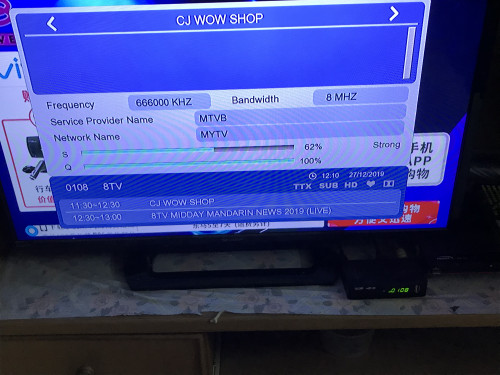
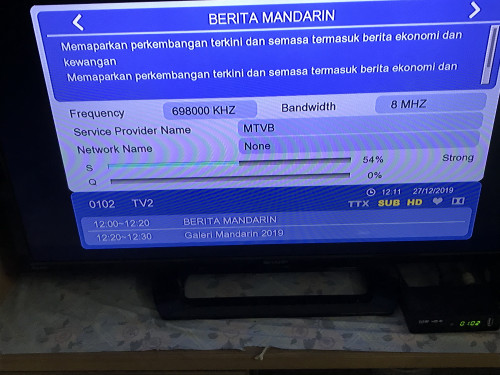
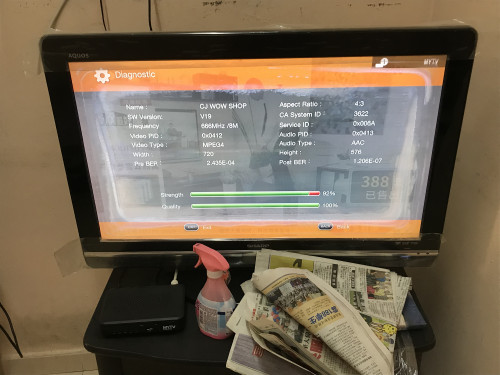
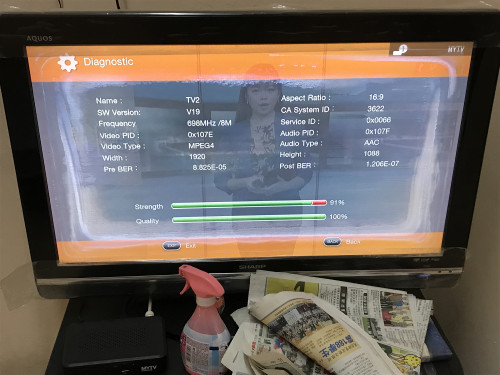
TV 1 signal :
Mux 1

user posted image

Mux 2

user posted image

TV 2 ( TV 1 decoder OFF )

Mux 1

user posted image

Mux 2
user posted image

TV 1 ( both decoder ON)
Mux 1
user posted image

Mux 2
user posted image

And the hobby grade splicing by the landlord

user posted image

Edit: after factory reset the botato DVB T2 box, auto scan at first can’t receive the RTM channels and have the Mux 1 channel with poor quality( image breaking up )

Considering to buy an indoor antenna, any indoor antenna to recommend? According to google maps, it’s 18KM from the nearest transmitter ( gunung kledang)

This post has been edited by yongtjunkit: Dec 27 2019, 01:26 PM
yongtjunkit
post Dec 27 2019, 05:44 PM

Look at all my stars!!
*******
Senior Member
2,516 posts

Joined: Mar 2016
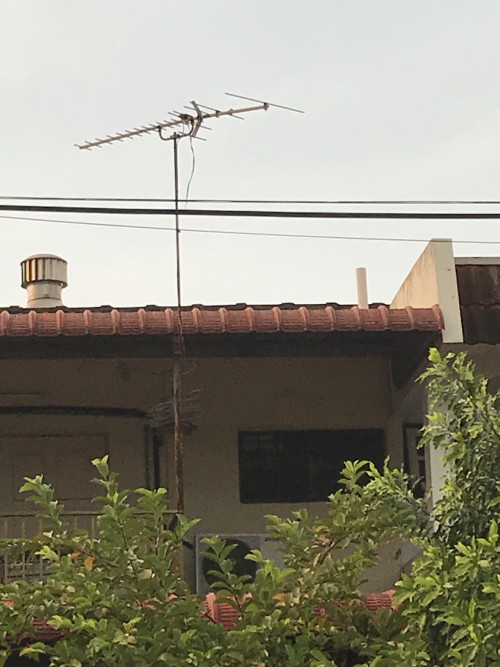
Also I’ve noticed that there’s something hanging off the antenna

user posted image
Skylinestar
post Dec 27 2019, 06:12 PM

Mega Duck
********
All Stars
10,472 posts

Joined: Jan 2003
From: Sarawak
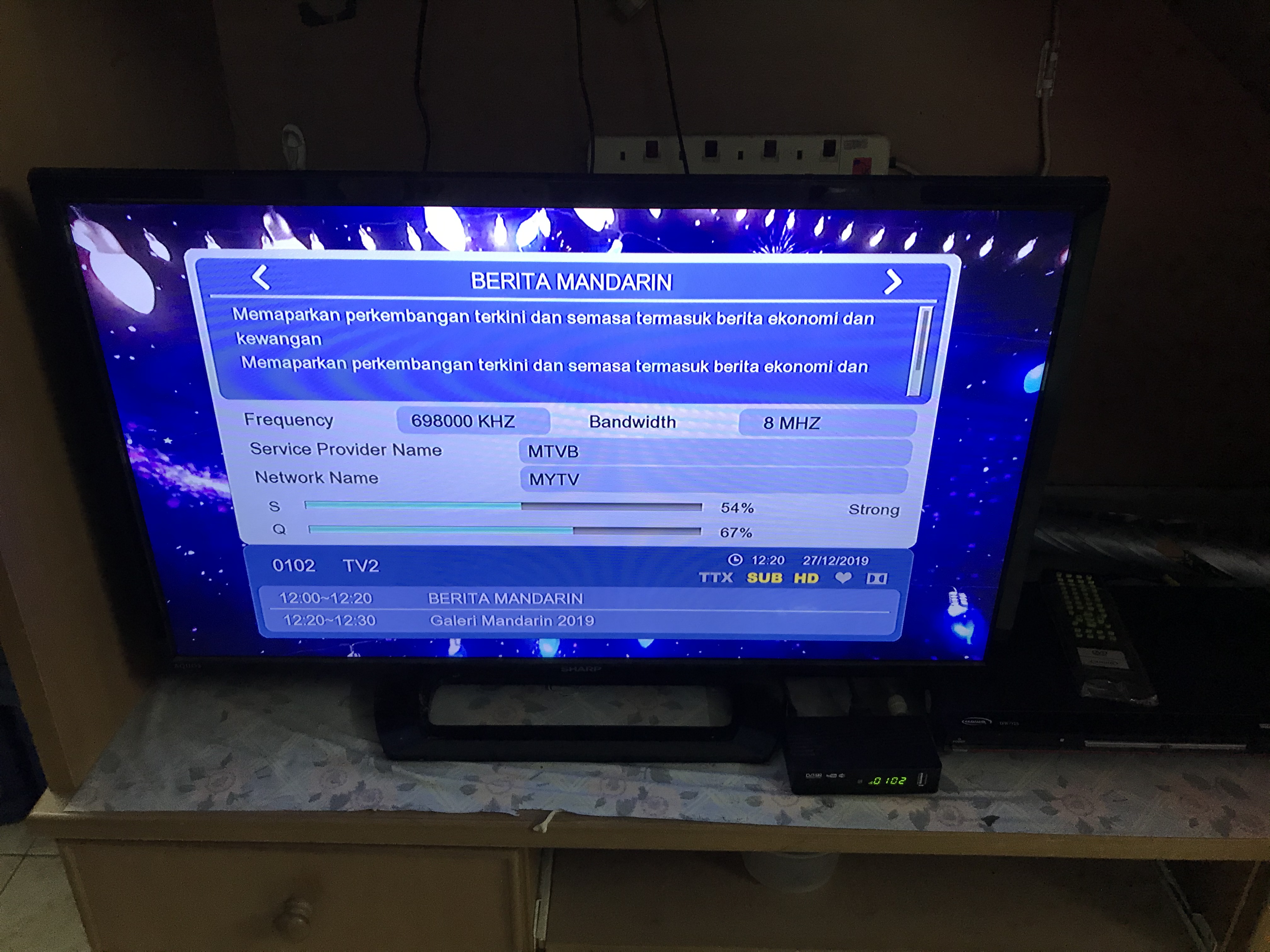
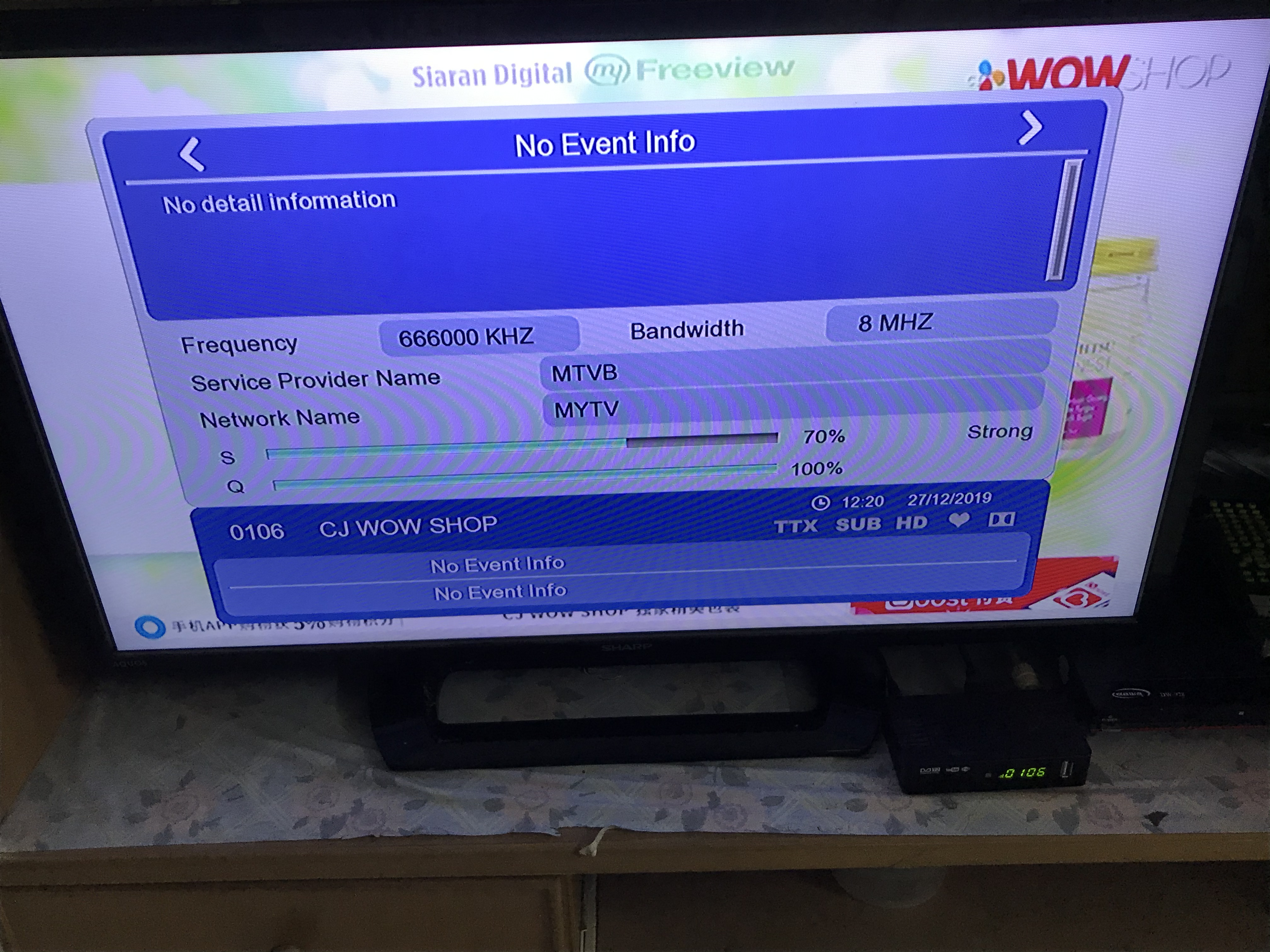
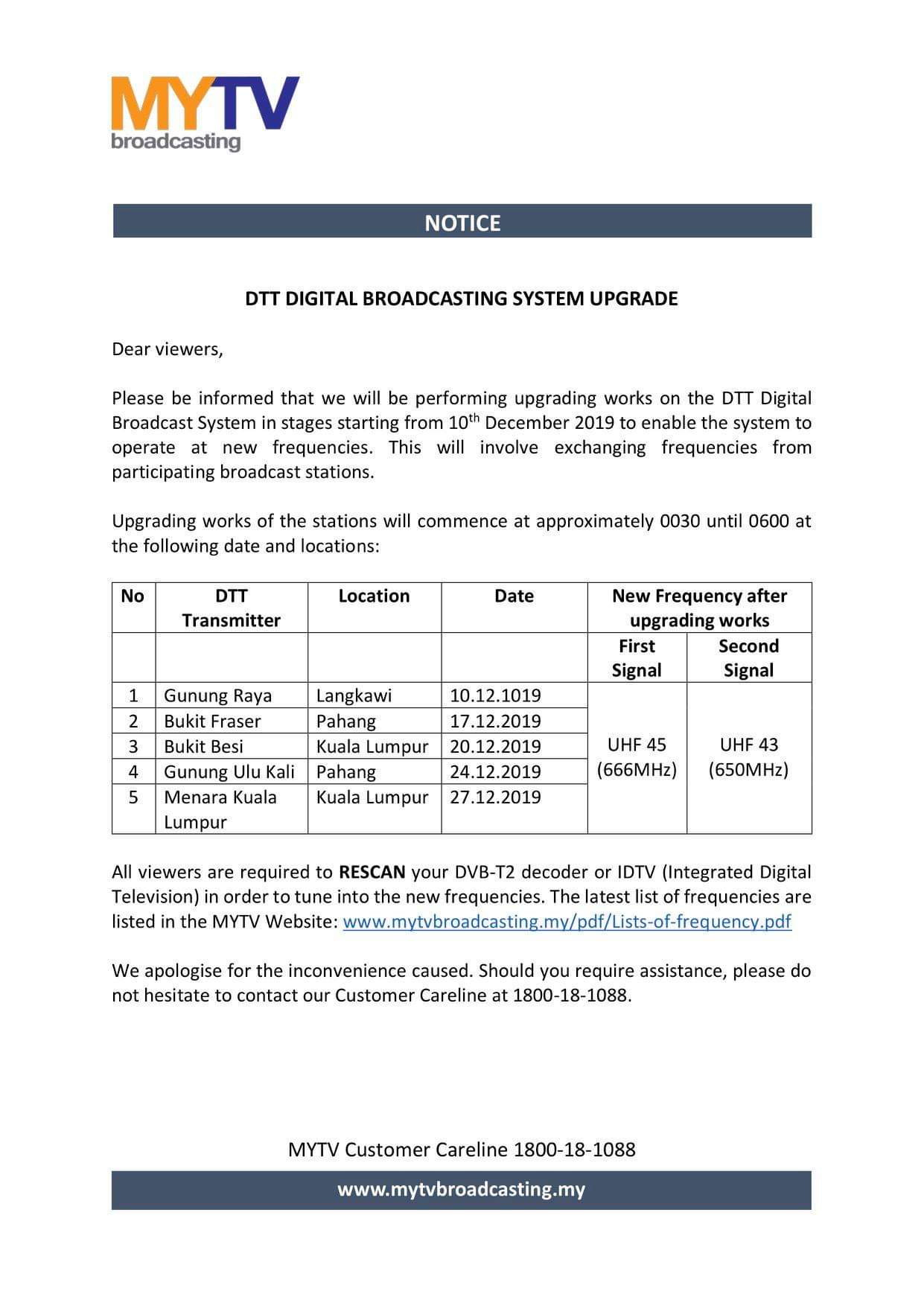
based on myfreeview page, there's change of frequency. anyone feel any difference?
https://www.mytvbroadcasting.my/pdf/lists-of-frequency.pdf

KL bukit besi (20 dec 2019) > 1st signal = UHF45 666MHz , 2nd signal = UHF43 650MHz
KL tower (27 dec 2019) > 1st signal = UHF45 666MHz , 2nd signal = UHF43 650MHz

I tried to scan 650MHz but got nothing? hmm.gif I'm still getting signal on 666 & 698 MHz in selangor area. rclxub.gif

This post has been edited by Skylinestar: Dec 27 2019, 06:18 PM
shaun_kok
post Dec 27 2019, 06:54 PM

Regular
******
Senior Member
1,068 posts

Joined: Dec 2012
QUOTE(Skylinestar @ Dec 27 2019, 06:12 PM)
based on myfreeview page, there's change of frequency. anyone feel any difference?
https://www.mytvbroadcasting.my/pdf/lists-of-frequency.pdf

KL bukit besi (20 dec 2019) > 1st signal = UHF45 666MHz , 2nd signal = UHF43 650MHz
KL tower (27 dec 2019) > 1st signal = UHF45 666MHz , 2nd signal = UHF43 650MHz

I tried to scan 650MHz but got nothing?  hmm.gif  I'm still getting signal on 666 & 698 MHz in selangor area.  rclxub.gif
*
DTT service retuning is not yet done in any transmitters. 698MHz will still work as usual until the announced retune date. An announcement will be done by MYTV in the future regarding the DTT retune process.

This post has been edited by shaun_kok: Dec 27 2019, 06:58 PM
joshhd
post Dec 27 2019, 07:04 PM

Look at all my stars!!
*******
Senior Member
7,791 posts

Joined: Dec 2014
From: Malaysia


QUOTE(yongtjunkit @ Dec 27 2019, 05:44 PM)
Also I’ve noticed that there’s something hanging off the antenna

user posted image
*

The cable is cut off? Hmmm..

Anyhow, if it's too complicated to find a solution, consider "start fresh".
Meaning, buy new antenna and cable, do the wiring yourself and connect to your TV. The one that your landlord install one, don't bother. Leave it as it is, unless your landlord want to do something about it.

You get your own antenna and cable. This time don't install at rooftop first like what your landlord do. You hold the outdoor antenna with your hands as high as you can (since you don't have ladder) then move here and there, while monitor the signal strength readings on TV. From there, you can study which spots in and around your home are able to get good digital TV reception.

Rather than complicating stuff, it's easier and more straightforward to start fresh in this way.

To buy antenna, I believe those 5 elements UHF antenna that you saw on online shopping sites (Shopee, Lazada...) are good enough. Or u can get 8 elements or 14 elements UHF ones if you wanna play safe.
joshhd
post Dec 27 2019, 07:07 PM

Look at all my stars!!
*******
Senior Member
7,791 posts

Joined: Dec 2014
From: Malaysia


QUOTE(Skylinestar @ Dec 27 2019, 06:12 PM)
based on myfreeview page, there's change of frequency. anyone feel any difference?
https://www.mytvbroadcasting.my/pdf/lists-of-frequency.pdf

KL bukit besi (20 dec 2019) > 1st signal = UHF45 666MHz , 2nd signal = UHF43 650MHz
KL tower (27 dec 2019) > 1st signal = UHF45 666MHz , 2nd signal = UHF43 650MHz

I tried to scan 650MHz but got nothing?  hmm.gif  I'm still getting signal on 666 & 698 MHz in selangor area.  rclxub.gif
*

I mentioned about this previously that the frequency retune exercise has been postponed until further notice. Until now still no news.
Refer to my previous post here:
https://forum.lowyat.net/index.php?showtopi...post&p=94812345
Skylinestar
post Dec 27 2019, 07:08 PM

Mega Duck
********
All Stars
10,472 posts

Joined: Jan 2003
From: Sarawak
QUOTE(shaun_kok @ Dec 27 2019, 06:54 PM)
DTT service retuning is not yet done in any transmitters. 698MHz will still work as usual until the announced retune date. An announcement will be done by MYTV in the future regarding the DTT retune process.
*
What do you mean not yet done?

user posted image
joshhd
post Dec 27 2019, 07:23 PM

Look at all my stars!!
*******
Senior Member
7,791 posts

Joined: Dec 2014
From: Malaysia


QUOTE(Skylinestar @ Dec 27 2019, 07:08 PM)
What do you mean not yet done?

user posted image
*

This statement indeed was officially published, but now no longer valid as their upgrading works has been postponed until further notice. Read my previous post to know more.
yongtjunkit
post Dec 27 2019, 07:24 PM

Look at all my stars!!
*******
Senior Member
2,516 posts

Joined: Mar 2016
QUOTE(joshhd @ Dec 27 2019, 07:04 PM)
The cable is cut off? Hmmm..

Anyhow, if it's too complicated to find a solution, consider "start fresh".
Meaning, buy new antenna and cable, do the wiring yourself and connect to your TV. The one that your landlord install one, don't bother. Leave it as it is, unless your landlord want to do something about it.

You get your own antenna and cable. This time don't install at rooftop first like what your landlord do. You hold the outdoor antenna with your hands as high as you can (since you don't have ladder) then move here and there, while monitor the signal strength readings on TV. From there, you can study which spots in and around your home are able to get good digital TV reception.

Rather than complicating stuff, it's easier and more straightforward to start fresh in this way.

To buy antenna, I believe those 5 elements UHF antenna that you saw on online shopping sites (Shopee, Lazada...) are good enough. Or u can get 8 elements or 14 elements UHF ones if you wanna play safe.
*
Considering to get this as the solution, seems like the splicing isn’t good as TV 2 can get better signal than TV 1

RG6 cable
https://s.lazada.com.my/s.Zwpcw

Indoor/outdoor antenna
https://s.lazada.com.my/s.ZwHEo


Is this good? Or any better solution(prefer indoor if possible since I can seem to find a hole where the cable can go through( can’t drill hole since my aunt rents)

joshhd
post Dec 27 2019, 07:36 PM

Look at all my stars!!
*******
Senior Member
7,791 posts

Joined: Dec 2014
From: Malaysia


QUOTE(yongtjunkit @ Dec 27 2019, 07:24 PM)
Considering to get this as the solution, seems like the splicing isn’t good as TV 2 can get better signal than TV 1

RG6 cable
https://s.lazada.com.my/s.Zwpcw

Indoor/outdoor antenna
https://s.lazada.com.my/s.ZwHEo
Is this good? Or any better solution(prefer indoor if possible since I can seem to find a hole where the cable can go through( can’t drill hole since my aunt rents)
*

Maybe you can consider this:
https://shopee.com.my/product/6938079/313253815?smtt=0.0.9

https://shopee.com.my/product/45285202/2283873507?smtt=0.0.9

These antenna can be used either indoor or outdoors. Not necessarily must drill hole to install permanently on the wall. Cuz if the signal is strong enough, you can just place the antenna on top of the shelf, or cupboard or something, and still able to get signal already. So don't nerd to think about drilling first, unless if you tried that indoor reception is not possible at all, then outdoor is your better option. Wiring part, you can just find ways to lay the cable from the window or door.... Still, not necessarily must drill, unless you decided to make it permanent. For your case, doesn't seems like it la 😂
yongtjunkit
post Dec 27 2019, 07:58 PM

Look at all my stars!!
*******
Senior Member
2,516 posts

Joined: Mar 2016
QUOTE(joshhd @ Dec 27 2019, 07:36 PM)
Maybe you can consider this:
https://shopee.com.my/product/6938079/313253815?smtt=0.0.9

https://shopee.com.my/product/45285202/2283873507?smtt=0.0.9

These antenna can be used either indoor or outdoors. Not necessarily must drill hole to install permanently on the wall. Cuz if the signal is strong enough, you can just place the antenna on top of the shelf, or cupboard or something, and still able to get signal already. So don't nerd to think about drilling first, unless if you tried that indoor reception is not possible at all, then outdoor is your better option. Wiring part, you can just find ways to lay the cable from the window or door.... Still, not necessarily must drill, unless you decided to make it permanent. For your case, doesn't seems like it la 😂
*
I was actually considering this type of antenna as well, cable is fine right( order 1 set with cable in the link above or separate RG6?)

Long cable eg: 15m won’t affect signal strength right?

This post has been edited by yongtjunkit: Dec 27 2019, 07:59 PM
joshhd
post Dec 27 2019, 10:31 PM

Look at all my stars!!
*******
Senior Member
7,791 posts

Joined: Dec 2014
From: Malaysia


QUOTE(yongtjunkit @ Dec 27 2019, 07:58 PM)
I was actually considering this type of antenna as well, cable is fine right( order 1 set with cable in the link above or separate RG6?)

Long cable eg: 15m won’t affect signal strength right?
*

As long any "good enough quality" standard RG6 coaxial cable, is good enough already. Usually it's white colour cable.
Even the ones that Astro provide to customer during installation, they also use the normal/standard quality ones, and not those more expensive black colour cable.

How to know whether the cable is "good enough"? That one you need to ask other sifus here.
But I don't think need to worry too much about it, I guess? hmm.gif
yongtjunkit
post Dec 28 2019, 06:37 AM

Look at all my stars!!
*******
Senior Member
2,516 posts

Joined: Mar 2016
QUOTE(joshhd @ Dec 27 2019, 10:31 PM)
As long any "good enough quality" standard RG6 coaxial cable, is good enough already. Usually it's white colour cable.
Even the ones that Astro provide to customer during installation, they also use the normal/standard quality ones, and not those more expensive black colour cable.

How to know whether the cable is "good enough"? That one you need to ask other sifus here.
But I don't think need to worry too much about it, I guess?  hmm.gif
*
For the signal strength, what’s the recommended signal strength that I’m supposed to be at ?

This post has been edited by yongtjunkit: Dec 28 2019, 06:38 AM
joshhd
post Dec 28 2019, 07:19 AM

Look at all my stars!!
*******
Senior Member
7,791 posts

Joined: Dec 2014
From: Malaysia


QUOTE(yongtjunkit @ Dec 28 2019, 06:37 AM)
For the signal strength, what’s the recommended signal strength that I’m supposed to be at ?
*

Errr... I would say... 70-80% and above whenever possible? Just try your best to get the highest readings while positioning your antenna.

And make sure the BER is always 0.00 (Bit Error Rate) and it's not fluctuating. MYTV box does indicate that on the diagnosis page. When BER is 0, that means the reception doesn't have signal errors (stable signal), hence you won't experience pixelation or intermittent loss of signal.

This post has been edited by joshhd: Dec 28 2019, 07:20 AM
yongtjunkit
post Dec 28 2019, 08:54 AM

Look at all my stars!!
*******
Senior Member
2,516 posts

Joined: Mar 2016
QUOTE(joshhd @ Dec 28 2019, 07:19 AM)
Errr... I would say... 70-80% and above whenever possible? Just try your best to get the highest readings while positioning your antenna.

And make sure the BER is always 0.00 (Bit Error Rate) and it's not fluctuating. MYTV box does indicate that on the diagnosis page. When BER is 0, that means the reception doesn't have signal errors (stable signal), hence you won't experience pixelation or intermittent loss of signal.
*
🤔, Do I look at pre BER or post BER... currently it seems like I got like BER rating of 1 as in the screenshot above but the image is useable
joshhd
post Dec 28 2019, 09:54 AM

Look at all my stars!!
*******
Senior Member
7,791 posts

Joined: Dec 2014
From: Malaysia


QUOTE(yongtjunkit @ Dec 28 2019, 08:54 AM)
🤔, Do I look at pre BER or post BER... currently it seems like I got like BER rating of 1 as in the screenshot above but the image is useable
*

Oh, I wasn't aware the BER reading on your previous photos, and plus you edited the post by adding more photos (Lowyat forum didn't notify me hmm.gif ) Then I have some corrections to made...
QUOTE(yongtjunkit @ Dec 27 2019, 12:22 PM)
» Click to show Spoiler - click again to hide... «

*

And wah, that "hobby grade splicing" shakehead.gif Confirm reduce signal... Use a cable splitter, like this...
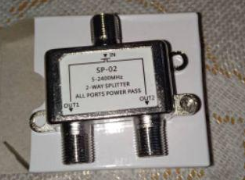
user posted image
https://shopee.com.my/2way-splitter-for-rg6...5202.2851272280

Pre BER means the readings of any data errors receive by your MYTV, before it is being corrected.
Post BER means the result after the receiver (MYTV box) corrected the data signal errors received earlier.

Anyhow, both pre and post BER should be 0.00

BER of 1 and 2 may be acceptable and may able to watch as usual, but susceptible to viewing disruption at anytime since the signal is not stable.
Because BER means "bit error rate", that means the "data" has errors for some reasons (e.g. cable attenuation, interference, weak signal). So that's why the BER should be 0.00, or else you will experience intermittent disruption in reception.

I think you can get started, firstly by removing that tape on the cables used by your landlord's "hobby grade splicing" and re-terminate the cable with F connectors, then connect to the cable splitter. I don't think your landlord would mind that la.... Even if your landlord is not friendly type, I don't think he/she would mind also, since using proper cable splitter will be better than that "hobby splicing" method.

And once you did that, and the signal improves and BER is 0.00, both TVs also no signal issue, then no need to get new antenna and cable... biggrin.gif
In that case, signal quality and BER matters more than signal strength. Simply means, just because you have strong signal, doesn't mean you have good signal.

yongtjunkit
post Dec 28 2019, 10:10 AM

Look at all my stars!!
*******
Senior Member
2,516 posts

Joined: Mar 2016
QUOTE(joshhd @ Dec 28 2019, 09:54 AM)
Oh, I wasn't aware the BER reading on your previous photos, and plus you edited the post by adding more photos (Lowyat forum didn't notify me  hmm.gif ) Then I have some corrections to made...
And wah, that "hobby grade splicing" shakehead.gif Confirm reduce signal... Use a cable splitter, like this...
user posted image
https://shopee.com.my/2way-splitter-for-rg6...5202.2851272280

Pre BER means the readings of any data errors receive by your MYTV, before it is being corrected.
Post BER means the result after the receiver (MYTV box) corrected the data signal errors received earlier.

Anyhow, both pre and post BER should be 0.00

BER of 1 and 2 may be acceptable and may able to watch as usual, but susceptible to viewing disruption at anytime since the signal is not stable.
Because BER means "bit error rate", that means the "data" has errors for some reasons (e.g. cable attenuation, interference, weak signal). So that's why the BER should be 0.00, or else you will experience intermittent disruption in reception.

I think you can get started, firstly by removing that tape on the cables used by your landlord's "hobby grade splicing" and re-terminate the cable with F connectors, then connect to the cable splitter. I don't think your landlord would mind that la.... Even if your landlord is not friendly type, I don't think he/she would mind also, since using proper cable splitter will be better than that "hobby splicing" method.

And once you did that, and the signal improves and BER is 0.00, both TVs also no signal issue, then no need to get new antenna and cable...  biggrin.gif
In that case, signal quality and BER matters more than signal strength. Simply means, just because you have strong signal, doesn't mean you have good signal.
*
I’ve literally no idea how to go there since there’s zinc roof

Would go on with “starting fresh” probably better than redoing their work and use RG6 cable instead instead of the poorly terminated cable( some how 1 end- TV side needs an appropriate angle for the best performance ) not to mention that the antenna have a wire hanging off of it for some reason

Looking to start fresh with this combo, according to the picture, it comes with black color RG6 cable

https://s.lazada.com.my/s.Zwtoo

Also that splitter uses the Astro satellite connector ? Maybe I could use the splitter for both TV and leave the landlord antenna as it is( no TV connected)... TV 2 seems to be able to receive just fine other than probably higher than normal BER rating on RTM channel and rarely used at the moment....

This post has been edited by yongtjunkit: Dec 28 2019, 11:01 AM
yongtjunkit
post Dec 28 2019, 07:09 PM

Look at all my stars!!
*******
Senior Member
2,516 posts

Joined: Mar 2016
joshHD the situation is the “hobby grade splicing” is at the zinc roof area....
user posted image
birain
post Dec 28 2019, 11:17 PM

良い一日を
******
Senior Member
1,448 posts

Joined: Apr 2007
QUOTE(yongtjunkit @ Dec 28 2019, 07:09 PM)
joshHD the situation is the “hobby grade splicing” is at the zinc roof area....
user posted image
*
use a 14 to 16 feet folding ladder to reach it or use the upper master room to go near the antenna....the pipe maybe got screw that you need to unscrew before taking it down for maintenance.

184 Pages « < 15 16 17 18 19 > » Top
 

Change to:
| Lo-Fi Version
0.0187sec    0.57    6 queries    GZIP Disabled
Time is now: 1st December 2025 - 07:49 PM