Welcome Guest ( Log In | Register )

Bump Topic Topic Closed RSS Feed
139 Pages « < 45 46 47 48 49 > » Bottom

Outline · [ Standard ] · Linear+

 ILLEGEAR Custom Performance Laptops v.4, AMD RYZEN 4800H with FREE AC Valhalla

views
     
Jared21
post Mar 7 2020, 01:46 AM

New Member
*
Newbie
2 posts

Joined: Aug 2015
QUOTE(fat cat @ Mar 6 2020, 09:55 AM)
i was wondering as well, why dont these gaming notebook support faster ram? and most support 2666 mhz max usually.

edit: if anyone is curious, here is the difference between Illegear supplied ram and the corsair one i bought. The illegear ram is actually good for one thats given for "free".
» Click to show Spoiler - click again to hide... «

*
hmm mine comes with CL19 micron (16gb dual channel). Looks like i'm swapping to Hyper X Impact CL15. Probably will get a custom bios from the notebookreview forum people to enable support for faster speeds
fat cat
post Mar 7 2020, 03:28 AM

Casual
***
Junior Member
449 posts

Joined: Jan 2010
From: Race : ☐ Malay ☐ Chinese ☐ India ☑ /k/tard


QUOTE(Jared21 @ Mar 7 2020, 01:46 AM)
hmm mine comes with CL19 micron (16gb dual channel). Looks like i'm swapping to Hyper X Impact CL15. Probably will get a custom bios from the notebookreview forum people to enable support for faster speeds
*
custom bios? could you pm me the forum or link? would be interested.
Jared21
post Mar 7 2020, 08:23 PM

New Member
*
Newbie
2 posts

Joined: Aug 2015
QUOTE(fat cat @ Mar 7 2020, 03:28 AM)
custom bios? could you pm me the forum or link? would be interested.
*
I'll link it to you once i can find it. So far its mostly for the GK5 as its a much more popular chassis choice
user_51
post Mar 8 2020, 12:06 AM

New Member
*
Newbie
39 posts

Joined: Jan 2018
does raven SE with i7 comes with 144Hz 300 nits display by default or need to add money?
STEVE@ILLEGEAR
post Mar 9 2020, 12:03 PM

New Member
*
Newbie
2 posts

Joined: Apr 2018
From: Team ILLEGEAR


QUOTE(user_51 @ Mar 8 2020, 12:06 AM)
does raven SE with i7 comes with 144Hz 300 nits display by default or need to add money?
*
Hi user_51, there is an option to upgrade to 144Hz screen (only applicable for GTX1650 graphics card option configuration). The upgraded screen option is 15.6" FHD Anti-glare 144Hz IPS sRGB 100% Display featuring INFINIVISION Bezel-less Technology. It would be additional RM249 (discounted from RM299). BY default, it is just 60Hz FHD 15.6" screen only.

This post has been edited by STEVE@ILLEGEAR: Mar 9 2020, 12:39 PM
ojassed P
post Mar 9 2020, 10:38 PM

New Member
*
Probation
3 posts

Joined: Jul 2019


Currently my Raven SE-R display will not auto dim when unplugged, is there any way to set it? Kinda miss that feature...
YVONNE@ILLEGEAR
post Mar 10 2020, 06:40 PM

New Member
*
Newbie
2 posts

Joined: Nov 2017
From: Team ILLEGEAR


QUOTE(ojassed @ Mar 9 2020, 10:38 PM)
Currently my Raven SE-R display will not auto dim when unplugged, is there any way to set it? Kinda miss that feature...
*
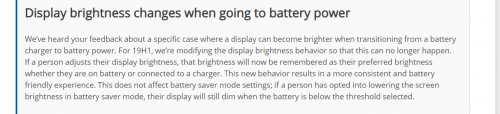
Hi, the windows auto dimming features is not manage by ILLEGEAR drivers or Software. We also notice that the brightness doesn't automatically dim or changes when unplugged or plugged in.
Based on our research windows had merge the brightness profile on battery with plugged in brightness profile since windows 1903 version.
Unfortunately we currently doesn't have any work around to enabling back the feature.


Quoted from Shawn Brink, Link: https://www.tenforums.com/tutorials/44213-a...ndows-10-a.html

"Starting with Windows 10 build 18282, Microsoft heard your feedback about a specific case where a display can become brighter when transitioning from a battery charger to battery power. Microsoft is modifying the display brightness behavior so that this can no longer happen. If a person adjusts their display brightness, that brightness will now be remembered as their preferred brightness whether they are on battery or connected to a charger. "

user posted image
ojassed P
post Mar 15 2020, 06:05 PM

New Member
*
Probation
3 posts

Joined: Jul 2019


Having used the Raven SER for a couple weeks, I realize that the laptop will wake itself during sleep without any software triggering it (I've checked with event viewer and task scheduler). After some googling, I now set "never" at Power Options>Sleep>Hibernate After. Lets see how it goes.

Just a heads-up to those using a traditional hdd on their Illegear laptop systems. Be vary of this issue because you'd not want your hdd to spin up while you're moving around with the laptop in your bag.
YVONNE@ILLEGEAR
post Mar 17 2020, 07:26 PM

New Member
*
Newbie
2 posts

Joined: Nov 2017
From: Team ILLEGEAR


QUOTE(ojassed @ Mar 15 2020, 06:05 PM)
Having used the Raven SER for a couple weeks, I realize that the laptop will wake itself during sleep without any software triggering it (I've checked with event viewer and task scheduler). After some googling, I now set "never" at Power Options>Sleep>Hibernate After. Lets see how it goes.

Just a heads-up to those using a traditional hdd on their Illegear laptop systems. Be vary of this issue because you'd not want your hdd to spin up while you're moving around with the laptop in your bag.
*
Hi, you may try to download and reinstall all the drivers from our support page (https://support.illegear.com/).

BBXiong
post Mar 20 2020, 12:40 PM

CFX
*******
Senior Member
6,317 posts

Joined: Sep 2007
anyone from Illegear.. I need some help here. When i was using my laptop this morning, I notice that it was rebooted, and one of my m.2 slot is not detecting my ssd. I tried swapping with my boot drive and my boot drive cannot be detected at all.

I have a 120GB crucial as boot drive, and another 1tb SSD as my game drive. the 1TB SSD cannot be detected at all regardless of what I did on windows. I notice that it was not detected on bios as well although it's a sata drive, which should be problem free. When i swap the 2 SSD's slot, on bios it now detects the 1TB SSD, but my boot drive cannot be detected.

Not sure if it's related, i notice that recently my laptop seems to be having some kind of static on the surface, maybe there's a grounding issue there. Just wondering if there are any fixes there, or I can only replace the motherboard, which I understood is very expensive.

not sure if it's also related to firmware issue.. hopefully it is.

also to add, my laptop model is Illegear S5, running Intel i7-4720HQ, and GTX 970M. I think the clevo model is P650SE

This post has been edited by BBXiong: Mar 20 2020, 12:43 PM
TSPrince J
post Mar 20 2020, 12:44 PM

Regular
******
Senior Member
1,272 posts

Joined: May 2010
From: Team ILLEGEAR


QUOTE(BBXiong @ Mar 20 2020, 12:40 PM)
anyone from Illegear.. I need some help here. When i was using my laptop this morning, I notice that it was rebooted, and one of my m.2 slot is not detecting my ssd. I tried swapping with my boot drive and my boot drive cannot be detected at all.

I have a 120GB crucial as boot drive, and another 1tb SSD as my game drive. the 1TB SSD cannot be detected at all regardless of what I did on windows. I notice that it was not detected on bios as well although it's a sata drive, which should be problem free. When i swap the 2 SSD's slot, on bios it now detects the 1TB SSD, but my boot drive cannot be detected.

Not sure if it's related, i notice that recently my laptop seems to be having some kind of static on the surface, maybe there's a grounding issue there. Just wondering if there are any fixes there, or I can only replace the motherboard, which I understood is very expensive.

not sure if it's also related to firmware issue.. hopefully it is.

also to add, my laptop model is Illegear S5, running Intel i7-4720HQ, and GTX 970M. I think the clevo model is P650SE
*
Hi BBXiong

The first generation S5 with i7-4720HQ is compatible with 1x PCIe M.2 SSD or 2x SATA M.2 SSD.

To check whether the static is caused by grounding, you can try to use your computer on other surface / socket, or you can bring into us for checking.


BBXiong
post Mar 20 2020, 12:48 PM

CFX
*******
Senior Member
6,317 posts

Joined: Sep 2007
QUOTE(Prince J @ Mar 20 2020, 12:44 PM)
Hi BBXiong

The first generation S5 with i7-4720HQ is compatible with 1x PCIe M.2 SSD or 2x SATA M.2 SSD.

To check whether the static is caused by grounding, you can try to use your computer on other surface / socket, or you can bring into us for checking.
*
that's correct. The SSD has been working for quite some time now, bought it at least 1 year back. it just suddenly fails to detect. Yesterday I notice that suddenly windows detected a new drive (was watching movie that is stored in another HDD at that time), and E drive was detected. That led me to believe that the other m.2 slot might be failing. Is there a way to tell for sure, and if the drive is indeed failing, what are my options?.

I will check the grounding issue later cos my battery is dead, and didnt replace it, so I need to shut down my laptop to proceed.
TSPrince J
post Mar 20 2020, 01:59 PM

Regular
******
Senior Member
1,272 posts

Joined: May 2010
From: Team ILLEGEAR


QUOTE(BBXiong @ Mar 20 2020, 12:48 PM)
that's correct. The SSD has been working for quite some time now, bought it at least 1 year back. it just suddenly fails to detect. Yesterday I notice that suddenly windows detected a new drive (was watching movie that is stored in another HDD at that time), and E drive was detected. That led me to believe that the other m.2 slot might be failing. Is there a way to tell for sure, and if the drive is indeed failing, what are my options?.

I will check the grounding issue later cos my battery is dead, and didnt replace it, so I need to shut down my laptop to proceed.
*
Can we have your laptop sent in after the RMO? Will check the slot and power together.
BBXiong
post Mar 20 2020, 02:00 PM

CFX
*******
Senior Member
6,317 posts

Joined: Sep 2007
QUOTE(Prince J @ Mar 20 2020, 01:59 PM)
Can we have your laptop sent in after the RMO? Will check the slot and power together.
*
but with the recent Order, is it a good time to do it now? or after march when the Order has ended?
TSPrince J
post Mar 20 2020, 02:01 PM

Regular
******
Senior Member
1,272 posts

Joined: May 2010
From: Team ILLEGEAR


QUOTE(BBXiong @ Mar 20 2020, 02:00 PM)
but with the recent Order, is it a good time to do it now? or after march when the Order has ended?
*
Yes please send in after RMO (restricted movement order).
BBXiong
post Mar 20 2020, 04:20 PM

CFX
*******
Senior Member
6,317 posts

Joined: Sep 2007
QUOTE(Prince J @ Mar 20 2020, 02:01 PM)
Yes please send in after RMO (restricted movement order).
*
alright, will try to arrange that. thanks
weijye
post Mar 20 2020, 04:50 PM

New Member
*
Junior Member
10 posts

Joined: Jan 2011
Hi Illegear, any 17.3 inch model with WQHD or 4K display? And what kind of battery life Can I expect from a 4K Onyx Pro? Thanks
throwawaykeepo P
post Mar 21 2020, 06:20 AM

New Member
*
Probation
0 posts

Joined: Oct 2019
is illegear closed down right now?
chittyserv
post Mar 21 2020, 09:11 AM

Regular
******
Senior Member
1,237 posts

Joined: Dec 2005


QUOTE(throwawaykeepo @ Mar 21 2020, 06:20 AM)
is illegear closed down right now?
*
Their office yes, online sales still accepting i guess, support also delay i guess cause you cant walk in to send your laptop ohmy.gif
throwawaykeepo P
post Mar 21 2020, 09:32 AM

New Member
*
Probation
0 posts

Joined: Oct 2019
QUOTE(chittyserv @ Mar 21 2020, 09:11 AM)
Their office yes, online sales still accepting i guess, support also delay i guess cause you cant walk in to send your laptop  ohmy.gif
*
thanks

139 Pages « < 45 46 47 48 49 > » Top
Topic ClosedOptions
 

Change to:
| Lo-Fi Version
0.0401sec    0.61    6 queries    GZIP Disabled
Time is now: 13th December 2025 - 03:44 AM