

QUOTE(cenkudu @ Jan 13 2019, 11:05 AM)
Thank you for your opinion. I read some good reviews of D-Link Dir-867, any better of this router compared to C9 TP-Link? My budget around RM 400++

I strongly recommend TP-Link over D-Link.Unifi Official TM UniFi High Speed Broadband Thread V36, READ 1ST PAGE FOR TURBO SPEED INFO!
|
|
 Jan 13 2019, 02:01 PM Jan 13 2019, 02:01 PM
|
 
Senior Member
5,714 posts Joined: Mar 2007   
|
QUOTE(cenkudu @ Jan 13 2019, 11:05 AM) Thank you for your opinion. I read some good reviews of D-Link Dir-867, any better of this router compared to C9 TP-Link? My budget around RM 400++ I strongly recommend TP-Link over D-Link. |
|
|
|
|
|
Jan 13 2019, 04:33 PM
|

Junior Member
324 posts Joined: Nov 2008
|
QUOTE(taqu @ Jan 12 2019, 01:00 PM) No need. Wifi switching/roaming all done by your your device. Normally works fine except sometimes it's still connected to your previous AP, or change to 2.4GHz even when you're previously connected to 5GHz band. Thanks so much for the clarification. So, let say I configure my infrastructure using Deco and Unifi router in the following format will it work as expected:Unifi modem -> TM router TM router -> Deco M5 Unit 1 (living room) TM router -> switch(Level 2) -> ethernet port in multiple rooms in Level 2 Room 1 at Level 2 ethernet port -> Deco M5 Unit 2 Room 2 at Level 2 ethernet port -> Deco M5 Unit 3 Will this configuration work as expected with the switch box located at Level 2? |
|
|
Jan 13 2019, 04:59 PM
|
|
Junior Member
864 posts Joined: May 2005
|
QUOTE(shdwkillr @ Jan 13 2019, 04:33 PM) Thanks so much for the clarification. So, let say I configure my infrastructure using Deco and Unifi router in the following format will it work as expected: YesUnifi modem -> TM router TM router -> Deco M5 Unit 1 (living room) TM router -> switch(Level 2) -> ethernet port in multiple rooms in Level 2 Room 1 at Level 2 ethernet port -> Deco M5 Unit 2 Room 2 at Level 2 ethernet port -> Deco M5 Unit 3 Will this configuration work as expected with the switch box located at Level 2? |
|
|
Jan 13 2019, 06:51 PM
|

All Stars
11,458 posts Joined: Oct 2007 From: KL
|
Trying out hAP AC2 as my RB750Gr3 was not fast enough to handle Turbo800 due to my use of local VLANs and a VLAN trunk for HyppTV and Internet.
Happy to report hAP AC2 more than capable. See the screen recording for CPU usage. HyppTV is also streaming at the same time as the test. Forgot to turn the TV off but it didn't affect the test. At RM300, a very affordable choice if you're on Turbo800 and trunking your HyppTV. Can put off buying the RB4011 for now.  hAP AC2 (IPQ4018 CPU same as ASUS RT-AC58U) ether1 - Unifi BTU ether2 - vlan 50 and 600 trunk to RB2011UAS downstairs ether3 - AP (Aztech FG7008GR) ether4 - unused ether5 - to my MacBook Pro (Thunderbolt GbE adaptor) Fasttrack: ON Bridge ports hw_offload: OFF (auto off due to vlans in bridge) VLANs configured are 500, 600, 50 (ipv4 LAN), 56 (ipv6 LAN) and 70 (IoT LAN.) Only 500, 600 and 50 in use during this test.  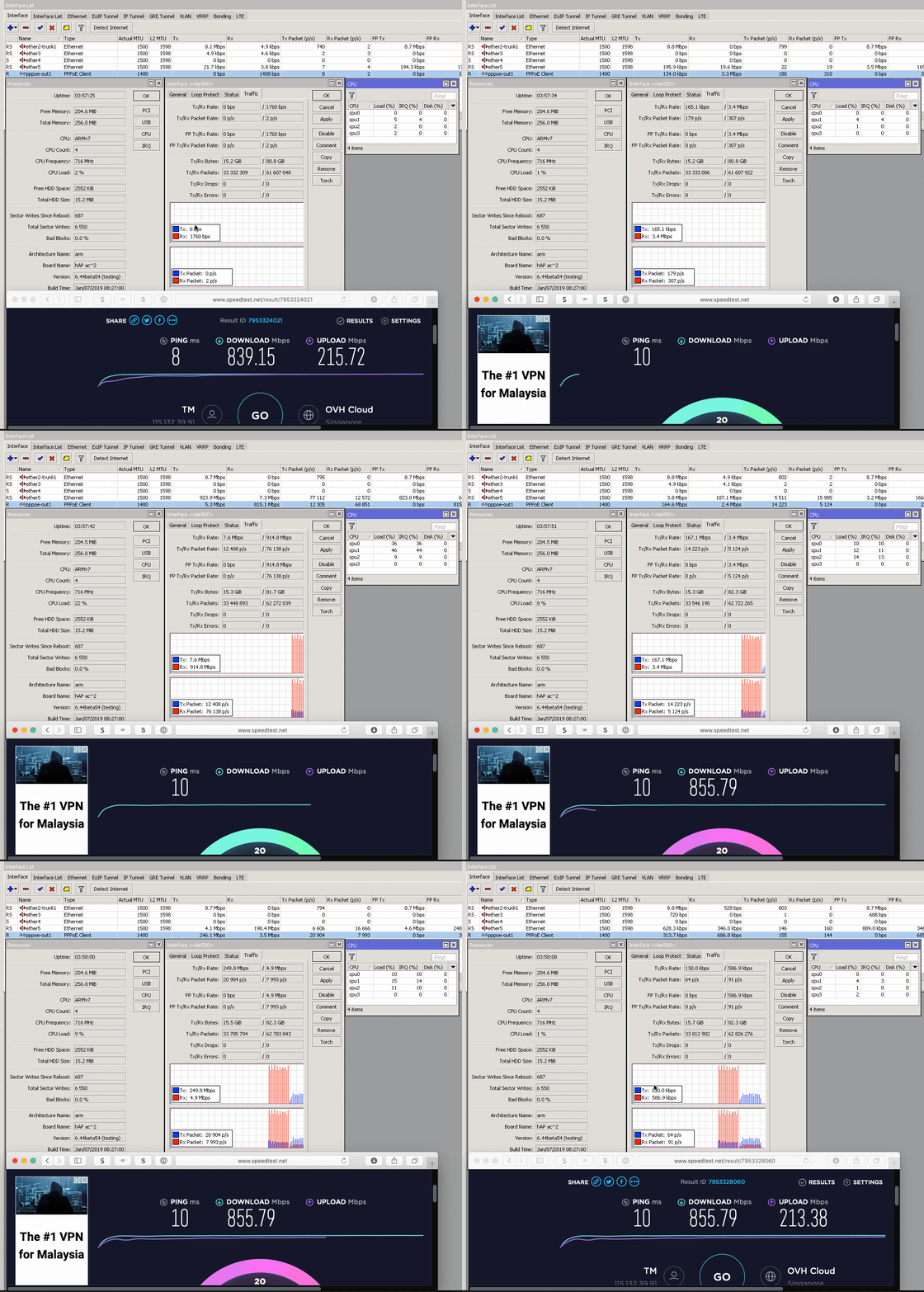 https://res.cloudinary.com/soonwai/image/up...t-cpu_usage.gif This post has been edited by soonwai: Jan 13 2019, 09:00 PM |
|
|
Jan 13 2019, 07:56 PM
|
|
Senior Member
1,882 posts Joined: Sep 2017
|
QUOTE(soonwai @ Jan 13 2019, 06:51 PM) Trying out hAP AC2 as my RB750Gr3 was not fast enough to handle Turbo800 due to my use of local VLANs and a VLAN trunk for HyppTV and Internet. TM give you higher peak bandwidth(900+mbps)..hahaHappy to report hAP AC2 more than capable. See the screen recording for CPU usage. HyppTV is also streaming at the same time as the test. Forgot to turn the TV off but it didn't affect the test. At RM300, a very affordable choice if you're on Turbo800 and trunking your HyppTV. Can put off buying the RB4011 for now. hAP AC2 (IPQ4018 CPU same as ASUS RT-AC58U) ether1 - Unifi BTU ether2 - vlan 50 and 600 trunk to RB2011UAS downstairs ether5 - to my MacBook Pro (Thunderbolt GbE adaptor) Fasttrack: ON Bridge ports hw_offload: OFF (auto off due to vlans in bridge) VLANs configured are 500, 600, 50 (ipv4 LAN), 56 (ipv6 LAN) and 70 (IoT LAN.) Only 500, 600 and 50 in use during this test. https://res.cloudinary.com/soonwai/image/up...t-cpu_usage.gif so sad mine max only 860+mbps in mikrotik .. |
|
|
Jan 13 2019, 08:44 PM
Show posts by this member only | IPv6 | Post
#6786
|

Senior Member
5,221 posts Joined: Aug 2007 From: Deneb star
|
QUOTE(nag @ Jan 13 2019, 01:30 AM) Anyone subscribe this ? This one maybe not bad if your area no coverage at all(no streamyx/fibre/4G) and you are not gaming because the ping is really high. Ka-band broadband satellite internet ? Is it same as Ku-band for rain fade / bad weather disruption ? https://www.connectme.my  |
|
|
|
|
|
Jan 13 2019, 09:05 PM
|
|
All Stars
11,458 posts Joined: Oct 2007 From: KL
|
QUOTE(go626201 @ Jan 13 2019, 07:56 PM) TM give you higher peak bandwidth(900+mbps)..haha I also wonder how TM decides how much to over provision a connection. You would think they’d have an SOP for this but it seems everyone get different speeds. Is it +5 or 10 or 15%? Or depends the mood of the technician.so sad mine max only 860+mbps in mikrotik .. |
|
|
Jan 13 2019, 09:52 PM
Show posts by this member only | IPv6 | Post
#6788
|
|
Junior Member
474 posts Joined: Jun 2005
|
QUOTE(nag @ Jan 13 2019, 01:30 AM) Anyone subscribe this ? when heavy rain will kacao like astro? Ka-band broadband satellite internet ? Is it same as Ku-band for rain fade / bad weather disruption ? https://www.connectme.my  |
|
|
Jan 13 2019, 10:01 PM
|

Junior Member
336 posts Joined: Jul 2010 From: Changlun, Kedah
|
QUOTE(xakarix84 @ Jan 13 2019, 09:52 PM) when heavy rain will kacao like astro? seems to be Yes. |
|
|
Jan 13 2019, 10:28 PM
|
|
Senior Member
5,714 posts Joined: Mar 2007
|
QUOTE(xakarix84 @ Jan 13 2019, 09:52 PM) when heavy rain will kacao like astro? 100% yes. |
|
|
Jan 14 2019, 12:34 AM
|
|
Senior Member
1,882 posts Joined: Sep 2017
|
QUOTE(soonwai @ Jan 13 2019, 09:05 PM) I also wonder how TM decides how much to over provision a connection. You would think they’d have an SOP for this but it seems everyone get different speeds. Is it +5 or 10 or 15%? Or depends the mood of the technician. See mood i think ?  |
|
|
Jan 14 2019, 06:36 AM
|

Senior Member
1,650 posts Joined: Feb 2009
|
hi
I would like to check, does new user of unifi get turbo as well? |
|
|
Jan 14 2019, 07:40 AM
|

Senior Member
2,093 posts Joined: Apr 2005
|
QUOTE(tippman @ Jan 14 2019, 06:36 AM) hi What plan did you sign up for? When?I would like to check, does new user of unifi get turbo as well? |
|
|
|
|
|
Jan 14 2019, 07:43 AM
|
|
Senior Member
1,650 posts Joined: Feb 2009
|
QUOTE(dickybird @ Jan 14 2019, 07:40 AM) What plan did you sign up for? When? Not yet sign up but looking into it. Thinking to sign up 100mbps |
|
|
Jan 14 2019, 08:21 AM
|
|
Senior Member
5,714 posts Joined: Mar 2007
|
QUOTE(tippman @ Jan 14 2019, 07:43 AM) Not yet sign up but looking into it. Thinking to sign up 100mbps Then, you won't get turbo. New users won't be turboed, as of this current time. |
|
|
Jan 14 2019, 08:47 AM
|

Junior Member
21 posts Joined: Dec 2009
|
Hi All, is anyone facing issue with Unifi TV, where the video is skipping? Every 5 to 10 minutes, the video will skip 1 second. Audio is not interrupted, but the video is affected. I've re-started the Unifi TV set top box, but still happening across all channels.
|
|
|
Jan 14 2019, 08:50 AM
|
|
Senior Member
2,093 posts Joined: Apr 2005
|
QUOTE(tippman @ Jan 14 2019, 07:43 AM) Not yet sign up but looking into it. Thinking to sign up 100mbps Then no, no turbo upgrade for new unifi subs. |
|
|
Jan 14 2019, 09:20 AM
|
|
All Stars
11,458 posts Joined: Oct 2007 From: KL
|
QUOTE(sulimc @ Jan 14 2019, 08:47 AM) Hi All, is anyone facing issue with Unifi TV, where the video is skipping? Every 5 to 10 minutes, the video will skip 1 second. Audio is not interrupted, but the video is affected. I've re-started the Unifi TV set top box, but still happening across all channels. Could be many things but sounds like your router is having a hiccup every 5 to 10 minutes. Try restarting your router. What router? |
|
|
Jan 14 2019, 11:41 AM
Show posts by this member only | IPv6 | Post
#6799
|

Senior Member
7,120 posts Joined: Oct 2011 From: Wakanda
|
QUOTE(sulimc @ Jan 14 2019, 08:47 AM) Hi All, is anyone facing issue with Unifi TV, where the video is skipping? Every 5 to 10 minutes, the video will skip 1 second. Audio is not interrupted, but the video is affected. I've re-started the Unifi TV set top box, but still happening across all channels. This happens sometimes with UnifiTV.. Try first to shutdown the STB and other networking equipment for about 5 minutes. Then power back on, saving the STB for last. If the issue still persists, then it's most likely a technical glitch that should resolve itself later. I've seen similar go on for days even.. Else, you can report to CS. |
|
|
Jan 14 2019, 11:56 AM
|
|
Senior Member
1,182 posts Joined: Jan 2003
|
QUOTE(nag @ Jan 13 2019, 01:30 AM) Anyone subscribe this ? Yes KU band is prone to rain fade and weather disruption ... this service is by MAXISKa-band broadband satellite internet ? Is it same as Ku-band for rain fade / bad weather disruption ? https://www.connectme.my |
|
Topic ClosedOptions
|
| Change to: |  0.0435sec 0.0435sec
 0.37 0.37
 6 queries 6 queries
 GZIP Disabled GZIP Disabled
Time is now: 9th December 2025 - 12:45 AM |
 Quote
Quote