Outline ·
[ Standard ] ·
Linear+
Unifi Official TM UniFi High Speed Broadband Thread V36, READ 1ST PAGE FOR TURBO SPEED INFO!
|
go626201
|
 Jan 14 2019, 12:42 PM Jan 14 2019, 12:42 PM
|

|
After second query to TM for asking the status of ipv6 problem to OVH SG, they finally reply a email that asking ipv6 traceroute again...(After 3days of second query,i submit this issue 1 month ago...)
BullSxxt Support,i Already send few times of the ipv4 and ipv6 traceroute result to them ,and they say they didn't received it...
What the Fxk...
|
|
|
|
|
|
lyc1982
|
Jan 14 2019, 01:07 PM
|
|
|
QUOTE(JohnLai @ Jan 13 2019, 12:13 AM)  Maybe AC86U supports different form of NAT Acceleration as SzeMeng76 said? Any weird antivirus or firewall? Can you get 500Mbps when running I3-8100 via wired in safe mode? Also, please check your CPU temperature and CPU clock rate during the speedtest. There are few people with improper cpu cooling....(eg, 5 years never clean the fan+heatsink+repaste, broken CPU fan pins resulted in 'suboptimal' contact between cpu and cooler, improper installation of cpu cooler resulting in loose contact) Then, there are cases where few people had wrong max cpu multipliers configured......  perhaps...i can't make that option appear also since i am IT noob i have kapersky 2018, disabled it while doing speed test win10 in safe mode also can't reach 500Mbps...funny CPU usage while speed testing is 50%+ btw...my cpu was newly assembled in june 2018 |
|
|
|
|
|
oxpigb00
|
Jan 14 2019, 02:01 PM
|
Getting Started

|
hi all, is there a place where we can discard the hypptv box and phone after termination?
|
|
|
|
|
|
BladeRider88
|
Jan 14 2019, 02:21 PM
|
|
|
QUOTE(soonwai @ Jan 10 2019, 02:35 PM) Can you try with TIME or OVH Cloud Singapore? I get fluctuating results with TM's Speedtest servers. Both 210.187.84.114 & 58.26.239.30. Fluctuating from 550-700, seldom goes above 800. Maybe their server overloaded. Tests with http://testyourspeed.time.com.my and speedtest.net OVH SG server are at consistent 850+-20Mbps. Testing with Safari and speedtest desktop app. Router: Mikrotik hAP AC2. MTU/MRU: 1480.  speedtest.net OVH Cloud Singapore 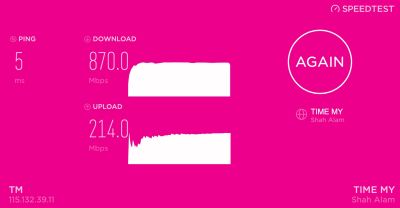 http://testyourspeed.time.com.my http://testyourspeed.time.com.my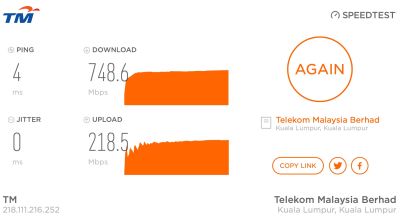 http://speedtest.tm.com.my http://speedtest.tm.com.my (58.26.239.30) 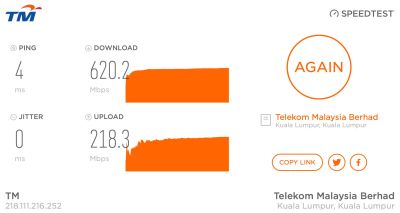 http://speedtest.tm.com.my http://speedtest.tm.com.my (210.187.84.114) Hi Sorry for the late reply. Was busy uploading my entire movie collection to Google Drive (abusing the upload speed) Below is the screenshot of the Speedtest results to OVH Singapore & TIME My IP range is 175.xxx.xxx.xxx 
 This post has been edited by BladeRider88: Jan 14 2019, 02:23 PM This post has been edited by BladeRider88: Jan 14 2019, 02:23 PM |
|
|
|
|
|
sulimc
|
Jan 14 2019, 03:06 PM
|
New Member
|
QUOTE(soonwai @ Jan 14 2019, 09:20 AM) Could be many things but sounds like your router is having a hiccup every 5 to 10 minutes. Try restarting your router. What router? Yes, tried restarting router, same issue. Router is TP-link. Can't remember the model, but switched to Unifi in Aug 2018. Thanks. |
|
|
|
|
|
sulimc
|
Jan 14 2019, 03:16 PM
|
New Member
|
QUOTE(voncrane @ Jan 14 2019, 11:41 AM) This happens sometimes with UnifiTV.. Try first to shutdown the STB and other networking equipment for about 5 minutes. Then power back on, saving the STB for last. If the issue still persists, then it's most likely a technical glitch that should resolve itself later. I've seen similar go on for days even.. Else, you can report to CS. Will try the restart sequence and see. Already the resolution is not 100% HD, especially for Chinese channels, then they dropped some channels just after I switched to Unifi last year. I asked them, they just say refer to Ruby+ channels on website and not going to replace those dropped channels. I had stopped Astro after being their subscriber for decades and switched from Maxis home fibre to Unifi. Trying to save $$$ I suppose Unifi TV is alright coz we get Warner TV, FOX life, Blue Ant, news channels and some sports. Only the Chinese content pretty bad so I'm using Njoi GO to get some chinese astro channels on my Andorid TV box (though Njoi GO hangs a lot) and plenty of FOC Chinese content on YouTube. For movies and Cantonese series, using Kodi with the usual addons. Cheers! This post has been edited by sulimc: Jan 14 2019, 03:25 PM |
|
|
|
|
|
TSSilentVampire
|
Jan 14 2019, 03:47 PM
|
|
|
QUOTE(sulimc @ Jan 14 2019, 03:06 PM) Yes, tried restarting router, same issue. Router is TP-link. Can't remember the model, but switched to Unifi in Aug 2018. Thanks. Yep. The infamous TP-Link C1200 v1. See 1st page, 1st post, green text. I suggest changing to another router as this router is very problematic. |
|
|
|
|
|
sohakyee
|
Jan 14 2019, 04:22 PM
|
|
|
Does anyone know what kind of router does unifi offer for RM188 after the unifi being turbo-ed to 500mbps?
The prices for 500mbps router start from RM300++ like archer C1200, is unifi offering rm188 for archer C1200?
|
|
|
|
|
|
iZuDeeN
|
Jan 14 2019, 04:42 PM
|
|
|
QUOTE(sohakyee @ Jan 14 2019, 04:22 PM) Does anyone know what kind of router does unifi offer for RM188 after the unifi being turbo-ed to 500mbps? The prices for 500mbps router start from RM300++ like archer C1200, is unifi offering rm188 for archer C1200? likely DLink DIR-842 But I suggest look for Asus router |
|
|
|
|
|
jpong1
|
Jan 14 2019, 05:18 PM
|
Getting Started
|
QUOTE(oxpigb00 @ Jan 14 2019, 02:01 PM) hi all, is there a place where we can discard the hypptv box and phone after termination? Can I have the TV box if you wanna discard it. I need those can connect via wifi, cause my current one Gen 1 , the oldest model. Thanks |
|
|
|
|
|
jpong1
|
Jan 14 2019, 05:19 PM
|
Getting Started
|
QUOTE(sohakyee @ Jan 14 2019, 04:22 PM) Does anyone know what kind of router does unifi offer for RM188 after the unifi being turbo-ed to 500mbps? The prices for 500mbps router start from RM300++ like archer C1200, is unifi offering rm188 for archer C1200? TM router at RM188 currently is DIR-842. |
|
|
|
|
|
TSSilentVampire
|
Jan 14 2019, 05:25 PM
|
|
|
QUOTE(sohakyee @ Jan 14 2019, 04:22 PM) Does anyone know what kind of router does unifi offer for RM188 after the unifi being turbo-ed to 500mbps? The prices for 500mbps router start from RM300++ like archer C1200, is unifi offering rm188 for archer C1200? You can get the DIR-842 cheap from TM, but it does not support 500Mbps over wifi, is locked down, have "@unifi" on SSID, and best reason not to have it is that it has TR-069. |
|
|
|
|
|
nag
|
Jan 14 2019, 05:54 PM
|
|
|
QUOTE(SilentVampire @ Jan 14 2019, 05:25 PM) You can get the DIR-842 cheap from TM, but it does not support 500Mbps over wifi, is locked down, have "@unifi" on SSID, and best reason not to have it is that it has TR-069. Can user have rights to request the 'master password' to replace SSID by user's own choice if still under contract ? How if user found out the 'master password' (not disclosed by TM) and disabled the TR-069, is it breach the rules if still under contract ? This post has been edited by nag: Jan 14 2019, 05:55 PM |
|
|
|
|
|
Icehart
|
Jan 14 2019, 06:12 PM
|
|
|
Received call this morning 9am. Told within 2 weeks turbo upgrade but I told TM I'm going overseas soon and they will expedite for me.
Just now 4pm upgraded to 800Mbps.
Torrent stable at 50MB/s.
|
|
|
|
|
|
JohnLai
|
Jan 14 2019, 06:58 PM
|
|
|
QUOTE(lyc1982 @ Jan 14 2019, 01:07 PM) perhaps...i can't make that option appear also since i am IT noob i have kapersky 2018, disabled it while doing speed test win10 in safe mode also can't reach 500Mbps...funny CPU usage while speed testing is 50%+ btw...my cpu was newly assembled in june 2018 How about CPU temperature and cpu clock rate during speedtest? Do I have to ask it over and over? =.= |
|
|
|
|
|
SzeMeng76
|
Jan 14 2019, 07:12 PM
|
|
|
QUOTE(lyc1982 @ Jan 14 2019, 01:07 PM) perhaps...i can't make that option appear also since i am IT noob i have kapersky 2018, disabled it while doing speed test win10 in safe mode also can't reach 500Mbps...funny CPU usage while speed testing is 50%+ btw...my cpu was newly assembled in june 2018 I having same result when testing on my new laptop in window 10 too. But when I change to old laptop in window8 I can get full speed instead. So I suspect limitation of CPU though. (Or maybe window10 limitation, lazy to find further setting on it Lol) The NAT acceleration no more appeared in router setting. It is auto enabled. This post has been edited by SzeMeng76: Jan 14 2019, 07:12 PM |
|
|
|
|
|
TSSilentVampire
|
Jan 14 2019, 07:58 PM
|
|
|
QUOTE(nag @ Jan 14 2019, 05:54 PM) Can user have rights to request the 'master password' to replace SSID by user's own choice if still under contract ? How if user found out the 'master password' (not disclosed by TM) and disabled the TR-069, is it breach the rules if still under contract ? There is no master password to remove the '@unifi' from the SSID as it is hardcoded into the hardware, and you can't technically disable the TR-069, as it is again hardcoded into the firmware. It won't be a breach of rules if you manage to do it though, so don't worry. |
|
|
|
|
|
sulimc
|
Jan 14 2019, 08:25 PM
|
New Member
|
QUOTE(SilentVampire @ Jan 14 2019, 03:47 PM) Yep. The infamous TP-Link C1200 v1. See 1st page, 1st post, green text. I suggest changing to another router as this router is very problematic. It says Wireless Router Archer C1200, so you might be right, need to get a better router. Thanks Cheers! |
|
|
|
|
|
GreenGuy6767
|
Jan 15 2019, 12:33 AM
|
New Member
|
Anyone tm down ? Im pekcek now in Ipoh nearly comeback in dota then suddenly internet down.
|
|
|
|
|
|
leonnlooi
|
Jan 15 2019, 12:34 AM
|
Getting Started
|
QUOTE(GreenGuy6767 @ Jan 15 2019, 12:33 AM) Anyone tm down ? Im pekcek now in Ipoh nearly comeback in dota then suddenly internet down. Taiping area too 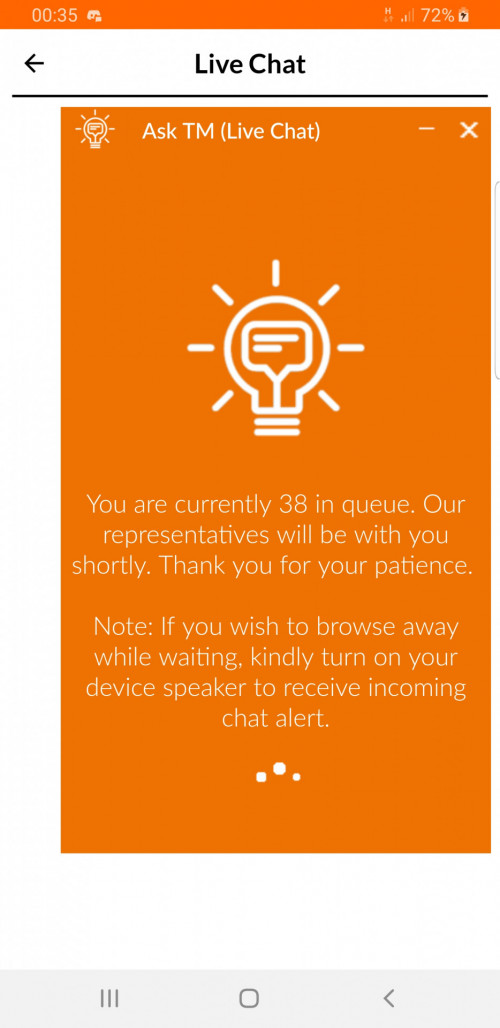 This post has been edited by leonnlooi: Jan 15 2019, 12:35 AM This post has been edited by leonnlooi: Jan 15 2019, 12:35 AM |
|
|
|
|



 Quote
Quote


 0.0186sec
 0.42
0.42
 6 queries
 GZIP Disabled