Welcome Guest ( Log In | Register )

Bump Topic Topic Closed RSS Feed
7 Pages « < 2 3 4 5 6 > » Bottom

Outline · [ Standard ] · Linear+

Unifi Official TM UniFi High Speed Broadband Thread V36, READ 1ST PAGE FOR TURBO SPEED INFO!

views
     
Doraku
post Nov 26 2018, 12:14 PM

Old threads digger
******
Senior Member
1,155 posts

Joined: Apr 2016


QUOTE(chickenluck @ Nov 26 2018, 12:05 PM)
Yes, I did. Call me blind but I read it over twice and still cannot find anything that solves my issue above.
Cables are up to date, Router can handle up to 800mbps. BTU is compatible.

Am I missing out on something? Looking thread, my speeds are extremely low compared to others having similar issues.

Do help point out to me on what I should be looking at because I really can't seem to find it bro haha.
*
Test it on Ethernet cable check is your speed is 500Mbps, and what devices did you use to test your internet speed using phone? please read this thread about wifi speed
https://forum.lowyat.net/topic/4658454

This post has been edited by Doraku: Nov 26 2018, 12:27 PM
Doraku
post Nov 27 2018, 08:30 AM

Old threads digger
******
Senior Member
1,155 posts

Joined: Apr 2016


QUOTE(dino89 @ Nov 27 2018, 08:07 AM)
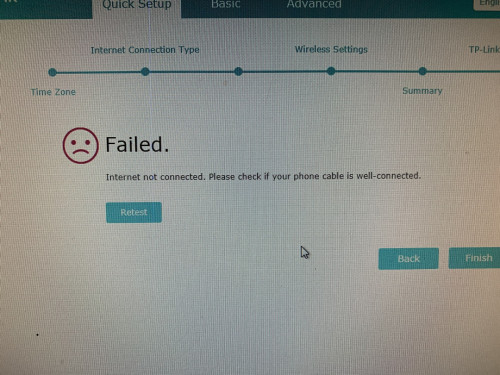
Hi sifus, currently facing problem with setting up my tplink c2300

Cant setup the router, keep getting this problem:
user posted image

Cant be the cables bcos my old router have no problem and the TM technician DLink router also no problem connecting. Any ideas?
*
You might set it wrong, Try follow this TP-Link router setup guide by Blacktubi
https://www.blacktubi.com/tp-link-unifi/
Edit : I forgot that TM is tagging Router MAC adress to Unifi account rclxub.gif rclxub.gif rclxub.gif doh.gif Like 'imalmighty' post that might be the culprit *

This post has been edited by Doraku: Nov 27 2018, 10:23 AM
Doraku
post Nov 27 2018, 11:14 AM

Old threads digger
******
Senior Member
1,155 posts

Joined: Apr 2016


QUOTE(dino89 @ Nov 27 2018, 11:12 AM)
Already factory default the router many times and still no avail  cry.gif
*
Try again with 30-30-30 reset?
1.With the router powered on, hold the reset button in for 30 seconds.
2.Continue to hold the reset button in and unplug the router, holding it in for another 30 seconds.
3.Plug the router back in, with the reset button still held, and continue to hold it in for another 30 seconds.

Doraku
post Nov 28 2018, 01:01 PM

Old threads digger
******
Senior Member
1,155 posts

Joined: Apr 2016


SlientVampire You might wanna replace TP-LINK Archer C1200 from your 'Suitable Wireless Router Guide List' with newer TP-LINK Archer C6 instead. The router perform very well for its price rclxms.gif Read TP-LINK Archer C6 Review by Blacktubi rclxms.gif rclxms.gif

This post has been edited by Doraku: Nov 28 2018, 01:03 PM
Doraku
post Nov 29 2018, 08:30 AM

Old threads digger
******
Senior Member
1,155 posts

Joined: Apr 2016


QUOTE(zeroendless @ Nov 29 2018, 07:18 AM)
Just upgraded to 500Mbps with unifi supplied tp-link ac1200, i'm getting 500Mbps on wired but max up 300+ on wireless.

Anyone knows what's the latest unifi router that's capable to get over 500 on wireless, there's a TM point on my way to work, thinking to drop by to ask for a new router.

Thanks
*
Just buy your own router dont bother use supplied router from TM whistling.gif whistling.gif
QUOTE
thinking to drop by to ask for a new router.

Ask for a new router? you mean for free? i dont think TM will give you a router for free unless you renew contract with them hmm.gif hmm.gif
Doraku
post Nov 29 2018, 08:35 AM

Old threads digger
******
Senior Member
1,155 posts

Joined: Apr 2016


QUOTE(brainocide @ Nov 29 2018, 08:27 AM)
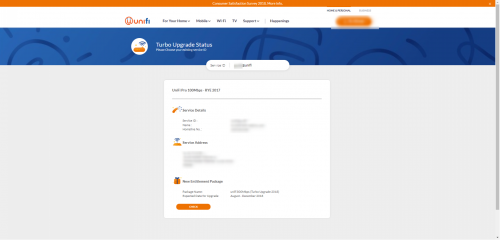
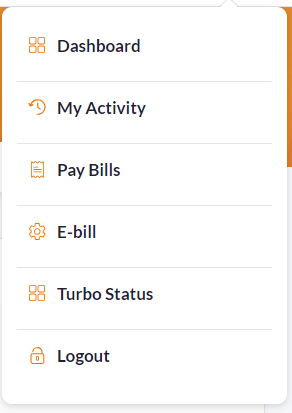
user posted image
user posted image

New page for checking turbo
*
'Unifi Turbo Upgrade Status' lol Its just show expected date(months**) you will get turbo upgrade(same with the old turbo eligibility check), not a status turbo progress:w whistling.gif

This post has been edited by Doraku: Nov 29 2018, 08:40 AM
Doraku
post Nov 29 2018, 08:56 AM

Old threads digger
******
Senior Member
1,155 posts

Joined: Apr 2016


QUOTE(Ququ @ Nov 29 2018, 08:54 AM)
If already renew contact can request new router?
*
Dont know, Maybe? confused.gif
Doraku
post Nov 29 2018, 11:00 AM

Old threads digger
******
Senior Member
1,155 posts

Joined: Apr 2016


QUOTE(maxguy @ Nov 29 2018, 10:10 AM)
rclxms.gif
*
QUOTE(maxguy @ Nov 29 2018, 10:25 AM)
thumbup.gif
*
QUOTE(maxguy @ Nov 29 2018, 10:27 AM)
rclxm9.gif
*
You lonely isn't whistling.gif you keep posting same thing every couple min whistling.gif whistling.gif
BTW serious, dont spam please.

QUOTE(lol0919 @ Nov 29 2018, 10:46 AM)
Does anyone know which router will gave by TM if request through this page?

user posted image
*
Probably D-LINK DIR842, just buy your own router, no need waste your money/renew contract just for a low end TM stock router rolleyes.gif

This post has been edited by Doraku: Nov 29 2018, 11:02 AM
Doraku
post Nov 29 2018, 11:07 AM

Old threads digger
******
Senior Member
1,155 posts

Joined: Apr 2016


QUOTE(cannavaro @ Nov 29 2018, 11:05 AM)
Same case with me.. nowadays can't get 800 Mbps from TM server on speedtest.net
Try with InNet, Macrolynx, Extreme Broadband, TIME dotcom servers
Eh how to get to this page? Just curious
*
Is this the cause of the issue?

https://twitter.com/unifi/status/1067612037000249346
Attached Image

This post has been edited by Doraku: Nov 29 2018, 11:13 AM
Doraku
post Nov 29 2018, 11:53 AM

Old threads digger
******
Senior Member
1,155 posts

Joined: Apr 2016


QUOTE(lol0919 @ Nov 29 2018, 11:23 AM)
I'm using Aztech FG7008, my router is not good either, especially wifi, wonder the router provide by TM wil perform better or not.
So this Dir-842 not good also?
*
Is this your router?
https://shopee.com.my/Aztech-FG7008GR(AC)-D...3178.1318268849
this aztech router have better spec than DIR-842 (Better CPU and abit more RAM)sweat.gif Changing to DIR-842 maybe wont perform any better and might be slower sweat.gif sweat.gif Well except with the Firmware issue
More info: https://forum.lowyat.net/topic/4543383/all

QUOTE(GrumpyCat @ Nov 29 2018, 11:33 AM)
Quick question. I finally got the message to be upgraded to the 800 MBPS package. Referring to the first post, where can I purchase the BTU mentioned there (Huawei HG8240x, AN5506-04-BG, Nokia G-240G and Alcatel Lucent I-240G).

I'm also planning to get 2 RT-AC86U - 800Mbps (One for upstairs, one for downstairs).

Also, as non-tech savvy person, is the set up of these items easy, i.e. plug and play, is there many stuff to configure?
*
You cant buy BTU, just contact TM and they will replace it for free.

This post has been edited by Doraku: Nov 29 2018, 11:57 AM
Doraku
post Nov 29 2018, 12:04 PM

Old threads digger
******
Senior Member
1,155 posts

Joined: Apr 2016


QUOTE(kimyee73 @ Nov 29 2018, 11:55 AM)
I just got turboed and ran speedtest. Got 477Mbps from my study desk thru multiple gigabit switches but can get 530Mbps when connect my laptop directly to router. Would like to update my forum signature but there is no copy to forum option in speedtest anymore. How do I get the result picture from speedtest? Thanks.
*
Weird i still have option for forum code:hmm: Try copy picture link instead and add IMG code->
CODE
[img]http://www.speedtest.net/result/7838173416.png[/img]

Attached Image
user posted image
[url=http://www.speedtest.net/result/7838173416]

This post has been edited by Doraku: Nov 29 2018, 12:08 PM
Doraku
post Nov 29 2018, 12:10 PM

Old threads digger
******
Senior Member
1,155 posts

Joined: Apr 2016


QUOTE(PowerGadget @ Nov 29 2018, 12:08 PM)
Wondering powerline is better or wireless adapter?
*

Doraku
post Nov 29 2018, 12:48 PM

Old threads digger
******
Senior Member
1,155 posts

Joined: Apr 2016


QUOTE(lamusiqa @ Nov 29 2018, 12:37 PM)
Did you test using LAN cable or 5Ghz wifi? Always use LAN cable to test real full speed.
*
Read his post again, he did test on LAN
Doraku
post Nov 29 2018, 01:15 PM

Old threads digger
******
Senior Member
1,155 posts

Joined: Apr 2016


.

This post has been edited by Doraku: Nov 29 2018, 01:21 PM
Doraku
post Nov 29 2018, 02:54 PM

Old threads digger
******
Senior Member
1,155 posts

Joined: Apr 2016


QUOTE(sHawTY @ Nov 29 2018, 02:52 PM)
doh.gif
*
LMAO biggrin.gif
Doraku
post Dec 3 2018, 07:50 PM

Old threads digger
******
Senior Member
1,155 posts

Joined: Apr 2016


QUOTE(dickybird @ Dec 3 2018, 03:23 PM)
Alamak Ada cable also like no cable. TM really sucks.
*
Maybe cable putus like TM fibre cable? wink.gif

QUOTE(cskean @ Dec 3 2018, 01:23 AM)
I did, and they confirm with me that my contract expire date remain the same in their system. I just never thought that the 1st CS can gave such explanation on my unifi dashboard details...  doh.gif

Actually my house ady got those "ahem" IPTV services which have around 300 channels, so do you think it is worth to tied down for 1 year contract for those channels offer by UnifiTV Ultimate? Not even a single time I use this service before, so not sure about their video quality? Are those channels all in FULL HD?
I went to Pandan Indah TM Point few days ago, asked about this 50MB @ RM99 package. Basically is and speed upgrade from my current package (VIP10), no STD20, carry forward current UnifiTV package and locked down for 2 years contract... Need to ask those CS directly, otherwise they will act like no such plan...

Initially I thought wanna upgrade my parent VIP10 to the 150MB @ RM9 package, but after visiting Maxis and found out that my mobile will get UMLIMITED data if I subscribe their home fibre and combine my mobile plan with it. So today I just went to Mytown and proceed to subscribe the RM89 @ 30MB, and their CS instantly perform the combination for me even before the home fibre installation. And voila, now my main and subline get to enjoy unlimited data~  rclxms.gif  rclxms.gif
How come only 100 DL and 100 UL? Is is on wifi or LAN?  :confused:  :confused:
Wow, why didn't you ask for a price reduction while waiting for your turbo?  doh.gif
From what I see on my own dashboard, seems like their system indeed is calculate the remain contract based on the updated service date. TM really never fail to creating jokes on them...

Look at recently how they offer those who get Turbo-ed but need to replace their BTU??? To me, it means all the while TM is fooling their users by telling need to have supported hardware before turbo them... But did TM really check on their users hardware? U know I know loh~~~
*
Woah didnt know there is 150Mbps RM9 Unifi package biggrin.gif

This post has been edited by Doraku: Dec 3 2018, 07:51 PM
Doraku
post Dec 3 2018, 08:33 PM

Old threads digger
******
Senior Member
1,155 posts

Joined: Apr 2016


Fuhh TNB fibre broadband now on pilot project :0


https://mobile.twitter.com/pos4you/status/1...537440551993344

This post has been edited by Doraku: Dec 3 2018, 08:36 PM
Doraku
post Dec 4 2018, 12:17 AM

Old threads digger
******
Senior Member
1,155 posts

Joined: Apr 2016


QUOTE(JohnLai @ Dec 3 2018, 08:50 PM)
Technically, it is 1Gbps line.

925Mbps = after some network overhead....
*
Yeah, now the question is how affordable it going be TNB fibre plan for home user hmm.gif
QUOTE(blacktubi @ Dec 3 2018, 09:01 PM)
It could be. Do take a look at that page.
I wonder who is the upstream wholesale data provider. There’s only a handful of providers here. hmm.gif
*
It could be cyberjaya broadband, which TNB acquired amost a year ago?
Doraku
post Dec 4 2018, 05:17 PM

Old threads digger
******
Senior Member
1,155 posts

Joined: Apr 2016


QUOTE(Bensonc @ Dec 4 2018, 04:39 PM)
I understand 100 percent speed is not possible, but I am receiving 20/300 as of now, which is less than 10 percent, can't really be....
Isn't powerline consider LAN, or what LAN you are referring to?
*
Do iperf test between your pc to and powerline adapter instead doing speedtest.net.

As far i know powerline is not really great for high speed usage , please ensure you plug powerline directly to socket, and you are not on three phase.

BTW those 300Mbps speed are just theoretical speed, its will be practically impossible to achieve 300Mbps (Due to interference, distance and wiring quality) unless you put powerline next each other

QUOTE(duke_hunt @ Dec 4 2018, 05:10 PM)
hhmm...i just saw my service got upgraded to 500mbps yesterday, upload can hit 100mbps while download via wifi for desktop, laptop and phone is at max 50mbps...
i didnt received any sms regarding the completion of the upgrade..
i have restarted the BTU but with same result...
so, basically i have to contact cust service regarding this, correct?
thanks is advance..
*
Did you already read 1st page middle green text?

This post has been edited by Doraku: Dec 4 2018, 05:23 PM
Doraku
post Dec 4 2018, 06:38 PM

Old threads digger
******
Senior Member
1,155 posts

Joined: Apr 2016


QUOTE(gedebe @ Dec 4 2018, 06:23 PM)
anybody can confirm that we will be getting this D‑Link 842 AC1200 after turbo, TM ask if we want to buy it is rm200 or else have to contract 2 years but warranty 1 year.
D‑Link 842 AC1200 good?
*
Nope TM wont give you a free router(After turbo*)unless you renew contract. DIR-842 not a great router but it get the job done for mostly LAN usage, but i really recommend buy your own router, there is better router with amost same price like archer c6.

This post has been edited by Doraku: Dec 4 2018, 06:47 PM

7 Pages « < 2 3 4 5 6 > » Top
Topic ClosedOptions
 

Change to:
| Lo-Fi Version
0.2192sec    0.73    7 queries    GZIP Disabled
Time is now: 7th December 2025 - 12:02 AM