the reviewer didn't mention how much wifi speed he is getting on ac68 wifi adapter...or maybe i missed out ?
ac68 specs on 5Ghz theoretically should be able to reach 1300Mbps right ?
Really? You main scroll kah There is big button below of the Reviewer article 1 2 : NEXT Anyway here the test result Source :https://www.digitalcitizen.life/reviewing-asus-usb-ac68-wifi-adapter-looks-bird
This post has been edited by Doraku: Nov 13 2018, 04:30 PM
Apparently the Dlink DIR615 was factory reset by itself. Not sure how does this happen.
So today I went back to my parent house with my laptop, login into the router setting and enable the wifi. But still no internet connection. And I have to live chat again with Unifi, found out that the router setting was reset back to default setting.
Request a password reset and surprisingly the sms arrive almost immediately after the CS reset the password for me. Key in the username and password, voila the internet is back online again~
Thank you for those who have putting in suggestion....
QUOTE(cskean @ Nov 13 2018, 09:44 PM)
Already back to my own place. Anyway where can I check the remote access is enable or disable, any idea under which window/setting?
Oh yeah i just remember Dlink-D615 have a remote access which is turned on by TM, Someone might exploit the remote access thing on your parent router then steal PPPoE infomation and reset router? Look at this website and video for demoHow I hacked 4 Unifi accounts in under 5 minutes BY Keith Rozario creator of Sayakenahack.com
This post has been edited by Doraku: Nov 14 2018, 05:34 PM
It will not connect to internet. It should just show the speed between the BTU and the PC. Just like how you now see the speed between router and PC in Windows Network adaptor settings. The BTU may be set to 100M although it is a 1G capable BTU because wrongly misconfigured. I think they can reset that for you. But please try first.
You actually can connect directly from BTU to internet using windows built in PPPoE Dialer , just make sure you have a PPPoE username/password and set your ethernet adapter VLAN ID to 500
I am currently a 1gbps internet subscriber. The router that came with the isp is D-Link DIR 850L. Being an old router with okay connection decided to get an upgrade.
Bought the Tenda AC6 from Lazada during the 11.11 sale. Even though this router is advertise for 300 + 867 mbps, found out today that it only has megabit port and not gigabit, and my speed is only reaching 94 mbps. Any ideas what can I do ?
A friend suggested bridging both router, but I don't have signal problems as I live in a small apartment. The reason for the upgrade was for better speeds and handling between multiple connections also for gaming with low ping. So should I just maintain the old router? Thanks for helping in advance
Nothing you can do i guess, the router only advertised theoretical speed of 300+967Mbps on WLAN not LAN(100Mbps)r. it your own fault for not doing in depth research and buy cheap router for a gigabit ethernet usage
I have no interest at TM other than being a normal consumer like everyone here
I am just speaking from the shoe of a normal employee as I do make mistakes in my job too
QUOTE(mylinear @ Nov 17 2018, 06:33 PM)
End result is they fixing it. Thats good.
Whether it was a mistake or not who knows. This was not just a typo error. It was a whole new question and answer with a price table. That is not a simple mistake. Someone must have been told to do it. I don't think anyone updating the FAQ will simply do it on their own. And in my previous post I posted a link to a reseller site which also had the same price issue. So some instruction must have gone out for that too. Only an agent / resller here can clarify whether they got such instructions. Then it could not have been a mistake.
Maybe they tried their luck. I think they should realise now that their moves are being watched by everyone.
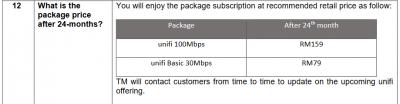
this is probably not a mistake lol annoymous1234 actually call tm staff and confirm 100Mbps price going to be RM159 after 2 year,there is no way this is just a mistake is other CS staff know about this
» Click to show Spoiler - click again to hide... «
QUOTE(annoymous1234 @ Nov 17 2018, 10:08 AM)
100mbps will be rm159 after 24 months?? https://amanz.my/2018185642/amp/?__twitter_impression=true edit: just called the call center, conlanfirm price will be rm159 after 2 years, like that I better remain 500mbps for RM169 la, got ultimate pack some more
TM is always listening to our customers and to our stakeholders and have been responding both individually on social media as well as via several media statements,
Disable IPv6. No issue here for me. Subang area. 175.x.x.x. Are your friends and you using TM own router? If you are, maybe the DNS have been hard coded into the router. All of us that are using own routers and own DNS probably is okay.
So i the only one here, that doesn't have any problem using IPv6? lol
Internet outage problem going to be solved around 6AM, Apparently 3rd party accidently cut cable at Sentul and Sabak Bernam lol Source https://amanz.my/2018185678/
Yes, kaspersky is known to slow down LAN transfer by half Please disable it. I was expecting you to use Windows built-in antivirus in first place.
Next, how about the stuff I asked you to do? Aim a table fan to the bottom of your laptop and try to ensure temperature below 55'C and do a speedtest? You should be able to reach 780Mbps when the temp is around 55'C. If so, then you better clean the CPU heatsink, fins, fan + reapplying thermal paste.
LOL, BTW what antivirus do you use?,
This post has been edited by Doraku: Nov 20 2018, 12:37 AM
Windows Defender detection rate is quite decent for malware protection, but its PUP and Ransomeware protection is abit lacking to me, installing kaspersky anti ransomware probably a good idea to me
im surprised. nobody recommend yet powerline to extend wifi connectivity. anybody can share?
Depending on your house wiring Powerline Adapter might no be reliable solution to extend your network tho.
QUOTE(cskean @ Nov 20 2018, 02:10 PM)
My GT-AC5300 is otw from local courier soon. Just wondering the speed allocation, is it possible to apply to guest wifi as well? Mind to tell under which section can I set the speed limit to the guest wifi? If on the guest wifi, can we select which band to on only? Like either 2.4Ghz or 5GHz, or both...
Just don't want my bandwidth divided too much to guest when they connect to my wifi~
Like SV say you might want to play around with this emulator while waiting your new router http://demoui.asus.com


 Nov 13 2018, 04:28 PM


 Quote
Quote


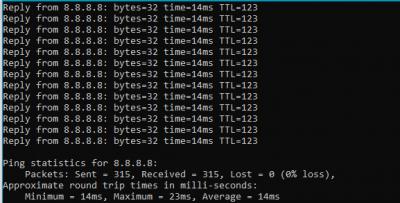

 Please disable it. I was expecting you to use Windows built-in antivirus in first place.

 0.0305sec
 0.27
0.27
 7 queries
 GZIP Disabled