Welcome Guest ( Log In | Register )

Bump Topic Topic Closed RSS Feed
7 Pages « < 4 5 6 7 >Bottom

Outline · [ Standard ] · Linear+

Unifi Official TM UniFi High Speed Broadband Thread V36, READ 1ST PAGE FOR TURBO SPEED INFO!

views
     
Doraku
post Dec 16 2018, 11:19 PM

Old threads digger
******
Senior Member
1,155 posts

Joined: Apr 2016


QUOTE(SzeMeng76 @ Dec 16 2018, 08:24 PM)
Hi just now do as per instructed on my desktop first,
Intel i3-4150, using newly purchased wireless adapter ASUS USB AC68 with 4 bar signal (full signal 5 bar),
I got only 220 M download & 160 M upload only. Is this normal?
Btw, later I will report back for the laptop & LAN speedtest.
*
Did you insert wifi adapter on USB 2.0 port or USB 3.0 port on your motherboard?

This post has been edited by Doraku: Dec 16 2018, 11:21 PM
Doraku
post Dec 17 2018, 09:55 PM

Old threads digger
******
Senior Member
1,155 posts

Joined: Apr 2016


QUOTE(stxksy @ Dec 17 2018, 07:54 PM)
Did not change my DNS, QoS for sure will throttle (I tried) and another guess is TM network is not IPV6 ready (correct me if I'm wrong) therefore loss bandwidth due to translation??
*
Kinda make nonsense, most download server i download on and Speedtest.net does not support ipv6 .
QUOTE
therefore loss bandwidth due to translation
there is no need for NAT in ipv6 all host have its own global unicast address(Public Address) that means no address translation is happend.
QUOTE(solarmystic @ Dec 17 2018, 08:56 PM)
Unifi doesn't block torrenting. Your maximum speed will depend on seeders and their proximity to you and other seeds.

I personally use QBittorent, others use uTorrent.

Make sure to disable uTP in the enabled protocols list for maximum speed when torrenting. Also disable all rate limit settings.

Only use TCP connections.
*
Be sure to seed once you done downloading too.

This post has been edited by Doraku: Dec 17 2018, 09:57 PM
Doraku
post Dec 18 2018, 06:44 AM

Old threads digger
******
Senior Member
1,155 posts

Joined: Apr 2016


QUOTE(cskean @ Dec 14 2018, 11:42 PM)
These 2 routers has been released  by Asus at other countries for some times. So far only GT-AX11000 can be view from Asus MY website. Mind to share the site that has the news on these 2 routers release in MY and the pricing?
*
Update : I just found out, someone is selling RT-AX88U for a RM2,219 on lazada, for far i dont see anyone selling GT-AX11000 yet.
https://www.lazada.com.my/products/next-gen...s666713959.html
Attached Image

This post has been edited by Doraku: Dec 18 2018, 06:46 AM
Doraku
post Dec 21 2018, 03:22 AM

Old threads digger
******
Senior Member
1,155 posts

Joined: Apr 2016


QUOTE(watabakiu @ Dec 20 2018, 11:11 PM)
Wait what..... it can't??? guesstimate how much it can go up to? +-80% of 500mpbs is good enough for me
*
80%??? lol you asking too much for a cheap 2x2 low end router, This router hardly get speed more than 300++ on close range with 'one client' sad.gif yet again that was only with one client, available wifi bandwidth also will be shared by every clients using it(As far i know unsure.gif )


https://www.pcinside.info/reviews/dlink-dir...-router-review/

This post has been edited by Doraku: Dec 21 2018, 03:24 AM
Doraku
post Dec 21 2018, 10:07 PM

Old threads digger
******
Senior Member
1,155 posts

Joined: Apr 2016


QUOTE(jkgermanotta @ Dec 21 2018, 08:19 PM)
user posted image
*
Did you just move FWS or also detach the fibre optic cable from FWS?

And did you also bend that cable?

This post has been edited by Doraku: Dec 21 2018, 10:10 PM
Doraku
post Dec 22 2018, 01:13 AM

Old threads digger
******
Senior Member
1,155 posts

Joined: Apr 2016


QUOTE(jkgermanotta @ Dec 21 2018, 10:20 PM)
yes i remove the cable. but on call with TM 100 cs i just said i come back home suddenly no internet lol.
*
Fibre optic cable are quite fragile and sensitive to dust, is you bend it could break. and is you disconnect it, dust could get in and cause problem,

QUOTE(roosie @ Dec 21 2018, 10:49 PM)
Final posting on my Turbo upgrade. Finally gotten a reliable Cat6 cable after buying a faulty Cat5e cable. Urgh!

I've disabled all Windows 10 Meltdown and Spectre protections and able to obtain the latest speed bump of over 800Mbpsrclxm9.gif !! Woohoo !! rclxm9.gif

Best free speed upgrade ever!
*
lol 3 speedtest result in signature sweat.gif ni mahu cari nahas dengan mod ke rclxs0.gif

This post has been edited by Doraku: Dec 22 2018, 01:13 AM
Doraku
post Jan 2 2019, 02:11 PM

Old threads digger
******
Senior Member
1,155 posts

Joined: Apr 2016


QUOTE(adiyon84 @ Jan 2 2019, 11:54 AM)
I can get peak rate 81MB/s for this download. Using Safari browser default download. I'm on 1Gbps TIME plan.


Perhaps you may try below link and test your speed.


*
thats was pirated movie la not speedtest file doh.gif doh.gif try download large test media from xiph instead
https://media.xiph.org/video/derf/

Largest sample footage 88GB : https://media.xiph.org/video/derf/meridian/...60909_OV_01.mxf

This post has been edited by Doraku: Jan 2 2019, 02:15 PM
Doraku
post Jan 16 2019, 10:39 PM

Old threads digger
******
Senior Member
1,155 posts

Joined: Apr 2016


QUOTE(soonwai @ Jan 16 2019, 06:33 PM)
Can get above 100Mbps but depends on a few factors.
https://forum.lowyat.net/index.php?showtopi...post&p=87547848
*
I can get around 130Mbps++ to 150Mbps+ on 2.4Ghz with my TP-Link C1200 rolleyes.gif

This post has been edited by Doraku: Jan 16 2019, 10:47 PM
Doraku
post Jan 17 2019, 07:55 PM

Old threads digger
******
Senior Member
1,155 posts

Joined: Apr 2016


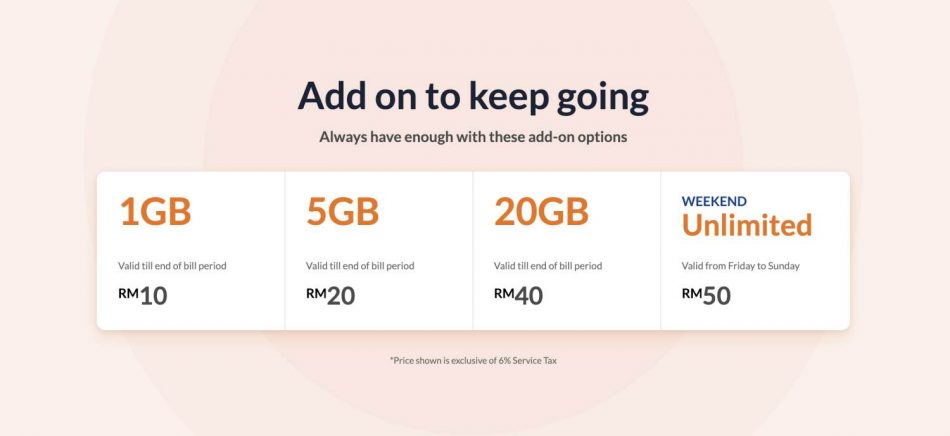
Unifi Basic(SE) overpriced add on quota lol
user posted image
Doraku
post Jan 17 2019, 09:42 PM

Old threads digger
******
Senior Member
1,155 posts

Joined: Apr 2016


QUOTE(voncrane @ Jan 17 2019, 09:28 PM)
Okay.. I  laugh.gif  laugh.gif .. Hope not many fall for such tactics.
*
Unifi Scam edition whistling.gif whistling.gif
Doraku
post Jan 17 2019, 09:48 PM

Old threads digger
******
Senior Member
1,155 posts

Joined: Apr 2016


QUOTE(JohnLai @ Jan 17 2019, 09:45 PM)
Don't worry, mr gobind just announced there will be further price reduction this year.
So, price of RM129 100Mbps WILL* fall again.

Ain't nobody gonna fall for that unifi basic quota scam.
*
Price reduction? are you sure its not another VVT-I speed upgrade laugh.gif laugh.gif

This post has been edited by Doraku: Jan 17 2019, 09:55 PM
Doraku
post Jan 17 2019, 09:57 PM

Old threads digger
******
Senior Member
1,155 posts

Joined: Apr 2016


QUOTE(JohnLai @ Jan 17 2019, 09:52 PM)
..........OH......OHHHHH.......So that explains why TM didn't straight away provide 1Gbps last time and capped it at 800Mbps.......... laugh.gif
*
(Shh typo missing 'you' word doh.gif)
Ya they still have extra head room to upgrade 800Mbps user into 1Gbps whistling.gif
Doraku
post Jan 17 2019, 10:14 PM

Old threads digger
******
Senior Member
1,155 posts

Joined: Apr 2016


QUOTE(JohnLai @ Jan 17 2019, 10:07 PM)
Aiyoyo....susah lor like this.

I just hope my neighbours won't ask me same stuff again on the price this year......I don't want a repeat of last year situation.... sweat.gif
*
No offense unsure.gif but based on your previous post your neighbours maybe jenis yang tak reti bahasa. So dont make any promise with them, and is they asking about this price reduction just buat dont know je whistling.gif

This post has been edited by Doraku: Jan 17 2019, 10:15 PM
Doraku
post Jan 18 2019, 05:39 PM

Old threads digger
******
Senior Member
1,155 posts

Joined: Apr 2016


QUOTE(noien @ Jan 18 2019, 03:55 PM)
this is plain stupid.maxis is just rm10 away
celcom is around the same price with higher speed.
TM is killing themselve
*
true, who on earth will buy the RM50 unlimited add on quota which only for 2 day on weekend lol.
Doraku
post Jan 18 2019, 09:24 PM

Old threads digger
******
Senior Member
1,155 posts

Joined: Apr 2016


Anyone else having issue with unifi today? some website is quite slow today
Doraku
post Jan 18 2019, 10:37 PM

Old threads digger
******
Senior Member
1,155 posts

Joined: Apr 2016


QUOTE(JohnLai @ Jan 18 2019, 10:21 PM)
Yup...connection to website at France OVH is quite slow.....
*
10KB/s download lol
Attached Image
Doraku
post Jan 18 2019, 10:57 PM

Old threads digger
******
Senior Member
1,155 posts

Joined: Apr 2016


QUOTE(JohnLai @ Jan 18 2019, 10:48 PM)
Oh well.......at least it didn't affect my downloading speed of that leaked 773 million e-mail entries data breach just now.  innocent.gif
*
lol, my email in the breach, the seller who sell that data breach say the breach was 2-3 year old (which i should be okay) and claimed he have new 4tb data breach which less than year old rclxub.gif
Doraku
post Jan 27 2019, 11:46 PM

Old threads digger
******
Senior Member
1,155 posts

Joined: Apr 2016


QUOTE(blibala @ Jan 27 2019, 11:01 PM)
Is unifi Basic RM79 confirmed unlimited quota now?
*
Not confirmed yet, but tm has extend the unlimited quota to end 2019
Doraku
post Jan 28 2019, 07:02 AM

Old threads digger
******
Senior Member
1,155 posts

Joined: Apr 2016


QUOTE(System Error Message @ Jan 28 2019, 03:36 AM)
Actually its not as the others  say. You do  need a new router and  your adapter sucks.

Wireless N practical speeds are 30% on a good day, wireless AC practical speeds are 50% on  a good day.
So at 30% on wifi your current router will do 100Mb/s on 2.4Ghz, 150Mb/s on 5Ghz. If you want 500Mb/s you'll need a 3 channel wireless AC router to max it out but your adapter is 2 channel wifi AC and crap, so i'd expect  around  400Mb/s from it. All you need is a 2 channel wifi AC router, and if you are on a budget, tplink is decent, infact  call TM to let them know you arent enjoying their new speeds, still at 100Mb/s, get them to come and have them replace your equipment. The tp link AC1200 that tm gives out may only have a wifi 5Ghz practical speed of 433Mb/s but thats at least close to your subscribed speed if you get it free.
*
Streams* AKA Spatial Streams AKA 1x1, 2x2, 3x3, 4x4(1, 2, 3, 4 streams)AKA MIMO. Channel is your wifi operating frequency range.

This post has been edited by Doraku: Jan 29 2019, 02:25 AM

Doraku
post Jan 29 2019, 02:24 AM

Old threads digger
******
Senior Member
1,155 posts

Joined: Apr 2016


QUOTE(System Error Message @ Jan 28 2019, 12:15 PM)
channel is correct as well. 4 streams/channel actually uses the physical space of 4 5Ghz channels
*
Oh ok sweat.gif

7 Pages « < 4 5 6 7 >Top
Topic ClosedOptions
 

Change to:
| Lo-Fi Version
0.2012sec    0.69    7 queries    GZIP Disabled
Time is now: 8th December 2025 - 03:24 PM