QUOTE(DavidtheSingle @ Dec 5 2018, 03:12 PM)
Oops, I mean wireless router, because I saw his post and he can replace free wireless router.

What is your BTU model?(picture?)How fast is your speedtest using LAN?
Unifi Official TM UniFi High Speed Broadband Thread V36, READ 1ST PAGE FOR TURBO SPEED INFO!
|
|
 Dec 5 2018, 03:14 PM Dec 5 2018, 03:14 PM
Return to original view | Post
#81
|
 
Senior Member
1,155 posts Joined: Apr 2016  
|
QUOTE(DavidtheSingle @ Dec 5 2018, 03:12 PM) Oops, I mean wireless router, because I saw his post and he can replace free wireless router. What is your BTU model?(picture?)How fast is your speedtest using LAN? |
|
|
|
|
|
Dec 5 2018, 03:39 PM
Return to original view | Post
#82
|
|
Senior Member
1,155 posts Joined: Apr 2016
|
QUOTE(DavidtheSingle @ Dec 5 2018, 03:25 PM) Picture is at the last post about 90mbps download and upload Are you sure its not your cable cause the problem?, try check network link on both BTU and your PC, It is 1Gbps or 100Mbps?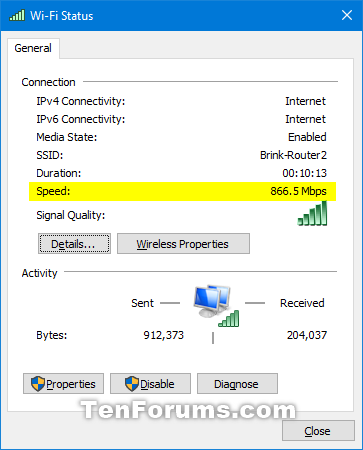 |
|
|
Dec 5 2018, 03:45 PM
Return to original view | Post
#83
|
|
Senior Member
1,155 posts Joined: Apr 2016
|
QUOTE(sHawTY @ Dec 5 2018, 03:21 PM) Aduh bro, you can afford all those watercooling and what not, buy your own router la, aiyo Lmao he can afford high end PC(5k++) he should buy his own router, instead of TM Router stock This post has been edited by Doraku: Dec 5 2018, 03:50 PM |
|
|
Dec 5 2018, 06:59 PM
Return to original view | Post
#84
|
|
Senior Member
1,155 posts Joined: Apr 2016
|
QUOTE(drunkonpiss @ Dec 5 2018, 06:47 PM) Disabling the IPv6 seemed to work TP Link Archer C6? RM200+ Appreciate it man! Appreciate it man!  TP-Link Archer C7 V5 is a bit pricey. Any alternatives to it? TP-Link Archer C7 V5 is a bit pricey. Any alternatives to it? |
|
|
Dec 5 2018, 08:57 PM
Return to original view | Post
#85
|
|
Senior Member
1,155 posts Joined: Apr 2016
|
QUOTE(miloaisdino @ Dec 5 2018, 07:27 PM) ac1200 only tho But C7 V5 already pricey for him  QUOTE(JohnLai @ Dec 5 2018, 07:30 PM) Wonder how long is C6 startup time.......TM C1200 takes around 4 minutes to startup. Yea i wondering too, i wish Blacktubi tell its startup time in his review tho. QUOTE TM C1200 takes around 4 minutes to startup. Dont forget the worst part, then C1200 rebooting again after the self reboot  |
|
|
Dec 7 2018, 12:02 PM
Return to original view | Post
#86
|
|
Senior Member
1,155 posts Joined: Apr 2016
|
QUOTE(mizi3 @ Dec 7 2018, 07:50 AM) Is it just me or everyone else that subscribed to 500mbps only get 100mbps for LAN cable on speedtest these past few days? And yes they already changed my modem and router. Try change your WAN and LAN cable with new one?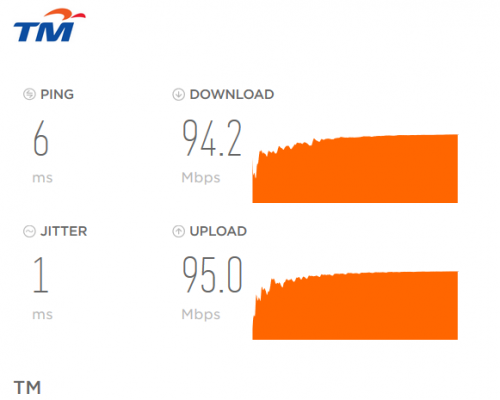 QUOTE(NyOx @ Dec 7 2018, 11:25 AM) call 100 ask TM replace your BTU Read again TM already replace his BTU and Router. |
|
|
|
|
|
Dec 8 2018, 01:20 PM
Return to original view | Post
#87
|
|
Senior Member
1,155 posts Joined: Apr 2016
|
QUOTE(gedebe @ Dec 8 2018, 03:00 AM) can anybody teach me how to kill my router dlink wbr2300 so that tm could replace 1 new one since it is still under warranty Just use bug zapper to zap all of your router port   |
|
|
Dec 9 2018, 04:24 PM
Return to original view | Post
#88
|
|
Senior Member
1,155 posts Joined: Apr 2016
|
QUOTE(MrSpeedy @ Dec 9 2018, 02:14 PM) Simple question: I not a IPv6 expert In IPv6 settings, which one is better to obtain IPv6 WAN address? 1. Auto 2. SLAAC 3. DHCPv6 4. As specified by ISP Tplink Archer c1200 Edit: And no, I won't turn off IPv6 for now. This post has been edited by Doraku: Dec 9 2018, 09:21 PM |
|
|
Dec 9 2018, 04:52 PM
Return to original view | IPv6 | Post
#89
|
|
Senior Member
1,155 posts Joined: Apr 2016
|
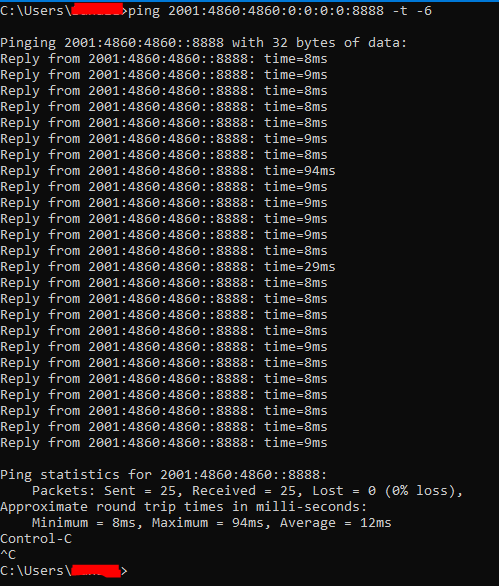
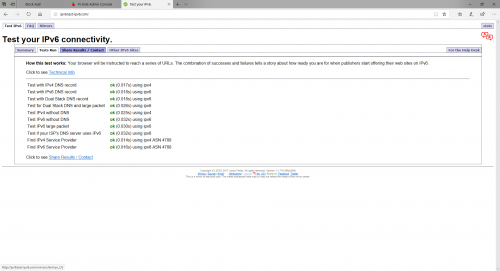
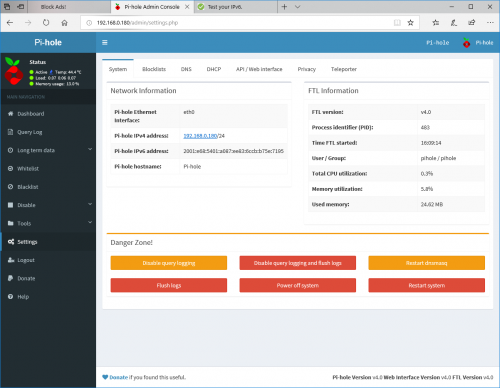
QUOTE(MrSpeedy @ Dec 9 2018, 04:38 PM) Yeah I tried both DHCPv6 and SLAAC (one-by-one), my router always gives Orange LED and indicates "Poor Network" from the web management once it can connect to IPv6. Could you ping IPv6 Directly without domain name?Probably due to Pi-Hole DNS I'm using it now. If you aware few weeks ago, I mentioned that to you guys that I will set up Pi-Hole for my home. Everything is working except IPv6 (kinda work just Tplink C1200 reported poor network for IPv6 with Pi-Hole DNS for some reasons). Gonna give it few hours to test. Expect tomorrow for the rep-up. try ping google IPv6 DNS address? [2001:4860:4860:0:0:0:0:8888] Edit : BTW does your pc and router has IPv6 address and ipv6 DNS assigned? This post has been edited by Doraku: Dec 9 2018, 04:59 PM |
|
|
Dec 9 2018, 06:21 PM
Return to original view | IPv6 | Post
#90
|
|
Senior Member
1,155 posts Joined: Apr 2016
|
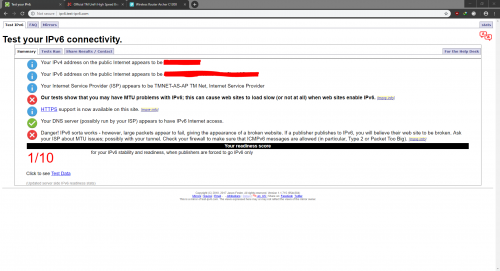
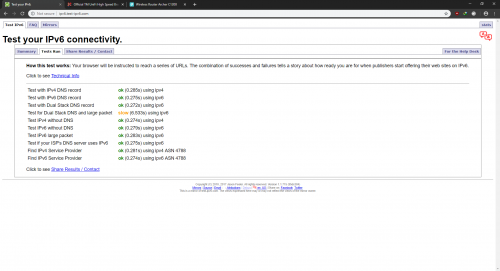
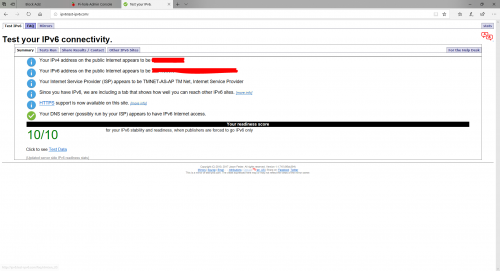
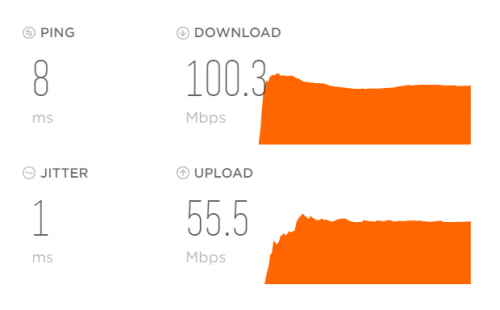
QUOTE(MrSpeedy @ Dec 9 2018, 05:44 PM) My IPv6 settings: » Click to show Spoiler - click again to hide... « IPv6 ping test: » Click to show Spoiler - click again to hide... « IPv6 test (Chrome): » Click to show Spoiler - click again to hide... « IPv6 test (Edge): » Click to show Spoiler - click again to hide... « ipconfig /all » Click to show Spoiler - click again to hide... « Speedtest: » Click to show Spoiler - click again to hide... « Look like your Pi-Hole IPv6 adress is static because i cant ping your DNS? This post has been edited by Doraku: Dec 9 2018, 08:27 PM |
|
|
Dec 9 2018, 08:49 PM
Return to original view | Post
#91
|
|
Senior Member
1,155 posts Joined: Apr 2016
|
QUOTE(MrSpeedy @ Dec 9 2018, 07:22 PM) IDK this is what local IPv6 that is given during setup. During setup there's only static for IPv4, after I proceed it's just automatically assign this IPv6 address instead. Please ignore the Global address part i talking about » Click to show Spoiler - click again to hide... « So should I leave the IPv6 DNS empty (or CloudFlare v6 DNS), and remain 192.168.0.180 as DHCP primary address? Your IPv6 WAN prefix is dynamic thats mean it will change everytime you restart your router. Try obtain your IPv6 WAN Adress using DHCPv6 instead and turn on Prefix Delegation. And check does your IPv6 changed is you restart your router? More info https://blog.apnic.net/2017/07/07/isps-simp...ressing-part-1/ This post has been edited by Doraku: Dec 9 2018, 09:19 PM |
|
|
Dec 9 2018, 10:46 PM
Return to original view | IPv6 | Post
#92
|
|
Senior Member
1,155 posts Joined: Apr 2016
|
QUOTE(MrSpeedy @ Dec 9 2018, 10:01 PM) » Click to show Spoiler - click again to hide... « PROBLEM SOLVED! Basically just need to set Pi-Hole IPv4 address as DHCP DNS server... WAN: DNS set to CloudFlare IPv4 IPv6: Settings remain the same as picture, but change DNS to CloudFlare IPv6 DHCP: Primary DNS replace with Pi-Hole IPv4 address (192.168.0.180 for my case), secondary remain empty. It looks like Pi-Hole will block incoming ads from both IPv4 and IPv6 address although DNS from DHCP is only IPv4 Everything is okay, TPLink C1200 no more report "Poor Network". Only my iPad need to set DNS manually to get ad-blocked (probably there's a fixed to unknown DNS if remain auto). |
|
|
Dec 10 2018, 02:11 PM
Return to original view | IPv6 | Post
#93
|
|
Senior Member
1,155 posts Joined: Apr 2016
|
QUOTE(westlife @ Dec 10 2018, 01:51 PM) exactly, most people will not need that kind of speed at all time. most of the time will be a spike of seconds or minutes they need depending on what they do. lol? sarcasm? even 1TB of data, given full speed of 800Mbps, just need 2 hours 46 minutes 40 seconds to download at full speed.  8TB of data needs only 1 day to download. 30 days one can download 240TB of data.  |
|
|
|
|
|
Dec 11 2018, 03:34 PM
Return to original view | IPv6 | Post
#94
|
|
Senior Member
1,155 posts Joined: Apr 2016
|
QUOTE(biloxee @ Dec 11 2018, 02:47 PM) Try downloading them simultaneously and see if you can saturate your line. Yeah Some server is faster than other.I was getting varying results depending on the server so I decided to try multiple servers at once... IP ServerOne http://centos.ipserverone.com/centos/7.6.1...ything-1810.iso MYREN http://mirror.myren.net.my/centos/7.6.1810...ything-1810.iso Exabytes http://centos.exabytes.com.my/main/7.6.181...ything-1810.iso Shinjiru http://centos.shinjiru.com/centos/7.6.1810...ything-1810.iso MYDuniaHosting http://centos.mirror.myduniahost.com/cento...ything-1810.iso NetOnboard http://centos.netonboard.com/centos/7.6.18...ything-1810.iso [attachmentid=10132622] 
This post has been edited by Doraku: Dec 11 2018, 03:41 PM |
|
|
Dec 11 2018, 09:10 PM
Return to original view | Post
#95
|
|
Senior Member
1,155 posts Joined: Apr 2016
|
QUOTE(Cloud0890 @ Dec 11 2018, 08:24 PM) Unifi50 recently got upgraded to 500. Capable of getting up to 250mbps for 5ghz wifi on phone but PC ethernet is capped at 100mbps for some reason. Check TP Link duplex settings it is 1Gbps and change your LAN CableHardware: D-Link Cat6 cable, Killer E2200 gigabit controller (latest driver), TP-Link AC1200 router    QUOTE(chan01 @ Dec 11 2018, 08:27 PM) Your BTU. Call TM to replace BTU. I dont think his BTU because on wifi, his wifi speed is 200+ |
|
|
Dec 12 2018, 12:43 AM
Return to original view | Post
#96
|
|
Senior Member
1,155 posts Joined: Apr 2016
|
QUOTE(jack2 @ Dec 11 2018, 10:17 PM) Why u all need so fast? What kind of question is this lol? Just let them choose between speed or price no need to force them renew contract and downgrade to 100Mbps Just downgrade and let TM faces reduction in their revenue. QUOTE Just downgrade and let TM faces reduction in their revenue Is you really want TM suffer revenue reduction, you might aswell just terminate Unifi and opt in for Maxis 30Mbps RM89 fibre plan this way much more effective  QUOTE(Cloud0890 @ Dec 11 2018, 09:16 PM) Just check TP-Link duplex settings, it was on Auto Negotiation, should I manually change it to 1000? leave it to auto. Change your ethernet cable to reliable brand like Dintek,Prolink,Ugreen.This post has been edited by Doraku: Dec 12 2018, 12:44 AM |
|
|
Dec 14 2018, 10:21 PM
Return to original view | IPv6 | Post
#97
|
|
Senior Member
1,155 posts Joined: Apr 2016
|
QUOTE(nateberuk @ Dec 14 2018, 02:13 PM) Hi all. I saw latest wireless, wifi 6, will be out next year so im thinking to buy it instead of now available router on the market. My question is there any adapter (usb/pcie) that support this tech or it still not available on the market. Thanks there is two Wifi 6(AX) router just released right now from asus : RT-AX88U and GT-AX11000, but Wifi 6 adapter only expected to be on market in late 2019. |
|
|
Dec 15 2018, 02:40 AM
Return to original view | IPv6 | Post
#98
|
|
Senior Member
1,155 posts Joined: Apr 2016
|
QUOTE(cskean @ Dec 14 2018, 11:42 PM) These 2 routers has been released by Asus at other countries for some times. So far only GT-AX11000 can be view from Asus MY website. Mind to share the site that has the news on these 2 routers release in MY and the pricing? Both router is not yet being sold in malaysia and so there is no offcial pricing yet, but both router and Asus new AX aimesh going to be released soon in malaysia accroding to this leaked https://pokde.net/news/leaked-asus-malaysia...t-wi-fi-router/I going to wait low end 2x2 AX router(AX1774) to be released tho |
|
|
Dec 15 2018, 04:58 AM
Return to original view | IPv6 | Post
#99
|
|
Senior Member
1,155 posts Joined: Apr 2016
|
QUOTE(toytoy @ Dec 15 2018, 12:38 AM) Bandar Menjalara, near Desa Park City. Actually my neighbour got turbo-ed 1.5 months earlier than me. I dunno how TM decide who to turbo... IPv4 Address start with 10.X.X.X is a private address,Anyone can share the default gateway. Mine is 10.233.33.60 which is weird as 10.xx range normally is from US. I did an IP WHOIS lookup and it really is from the US. QUOTE IP WHOIS lookup and it really is from the US according to wikipedia QUOTE Private network addresses are not allocated to any specific organization and anyone may use these addresses without approval from a regional Internet registry. Which means that 10.233.33.60 is not from US but from TM network side. |
|
|
Dec 15 2018, 07:27 AM
Return to original view | IPv6 | Post
#100
|
|
Senior Member
1,155 posts Joined: Apr 2016
|
QUOTE(myron649 @ Dec 15 2018, 06:41 AM) I actually read first page many times.... My btu is alcatel i240g that able to support... My only lacking now is the router which max support 300mbps...but now even 200mbps also can't support... Change your router, ASUS RT-12HP Does not support Gigabit Ethernet on both WAN and LAN, those 300Mbps is just theoretical speed on WLAN/Wifi this is from my pc network properties...which showed max 100mbps.... https://www.asrock.com/mb/AMD/FM2A88M-HD+/ this is my current mother board, which able support to 1000mbps - PCIE x1 Gigabit LAN 10/100/1000 Mb/s so now i not really sure where to trouble shoot to reach max speed... please advise...appreciate |
|
Topic ClosedOptions
|
| Change to: |  0.2130sec 0.2130sec
 0.29 0.29
 7 queries 7 queries
 GZIP Disabled GZIP Disabled
Time is now: 6th December 2025 - 12:37 AM |
 Quote
Quote