Welcome Guest ( Log In | Register )

Bump Topic Topic Closed RSS Feed
7 Pages < 1 2 3 4 5 > » Bottom

Outline · [ Standard ] · Linear+

Unifi Official TM UniFi High Speed Broadband Thread V36, READ 1ST PAGE FOR TURBO SPEED INFO!

views
     
Doraku
post Nov 20 2018, 10:40 PM

Old threads digger
******
Senior Member
1,155 posts

Joined: Apr 2016


QUOTE(cskean @ Nov 20 2018, 09:19 PM)
Hey, this is good... Never thought Asus will provide such demoUI...

How did you found it anyway?

But I think the RT and GT will have a slightly different UI, thus those setting might not be at the same tab. But I think is not a big issue, just need to familiarize it~
*
I just type asus router emulator in google lol sweat.gif :sweat look amost same to me except new ui design
user posted image
Edit wrong image lol ;-;

This post has been edited by Doraku: Nov 20 2018, 10:41 PM
Doraku
post Nov 21 2018, 03:28 AM

Old threads digger
******
Senior Member
1,155 posts

Joined: Apr 2016


QUOTE(cskean @ Nov 20 2018, 11:52 PM)
Mind to share the link for this GT-AC5300 emulator? Tried to google buy only found RT-AC5300 one~
*
So far i know ASUS did not release emulator GT-AC5300 yet unsure.gif
Doraku
post Nov 21 2018, 04:07 AM

Old threads digger
******
Senior Member
1,155 posts

Joined: Apr 2016


QUOTE(cskean @ Nov 21 2018, 12:30 AM)
So for the DIR-842, which method we are using to remotely access to it?

It would be convenient if it comes with such option, as I don't need to go back to my parent house to troubleshoot for them...
*
One way is to host a VPN server on your parents house to securely tunnel your internet to your parent home networks. Thats means you can just access your parent router by just typing private ip address of the router like 192.168.0.1 or 192.168.1.1 after connected to the VPN. Most router have a built in VPN hosting function. Oh yeah you also need to set a DDNS since Unifi IP are dynamic check this link out to set a DDNS https://www.dlink.com.my/how-do-i-configure...on-my-dir-890l/. This link is quite useful BTW https://www.dlink.com.sg/how-do-i-set-up-th...ir-885l-router/

This post has been edited by Doraku: Nov 21 2018, 04:16 AM
Doraku
post Nov 21 2018, 07:35 AM

Old threads digger
******
Senior Member
1,155 posts

Joined: Apr 2016


QUOTE(Microsuck_360 @ Nov 21 2018, 07:09 AM)
Hi SilentVampire,
Currently i using powerline (Dlink brand) with 50M so far im happy with the speed..but my question is if this turbo thing is on, should i change? TQ
*
see this

Doraku
post Nov 21 2018, 09:22 PM

Old threads digger
******
Senior Member
1,155 posts

Joined: Apr 2016


QUOTE(CPURanger @ Nov 21 2018, 08:26 PM)
I received TM e-mail offer of upgrading to Ultimate Pack for RM10. This is after I change to Unifi Lite plan 100 Mbps plan recently.
Note : "*Customer can enjoy all unifi TV channels except France 24 & NHK World Premium"

Anyone took this offer ?
My only worry is messy TM bill  sweat.gif 

user posted image
*
That TAC text is smaller than ant lol puke.gif
Doraku
post Nov 22 2018, 01:51 AM

Old threads digger
******
Senior Member
1,155 posts

Joined: Apr 2016


QUOTE(devilmaysmile @ Nov 22 2018, 01:27 AM)
Received turbo upgrade from 30 to 300mbps but speed test average 200mbps. Not as promised.
*
Please test it on cable and read first page green text bruce.gif
Doraku
post Nov 22 2018, 03:34 AM

Old threads digger
******
Senior Member
1,155 posts

Joined: Apr 2016


QUOTE(zragon @ Nov 22 2018, 03:28 AM)
Guys, i just received 500mbps turbo upgrade. But my speed test (download) is just 90mbps

I'm using asus ac68u router. I had turn off the btu + router for more than 1hr but still to no success...

& of course, i had test using cat5e, & cat6 cable but speed is still the same, 90mbps download speed

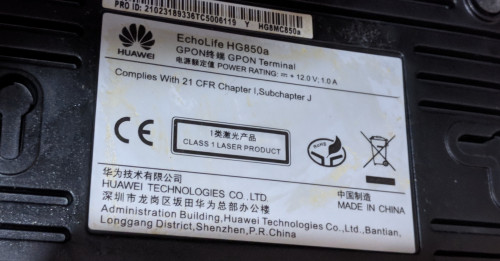
I think the culprit here is my btu... My btu model is HG850A. If compared to page 1's green section, my model is in 'others' categories so i presume btu is the culprit

So, if that is the problem, how to change btu? Just call unifi & ask for replacement?

(Btw, my area is near zoo negara & giant ulu klang)

user posted image
*
That was a old BTU it doesn't support gigabit Ethernet, your BTU need to be replaced.

I thought Unifi users with unsupported BTU will be turbo-ed around 2019 instead? lol
Doraku
post Nov 22 2018, 03:40 AM

Old threads digger
******
Senior Member
1,155 posts

Joined: Apr 2016


QUOTE(zragon @ Nov 22 2018, 03:36 AM)
Haha devil luck i guess... Btw, how 'new' btu looks like? How to ask for replacement? Free of charge?
*
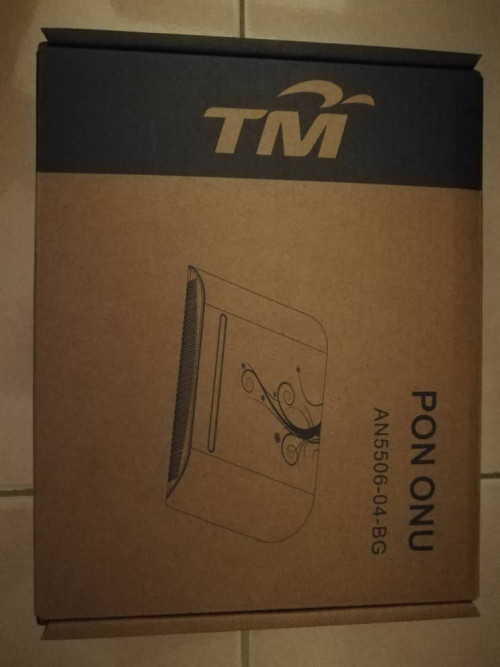
The newest one is Nokia BTU, but TM might replace with other brand like huawei or fiberhome user posted image

QUOTE
How to ask for replacement?

I dont know but you can live chat with TM or call TM
QUOTE
Free of charge?

Probably? since BTU has lifetime warranty

This post has been edited by Doraku: Nov 22 2018, 03:41 AM
Doraku
post Nov 22 2018, 03:44 AM

Old threads digger
******
Senior Member
1,155 posts

Joined: Apr 2016


QUOTE(redforest @ Nov 22 2018, 03:39 AM)
most likely you will need to renew your contract to get new equipments.
*
I dont think he need to renew contract because its TM equipment fault plus BTU have lifetime warranty hmm.gif

This post has been edited by Doraku: Nov 22 2018, 03:45 AM
Doraku
post Nov 22 2018, 03:53 AM

Old threads digger
******
Senior Member
1,155 posts

Joined: Apr 2016


QUOTE(redforest @ Nov 22 2018, 03:49 AM)
I'm not so sure. I asked about equipment replacements before I downgraded my plan, I was told that my equipments are out of warranty, I will only get new equipments by renewing my contract  dry.gif
*
About TM Equipment fault what i mean is BTU not router BTW
Doraku
post Nov 22 2018, 06:10 PM

Old threads digger
******
Senior Member
1,155 posts

Joined: Apr 2016


QUOTE(cskean @ Nov 22 2018, 05:49 PM)
Crimping is refer to the LAN cable connector reconnecting right? I'm not sure about that, as I went to computer shop and ask them to do for me. I triple confirm with them those connector are standard across CAT 5E, CAT 6... And they say yes...

I came home and test those cables, am able to connect to internet. Just that the speed test result is slower as compare to before.

The speed test I mentioned previously, is based on LAN connection. I know the C1200 isn't capable of 800MB wifi, but for LAN connection, I think should be able right? Since it is a gigabit port...

I'm now setting up my GT-AC5300, hopefully will have a flying result...
*
try test speed via LAN between two pc using iperf instead on speedtest.net
Doraku
post Nov 22 2018, 06:33 PM

Old threads digger
******
Senior Member
1,155 posts

Joined: Apr 2016


QUOTE(dagg3r @ Nov 22 2018, 06:18 PM)
Anyone got link where I can buy 30M network cable? Need to run the cables close to the wall and corners from downstairs living room to upstairs living room. UGreen I can only see 20M. Thanks!

ordered an AC-88U pray is all well in transit.
*
This? RM70 for 30meter prolink CAT6 https://shopee.com.my/PROLiNK-CAT6-Network-...8884.1197511833

This post has been edited by Doraku: Nov 22 2018, 06:34 PM
Doraku
post Nov 22 2018, 06:35 PM

Old threads digger
******
Senior Member
1,155 posts

Joined: Apr 2016


QUOTE(SilentVampire @ Nov 22 2018, 06:34 PM)
Dintek is reliable. But, get Ugreen to test your connection and see if it makes a difference
Does it need to be Ugreen? Look for other options.
*
Maybe he really need flat ethernet cable?
Doraku
post Nov 23 2018, 02:15 AM

Old threads digger
******
Senior Member
1,155 posts

Joined: Apr 2016


QUOTE(cskean @ Nov 22 2018, 07:17 PM)
Oh, don't get me wrong. Whether is flat or rounded LAN cable, doesn't make any difference to me. My concern is the quality, reliability and performance that the cable is capable of...

So for Cat 6 and Cat 7 cable, is there huge increment in term of speed?

Just feel strange that the Dintek perform differently after being shorten into 1m length cable... Kinda felt wasted RM 6 for each 1m cable...
*
Probably there is not much difference in terms of speed between cat6 and cat 7 unless you are using it for 10 Gigabit Ethernet.
Doraku
post Nov 23 2018, 08:41 AM

Old threads digger
******
Senior Member
1,155 posts

Joined: Apr 2016


QUOTE(h03tn4d @ Nov 23 2018, 08:32 AM)
TM came to my house and replaced my BTU.. to this below... how fast can this support?

user posted image

How you guys get new modems replaces but I’m like still getting the fiberhome models :/
*
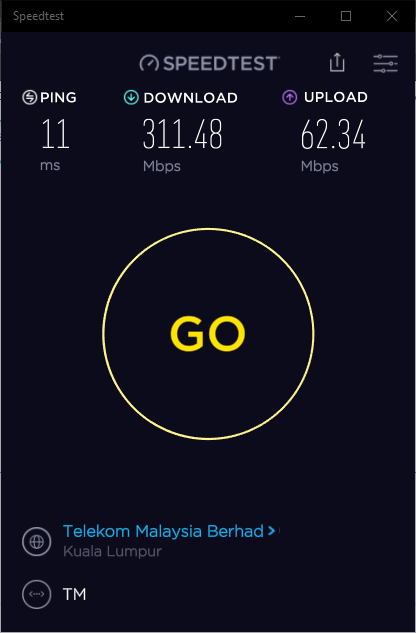
I have this BTU it does support gigabit ethernet
My speed Unifi Turbo 300Mbps
user posted image

This post has been edited by Doraku: Nov 23 2018, 08:42 AM
Doraku
post Nov 23 2018, 12:12 PM

Old threads digger
******
Senior Member
1,155 posts

Joined: Apr 2016


QUOTE(h03tn4d @ Nov 23 2018, 12:05 PM)
Noted doraku. What’s your router and cable you’re using?
*
Router : TP-Link Archer C1200
Ethernet Cable : Prolink CAT6 20Meter
Doraku
post Nov 25 2018, 03:59 AM

Old threads digger
******
Senior Member
1,155 posts

Joined: Apr 2016


QUOTE(vivixeon @ Nov 25 2018, 02:43 AM)
hi guys.. need some help.. i've been upgraded to unifi 500 recently.. changed my router to TP link archer C9.. but still using huawei echolife hg850a modem.. done a speedtest using wifi 2.4/5ghz and LAN cable.. max speed that i could get is only 100Mbps.. how can i get full potential of 500Mbps
*
Your BTU need to be replace as it does not support Gigabit Ethernet/
Doraku
post Nov 25 2018, 08:35 AM

Old threads digger
******
Senior Member
1,155 posts

Joined: Apr 2016


QUOTE(moiskyrie @ Nov 25 2018, 08:21 AM)
this morning try download something, notice the speed become almost 300 mbps...
does this mean already tubo?
check at speedtest reach around 200 while tm speedtest rech 270...
upload still just 50 ni...
*
Yea look like you has been turbo-ed congrats
Doraku
post Nov 25 2018, 09:09 AM

Old threads digger
******
Senior Member
1,155 posts

Joined: Apr 2016


QUOTE(dino89 @ Nov 25 2018, 08:58 AM)
Will this affect my wifi speed? My Router is connected to BTU Lan 1 port, cable is Cat5e so my wifi itself should be able to reach 500mbps right? Regardless of my motherboard specs
*
Do you use cable that come with your TP-Link C2300?, what is your wifi Adapter model?, do you connect wifi adapter on USB 2.0?

This post has been edited by Doraku: Nov 25 2018, 09:15 AM
Doraku
post Nov 26 2018, 11:49 AM

Old threads digger
******
Senior Member
1,155 posts

Joined: Apr 2016


QUOTE(chickenluck @ Nov 26 2018, 11:44 AM)
Hello Sifu sifu sekalian,

First and foremost, disclaimer that considered a noob when it comes to Internet. I am on the 500mbps plan and I am running an Asus RT-AC87u (router gifted to me hence I'm not too versed in the router itself). All cables are CAT 5e/6. The speeds on WIFI I'm getting is approx:

30-40mbps on 2.4ghz
80-90mbps on 5ghz.

Speed is extremely slow as I did some googling and noticed my router is capable for faster speeds.

I've tried re-configuring the Router from factory defaults as well but speeds are still the same. I have not tried the LAN as my desktop is in my room upstairs.

Other than that, I'm not sure what or why it's like this. Just went through this topic today and I might go home and try changing my router/modem cable with a fresh one.

Tried TM Live Chat and they just asked me to follow steps within provided in the Email they sent: turn off modem 10 mins..etc.
Am I missing out on any settings needed to be configured?

Hope I can find some answers here. smile.gif
*
Please read 1st page green text bruce.gif bruce.gif bruce.gif

7 Pages < 1 2 3 4 5 > » Top
Topic ClosedOptions
 

Change to:
| Lo-Fi Version
0.1856sec    0.54    7 queries    GZIP Disabled
Time is now: 5th December 2025 - 08:30 PM