Outline ·
[ Standard ] ·
Linear+
TIME [OFFICIAL] TIME Fibre Broadband™ v4, Experience the ONE TRUE 2Gbps
|
shinrei
|
 Jun 28 2021, 11:19 AM Jun 28 2021, 11:19 AM
|
Getting Started


|
QUOTE(tcwan @ Jun 28 2021, 11:18 AM) I have the separate modem / router and I'm using my own router. I guess the advantage of separate modem is that the one I have has the VoIP jack so you can still keep the VoIP service. I don't know anything about the 2 in 1. wow! thanks for the reply! noted and will do as advice   |
|
|
|
|
|
jjj2
|
Jun 28 2021, 01:57 PM
|
|
|
QUOTE(das99990428 @ Jun 26 2021, 01:17 PM) I am using the TP-Link EC230. For my second router in my bedroom, it is D-Link DVG-N5412SP N300 as a network bridge. Thank you for your input, really appreciate it. Any suggestion on a mesh model that pair up with TP-LINK EC230 (stock TIME router)? Hi, I'm sorry you cant use TIME EC230 to achieve the bandwidth shaping, suggest you to go for some more advanced routers, eg. Asus. For pairing, you may use another unit of TP-link EC230 to mesh it up. Better alternative, get yourself some WiFi6 Mesh Nodes. Thanks. |
|
|
|
|
|
jjj2
|
Jun 28 2021, 02:08 PM
|
|
|
QUOTE(shinrei @ Jun 28 2021, 11:10 AM) Guys, Just sub to time and wondering is it easier to bridge the 2 in 1 (modem+router) or ask straight separate modem+router before installation? I'm subbing the 500Mbps. My new router is GX90. Having the 2 in 1 modem+router feel can provide more flexibility. Any thoughts? Hi, the type of ONU/ONT provided will be pre-determined by TIME in their system. If you wish to have your own router, do remember to request SI to set it to Bridge Mode for you during Installation. I'd say both type of design (either 2-in-1 or separate) have their advantages depending on your in-house network design. Thanks. |
|
|
|
|
|
shinrei
|
Jun 28 2021, 03:21 PM
|
Getting Started
|
QUOTE(jjj2 @ Jun 28 2021, 02:08 PM) Hi, the type of ONU/ONT provided will be pre-determined by TIME in their system. If you wish to have your own router, do remember to request SI to set it to Bridge Mode for you during Installation. I'd say both type of design (either 2-in-1 or separate) have their advantages depending on your in-house network design. Thanks. Thanks! Just call then to request a separate modem and router. If they don’t remember then will set bridge mode during installation no pro. Thanks for your reply! 👍🏻 |
|
|
|
|
|
jjj2
|
Jun 28 2021, 05:57 PM
|
|
|
QUOTE(shinrei @ Jun 28 2021, 03:21 PM) Thanks! Just call then to request a separate modem and router. If they don’t remember then will set bridge mode during installation no pro. Thanks for your reply! 👍🏻 Welcome  |
|
|
|
|
|
Heater8811
|
Jun 29 2021, 12:43 PM
|
New Member
|
Hi fellow TIME subs, need some clarification here. Been using TIME for more than a year, but yesterday hand itchy go and test the speed. I had 500Mbps subscription, but test from speedtest game me 235Mbps, fast.com gave me 180Mbps and TIME own speed test game me 215Mbps. Is this normal? edit: test using ori LAN cable straight to me desktop, not wifi. 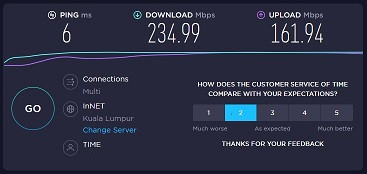 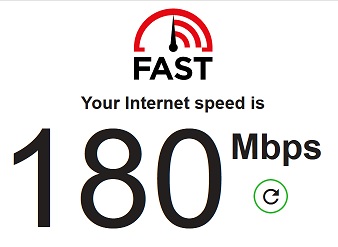 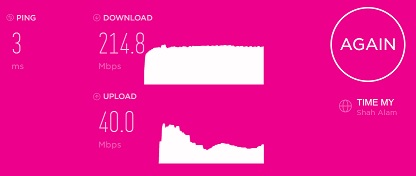 This post has been edited by Heater8811: Jun 29 2021, 12:44 PM This post has been edited by Heater8811: Jun 29 2021, 12:44 PM |
|
|
|
|
|
wyh
|
Jun 29 2021, 01:31 PM
|
|
|
FMCO still can install Time ?
|
|
|
|
|
|
kmrdeva
|
Jun 29 2021, 01:43 PM
|
|
|
QUOTE(Heater8811 @ Jun 29 2021, 12:43 PM) Hi fellow TIME subs, need some clarification here. Been using TIME for more than a year, but yesterday hand itchy go and test the speed. I had 500Mbps subscription, but test from speedtest game me 235Mbps, fast.com gave me 180Mbps and TIME own speed test game me 215Mbps. Is this normal? edit: test using ori LAN cable straight to me desktop, not wifi. Tried rebooting your modem, router and computer? 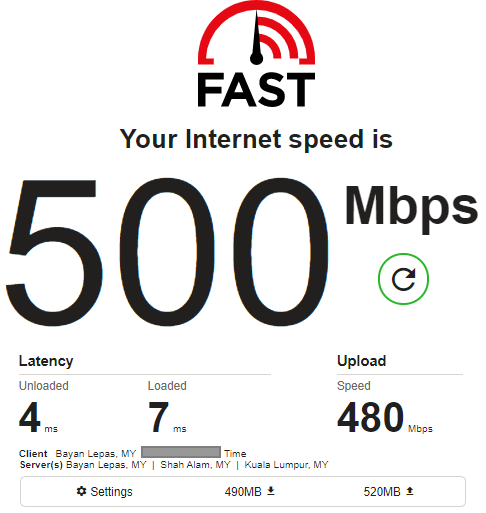 This post has been edited by kmrdeva: Jun 29 2021, 01:46 PM This post has been edited by kmrdeva: Jun 29 2021, 01:46 PM |
|
|
|
|
|
jjj2
|
Jun 29 2021, 02:23 PM
|
|
|
QUOTE(wyh @ Jun 29 2021, 01:31 PM) FMCO still can install Time ? Can, but it will also depend on your property management office. Some don't allow. |
|
|
|
|
|
Heater8811
|
Jun 29 2021, 04:09 PM
|
New Member
|
QUOTE(kmrdeva @ Jun 29 2021, 01:43 PM) Tried rebooting your modem, router and computer? » Click to show Spoiler - click again to hide... « I did reset and restart everything, still the same result. But the speed was normal when download file from google drive tho.  Don't know what gives, and not sure if any of it is a correct speed. But already contacted tech support, will check again on my side with their laptop soon. |
|
|
|
|
|
kmrdeva
|
Jun 29 2021, 04:15 PM
|
|
|
QUOTE(Heater8811 @ Jun 29 2021, 04:09 PM) I did reset and restart everything, still the same result. But the speed was normal when download file from google drive tho. Don't know what gives, and not sure if any of it is a correct speed. But already contacted tech support, will check again on my side with their laptop soon. Do let us know how it goes. Thanks. |
|
|
|
|
|
shinrei
|
Jun 30 2021, 07:52 AM
|
Getting Started
|
QUOTE(wyh @ Jun 29 2021, 01:31 PM) FMCO still can install Time ? My appointment is next Monday for installation. I think so 😅😅😅 |
|
|
|
|
|
Heater8811
|
Jun 30 2021, 10:30 AM
|
New Member
|
QUOTE(kmrdeva @ Jun 29 2021, 04:15 PM) Do let us know how it goes. Thanks. I test again with different browser (Edge), previously was using FF. And the result is better than my subscribed speed. Which is good. Not sure why FF gave lower speed tho. 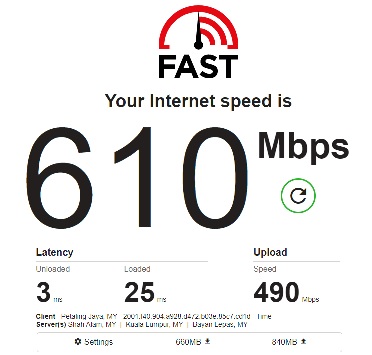 |
|
|
|
|
|
kmrdeva
|
Jun 30 2021, 10:51 AM
|
|
|
QUOTE(Heater8811 @ Jun 30 2021, 10:30 AM) I test again with different browser (Edge), previously was using FF. And the result is better than my subscribed speed. Which is good. Not sure why FF gave lower speed tho. Strange. I get about the same Fast.com speeds on both browsers. FF (v90) = 560 down, 520 up Edge (v91) = 540 down, 490 up Don't use Chrome though. Anyway, when I tested both my browsers with http://speed-battle.com/speedtest_e.php, I got way higher numbers on Edge.   |
|
|
|
|
|
Heater8811
|
Jun 30 2021, 11:06 AM
|
New Member
|
QUOTE(kmrdeva @ Jun 30 2021, 10:51 AM) Strange. I get about the same Fast.com speeds on both browsers. FF (v90) = 560 down, 520 up Edge (v91) = 540 down, 490 up Don't use Chrome though. Anyway, when I tested both my browsers with http://speed-battle.com/speedtest_e.php, I got way higher numbers on Edge. I have about the same score as yours for Speed Battle. Just speed testing with FF yield a much lower result. But I can safely assume that the overall speed aren't affected. So for those get low result when doing speed test, could try different browser and see if there's any different.   |
|
|
|
|
|
jjj2
|
Jun 30 2021, 11:30 AM
|
|
|
QUOTE(Heater8811 @ Jun 30 2021, 10:30 AM) I test again with different browser (Edge), previously was using FF. And the result is better than my subscribed speed. Which is good. Not sure why FF gave lower speed tho. Hi, do try a few browsers & take a average. Another thing to avoid is make sure heavy services that consume much resources & also Internet Security/certain Antivirus tools do not run at background while doing speed test. Thanks. |
|
|
|
|
|
Wonka
|
Jun 30 2021, 01:43 PM
|
|
|
I am always getting this intermittent dc tho. Is it cause of the instability of TIME or just my router thats giving the problem? Not sure how to troubleshoot. 
|
|
|
|
|
|
Heater8811
|
Jun 30 2021, 02:10 PM
|
New Member
|
QUOTE(jjj2 @ Jun 30 2021, 11:30 AM) Hi, do try a few browsers & take a average. Another thing to avoid is make sure heavy services that consume much resources & also Internet Security/certain Antivirus tools do not run at background while doing speed test. Thanks. yeah.. Edge and Chrome gave me expected result or better, only FF gave me poor speed test. |
|
|
|
|
|
Seng89
|
Jun 30 2021, 02:12 PM
|
|
|
QUOTE(Wonka @ Jun 30 2021, 01:43 PM) I am always getting this intermittent dc tho. Is it cause of the instability of TIME or just my router thats giving the problem? Not sure how to troubleshoot.
Can see which router? |
|
|
|
|
|
Wonka
|
Jun 30 2021, 02:18 PM
|
|
|
QUOTE(Seng89 @ Jun 30 2021, 02:12 PM) Mine is the Huawei HG8145V5 |
|
|
|
|



 Quote
Quote




 0.0332sec
 0.85
0.85
 6 queries
 GZIP Disabled