

QUOTE(abukaka @ Jun 10 2021, 09:19 PM)
Same location here, very unstable connection

Ah.. No wonder.. Haiz.. Very frustrating..TIME [OFFICIAL] TIME Fibre Broadband™ v4, Experience the ONE TRUE 2Gbps
|
|
 Jun 10 2021, 09:21 PM Jun 10 2021, 09:21 PM
|
 
Junior Member
59 posts Joined: Nov 2011 
|
QUOTE(abukaka @ Jun 10 2021, 09:19 PM) Same location here, very unstable connection Ah.. No wonder.. Haiz.. Very frustrating.. |
|
|
|
|
|
Jun 10 2021, 09:29 PM
|
|
Junior Member
59 posts Joined: Nov 2011
|
QUOTE(abukaka @ Jun 10 2021, 09:19 PM) Same location here, very unstable connection Hi,Any luck on contacting the CS? I’m been trying to call them since 8.30pm.. No luck.. |
|
|
Jun 10 2021, 11:03 PM
|

Senior Member
964 posts Joined: Sep 2010 
|
QUOTE(kogul92 @ Jun 10 2021, 09:13 PM) Hi, you're not aloneDoes anyone face high ping? And my down speed are +-10mbps only. My UP speed as normal.. reach 100mbps. Location at Puchong Jaya. Anyone experiencing same? Thanks. Bukit Jalil |
|
|
Jun 10 2021, 11:57 PM
Show posts by this member only | IPv6 | Post
#7444
|

Junior Member
495 posts Joined: Nov 2007 From: Sarawak (Now in PJ)
|
QUOTE(jjj2 @ Jun 10 2021, 04:52 PM) Hi, try relocate the ONT to the spot marked with star. No power socket at that area and the power cable come with the modem very short too.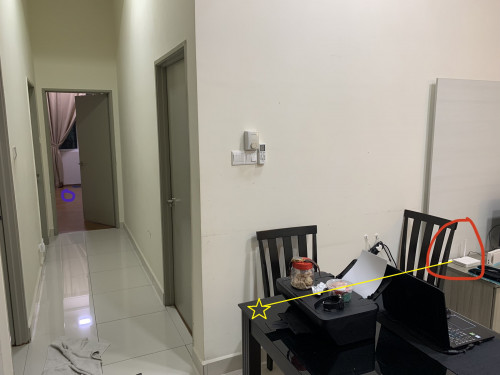 Thanks. Anyway thank you very much, From the solution that you showed me. seems like the problem maybe the modem just can't penetrate that amount of wall. This post has been edited by Zelmel: Jun 10 2021, 11:58 PM |
|
|
Jun 11 2021, 12:04 AM
|

Senior Member
3,612 posts Joined: Feb 2006
|
QUOTE(fouzhi @ Jun 10 2021, 07:46 PM) Yeah, why not? After replaced, I can save up 1 power point to power separate wifi router and I can request for free OmniMesh to widen my wifi coverage since the new Huawei HG8145 is 2 in 1 modem+Wifi and Mesh router It really depends on individual preference & your house unit size, and of course your expectation on the performance. |
|
|
Jun 11 2021, 12:05 AM
|
|
Senior Member
3,612 posts Joined: Feb 2006
|
QUOTE(Zelmel @ Jun 10 2021, 11:57 PM) No power socket at that area and the power cable come with the modem very short too. Hi, the L-shape is a 'deadly' to the wifi signal ...lolxAnyway thank you very much, From the solution that you showed me. seems like the problem maybe the modem just can't penetrate that amount of wall. |
|
|
|
|
|
Jun 11 2021, 12:10 AM
Show posts by this member only | IPv6 | Post
#7447
|
|
Junior Member
495 posts Joined: Nov 2007 From: Sarawak (Now in PJ)
|
QUOTE(jjj2 @ Jun 11 2021, 12:05 AM) Hi, the L-shape is a 'deadly' to the wifi signal ...lolx i see i tot the newer modem/technology will have better wall penetration.What if i add a wifi repeater in between at the "corridor/walkway" Or add a mesh better there? |
|
|
Jun 11 2021, 12:19 AM
|
|
Senior Member
3,612 posts Joined: Feb 2006
|
QUOTE(Zelmel @ Jun 11 2021, 12:10 AM) i see i tot the newer modem/technology will have better wall penetration. Not really needed, if you can move the ONT to the spot I indicated & don't stick to the wall, you will notice the signal improve significantly.What if i add a wifi repeater in between at the "corridor/walkway" Or add a mesh better there? Zelmel liked this post
|
|
|
Jun 11 2021, 09:35 AM
|
|
Junior Member
460 posts Joined: Jun 2008
|
QUOTE(Ilomilo @ Jun 7 2021, 09:09 PM) Anyone know if Internet installation is allowed in condos during FMCO? fiber internet is essential to wfh nowManagement giving me trouble saying that SOP don't allow new installation, only allow fixing during FMCO. However I've looked through Strata management SOP and although it expressly allows fixing of electrical and plumbing during FMCO, but nothing mention on new installation, only cannot do renovation and moving house. Anyone got any news/articles clarifying this ah? Difficult wfh with my shitty mobile data only. your management should allow it try find kpkt guideline to nego with management |
|
|
Jun 11 2021, 01:02 PM
Show posts by this member only | IPv6 | Post
#7450
|

Senior Member
1,054 posts Joined: Jan 2003
|
QUOTE It seems like TIME is throttling the connection speed and I observe packet dropping. Anyone discover this problem?? TIME connection is back to normal This post has been edited by Dothan: Jun 11 2021, 01:48 PM |
|
|
Jun 11 2021, 01:06 PM
|
|
Newbie
8 posts Joined: Jun 2017
|
-Solved-
This post has been edited by textr: Jun 11 2021, 01:22 PM |
|
|
Jun 11 2021, 08:35 PM
Show posts by this member only | IPv6 | Post
#7452
|

Junior Member
433 posts Joined: Nov 2008 From: Kay Bee~Kay Eyy
|
hi guys, i just got my 500 package. somehow i cant get 500 speed even tho im using killer wifi.., max is about 300 only. theres no problem using lan, can reach 500 up n down no problem
|
|
|
Jun 12 2021, 08:06 PM
|

Junior Member
214 posts Joined: Dec 2007 From: Creams
|
QUOTE(dun_panic @ Jun 11 2021, 08:35 PM) hi guys, i just got my 500 package. somehow i cant get 500 speed even tho im using killer wifi.., max is about 300 only. theres no problem using lan, can reach 500 up n down no problem Your router model? |
|
|
|
|
|
Jun 13 2021, 10:32 AM
|

Junior Member
68 posts Joined: Oct 2009
|
Can TIME perform the installation while my TM service still active?
|
|
|
Jun 13 2021, 10:38 AM
Show posts by this member only | IPv6 | Post
#7455
|

Senior Member
3,836 posts Joined: Aug 2016
|
QUOTE(Vinzcent @ Jun 13 2021, 10:32 AM) Can TIME perform the installation while my TM service still active? Yes, you can as TIME FIBRE doesn't use TM Backbone.Thanks |
|
|
Jun 13 2021, 10:23 PM
Show posts by this member only | IPv6 | Post
#7456
|
|
Junior Member
433 posts Joined: Nov 2008 From: Kay Bee~Kay Eyy
|
QUOTE(nicholasmark @ Jun 12 2021, 08:06 PM) Your router model? huawei hg8145v5 |
|
|
Jun 14 2021, 12:43 PM
|

Senior Member
574 posts Joined: Jun 2010
|
Hi guys, asking for advise here.
On a Time 500mbps plan currently and running it with the provided stock router. In a space of about 2,300 sqft, would it be better to upgrade the router or keep the stock router and get mesh wifi? Budget of around RM500 |
|
|
Jun 14 2021, 01:54 PM
|

Senior Member
1,484 posts Joined: Aug 2005 From: Kuala Lumpur
|
Hi guys, i upgraded from 500mbps to 1gb. Currently am using Deco M5. Should i use the free router for 1gb plan or to get Deco M9 instead?
|
|
|
Jun 15 2021, 05:06 PM
|
|
Junior Member
69 posts Joined: Sep 2007
|
Does anyone have problem with the Huawei Modem router? Sometimes it drops the connectivity to internet for some of my devices although still connected to WiFi. Other devices will can connect to internet. Weirdly ping to DNS IP works but not DNS host name. It's like it can't perform DNS lookup.
|
|
|
Jun 15 2021, 09:11 PM
Show posts by this member only | IPv6 | Post
#7460
|
|
Senior Member
3,612 posts Joined: Feb 2006
|
QUOTE(Eisenmeteor @ Jun 14 2021, 01:54 PM) Hi guys, i upgraded from 500mbps to 1gb. Currently am using Deco M5. Should i use the free router for 1gb plan or to get Deco M9 instead? Get a good & decent WiFi6 router or mesh nodes, you wont regret. |
| Change to: |  0.0310sec 0.0310sec
 0.38 0.38
 6 queries 6 queries
 GZIP Disabled GZIP Disabled
Time is now: 22nd December 2025 - 01:51 AM |
 Quote
Quote