Welcome Guest ( Log In | Register )

100 Pages « < 34 35 36 37 38 > » Bottom

Outline · [ Standard ] · Linear+

TIME [OFFICIAL] TIME Fibre Broadband™ v4, Experience the ONE TRUE 2Gbps

views
     
jjj2
post Feb 6 2020, 05:07 PM

Look at all my stars!!
*******
Senior Member
3,612 posts

Joined: Feb 2006
QUOTE(pizzaboyj @ Feb 6 2020, 03:42 PM)
hi folks

So I have been having really inconsistent download speeds the last couple of weeks. Decided to log a ticket with TIME support. SI came, inspected the ONU, from wall patch port reading I "think" it was -5x (I could be wrong here) but from the Huawei ONU was -29 ish.

Fibre out from your FWS could not be -5x & yet from the ONU showing -29 dBm. Please kindly confirm this, check the proper reading from the FWS.


On a 1Gbps plan I was getting inconsistent D/U speeds ranging from 400-600 Down.
Please confirm the actual fibre reading first & then retest again using a Cat6/Cat5e cable to your laptop/computer.


The SI first said it was due to the fibre cable being used "Blue Vs Green" and that "Green was better", also tried to charge me RM30 for it.

Got him to show me if it worked, nope, reading went to -25, U/D speeds remained the same inconsistent as ever.
It's a bit long & technical to explain here, but if you would like to know more, you can contact me via 0124299200.

Then he said its probably the riser to the home cable issue, asked me to file report to my building management as that is outside his scope.

Now I am skeptical throughout this entire process. So would like to know what are the RX readings should I be looking out for and would changing the fibre cable from "Blue" to "Green" (asssuming APC vs UPC) make any difference? Did some light reading but I am by no means an expert at this.

For your 1Gbps line, if possible, it's good to maintain your fibre reading not more than -18dBm.


*
jjj2
post Feb 10 2020, 03:31 PM

Look at all my stars!!
*******
Senior Member
3,612 posts

Joined: Feb 2006
QUOTE(HolyCooler @ Feb 10 2020, 02:14 PM)
Hi,

Sorry for the late reply. I am using the original TIME router. Nope, can't see the "TIME Blazing Speed xxxx".

This Friday i will be free, so i will try to contact the technician to come to my house to fix it. Thanks.
*
OK, try to lodge a report first, if you need any further info, feel free to buzz me.

Thanks.
jjj2
post Feb 10 2020, 03:33 PM

Look at all my stars!!
*******
Senior Member
3,612 posts

Joined: Feb 2006
QUOTE(Ghostblind @ Feb 10 2020, 08:23 AM)
may i know since when TIME block subscene website ?
then i try other torrent websites, all block

"This site can’t be reached"
*
Not actual block, just change your DNS. Thanks.
jjj2
post Feb 11 2020, 12:54 AM

Look at all my stars!!
*******
Senior Member
3,612 posts

Joined: Feb 2006
QUOTE(HolyCooler @ Feb 11 2020, 12:38 AM)
Hi bro, now i checked again and saw the "TIME Blazing Speed xxxx", may i know what i can do to solve it myself?

I tried to login with my previous password but failed tho.
*
If you are using TP-Link Archer C1200,
You can login to your Router using the default 192.168.0.1 , User: admin, Paswd: TIMExxxx , turn to the back of the router to get this.

After login, click on Wireless on the left, and reconfigure your Wireless SSID & Key, Click Save (click 2-3 times).

Thanks.
jjj2
post Feb 12 2020, 12:09 AM

Look at all my stars!!
*******
Senior Member
3,612 posts

Joined: Feb 2006
QUOTE(qwertyuioped @ Feb 11 2020, 11:05 PM)
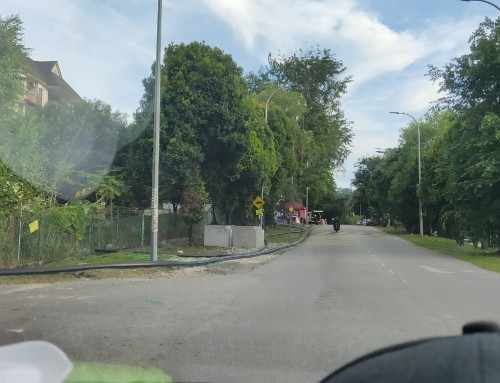
user posted image

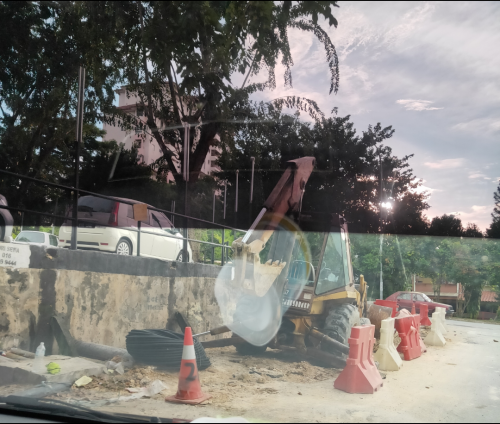
user posted image

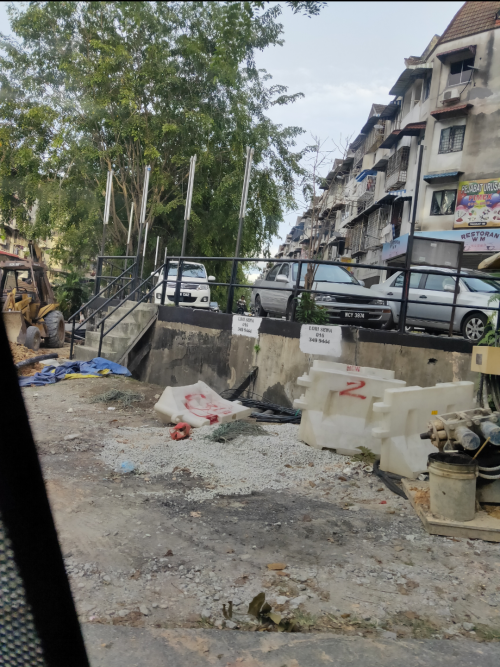
user posted image

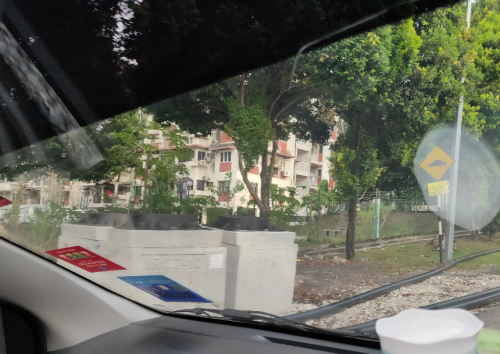
user posted image

Saw contractors doing some digging and installing manhole infront my apartment. On the manhole cover written Time logo there. Is my apartment getting Time? Or they just passing thru there? Can anyone here check if my apartment is in the coverage pipeline?
*
Which apartment ?
jjj2
post Feb 12 2020, 09:17 PM

Look at all my stars!!
*******
Senior Member
3,612 posts

Joined: Feb 2006
QUOTE(kllonely1 @ Feb 12 2020, 08:36 PM)
can apply for landed property?
*
Can, but still limited coverage...
jjj2
post Feb 13 2020, 01:10 AM

Look at all my stars!!
*******
Senior Member
3,612 posts

Joined: Feb 2006
QUOTE(fox_shinoda @ Feb 12 2020, 05:34 PM)
I just realized after changing from Maxis Fiber to Time, I can't connect my office VPN anymore. My office is using Time 100mbps leased line.

The weird thing is if I use my mifi device which is on Digi network, I can connect to the VPN no problem.

Am I missing something here?
*
One thing you could try is to bypassing your router, use your PC to direct dial PPPOE, and give it a try.

Thanks.


jjj2
post Feb 15 2020, 04:59 PM

Look at all my stars!!
*******
Senior Member
3,612 posts

Joined: Feb 2006
QUOTE(cba5566 @ Feb 15 2020, 09:03 AM)
Time fiber cover for landed house ?
*
Yes but kinda limited yet.
jjj2
post Feb 16 2020, 03:51 PM

Look at all my stars!!
*******
Senior Member
3,612 posts

Joined: Feb 2006
QUOTE(Ashhh @ Feb 16 2020, 05:40 AM)
Hi TiME Fibre agents.

I'm moving into Lake Point Residence @ Cyberjaya. Can I know the availability of TiME over there? I heard only UNiFi is available at the moment.
*
Yes, TIME is yet available there.
jjj2
post Feb 16 2020, 03:58 PM

Look at all my stars!!
*******
Senior Member
3,612 posts

Joined: Feb 2006
QUOTE(artcreator @ Feb 16 2020, 11:33 AM)
Hi all, my UNIFI contract is ending soon and would like to switch to TIME. However, their website is abit confusing thou. May I know what is the router are they going to provide for the current ongoing promotion? As it seems like there’s a few options to opt for.
*
Hi, we are TIME Authorised Distri, SI & Proj Partner.
We could assist you in Registration, Installation Arrangement / Installation (if you are staying in buildings that we are installaing), future support & all TIME related matters.

The current stock router given as followings :

1) 100/500Mbps -- TP-Link EC230
2) 1Gbps -- Dlink DIR882

Options to Upgrade upon SignUp :

1) Add RM350 to upgrade to Dlink DIR882
2) Add RM699 to upgrade to Asus AC86U
3) Add RM1809 to upgrade to Asus GT-AX11000
4) Add RM649 to upgrde to Linksys Velop (1 Node)
5) Add RM1199 to upgrade to Linksys Velop (2 Nodes)


Thanks.
jjj2
post Feb 19 2020, 03:36 PM

Look at all my stars!!
*******
Senior Member
3,612 posts

Joined: Feb 2006
QUOTE(kskoay @ Feb 17 2020, 07:25 AM)
Hi bro, actually these routers (upgrade package) running with TIME customize firmware or no different compare to those selling outside? thank you.
*
Hi Bro,

I havent got chance to test it out as really rare to have customers upgraded at this monent.

Thanks.
jjj2
post Feb 19 2020, 04:19 PM

Look at all my stars!!
*******
Senior Member
3,612 posts

Joined: Feb 2006
QUOTE(HolyCooler @ Feb 18 2020, 03:29 PM)
Checked with Time support. They said i upgraded to higher package before i used the older package for at least 12 months, so they don't upgrade my router. Looks like they don't encourage people to upgrade unless you have used the current package for at least 12 months.
*
Yes you are right.
The free router option for any plan upgrade is only available to subscriptions of at least 12 months.
Thanks.
jjj2
post Feb 19 2020, 04:21 PM

Look at all my stars!!
*******
Senior Member
3,612 posts

Joined: Feb 2006
QUOTE(IntensiveBytes @ Feb 19 2020, 01:49 PM)
Hey guys. Just upgraded from my 500Mbps plan to 1Gbps. I have the default EC230 router.

What do you guys suggest:

1) I follow up with TIME to get a better router and go through having to wait for a technician

2) Buy my own router - and if so, which router would you recommend for 1Gbps? Small apartment.

3) Keep the EC230.
*
Hi, please also share your house unit size to cover & your budget.


jjj2
post Feb 19 2020, 10:42 PM

Look at all my stars!!
*******
Senior Member
3,612 posts

Joined: Feb 2006
QUOTE(WaCKy-Angel @ Feb 19 2020, 04:27 PM)
Just found out TIME website accepts Boost and Grabpay for payment.

But Grabpay does not have scan & pay. Is it possible to change it? because if Grabpay use scan & pay can use points to deduct right?
*
Hi, pay using Grabpay will auto deduct from your Grab ewallet balance.

Thanks.
jjj2
post Feb 19 2020, 10:45 PM

Look at all my stars!!
*******
Senior Member
3,612 posts

Joined: Feb 2006
QUOTE(HolyCooler @ Feb 19 2020, 05:22 PM)
Let's say if i get one of these routers, what is the procedure to install this router? (I am using router not provided by Unifi, but i have totally forgotten what i did to install the router). Do i need to call Time to inform them before doing the changing? Or inform them after i have done connecting cables/wires to the new router?
*
Hi, if you opt for this Router Upgrade during signup, then it will be instaled during the first Installation.

Thanks.
jjj2
post Feb 20 2020, 10:25 PM

Look at all my stars!!
*******
Senior Member
3,612 posts

Joined: Feb 2006
QUOTE(mawardi @ Feb 20 2020, 06:26 PM)
user posted image

Is this TIME Fibre being installed or someone just pranking the whole apartment?
*
Hi, this is TIME Fibre but not yet terminated.

Good luck & soon you will be on board with TIME.

Thanks.
jjj2
post Feb 20 2020, 10:28 PM

Look at all my stars!!
*******
Senior Member
3,612 posts

Joined: Feb 2006
QUOTE(xerofear @ Feb 20 2020, 05:44 PM)
Looking to apply Time Fibre for unit for Block-B Sfera Residences. Any feedback regarding availability and stability of it at this particular development?

Also, I have been told by the contact of my property agent that this particular development is under exclusive contract and no availability till 20 Mar.

However, playing around using the online application availability checker, it says available. Any sales partner/Time agent can help to verify?
*
Hi, yes verified your building is available for TIME. Do let us know anything you wish to proceed.

Thanks.


jjj2
post Feb 25 2020, 12:43 PM

Look at all my stars!!
*******
Senior Member
3,612 posts

Joined: Feb 2006
QUOTE(harmeet15 @ Feb 25 2020, 12:35 PM)
Hi Sifus,
I just recently installed time 500mb at my unit.
Im using Deco M9 as my router.
So far I can get close to 500 over ethernet.
For wifi im getting max 3xxmb.
Hi, on which node ? Main one or the 2nd or 3rd node ? How is yr 2nd or 3rd nodes connected ?
3xxMbps is pretty good...


Tested with my Macbook Pro 2016 and my iphone max.
Are these speeds limited by my hardware?

Also, can I place the supplied Huawei Optical modem in a closed environment like in a cabinet?
Will it cause any heating issues? Only the Modem, not the router.
A slight venti is more recommended & not in a total closed environment though we tested the heat dissipation not high.

» Click to show Spoiler - click again to hide... «


thank you for listening.  notworthy.gif
*
jjj2
post Feb 26 2020, 12:08 AM

Look at all my stars!!
*******
Senior Member
3,612 posts

Joined: Feb 2006
QUOTE(harmeet15 @ Feb 25 2020, 12:52 PM)
I tested with my Main node.
2nd node connected via wifi only. Not ethernet.
So wont be possible to reach 500 without cable?

Thanks for the input.
Will leave it out in the open then.
*
Hi, not possible to get up to full 500Mbps....the best we could get is approx. 3xx--4xxMbps by forcing to run on 5GHz band.


Thanks.
jjj2
post Feb 26 2020, 12:09 AM

Look at all my stars!!
*******
Senior Member
3,612 posts

Joined: Feb 2006
QUOTE(harmeet15 @ Feb 25 2020, 09:28 PM)
I'm planning to add a switch to my deco m9.
Any recommendations sifus?
*
Yes you can connect a Gigabit switch.

100 Pages « < 34 35 36 37 38 > » Top
 

Change to:
| Lo-Fi Version
0.0352sec    0.46    7 queries    GZIP Disabled
Time is now: 21st December 2025 - 08:08 AM