

Already moved to Apps-based for Rewards claiming.
Thanks.
TIME [OFFICIAL] TIME Fibre Broadband™ v4, Experience the ONE TRUE 2Gbps
TIME [OFFICIAL] TIME Fibre Broadband™ v4, Experience the ONE TRUE 2Gbps
|
|
 Jan 10 2020, 08:53 PM Jan 10 2020, 08:53 PM
Return to original view | IPv6 | Post
#681
|
 
Senior Member
3,612 posts Joined: Feb 2006 
|
Already moved to Apps-based for Rewards claiming.
Thanks. |
|
|
|
|
|
Jan 12 2020, 01:44 PM
Return to original view | IPv6 | Post
#682
|
|
Senior Member
3,612 posts Joined: Feb 2006
|
QUOTE(koayty @ Jan 12 2020, 02:11 AM) Anyone else having issue with EC230-G1 provided by TIME? This router frequently freezes and I need to restart it to get internet back. I'm not even downloading, just leaving games connected. I know it's frozen because I tried to connect to 192.168.0.1 when internet is down and it doesn't respond. Hi, try to check on your firmware version, and report to 1800 18 1818, if the version is outdated, SI will come over to update for you. if you have the PPPOE credentials, just perform a hard reset & configure back. P/s : We rarely faced this freezing issue. Thanks. |
|
|
Jan 12 2020, 01:53 PM
Return to original view | IPv6 | Post
#683
|
|
Senior Member
3,612 posts Joined: Feb 2006
|
QUOTE(voncrane @ Jan 11 2020, 07:50 AM) Just installed the app.. Logged in and can't see the section for rewards claiming.. Mind sharing where it is? Or does it only activate on the 15th? Hi, it will be activated on the 15th of the month.Thanks. |
|
|
Jan 13 2020, 01:54 PM
Return to original view | IPv6 | Post
#684
|
|
Senior Member
3,612 posts Joined: Feb 2006
|
QUOTE(kombeng7 @ Jan 13 2020, 04:19 AM) Can anyone advise if using auto debit, when is the exact date TIME is going to charge the credit card? Thank you. It will be charged based on your billing cycle. Do login to selfcare.time.com.my to check on your Billing Cycle.Thanks. |
|
|
Jan 13 2020, 01:55 PM
Return to original view | IPv6 | Post
#685
|
|
Senior Member
3,612 posts Joined: Feb 2006
|
QUOTE(koayty @ Jan 13 2020, 07:00 AM) My version is You will need to reconfigure the PPPOE settings & the rest would be simply your preferable WiFi settings.Firmware Version:v1.0_190710.12908 Hardware Version:EC230-G1 v1 00000000 Is this outdated? and if I hard reset, what configuration should I do, only PPPoE? Thanks. |
|
|
Jan 13 2020, 02:00 PM
Return to original view | IPv6 | Post
#686
|
|
Senior Member
3,612 posts Joined: Feb 2006
|
QUOTE(sheeva86 @ Jan 13 2020, 10:58 AM) Hi guys need a bit of feedback for those on TIME fiber. Is there torrent throttling and got block websites according to MCMC? Hi, no throttling but Fair Usage Policy does apply if you usage is deemed affecting other users performances. For sites blocking, dare not to say 100% No Blocking, but you can get around by switching DNS. Thanks. |
|
|
|
|
|
Jan 13 2020, 02:00 PM
Return to original view | IPv6 | Post
#687
|
|
Senior Member
3,612 posts Joined: Feb 2006
|
QUOTE(kombeng7 @ Jan 13 2020, 10:19 AM) AX11000. Already setup. Thanks. Welcome  |
|
|
Jan 14 2020, 07:10 PM
Return to original view | Post
#688
|
|
Senior Member
3,612 posts Joined: Feb 2006
|
QUOTE(kombeng7 @ Jan 13 2020, 03:26 PM) There's a bill date and due date. So which one of these? Bill Date. |
|
|
Jan 14 2020, 07:11 PM
Return to original view | Post
#689
|
|
Senior Member
3,612 posts Joined: Feb 2006
|
QUOTE(lopqtx @ Jan 14 2020, 03:14 PM) for condo, drilling process will make my house messy? Hi, nope it won't be messy if it's done in right manner.We have ways to prevent dust from flying all over. Thanks. |
|
|
Jan 15 2020, 10:44 AM
Return to original view | IPv6 | Post
#690
|
|
Senior Member
3,612 posts Joined: Feb 2006
|
QUOTE(weeuweed @ Jan 15 2020, 10:17 AM) I have been trying to get time installed at my condo for the past 2 months and initially they said the completion date for upgrading work was middle of Dec 2019. Subsequently they added another month to the completion date to push the date to Mid-January 2020 and it's not yet done. Hi,Is this a normal process for Time installation? Even TMnet didnt take this long from previous experience.  Yes this is common as upgrading involves many situations that would cause delays. Thanks. |
|
|
Jan 15 2020, 12:12 PM
Return to original view | IPv6 | Post
#691
|
|
Senior Member
3,612 posts Joined: Feb 2006
|
QUOTE(weeuweed @ Jan 15 2020, 11:29 AM) Ahh ok, thanks for the info Welcome... |
|
|
Jan 16 2020, 03:06 AM
Return to original view | IPv6 | Post
#692
|
|
Senior Member
3,612 posts Joined: Feb 2006
|
QUOTE(halfdevil @ Jan 15 2020, 03:33 PM) Hi, anyone can teach me or redirect me to the post that show how to upgrade the firmware for EC230-G1? I'm trying to search but not luck. Hi, please kindly contact 1800 18 1818 and TIME Certified Service Installer will attend to your case.Under my System Tool menu, there is no firmware upgrade option/menu. My TIME EC230-G1 router info:- Firmware Version:v1.0_190905.36575 Hardware Version:EC230-G1 v1 00000000 I'm trying to set DNS but having same issue as another forumer in here which it always point to TIME DNS We are not allowed to release the firmware upgrade to user to prevent accidental fault. Thanks. |
|
|
Jan 18 2020, 11:53 PM
Return to original view | IPv6 | Post
#693
|
|
Senior Member
3,612 posts Joined: Feb 2006
|
QUOTE(sai2 @ Jan 18 2020, 02:09 PM) 4 Mbps is the REAL SPEED you get Please kindly contact CS @ 1800 18 1818 or contact your sales person that assist you to register to resolve it.4 Mbps is the REAL SPEED you get 4 Mbps is the REAL SPEED you get 4 Mbps is the REAL SPEED you get  And please don't spam here, we all don't face such issue at all. |
|
|
|
|
|
Jan 20 2020, 11:15 AM
Return to original view | IPv6 | Post
#694
|
|
Senior Member
3,612 posts Joined: Feb 2006
|
QUOTE(unknown_2 @ Jan 20 2020, 12:48 AM) jjj2 Hi, please provide me your email, I will send you the settings.i'm also having issue with changing DNS. Router Model: TP Link C60 AC1350 Hardware Version: EC230-G1 v1 00000001 Firmware Version: v1.0_191028.27089 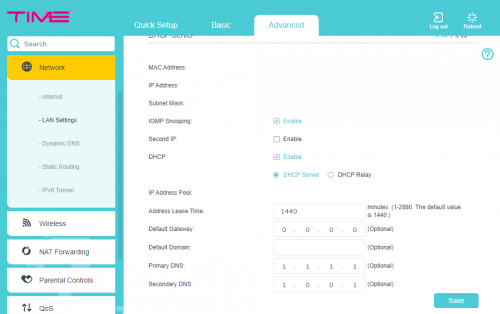 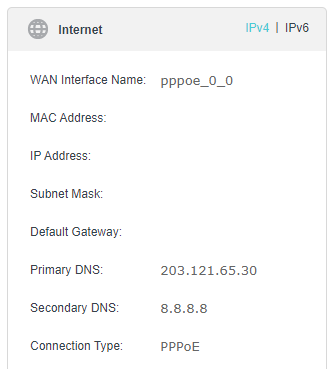 Already changed the DNS & reboot. However, it still point to TIME DNS & google as secondary. thoughts? Thanks. |
|
|
Jan 22 2020, 10:22 PM
Return to original view | IPv6 | Post
#695
|
|
Senior Member
3,612 posts Joined: Feb 2006
|
Yes, you got it
|
|
|
Jan 24 2020, 08:35 AM
Return to original view | IPv6 | Post
#696
|
|
Senior Member
3,612 posts Joined: Feb 2006
|
QUOTE(Wolffeh @ Jan 23 2020, 02:17 PM) How many meters of free cable are we entitled to for a new installation in a condo? Hi, For Standard Installation, 20meters of Free Optical Fiber cable will be provided. It starts counted from the Point-Of-Entry until your ONU (aka Fiber Modem). Addtional cable will be charged at RM10/m. All cables will be on surface, there will be extra charges if there is a need to run through the ceilng or any special request by owner. Thanks. |
|
|
Jan 25 2020, 08:43 PM
Return to original view | IPv6 | Post
#697
|
|
Senior Member
3,612 posts Joined: Feb 2006
|
Wishing all Forumers/Mods/Customers/Partners a properous Chinese New Year !
 |
|
|
Jan 31 2020, 10:51 AM
Return to original view | IPv6 | Post
#698
|
|
Senior Member
3,612 posts Joined: Feb 2006
|
QUOTE(Wolffeh @ Jan 31 2020, 12:20 AM) Point of entry meaning the fibre port that's pre-built into the wall yea? That sucks, think I got cheated by the contractors they said only 2m free. Point-Of-Entry only applies for NON-Prelaid building where we need to pull in optical fibre cable.For prelaid building (like your case) where Fibre Port is prebuilt on the wall, this 20-m rule does not apply anymore, instead a patch cord will be used to connnect from your Fibre Wall Socket to the ONU. Thanks. |
|
|
Jan 31 2020, 10:57 AM
Return to original view | IPv6 | Post
#699
|
|
Senior Member
3,612 posts Joined: Feb 2006
|
QUOTE(mrcloud9 @ Jan 31 2020, 08:54 AM) Hi, I’d like to choose phone number (like nice tender number) for the Home Fibre. I know TM allows this for their clients. Does Time allow this? Hi, phone number is assisgned randomly , unless under "special arrangement" under special occassion.Thanks. |
|
|
Jan 31 2020, 10:59 AM
Return to original view | IPv6 | Post
#700
|
|
Senior Member
3,612 posts Joined: Feb 2006
|
QUOTE(HolyCooler @ Jan 30 2020, 10:25 PM) I love TIME so far altho i had some issues here and there (not related to speed). Currently i have another issue, it is actually started since a few weeks ago, the WIFI is dead, it is not showing on the WIFI selection list. Hi, May I know which router are you using currently ?I didn't care about it since i applied TIME mainly using it for fighting games by connecting to LAN. But now i want to fix it, before i call TIME technician to come (which is troublesome since i need to take a day's leave), i would like to check if anyone had this issue before and if this issue can be fixed without TIME's technician? Thanks! Are you able to detect Wifi SSID by the name of "TIME Blazing Speed xxxx" ? Thanks. |
| Change to: |  0.0581sec 0.0581sec
 0.50 0.50
 7 queries 7 queries
 GZIP Disabled GZIP Disabled
Time is now: 21st December 2025 - 11:30 AM |
 Quote
Quote