Welcome Guest ( Log In | Register )

666 Pages « < 104 105 106 107 108 > » Bottom

Outline · [ Standard ] · Linear+

TIME [OFFICIAL] TIME Fibre Broadband™ v4, Experience the ONE TRUE 2Gbps

views
     
kmrdeva
post Dec 12 2018, 11:13 AM

Look at all my stars!!
*******
Senior Member
4,776 posts

Joined: Jan 2003
QUOTE(FusionXY @ Dec 11 2018, 05:58 PM)
Yes, I mean you. Been waiting for so long. I almost feel that you have forgotten.
Just arrived today only?
Do test it out ya.
*
Will need some days to monitor but straight off there are a few things I don't like about the TP-Link Deco M9 Plus:

1. No Web UI, everything is managed using Deco app on my phone. A bit too radical for me LOL.
2. Deco app has such a simple interface. Culture shock sikit after coming from AsusWRT-Merlin.
3. Can't customize the wifi config. No channel setting or ability to turn off 2.4Ghz.
4. Wifi coverage seems to be wider than my AC68U but speeds are not that impressive. More testing needed.
5. Had to setup the Deco as my main router because some of the Deco's features don't work in AP mode.

First few positive impressions:

1. Can finally retire my TP-Link AV1300 Powerline kit. Used to get below 200mbps on speedtest from my study room PC wired to the 2nd plug.
2. My study room PC connected by cable to the 2nd Deco unit is now getting 400mbps on speedtest.
3. No complaints from anyone at home so far.


eien no kataomoi
post Dec 12 2018, 11:56 AM

New Member
*
Newbie
23 posts

Joined: Sep 2010
QUOTE(FusionXY @ Dec 11 2018, 12:23 PM)
Try out the 3rd option and see.
Try switch on and off the Prefix Delegation.
Make sure to click save before restarting.

If still can't, need to guide over PM.

Mine having the same UI but mine works well.

Thanks.
*
Still no....tried every settings...

user posted image

What is your firmware version? By any chance is the firmware bugs? Last time the noip ddns also got bugs, im kinda feel little shaky of their firmware and they hiding the firmware upgrade section...
FusionXY
post Dec 12 2018, 12:25 PM

LAZZIE ON VACATION
*******
Senior Member
3,834 posts

Joined: Aug 2016

QUOTE(kmrdeva @ Dec 12 2018, 11:13 AM)
Will need some days to monitor but straight off there are a few things I don't like about the TP-Link Deco M9 Plus:

1. No Web UI, everything is managed using Deco app on my phone. A bit too radical for me LOL.
I heard about this. But don't know 2nd Deco can get more speed same as the main deco.
2. Deco app has such a simple interface. Culture shock sikit after coming from AsusWRT-Merlin.
3. Can't customize the wifi config. No channel setting or ability to turn off 2.4Ghz.
Cannot set Channel Bandwidth and Channels? Cannot Hide SSID? Like set to 40MHz?
4. Wifi coverage seems to be wider than my AC68U but speeds are not that impressive. More testing needed.
Do test more and let know ya.
5. Had to setup the Deco as my main router because some of the Deco's features don't work in AP mode.
What features won't work?

First few positive impressions:

1. Can finally retire my TP-Link AV1300 Powerline kit. Used to get below 200mbps on speedtest from my study room PC wired to the 2nd plug.
Oh, the speed was bad. Can sell off already
2. My study room PC connected by cable to the 2nd Deco unit is now getting 400mbps on speedtest.
2nd Deco can get 400Mbps and above. Stable all the time?
With room closed or opened?

3. No complaints from anyone at home so far.
*
Thanks for the updates. Just need the answers highlighted in blue.

How about 5GHz signal? Is it better than ASUS AC68U?
Can get full signal around the house over 5GHz?


QUOTE(eien no kataomoi @ Dec 12 2018, 11:56 AM)
Still no....tried every settings...

user posted image

What is your firmware version? By any chance is the firmware bugs? Last time the noip ddns also got bugs, im kinda feel little shaky of their firmware and they hiding the firmware upgrade section...
*
BTW. I'm using Archer C9.
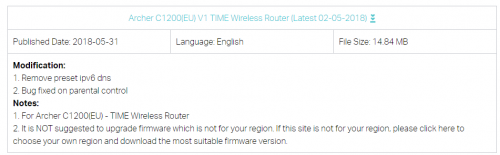
I have C1200 which is running on latest firmware, keeping in the cupboard now.

TIME Firmware hides the firmware upgrade section.
You can manually enter to this link.
http://192.168.0.1/userRpm/firmwareUpgrade.htm
Login to the router then only click the above link.

Try changing to Google DNS IPv6.

Thanks.
kmrdeva
post Dec 12 2018, 01:40 PM

Look at all my stars!!
*******
Senior Member
4,776 posts

Joined: Jan 2003
QUOTE(FusionXY @ Dec 12 2018, 12:25 PM)
Thanks for the updates. Just need the answers highlighted in blue.


Cannot set Channel Bandwidth and Channels? Cannot Hide SSID? Like set to 40MHz?
How about 5GHz signal? Is it better than ASUS AC68U?
Can get full signal around the house over 5GHz?

*
The 2nd deco unit (satellite?) does get lower speed. I can accept up to 100mbps loss vs the main deco unit since my internet connection is so fast already, personally speaking.

I don't see any channel bandwidth or selection options in the deco app. Can hide SSID though.

Not easy to do wifi analysis on iphone. Plus I don't really have time to compare AC68U vs Deco M9+ in every area in my home with my wife's android phone.

Unfortunately, I do not know if 5GHz is reaching to all corners of my home since I can't set different SSID for 2.4 and 5.0GHz on the deco.

For now, I can get strong wifi in my drying area and storeroom at the back of my home, better than almost zero signal with the AC68U.


FusionXY
post Dec 12 2018, 02:28 PM

LAZZIE ON VACATION
*******
Senior Member
3,834 posts

Joined: Aug 2016

QUOTE(kmrdeva @ Dec 12 2018, 01:40 PM)
The 2nd deco unit (satellite?) does get lower speed. I can accept up to 100mbps loss vs the main deco unit since my internet connection is so fast already, personally speaking.
If I were you, I would accept 100Mbps loss or above too.
200 - 300Mbps is enough for me as my 5GHz Laptop up to 350 - 400Mbps near the router which is TP-Link Archer C9

I don't see any channel bandwidth or selection options in the deco app. Can hide SSID though.
OK. Thanks for the info.
Not easy to do wifi analysis on iphone. Plus I don't really have time to compare AC68U vs Deco M9+ in every area in my home with my wife's android phone.
If cannot, then Never Mind. Another member promised me update when he receives the Deco M9 PLUS
Unfortunately, I do not know if 5GHz is reaching to all corners of my home since I can't set different SSID for 2.4 and 5.0GHz on the deco.
You mean single Wi-Fi Name only? No separate band name?
For now, I can get strong wifi in my drying area and storeroom at the back of my home, better than almost zero signal with the AC68U.
That's good to hear. It's better than no coverage.
*
kmrdeva
post Dec 12 2018, 02:51 PM

Look at all my stars!!
*******
Senior Member
4,776 posts

Joined: Jan 2003
QUOTE(FusionXY @ Dec 12 2018, 02:28 PM)

*
Yes, both 2.4 and 5ghz bands have the same SSID name on the m9 deco plus.
FusionXY
post Dec 12 2018, 02:53 PM

LAZZIE ON VACATION
*******
Senior Member
3,834 posts

Joined: Aug 2016

QUOTE(kmrdeva @ Dec 12 2018, 02:51 PM)
Yes, both 2.4 and 5ghz bands have the same SSID name on the m9 deco plus.
*
That's the reason it cannot change the Wi-Fi Configuration.

Try using 2.4GHz device and test and see.
I suppose it will connect to 5GHz Band if device supports 5GHz connection.
What's the link speed on 2.4GHz device only and 5GHz device.

Thanks.
kmrdeva
post Dec 12 2018, 03:15 PM

Look at all my stars!!
*******
Senior Member
4,776 posts

Joined: Jan 2003
QUOTE(FusionXY @ Dec 12 2018, 02:53 PM)
That's the reason it cannot change the Wi-Fi Configuration.

Try using 2.4GHz device and test and see.
I suppose it will connect to 5GHz Band if device supports 5GHz connection.
What's the link speed on 2.4GHz device only and 5GHz device.

Thanks.
*
Ha, I don't have any 2.4Ghz only devices. All my mobile and home devices support 5GHz Wifi AC or Gigabit wired LAN.

This post has been edited by kmrdeva: Dec 12 2018, 03:15 PM
FusionXY
post Dec 12 2018, 03:22 PM

LAZZIE ON VACATION
*******
Senior Member
3,834 posts

Joined: Aug 2016

QUOTE(kmrdeva @ Dec 12 2018, 03:15 PM)
Ha, I don't have any 2.4Ghz only devices. All my mobile and home devices support 5GHz Wifi AC or Gigabit wired LAN.
*
Never mind bro. Appreciate your help bro.

Will wait for another member here to update.
My house having the most is 2.4GHz devices.
3 Phones and 4 Laptops under 2.4GHz.

5GHz devices.
1 Android Box, 1 Phone and 1 Laptop.

Thanks.
Lord_Ashe
post Dec 12 2018, 03:26 PM

Old Treasure Hunter Sidekick
******
Senior Member
1,495 posts

Joined: Sep 2005
From: Damansara Perdana - KL


Just received my Deco M9+ today. Will be setting up later.
My current setup is 1800sqft apartment, Asus 1200G+ and TPlink AC RE305 extender.
Will post my impressions later.
louis198920
post Dec 12 2018, 03:41 PM

Casual
***
Junior Member
476 posts

Joined: Jan 2011
From: Penang


hi, im interested in deco M9+ as well, do you guys mind sharing where you placed both units ? maybe a layout of the condo/apartment with the positions of the deco m9+ ? thanks a lot!
Lord_Ashe
post Dec 12 2018, 03:41 PM

Old Treasure Hunter Sidekick
******
Senior Member
1,495 posts

Joined: Sep 2005
From: Damansara Perdana - KL


QUOTE(louis198920 @ Dec 12 2018, 03:41 PM)
hi, im interested in deco M9+ as well, do you guys mind sharing where you placed both units ? maybe a layout of the condo/apartment with the positions of the deco m9+ ? thanks a lot!
*
Sure, I'll come up with a rough diagram if I can.
louis198920
post Dec 12 2018, 03:52 PM

Casual
***
Junior Member
476 posts

Joined: Jan 2011
From: Penang


QUOTE(Lord_Ashe @ Dec 12 2018, 03:41 PM)
Sure, I'll come up with a rough diagram if I can.
*
thanks a lot!
FusionXY
post Dec 12 2018, 03:53 PM

LAZZIE ON VACATION
*******
Senior Member
3,834 posts

Joined: Aug 2016

QUOTE(Lord_Ashe @ Dec 12 2018, 03:26 PM)
Just received my Deco M9+ today. Will be setting up later.
My current setup is 1800sqft apartment, Asus 1200G+ and TPlink AC RE305 extender.
Will post my impressions later.
*
Can't wait for your test bro.
Do test out 2.4GHz connection speed on only 2.4GHz devices.
And 5GHz devices too.

Thanks.

This post has been edited by FusionXY: Dec 12 2018, 03:54 PM
greayx
post Dec 12 2018, 04:29 PM

New Member
*
Junior Member
23 posts

Joined: Nov 2013


im paying rm147.34 now for 300mbps (or issit 500mbps), is it possible for me to upgrade to without additional charges? still within contract period.

This post has been edited by greayx: Dec 12 2018, 04:33 PM
Lord_Ashe
post Dec 12 2018, 04:29 PM

Old Treasure Hunter Sidekick
******
Senior Member
1,495 posts

Joined: Sep 2005
From: Damansara Perdana - KL


QUOTE(FusionXY @ Dec 12 2018, 03:53 PM)
Can't wait for your test bro.
Do test out 2.4GHz connection speed on only 2.4GHz devices.
And 5GHz devices too.

Thanks.
*
I only have 1 2.4ghz device in the house hahaha. Ok will try.
FusionXY
post Dec 12 2018, 04:33 PM

LAZZIE ON VACATION
*******
Senior Member
3,834 posts

Joined: Aug 2016

QUOTE(greayx @ Dec 12 2018, 04:29 PM)
im paying rm147.34 now for 300mbps, is it possible for me to upgrade to 500mbps without additional charges? still within contract period.
*
You're using Unifi 300Mbps?
TIME doesn't have 300Mbps.

QUOTE(Lord_Ashe @ Dec 12 2018, 04:29 PM)
I only have 1 2.4ghz device in the house hahaha. Ok will try.
*
Try and test for me ya.
Test 5GHz devices too.
Including LAN Cable connection speed on 2nd Deco ya.

Thanks.

greayx
post Dec 12 2018, 04:34 PM

New Member
*
Junior Member
23 posts

Joined: Nov 2013


QUOTE(FusionXY @ Dec 12 2018, 04:33 PM)
You're using Unifi 300Mbps?
TIME doesn't have 300Mbps.
Try and test for me ya.
Test 5GHz devices too.
Including LAN Cable connection speed on 2nd Deco ya.

Thanks.
*
sorry upon checking its 500mbps sweat.gif
FusionXY
post Dec 12 2018, 04:36 PM

LAZZIE ON VACATION
*******
Senior Member
3,834 posts

Joined: Aug 2016

QUOTE(greayx @ Dec 12 2018, 04:34 PM)
sorry upon checking its 500mbps  sweat.gif
*
It's OK bro.

Thanks.
Lord_Ashe
post Dec 12 2018, 09:08 PM

Old Treasure Hunter Sidekick
******
Senior Member
1,495 posts

Joined: Sep 2005
From: Damansara Perdana - KL


QUOTE(FusionXY @ Dec 12 2018, 04:33 PM)
You're using Unifi 300Mbps?
TIME doesn't have 300Mbps.
Try and test for me ya.
Test 5GHz devices too.
Including LAN Cable connection speed on 2nd Deco ya.

Thanks.
*
OK, results of my preliminary checking and testing will follow.
Attached Image My house layout. The red arrows indicate the current position of the Asus router and TPlink extender

this is the speedtest results in the living room on AC wifi with router setup:
Attached Image

this is the speedtest in the living room on AC wifi with Deco main node:
Attached Image

Next screenshot is the speedtest in master bedroom, BR1, furthest with AC extender on (original setup):
Attached Image

Last one is in the speedtest in master bedroom with Deco node on:
Attached Image

This post has been edited by Lord_Ashe: Dec 12 2018, 09:19 PM

666 Pages « < 104 105 106 107 108 > » Top
 

Change to:
| Lo-Fi Version
0.0178sec    0.17    6 queries    GZIP Disabled
Time is now: 7th December 2025 - 06:40 AM