Outline ·
[ Standard ] ·
Linear+
TIME [OFFICIAL] TIME Fibre Broadband™ v4, Experience the ONE TRUE 2Gbps
|
louis198920
|
 Dec 12 2018, 03:41 PM Dec 12 2018, 03:41 PM
|

|
hi, im interested in deco M9+ as well, do you guys mind sharing where you placed both units ? maybe a layout of the condo/apartment with the positions of the deco m9+ ? thanks a lot!
|
|
|
|
|
|
louis198920
|
Dec 12 2018, 03:52 PM
|
|
|
QUOTE(Lord_Ashe @ Dec 12 2018, 03:41 PM) Sure, I'll come up with a rough diagram if I can. thanks a lot! |
|
|
|
|
|
louis198920
|
Dec 13 2018, 07:48 AM
|
|
|
QUOTE(Lord_Ashe @ Dec 12 2018, 09:08 PM) OK, results of my preliminary checking and testing will follow. [attachmentid=10133748] My house layout. The red arrows indicate the current position of the Asus router and TPlink extender this is the speedtest results in the living room on AC wifi with router setup: [attachmentid=10133755] this is the speedtest in the living room on AC wifi with Deco main node: [attachmentid=10133756] Next screenshot is the speedtest in master bedroom, BR1, furthest with AC extender on (original setup): [attachmentid=10133762] Last one is in the speedtest in master bedroom with Deco node on: [attachmentid=10133767] thanks for the informative post! For the speed to be good, I think the decos need to be in each other's line of sight ? |
|
|
|
|
|
louis198920
|
Dec 13 2018, 08:20 AM
|
|
|
QUOTE(kmrdeva @ Dec 13 2018, 08:15 AM) Line of sight would be better but not really practical, I think. My second deco node is in my study room, behind one wall from the main deco node in my living room. About 6-8m between them. my unit's layout is the long type with multiple walls in between my living room and master bedroom, really headache if want to find a good position for the node unit =/ |
|
|
|
|
|
louis198920
|
May 19 2022, 02:37 PM
|
|
|
hey guys, I upgraded from 100Mbps to 500Mbps and got the HG8145X6 + WA8021V5.
I asked the technician to setup the HG8145X6 as modem so that I just use just 1 device as ONT + router (to save space), but he say it is configured in router mode.
I gave TIME support a call and they also can't help me to switch it from router to modem mode for some unknown reason.
In TIME's support FAQ, there's even a method to switch between 2--in-1 mode and router mode by long pressing WPS until all the indicators lights up, but unfortunately this doesn't work for me.
Any sifu here can help me? I just want to use the HG8145X6 as ONU + router instead of using a separate ONU and connect to this HG8145X6 (router mode).
|
|
|
|
|
|
louis198920
|
May 19 2022, 02:46 PM
|
|
|
Found the reason >.> 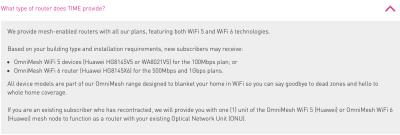
So for existing user, we are somehow not allowed to use the new WiFi 6 device as ONU zzzz |
|
|
|
|
|
louis198920
|
May 20 2022, 10:07 AM
|
|
|
QUOTE(eauyong @ May 19 2022, 05:13 PM) Can you terminate the old contract 100Mbps; return the equipment and re-apply a new 500Mbps contract? Perhaps it is too late now. - haha, too late liao  QUOTE(jjj2 @ May 19 2022, 06:47 PM) Hi, assuming the SI already setup Router(AP) for you now, you will need to press the Reset button for 3 secs to return to the ONT mode. Thanks. yes, i tried that, also used my Time credential as password for OLT registration, but ultimately failed at ACS portion (probably need TIME to approve or something). So i give up and set it back to router mode and try it out few days.. thinking to replace with Deco X90 or ZenWiFi XT8.. |
|
|
|
|
|
louis198920
|
May 20 2022, 07:41 PM
|
|
|
QUOTE(jjj2 @ May 20 2022, 05:58 PM) Hi, you can't use that credential for OLT authentication, once you reset you will need to contact the CS to push in the new profile, just inform them you want your HG8145X6 to function as ONT. If you want to use your own Deco/ Zenwifi, then you will need to have an ONU in front. Thanks. ooooo, thanks for the info for this portion! Let’s hope the CS don’t give me alasan when I request that =p |
|
|
|
|



 Quote
Quote

 0.0308sec
 0.73
0.73
 7 queries
 GZIP Disabled