Welcome Guest ( Log In | Register )

100 Pages « < 61 62 63 64 65 > » Bottom

Outline · [ Standard ] · Linear+

TIME [OFFICIAL] TIME Fibre Broadband™ v4, Experience the ONE TRUE 2Gbps

views
     
jjj2
post Jan 3 2022, 05:41 PM

Look at all my stars!!
*******
Senior Member
3,608 posts

Joined: Feb 2006
QUOTE(engonaplane @ Jan 2 2022, 09:33 PM)
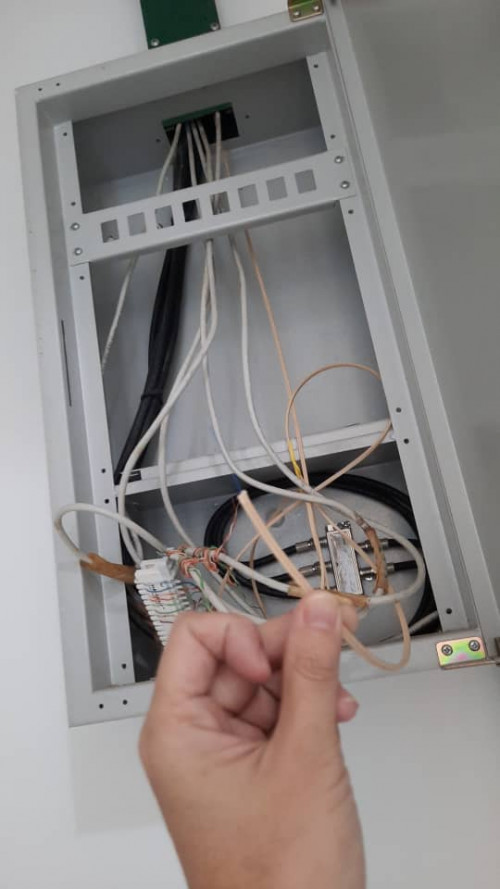
hi all. Just got a subsale condo and plan to install Time. However I suspect the previous owner cut the fiber - cannot find the fiber wall socket anywhere in the house and found a fibre dangling from the ceiling next to the MDB.

if i go with Time - does the standard  installation cover the fiber wall socket or do i need to top up / find an external contractor to fix it prior to installation?
user posted image
*
Hi,

I assume your condo is prelaid with fibre with the soho box like you shown.

Not necessarily need a FWS, just get the SI to terminate the fibre with a fibre connector & plug into the ONU/ONT will do.

*P/S : I dont see a power supply there, is there one ?


jjj2
post Jan 3 2022, 06:01 PM

Look at all my stars!!
*******
Senior Member
3,608 posts

Joined: Feb 2006
QUOTE(wesleyktr @ Jan 3 2022, 07:37 AM)
Hey all, recently my time internet stopped working all of a sudden in the middle of the night, and hasnt been working for like 4 days already. My router (C1200) has an orange Internet light, and when I checked 192.168.0.1 the WAN shows 0.0.0.0. Does anyone know a fix to this? Thanks.
I initially thought it was a problem with my entire condo but it seems to not be the case as when I turn off my router and connect to the modem WiFi directly (Huawei), the WiFi seems to work (but at very slow speeds). Also when I tried to connect my computer directly to the modem using an ethernet cable, it doesn't work and the connection shows up as unidentified.
*
Hi, this is a common issue for C1200, if you on & off, it will be back to normal. Advisable to change a router for long term solution.
jjj2
post Jan 3 2022, 06:41 PM

Look at all my stars!!
*******
Senior Member
3,608 posts

Joined: Feb 2006
QUOTE(engonaplane @ Jan 3 2022, 06:35 PM)
Here? - no. This is in the kitchen
*
This should be the proper place to place your ONU/ONT + a Router, as all the network cables are centralized here, where you can utilize them to add AP at various locations in your unit.

Anyway, you will need to tap a power source & prepare several power sockets for the devices.

*P/S : Btw, which condo are you in ?
jjj2
post Jan 3 2022, 10:42 PM

Look at all my stars!!
*******
Senior Member
3,608 posts

Joined: Feb 2006
QUOTE(wesleyktr @ Jan 3 2022, 10:26 PM)
I've tried that already, also tried resetting my router to factory settings, but still doesn't work sad.gif
*
Hi, please lodge a report to our CS @ 1800 18 1818.

Meanwhile please take some pics showing us the device indicators & cable connections.
jjj2
post Jan 5 2022, 10:49 PM

Look at all my stars!!
*******
Senior Member
3,608 posts

Joined: Feb 2006
QUOTE(lukhmanalif @ Jan 5 2022, 04:36 PM)
Hi, may I ask? Currently, I'm using TP-Link EC230 and I've been thinking to change it to Huawei OmniMesh WA8021V5. Should I change the router to Huawei Omnimesh or should I stay with the TP-Link router? Which routers are better for signal and speed? I'm Using TIME with a 100Mbps plan for now.
*
Hi, more or less the same.
jjj2
post Jan 7 2022, 07:29 AM

Look at all my stars!!
*******
Senior Member
3,608 posts

Joined: Feb 2006
QUOTE(cheekb @ Jan 7 2022, 12:29 AM)
i am using Huawei mesh WA8021V5 as router and want to buy another to setup mesh. what other options i have besides HG8145V5 or HG8145X6?
TQ
*
Hi, obviously WA8021V5.

Thanks.
jjj2
post Jan 7 2022, 07:32 AM

Look at all my stars!!
*******
Senior Member
3,608 posts

Joined: Feb 2006
QUOTE(lohmaikai @ Jan 5 2022, 10:51 PM)
I have a question.
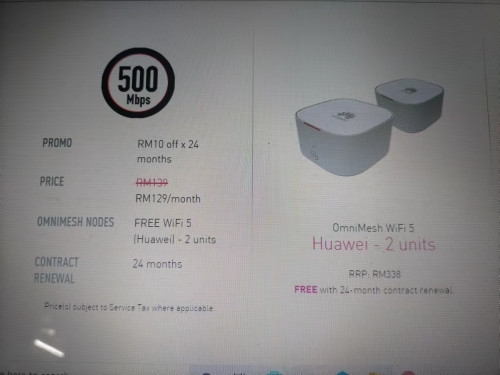
Im currently paying 129 for 500mb which is already a -rm10 discount from a promo many years ago.
Now Time offer recontract but the summary states 139-rm10 which is back to rm129 the same as what im paying now. It is supposed to be rm119?

Otherwise if no reduction of the rm10 i don't think i will take the recontract.

» Click to show Spoiler - click again to hide... «

*
Nope, your previous Promo only for 24 months. The RM119 was very long time ago, where that time under promo "Because You are Awesome" of -RM20.


jjj2
post Jan 8 2022, 10:22 PM

Look at all my stars!!
*******
Senior Member
3,608 posts

Joined: Feb 2006
QUOTE(cheekb @ Jan 8 2022, 05:34 PM)
where can i buy OmniMesh WiFi 5 router (Huawei HG8145V5)? didnt see in time website and shopee/lazada also dont have. result come out huawei AX3.
can i use this AX3 with Huawei WA8021V5?
tq
*
To buy Huawei HG8145V5, you need to contact TIME CS & provide a valid reason why you need to purchase, as this ONT normally given with the subscribed plan.

What is the problem you are having ? AX3 can work with WA8021v5 in wireless bridge mode.
jjj2
post Jan 8 2022, 10:33 PM

Look at all my stars!!
*******
Senior Member
3,608 posts

Joined: Feb 2006
QUOTE(potatocam @ Jan 8 2022, 09:21 PM)
Hi all,
I bought a subsale unit since last year, and this month only start full renovation (after much delays - mco, fmco).
This unit seems to have fibre optics install within inside the walls.
As per picture, I would want to relocate this from top to the below.
For this fibre optics relocation, normally who should I engage, and what are the procedures and cost?
Also, this condo support TIME.
This renovation targeted to be completed by mid-Feb, which I will soon relocate my current TIME to the new unit.
*
Hi, from the pic you shown, there seems to be another Fiber Wall Socket (Netway) at bottom, please take a look is there any fiber inside, gently open it, do not force open harshly as it will damage the inner fiber.

For relocation, you will need to engage fiber specialist which able to do a proper & professional job that will last forever.
If you are based in Penang, then we can assist.

Thanks.
jjj2
post Jan 9 2022, 02:42 PM

Look at all my stars!!
*******
Senior Member
3,608 posts

Joined: Feb 2006
QUOTE(potatocam @ Jan 8 2022, 11:53 PM)
Thanks for the feedback.
The Netway socket is empty.
Suspected it was moved by previous owner to the top one, which now I wanted to move it back at the bottom (to align with the power sockets)
My new unit is at Bukit Jalil area.
*
Hi, if you want to relocate it to the Netway position, then you would have to hack the wall & extend the fiber....

Try get some contractor contact from your management office.
jjj2
post Jan 10 2022, 05:47 PM

Look at all my stars!!
*******
Senior Member
3,608 posts

Joined: Feb 2006
QUOTE(cheekb @ Jan 10 2022, 11:35 AM)
contacted time but they dont sell HG8145V5. means if i use AX3, AX3 can be the router to replace WA8021v5 so tat the existing WA8021v5  can be use as mesh node? tq
*
Hi, AX3 can be router & WA8021v5 can be used as wireless relay.
jjj2
post Jan 13 2022, 09:02 AM

Look at all my stars!!
*******
Senior Member
3,608 posts

Joined: Feb 2006
QUOTE(aced84 @ Jan 13 2022, 03:01 AM)
JJ! Thanks for this! I have been searching hi and low for this information, and there's very limited information about this.

I've subscribed to Time but just cancelled it because I was in dilemma to upgrade the offer to WiFi 6 or not.

I bought the mesh router AX3 (dual-core), according to their website and the seller, it already has MESH function ready.

When I signed up, I remember I saw the option that Time gave me for my 100mbps package = WiFi 5 -  2-in-1 router (model number = HG8145V5)

So now I am in dilemma if I should go with (HG8145V5, F.O.C) or take up the offer to add one-time RM99 fee to upgrade it to the WiFi 6 (HG8145X6) router.

I think I'll PM you about it.

I'm SUPER GRATEFUL to see someone from the inside appears in community forum and actively answering questions!

P.S. I've ask the same question about MESH setup to CS from TIME Broadband and also the installer contractor. None were able to give me clear-cut answers. This is so sad man.
*
Hi Bro,

Thanks for reaching out to me smile.gif

May I have your unit layout, then we could determine the best solution to go about.

Thanks smile.gif
jjj2
post Jan 13 2022, 10:28 AM

Look at all my stars!!
*******
Senior Member
3,608 posts

Joined: Feb 2006
QUOTE(dynamite_nmt @ Jan 13 2022, 10:14 AM)
Hi all, need some advice from the esteemed sifus here.

I live in a condominium where the developer has provided 4 internet ports in various locations throughout the unit.

We are on the TIME 500mbps subscription, and recently upgraded to the mesh setup, since they provided it for free.

When the installer came over, after some testing, we agreed that he would install the mesh nodes/APs (Huawei Edge ONT) in 2 of the 4 internet ports provided, as these provided the best coverage of the unit.

So far it's all working fine, but I do notice some blind spots between certain areas.

What I'm wondering is, since I have two more of these ports, can I just buy two more units of the Huawei Edge ONT and plug and play, or is there some configuration required?

Or would it be simpler to simply pasang a simple wifi extender?
Thank you in advance for any input.
Note: The TIME installer who came to my place was mute, hence it was slightly difficult for me to discuss alternative setups with him.
*
Hi, yes you can purchase additional 2 units to extend the coverage. Alternatively, study the layout of your unit & replace the 2 units of WA8021v5 with more powerful units.

Extender not so recommended unless you know how to tweak with it.
jjj2
post Jan 15 2022, 05:35 AM

Look at all my stars!!
*******
Senior Member
3,608 posts

Joined: Feb 2006
QUOTE(dynamite_nmt @ Jan 13 2022, 12:26 PM)
Thank you. Will it be difficult to configure the two units, or is it plug and play?
*
Yes, it's easy, just press WPS button on your Huawei ONT & wait for the WA8021v5 to turn white.

Thanks.
jjj2
post Jan 15 2022, 05:38 AM

Look at all my stars!!
*******
Senior Member
3,608 posts

Joined: Feb 2006
QUOTE(polarzbearz @ Jan 14 2022, 03:21 PM)
Is it possible to use those Mesh 5 units as lan-to-lan access point extension?
*
Yes, you can, cable in fact is more preferred. In this case WA8021v5 needs to be connected back to the Huawei Gateway (HG8145V5/HG8145X6) which acts as Router/ONT mode.

Thanks.

This post has been edited by jjj2: Jan 15 2022, 05:42 AM
jjj2
post Jan 15 2022, 05:45 AM

Look at all my stars!!
*******
Senior Member
3,608 posts

Joined: Feb 2006
QUOTE(jack2 @ Jan 14 2022, 05:30 PM)
500mbps plan. First I connected to the supply Huawei  router 2.4ghz and get 80mbps only. Then I connected to 5Ghz and can get 400-500.

Then I setup TPlink ac1200 mesh and more damn, can get 100mbps..why ya
*
If your AC1200 is connected such a way in wireless repeater, makes sure you selected the 5GHz band as backhaul. If you expect to have 2xx---3xxMbps wifi speed, then go with wired connection & turn Ac1200 into AP mode.

Thanks.
jjj2
post Jan 15 2022, 05:47 AM

Look at all my stars!!
*******
Senior Member
3,608 posts

Joined: Feb 2006
QUOTE(aced84 @ Jan 13 2022, 04:08 PM)
Ahh I missed out the layout part, will PM you. I don't have the floor unit layout but I can video shot it for you. Thanks!
Edit: After PMing JJ back and forth for less than a day, I've decided to order TIME subscription from him! As a first time user, my experience with Time website chat support and also their supposed installation technician who was assigned to install the service, was weird... so in the end I couldn't get my questions regarding my router upgrade to be resolved, and I cancelled the subscription service before confirming with the installation technician.

After I found out JJ on Lowyat forum, he got my questions answered in a clear-cut style, and within few hours, I ordered the subscription from him directly. JJ is very knowledgeable in terms of technical stuff, and friendly too!!! Thank you very much for your help, JJ.  thumbsup.gif
*
Thanks Bro, can't wait to see you onboard, cheers smile.gif
jjj2
post Jan 16 2022, 06:25 PM

Look at all my stars!!
*******
Senior Member
3,608 posts

Joined: Feb 2006
QUOTE(KingArthurVI @ Jan 16 2022, 01:31 PM)
Guys TIME came to my condo unit try to install yesterday but they told me the fiber inlet got problem, no signal when they tried to run some tests before setup. They said my building no longer under TIME warranty and need inform management.

I informed management and they said will ask some contractors to come check. My question is, these sort of troubleshooting and fixes, should the bill be paid by me or management? Since the issue seems to be outside my unit I’d say it’s the building management’s responsibility to provide a usable fiber connection, so I would say they should pay to fix for me but not sure.

Also, what are the chances they’ll come back and say it’s impossible to fix? I think should be fixable since none of my neighbors have complained about fiber issues so the problem likely lies between my unit and the floor’s “switchboard” or something similar?
*
The type of arrangement depend on your JMB/MC/Management, some management will absorb the repair cost but some will direct back to owner.
It is best to find out from them.


jjj2
post Jan 21 2022, 09:45 AM

Look at all my stars!!
*******
Senior Member
3,608 posts

Joined: Feb 2006
QUOTE(Jazzer00 @ Jan 18 2022, 11:09 PM)
Hi sifus, need to ask 2 quick questions.

1)Can we get time to reset the PPPoe credentials for the account.?
PPPOE credentials cannot be reset.

And 2) I recently signed up for new time account at my new condo unit, the router model given was the huawei HG8145V5 but seems to be lack of coverage compared to the previous time hardware that was given.(old house) If not mistaken it should be the TP-link archer c-1200 model.

Lack of coverage meaning my iphone wifi signal bar only 1 bar. Old house used to be 3 bars.

Note: my archer was sitting in wooden tv cabinet with the cabinet doors closed. Huawei is just sitting on the floor in the living room. (open air)
Distance between router and room is similar.

I use the 2.4ghz connection generally.

Any ideas/ suggestions/ recommendations?

Should i just switch back to the old hardware setup time previously gave? And is that possible?
You can use back your existing hardware Archer C1200 (if you want) by turning it to AP mode or have your Huawei ONT turned into Bridge Mode & C1200 as Router.
Better get a more powerful router or consider mesh system.


Sorry for the longwinded post 🤣
*
jjj2
post Jan 21 2022, 09:46 AM

Look at all my stars!!
*******
Senior Member
3,608 posts

Joined: Feb 2006
QUOTE(Jazzer00 @ Jan 18 2022, 11:32 PM)
Sorry for the wrong info, not the PPPoe credentials but the huawei device landing page username and password. ( user and pass on the device is not working)
*
The credentials is written on the back of the ONT.

100 Pages « < 61 62 63 64 65 > » Top
 

Change to:
| Lo-Fi Version
0.0402sec    0.42    7 queries    GZIP Disabled
Time is now: 14th December 2025 - 08:15 AM