Welcome Guest ( Log In | Register )

100 Pages « < 63 64 65 66 67 > » Bottom

Outline · [ Standard ] · Linear+

TIME [OFFICIAL] TIME Fibre Broadband™ v4, Experience the ONE TRUE 2Gbps

views
     
jjj2
post Feb 22 2022, 05:31 PM

Look at all my stars!!
*******
Senior Member
3,608 posts

Joined: Feb 2006
QUOTE(noobfm @ Feb 22 2022, 04:36 PM)
Hi guys, i've called Time CS for 5 times to request their help in switching to bridging mode but that doesn't seems to be effective at all..

how should i proceed in this case? other than keep on calling them lol
*
Hi, they cant do it right away for you, they will request the provisioning team to push over the correct settings, that will take some time.

jjj2
post Feb 23 2022, 09:41 AM

Look at all my stars!!
*******
Senior Member
3,608 posts

Joined: Feb 2006
QUOTE(noobfm @ Feb 22 2022, 06:13 PM)
thanks, do you know usually how long would they take ?
*
Hi, usually it takes 24---72 hours upon agreement.

P/S : What did they tell you ?

Thanks.
jjj2
post Feb 23 2022, 10:58 AM

Look at all my stars!!
*******
Senior Member
3,608 posts

Joined: Feb 2006
QUOTE(dannyw @ Feb 23 2022, 10:36 AM)
Any user switching from Unifi 30Mbps to TIME 100Mbps. Just want to know in actual fact is that much different?
*
Yes, it has significant difference viewing the backbone architecture is totally different, moreover when you connect via LAN cable.
Thanks.
jjj2
post Feb 23 2022, 02:59 PM

Look at all my stars!!
*******
Senior Member
3,608 posts

Joined: Feb 2006
QUOTE(dannyw @ Feb 23 2022, 12:00 PM)
Thanks. Now days people put the modem & router on TV cabinet (easy for LAN connect to TV) or higher place at center of house (for better WiFi reception)?
*
Hi, usually you put the Router approx. 1.5m above the floor is good enough, anyway if you go for ceiling/wall mounted AP, then you need to mount it higher.
Thanks.
jjj2
post Feb 23 2022, 03:02 PM

Look at all my stars!!
*******
Senior Member
3,608 posts

Joined: Feb 2006
QUOTE(guess0410 @ Feb 23 2022, 12:05 PM)
Hi guys..i got a call. to upgrade my current tplink archer c1200 to huawei wa8021v5 router.

i try to serarch the wifi speed of huawei router but cant get any info.
Is it worth to change it?

Mostly using wifi only (100Mbps plan).

The promoter told me that current warranty for TP link router is ended.

With the renewal of 2 year contract, will get a huawei wa8021v5 router.

thank for the input.
*
Hi, if you read through past messages, you will see some users & we did highlighted for some houses, Archer C1200 actually outperforms WA8021V5 in terms of wifi signal penetration & speed.

Thanks.
jjj2
post Feb 23 2022, 03:04 PM

Look at all my stars!!
*******
Senior Member
3,608 posts

Joined: Feb 2006
QUOTE(noobfm @ Feb 23 2022, 01:38 PM)
first CS told 1 hr, but not really helping
2nd and 3rd CS told that they are getting 2nd level subject matter expert to help, although already called me to confirm they had changed to bridging mode from their end but nothing is working at the moment  doh.gif
*
If it has been switched to bridge mode, then you need to configure your own router with the given PPPOE credentials & connect the Router WAN/Internet port to the LAN1 port of the Huawei ONT.

Thanks.
jjj2
post Feb 25 2022, 12:15 AM

Look at all my stars!!
*******
Senior Member
3,608 posts

Joined: Feb 2006
QUOTE(Kaya Butter Toast @ Feb 23 2022, 06:54 PM)
Hi,
I'm planning to get time 500mbps in a couple of weeks.
Any suggestions for maximum wifi performance to reach my office area? whole place is around 900sqf.
I noticed that they stopped offering the free mesh wifi, so any suggestions on the suitable router and position would be great
<a href='https://pictr.com/images/2022/02/23/BAp8xr.md.png' target='_blank'>https://pictr.com/images/2022/02/23/BAp8xr.md.png </a>
*
Hi, budgetary options like Huawei AX3 Pro, TP-Link AX73 or even the stock router HG8145X6 may do the trick.
Thanks.
jjj2
post Feb 26 2022, 12:18 AM

Look at all my stars!!
*******
Senior Member
3,608 posts

Joined: Feb 2006
QUOTE(fragma757 @ Feb 25 2022, 05:46 PM)
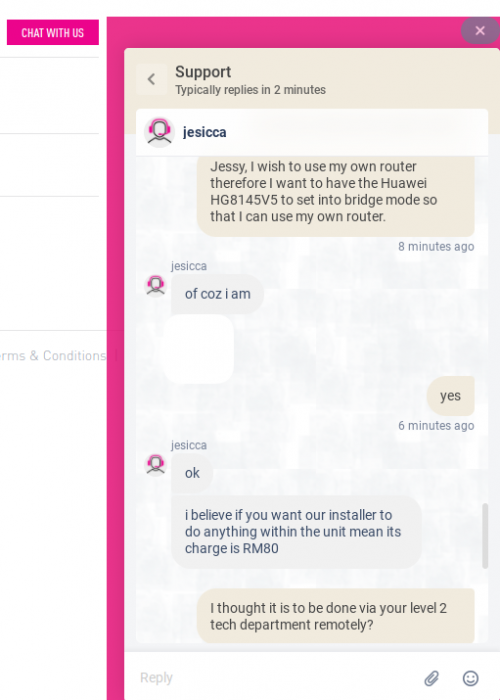
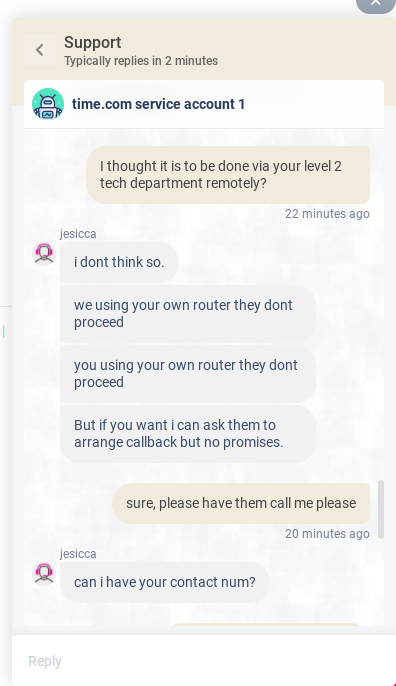
@jjj2 just wanna check, changing to bridge mode is done by level 2 tech remotely isn't it? And it should be no charges right? I wonder why the time broadband chat agent said there is an RM80 charge and cannot be done remotely and installer need to come physically?

user posted image
user posted image
*
Hi, are you chatting with bots ? Please ring CS @ 1800 18 1818.
Yes can be done remotely by pushing over the settings to your ONT.

Thanks.

jjj2
post Feb 26 2022, 12:22 AM

Look at all my stars!!
*******
Senior Member
3,608 posts

Joined: Feb 2006
QUOTE(alpha team @ Feb 25 2022, 06:03 PM)
Hi jjj2, can u explain what kid of house showed AC1350/1200 better than WA8015v5 ? thanks. bcz i received the same call from customer services asked me to renew the contract for anothre 2yrs and in re turn the give me the Huawei WA8021V5 FOC.
*
We tested it in condos approx. 900--1200 sq ft. with 3 bedrooms about 8-10m away, Archer C1200 outperforms the WA8021V5 significantly. You won't see much difference if your unit is open studio type...it gets more obvious where you have corners even though it's not far away from the router.
jjj2
post Feb 26 2022, 12:27 AM

Look at all my stars!!
*******
Senior Member
3,608 posts

Joined: Feb 2006
QUOTE(engonaplane @ Feb 25 2022, 10:27 AM)
jjj2 pm me if you have staff or a contact that services Mont Kiara - might need an audit and rectification. The installer I used managed to turn a CAT6 into CAT5 speeds and is now shirking responsibility
*
Hi, can let me know what is the issue in more details ?
Thanks.
jjj2
post Feb 27 2022, 05:06 PM

Look at all my stars!!
*******
Senior Member
3,608 posts

Joined: Feb 2006
QUOTE(slack3r @ Feb 27 2022, 01:32 AM)
Hi. last year got new time connection and I was provided the new HG8145V5 but some settings specially the dns cannot change. Since I work from home and sometimes got vpn/intranet issues, our IT ask me to test different dns settings they provide to troubleshoot the issue. I want the settings to be on the modem/router since I use 2 machines (1 desktop and 1 laptop) for work so I rather not change dns settings manually in windows and have them removed again when I work from another location or from the office.

I have a friend who has HG8240H that he is not using anymore (also previously used with TIME)

Questions
1. Can I borrow his onu and use it with my connection?
Sorry you cant.
2. Do I need to call time to setup anything?
3. Can I set it up myself without calling time?
4. Should I just call time and setup my HG8145V5 to bridge mode and I control my network using my own router?
Yes, if you want to have more control & better routing performance.
5. If option #4 do I need special router or normal one with option for pppoe settings will work?
Normal router that able to perform PPPOE dialing will work just fine.

Basically I want to use his modem/onu/ont and have my own separate router to handle things on my own I just need the connection to time's server. Basically my time connection I don't use the phone.. I just basically use it for internet

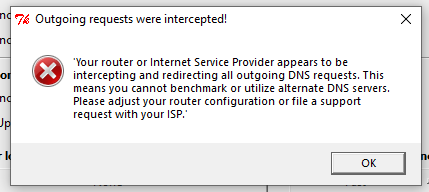
Another reason for changing modem and want my own router to setup my network is because they are hijacking the dns
user posted image

Any information will be appreciated.
*
jjj2
post Feb 28 2022, 12:30 AM

Look at all my stars!!
*******
Senior Member
3,608 posts

Joined: Feb 2006
QUOTE(fragma757 @ Feb 27 2022, 11:20 PM)
@jjj2, I took your advice and called the CS at 1800 18 1818, everything settled in 15 mins quick and painless. Thank you so much!

Now I'm using my own TP-Link Archer C3150 with HG8145V5 in bridge mode. Archer C3150 wifi coverage outperformed HG8145V5 itself.
*
Hi, glad it's done smile.gif

Cheers smile.gif
jjj2
post Feb 28 2022, 12:32 AM

Look at all my stars!!
*******
Senior Member
3,608 posts

Joined: Feb 2006
QUOTE(sasuketaichou @ Feb 28 2022, 12:12 AM)
i try searching for this but no luck

im moving out to a new condo next month and this place doesnt have time yet, in the website it seems like theres an option to request for it

how long does the process take place? if anyone can answer me as in the meantime i am waiting for time response

thank you
*
Hi, this really depends, generally it takes 3--9 months. Some cases take even much longer.

Thanks.
jjj2
post Mar 3 2022, 09:19 AM

Look at all my stars!!
*******
Senior Member
3,608 posts

Joined: Feb 2006
QUOTE(garybenjamin @ Mar 1 2022, 04:39 PM)
Thank you JJ. i moved my ONT to close to where you place vola .... i able to get 28xmbps rather than 8x~9x mbps .... thanks bro.
*
Welcome Bro smile.gif
jjj2
post Mar 3 2022, 09:27 AM

Look at all my stars!!
*******
Senior Member
3,608 posts

Joined: Feb 2006
QUOTE(throwawayacclmao @ Feb 28 2022, 01:11 AM)
Hi i am recently moving to a new place and requested relocation service.
The installer came and mentioned there is a high reading error at the optical fibre and say he cant install and asked me to talk to management.
Management says its usual case in this condo and usually need the TIME installer to replace the fibre head connector.

May I know how long this process usually take? Not sure if TIME going to charge me full price during when this service is down pending relocation installation.
*
Hi, for long run, it is advisable to get your management to recommend a professional fibre contractor/specialist to check the entire infra, from MDF-->Riser-->Unit, and rectify respectively.
The fibre contractor/specialist would be able to generate an OTDR report for your reference.

If you are based in Penang, then we could assist.

Thanks.
jjj2
post Mar 3 2022, 09:32 AM

Look at all my stars!!
*******
Senior Member
3,608 posts

Joined: Feb 2006
QUOTE(slack3r @ Feb 28 2022, 01:14 PM)
Thanks to jjj2 & PRSXFENG my ont is now in bridge mode took less than 15mins
Hi I can't seem to access the ONT now but I can still see the wireless networks from the ONT but there are exclamation points indicating there is no internet connection
*
If the CS pushed over the settings, the WiFi should be turned off and the ONT will be on Full Bridge Mode. Anyway you can login to turn it off manually.
Thanks.
jjj2
post Mar 3 2022, 09:39 AM

Look at all my stars!!
*******
Senior Member
3,608 posts

Joined: Feb 2006
QUOTE(stevenhsl @ Feb 28 2022, 02:50 PM)
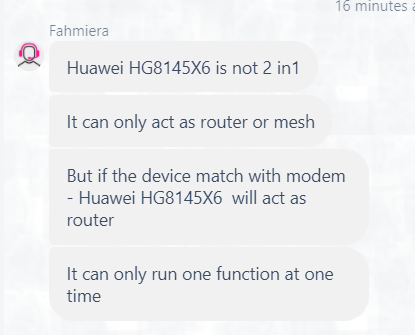
Question: Is the Wifi 6 router HG8145X6 a 2-in-1 ONT or standalone router?

My condo's optical terminal is placed near the fuse box and enclose inside a metal case, currently the config is a standalone ONU + router place near TV console through the build-in LAN socket, hence 2-in-1 is not ideal for my unit. My current setup is HG8240H ONU + WA8021V5.

From the comments in thread, and also Huawei support site, (https://support.huawei.com/enterprise/en/doc/EDOC1100140843), it looks like HG8145X6 and 8145V5 are the same 2-in-1 ONT unit.

However, TIME CS told me otherwise, she said HG8145X6 is a standalone router, and will pair with HG8240H ONU.

I'm quite confused though, some said it is 2-in-1, but CS said it is standalone router...

user posted image
*
Hi, X6 can be configured as a 2-in-1 (aka Fibre Modem + Router). Like your case, it can be also configured as an AP (should be called Router) by omitting the PON function, means you may have a HG8240H5 ONU paired with X6.

Thanks.
jjj2
post Mar 3 2022, 09:40 AM

Look at all my stars!!
*******
Senior Member
3,608 posts

Joined: Feb 2006
QUOTE(paogeh @ Feb 28 2022, 01:56 AM)
another questions .
For past years TIME receipt/statement ,

if IncomeTax audit,
can we ask TIME to provide the backdated years for the receipt claim under internet/broadband ? Thank you
*
Hi, you may request from CS to provide a Summary of payment for the respective year.
Thanks.
jjj2
post Mar 4 2022, 09:17 AM

Look at all my stars!!
*******
Senior Member
3,608 posts

Joined: Feb 2006
QUOTE(Stinga @ Mar 4 2022, 01:16 AM)
Wondering if the device will auto switch from 5Ghz to 2.4Ghz depending on distance?
*
Yes.
jjj2
post Mar 6 2022, 06:51 PM

Look at all my stars!!
*******
Senior Member
3,608 posts

Joined: Feb 2006
QUOTE(blackwindow @ Mar 5 2022, 11:14 AM)
Hi guys, I've gotten the free mesh from TIME. But when I switch on the mesh. For awhile the connection is fine but after awhile it will mess up. Either it goes really slow or no connection at all. How to fix this?
*
Hi, if you are referring to the mesh node that connects wirelessly to the main node, make sure it's not placed too far.
Best performance can be achieved with ethernet backbone.
Thanks.

100 Pages « < 63 64 65 66 67 > » Top
 

Change to:
| Lo-Fi Version
0.0358sec    0.57    7 queries    GZIP Disabled
Time is now: 14th December 2025 - 05:17 AM