Welcome Guest ( Log In | Register )

100 Pages « < 60 61 62 63 64 > » Bottom

Outline · [ Standard ] · Linear+

TIME [OFFICIAL] TIME Fibre Broadband™ v4, Experience the ONE TRUE 2Gbps

views
     
jjj2
post Dec 2 2021, 03:33 PM

Look at all my stars!!
*******
Senior Member
3,608 posts

Joined: Feb 2006
QUOTE(DarkNite @ Dec 2 2021, 02:30 PM)
Free OmniMesh too brows.gif
Ok. use back the AX20.
Boss, the Free OmniMesh I can sell off or need to keep in case want to terminate TIME service?
Not going to collect back... keep for memory la.... lol
*
jjj2
post Dec 3 2021, 11:40 AM

Look at all my stars!!
*******
Senior Member
3,608 posts

Joined: Feb 2006
QUOTE(KingArthurVI @ Dec 2 2021, 08:14 PM)
Hey guys I just realized my fiber optic will come in from my condo foyer area, so my understanding is the modem will need to be there. However, I also have 2 ethernet ports, one at living room and one at study.
When you say "Will come in..." means Installer will pull in or the fibre is already there by the developer ? Please take a picture, is there a distribution panel or soho box at foyer area ?

I want to put the router in my study so it's connected to the wall ethernet port.

How should I set it up such that: Modem in foyer ---PPPoE +bridge mode ---> Router in office ---> Wi-Fi and Ethernet ports on the wall?

Or am I basically stuck with Modem in foyer --> Ethernet ports on wall --> Router piggyback as 192.168.2.1 from one of the wall ports?

Much appreciated.
*
jjj2
post Dec 4 2021, 06:32 PM

Look at all my stars!!
*******
Senior Member
3,608 posts

Joined: Feb 2006
QUOTE(KingArthurVI @ Dec 4 2021, 12:05 PM)
The fibre is already there by the developer. There's a distribution panel at foyer area but it's barred (I didn't bring screwdriver when I visited...)

I did notice there's a network switch with multiple LAN ports, but idk how those are connected to the wall ports in my study and living room.

Maybe the easiest is to do

Modem at foyer -- bridge mode --> switch --> wall port in study --> router plug there w/ PPPoE configured?

But if I do this above, my other wall port won't be usable right, since the modem is connected directly to the other wall port? Sorry for so many questions blush.gif
*
Hi, in your case, the ONT will be placed inside the distribution panel (soho box), PPPOE will be handled by the ONT, and from your ONT, patch in 2 UTP cables into the patch panels, and your study & living room network port will have Internet ready.
Speaking on coverage, then have your own router or Mesh Node plug into the network port....it will work in AP mode.

Alternatively, you can have your ONT put inside Soho box to be configured as bridge mode, and put your router at study room, and have it configured to handle pppoe.

There are numerous ways to play around depends on your requirement.

Thanks.


jjj2
post Dec 9 2021, 06:23 PM

Look at all my stars!!
*******
Senior Member
3,608 posts

Joined: Feb 2006
QUOTE(tZZ @ Dec 9 2021, 11:04 AM)
@jjj2, Is there time coverage for Savanna 2 Bukit Jalil ?
*
Hi, Savanna 2 not in coverage yet.

Thanks.
jjj2
post Dec 10 2021, 07:53 PM

Look at all my stars!!
*******
Senior Member
3,608 posts

Joined: Feb 2006
QUOTE(wayangpok @ Dec 10 2021, 04:15 PM)
Sifu, can i use the Times ONU as a modem only with TP-link AX50 router.
*
Hi, which ONU model you have ?
jjj2
post Dec 11 2021, 10:55 AM

Look at all my stars!!
*******
Senior Member
3,608 posts

Joined: Feb 2006
QUOTE(wayangpok @ Dec 10 2021, 08:06 PM)
The one come with the latest 500mb promo.
*
Hi, please give our CS a call @ 1800 18 1818, and request them to switch your ONT to Bridge Mode, inform them you wish to use your own router.
New profile will be pushed over to your HG8145V5 ONT.

Thanks.


jjj2
post Dec 15 2021, 08:13 AM

Look at all my stars!!
*******
Senior Member
3,608 posts

Joined: Feb 2006
QUOTE(jychow @ Dec 14 2021, 10:49 PM)
hi, seek help from all the GURUS here.

The new Huawei Mesh ONT router that is given free by TIME. Can the normal Huawei AX3 router work with the MESH system? Thanks in advance
*
Hi, yes, work in WiFi Relay mode, not Full Mesh.

Thanks.
jjj2
post Dec 15 2021, 08:15 AM

Look at all my stars!!
*******
Senior Member
3,608 posts

Joined: Feb 2006
QUOTE(minthiam @ Dec 14 2021, 05:43 PM)
Time has stopped offering TP-Link router on 1Gbps package and switch to Huawei HG8145X6 since early of December. Does anyone know if this is an upgrade or downgrade?
*
Hi, it is a hardware specs upgrade, the actual on-site performance still too early to tell.
We will update from time to time for any bugs or issues that may arise.

Thanks.
jjj2
post Dec 15 2021, 10:30 PM

Look at all my stars!!
*******
Senior Member
3,608 posts

Joined: Feb 2006
QUOTE(Exeunt @ Dec 15 2021, 05:52 PM)
Hi,

Any Time agent can help speed application process,
I applied for business package from the website havent heard from them for 2 days..

Area megan avenue 2
*
Hi, feel free to pm me your particulars, we will assist you on that.

Thanks.
jjj2
post Dec 15 2021, 10:58 PM

Look at all my stars!!
*******
Senior Member
3,608 posts

Joined: Feb 2006
QUOTE(JimbeamofNRT @ Dec 15 2021, 10:47 AM)
boss, for the Huawei HG8145V5 and WA8021V5, do you have the details on the spec on it?
RAM? memory?

cant find it at all

the official website dont stated anything on it
https://www.router-switch.com/eg8145v5-datasheet-pdf.html
*
Hi Bro, these 2 infos are not disclosed by Huawei. But we suspect it's running on 128MB only, you can sense the routing performance is a bit laggy.
jjj2
post Dec 16 2021, 10:04 PM

Look at all my stars!!
*******
Senior Member
3,608 posts

Joined: Feb 2006
QUOTE(wayangpok @ Dec 16 2021, 07:41 PM)
Now, I’m using my AX50 as AP.
*
Hook up your AX50's WAN port to LAN1 of your HG8240H5, and then configure the given TIME PPPOE credentials in your AX50.

Thanks.
jjj2
post Dec 16 2021, 10:05 PM

Look at all my stars!!
*******
Senior Member
3,608 posts

Joined: Feb 2006
QUOTE(JimbeamofNRT @ Dec 16 2021, 05:25 PM)
Thanks for the info : )

what to do, stock router liddat one lah, but better this than meksis's TP Link Archer C5v stock router

that one really  dry.gif  dry.gif  dry.gif
*
LOL biggrin.gif
jjj2
post Dec 21 2021, 03:33 PM

Look at all my stars!!
*******
Senior Member
3,608 posts

Joined: Feb 2006
QUOTE(Agent 45 @ Dec 17 2021, 01:37 PM)
[attachmentid=11060524]
Hi all, i intend to get time 100mb for my dual key unit, around 500ft2 each. I plan to place the router at the common area as shown in red box so that it is accessible for both unit. If i choose to upgrade with 1 omnimesh, is it enough to cover for 2 unit?
*
If it's really 500sqft each unit, then it can. but recommended you gotta hook it up by cable.

Thanks.
jjj2
post Dec 21 2021, 03:34 PM

Look at all my stars!!
*******
Senior Member
3,608 posts

Joined: Feb 2006
QUOTE(rezzorix @ Dec 20 2021, 11:55 PM)
Hi,

also posted this in the Mikrotik thread, but maybe my question is better placed here.

I am using Time Broadband and would like to get rid of the fiber modem and instead use a SFP Module in my Mikrotik Router.
(That way I can save 1 power plug / 1 unit that consumes power)

I heard that it is possible but have to get Time Broadband Support to update the MAC address in their system...

Is it possible?
Anyone here who has already done this and can share a how-to?
*
Hi, not possible, you have to use the stock ONU/ONT.
jjj2
post Dec 28 2021, 12:04 AM

Look at all my stars!!
*******
Senior Member
3,608 posts

Joined: Feb 2006
QUOTE(ThePolice @ Dec 27 2021, 03:55 PM)
Hello, I need some help with my TIME connection. Currently, under 100Mbps plan while using the HG8240H5 modem and WA8021V5 router with the latest firmware updated.
My desktop is connected with a powerline & CAT6 cable, however I'm only getting single digit speeds.
Please do a test by using the Cat6 network cable plug into LAN port of WA8021V5 & your laptop. Do a speedtest at speed.time.com.my


Also, I'm trying to get the PC connected to the data socket/SOHO box from the wall, but still no success in getting a connection.
Please take some pics to show us your current network connection.

Is there something I'm missing out? Abit lousy with internet connection issues. Thanks in advance.
<a href='https://pictr.com/images/2021/12/27/BdbqZ6.md.jpg' target='_blank'>https://pictr.com/images/2021/12/27/BdbqZ6.md.jpg </a>
*
jjj2
post Dec 28 2021, 12:05 AM

Look at all my stars!!
*******
Senior Member
3,608 posts

Joined: Feb 2006
QUOTE(tzxsean @ Dec 27 2021, 11:05 PM)
huh? Isn't TIME for high rise only?
*
Not true, landed property as well, though coverage still kinda limited.


jjj2
post Dec 28 2021, 12:42 AM

Look at all my stars!!
*******
Senior Member
3,608 posts

Joined: Feb 2006
QUOTE(desmond1310 @ Dec 26 2021, 08:02 PM)
Hi guys, I know my question is hardware related, but was hoping to get sifu advice here. I have also posted my question in the router thread, but am hoping for quick response, thus here i am as well. Sorry if my question is redundant.

I am on TIME fiber 500mbps plan.
Current router is Huawei WA8021V5.
Current modem is Huawei HG8240H5.

All the buzz around WIFI 6, i want to capitalize on the OFDMA and MU-MIMO tech and convinced to upgrade now.

What needs to change? The router only? or both router + modem?
Change the Huawei WA8021V5 router.

May I have a recommendation of what brand and model?
Do provide your size layout diagram & size, your budget too of course.

I have my TIME username and password with me. Is that enough to setup with when i get the new WIFI 6 hardware? Or do i need more info?
Yes that is sufficient.

Does my device needs to support WIFI 6 to make use of the OFDMA/MY-MINO tech? Main phones at home are iPhone XS, Mi 9T Pro, Redmi 10, Huawei Nova 3i (all support WIFI 5 only)
Yes. Anyway 500Mbps you wont see significant difference.

Many thanks in advanced.

*
jjj2
post Dec 29 2021, 12:12 AM

Look at all my stars!!
*******
Senior Member
3,608 posts

Joined: Feb 2006
QUOTE(desmond1310 @ Dec 28 2021, 09:58 AM)
Many thanks jjj2!

I'm in a ~900sqft condo with 2 rooms.
What do you think about Asus RT AX56U? Budget at the moment <RM500
This should do the trick.

Also, am i correct to assume Asus RT AX56U can support 1gbps speed if i make the upgrade?
It can support 1Gbps via LAN of course, but I've not tested it on 1Gbps line on wifi.

*
jjj2
post Dec 29 2021, 12:27 AM

Look at all my stars!!
*******
Senior Member
3,608 posts

Joined: Feb 2006
QUOTE(markypcs @ Dec 28 2021, 05:10 PM)
Spoke to ookas sales rep.

According to my setup, I cannot replace my existing setup with 2 TP Link AX73. He suggested to replace the C1200 mesh router to Deco M4 3 packs.
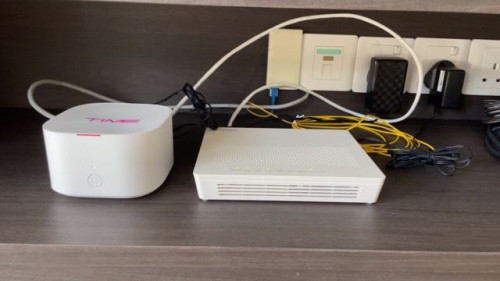
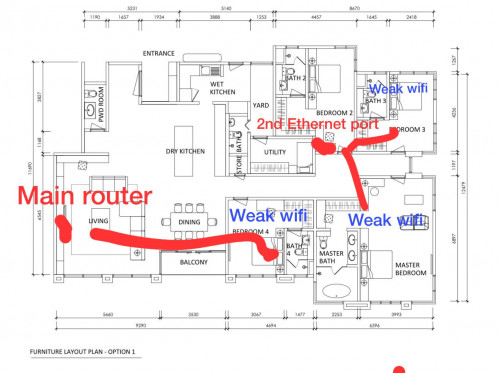
Attached below are images of my setup.
Main router: Huawei Echolife WA8021V5
Second ethernet port: TP Link Archer C1200

Can I get a second opinion here?

user posted image
user posted image
user posted image
*
Hi, based on your initial plan, remove your WA8021V5, replace it with AX73 (pppoe dialing router), hook up a network cable from the router to the wall jack, at the other end setup AX73 as an AP. In this case, you lose the mesh features.

Alternatively, get a real mesh system like TP-Link Deco X60 or X90.
jjj2
post Jan 3 2022, 05:37 PM

Look at all my stars!!
*******
Senior Member
3,608 posts

Joined: Feb 2006
QUOTE(darren_yuri @ Jan 2 2022, 07:45 PM)
I am sorry,so do I need to reset the nodes again by going thru the setups? and then reinstall the EC230 back next to the modem? Thanks!
*
Hi, if you are satisfied with the current performance, then just keep it as it is.

100 Pages « < 60 61 62 63 64 > » Top
 

Change to:
| Lo-Fi Version
0.0367sec    0.71    7 queries    GZIP Disabled
Time is now: 14th December 2025 - 01:37 PM