Welcome Guest ( Log In | Register )

100 Pages « < 57 58 59 60 61 > » Bottom

Outline · [ Standard ] · Linear+

TIME [OFFICIAL] TIME Fibre Broadband™ v4, Experience the ONE TRUE 2Gbps

views
     
jjj2
post Sep 20 2021, 12:30 AM

Look at all my stars!!
*******
Senior Member
3,608 posts

Joined: Feb 2006
QUOTE(nivla878 @ Sep 19 2021, 09:52 PM)
<a href='https://pictr.com/images/2021/09/19/BlFCav.md.jpg' target='_blank'>https://pictr.com/images/2021/09/19/BlFCav.md.jpg </a>
Hi sifus need some help. I am registering for Time Internet 100Mbps with given Huawei Modem+Router HG8145V5.
My unit has an fiber optic termination at the kitchen area and a concealed LAN cable running from kitchen to my living area as shown on my layout. I expect poor coverage on master bedroom. Need advise if I should get a Deco M4 3 pack to place at which locations or should I get a high gain router like Tplink AX73 to place it at living area.
Thanks for helping out.
<a href='https://pictr.com/images/2021/09/19/BlFTF5.md.jpg' target='_blank'>https://pictr.com/images/2021/09/19/BlFTF5.md.jpg </a>
*
Hi, go for Mesh Routers, if budget allows, go for higher end like M9 Plus or AX...

Thanks.
jjj2
post Sep 20 2021, 12:31 AM

Look at all my stars!!
*******
Senior Member
3,608 posts

Joined: Feb 2006
QUOTE(developer @ Sep 19 2021, 08:51 PM)
recently i moved from PJ back to KL, and in KL, the time server speedtest ping is always high. back in PJ, my speedtest to TIME server is only 1ms to 2ms.

but in KL, i am getting 15ms~18ms.

i checked with neighbour, apparently they are getting like 8ms?

i tried to complain to time and they told me, since its lower than 20ms, its normal.

wondering how many ms you guys get from speedtest to time server.
*
Between 5--15ms.
jjj2
post Sep 20 2021, 02:28 PM

Look at all my stars!!
*******
Senior Member
3,608 posts

Joined: Feb 2006
QUOTE(nivla878 @ Sep 20 2021, 01:11 AM)
If I use TPlink AX73 or Asus TUF AX3000 place in my living room, is it advisable as I heard a lot comments have good WiFi coverage. Putting mesh around the house will generate high radiation compared to a single router?
*
Hi, let's not worry too much on this low-level radiation... else, your phones, & even the single router will be a concern.
The master bedroom would have lower speed, if you still prefer single router, go for TUF AX3000 & place it facing the hallway.

Thanks.
jjj2
post Sep 22 2021, 08:46 AM

Look at all my stars!!
*******
Senior Member
3,608 posts

Joined: Feb 2006
QUOTE(RagingCandy @ Sep 21 2021, 05:46 PM)

**Need helps**


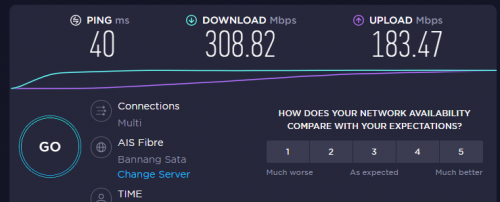
I applied for the 300Mbps plan yesterday. A check just now it seems like they have upgraded it. HOWEVER, the upload speed is not able to hit 300Mbps.
Sometimes I only get a download speed of 50Mbps.  It never happens with my 100Mbps plan.
Any idea?

Router: Tplink AX1500 Wi-Fi 6 Router

user posted image
*
HI, try changing the speedtest server to TIME Shah Alam or TT Dotcom.

Or you may directly proceed to use speed.time.com.my

Do make sure to perform speedtest under the following criterias.
1) Turn off any background running heavy services>
2) Turn off Internet Security or Antivirus temporary.
3) Stop all other Internet usage while performing speedtest.
4) Test using a good Cat5e or Cat6 network cable.
5) Try different browser & Speedtest server to test.
6) Download Speedtest Desktop Apps to test rather than Browser based.

If problem still persists, then please kindly file a report to 1800 18 1818, will proceed to 2nd level of troubleshooting.

Thanks.


This post has been edited by jjj2: Sep 22 2021, 08:53 AM
jjj2
post Sep 24 2021, 12:03 AM

Look at all my stars!!
*******
Senior Member
3,608 posts

Joined: Feb 2006
QUOTE(aichiban @ Sep 23 2021, 04:37 PM)
Hi. I am on 500mbps plan, and got "CURRENT ROUTER: TP-Link EC230" together with the plan in 2019.

Now I am getting the -RM10 promo together with the mesh nodes - Huawei WA8021V5.

Are they compatible?
It depends how you define compatible. If you expect it to work as a wireless relay, then yes. But if you want it to work in full meshing mode, then it's not.
Again, if you hook it up with a network cable & make it work as an AP, then yes it is.


*
This post has been edited by jjj2: Sep 24 2021, 12:04 AM
jjj2
post Sep 24 2021, 09:53 AM

Look at all my stars!!
*******
Senior Member
3,608 posts

Joined: Feb 2006
QUOTE(imcrazyz @ Sep 24 2021, 09:15 AM)
Halo guys.
I'm planning to switch internet service from TM to TIME after contract ends.

May I know what's the transition period for termination?

Let's say the contract ends on 22 October, can I raise the termination request on 22 October to TM and arrange TIME installation in the next few days?
*
Hi,

Thank you for your interest in TIME Fibre Internet services.

Let us assist you in the switching over with ease.

Please kindly check with TM on the termination conditions beforehand.
Then we will assist you in the Registration & Installation accordingly.

Buzz me when you are ready ya...

Thanks.
jjj2
post Sep 24 2021, 09:54 AM

Look at all my stars!!
*******
Senior Member
3,608 posts

Joined: Feb 2006
QUOTE(gtiwtks @ Sep 24 2021, 09:31 AM)
I am getting the -RM10 promo together with the mesh nodes - Huawei WA8021V5.

Can i use the mesh as wifi router and connect back my existing ac1200 and configure it as switch to connect all lan devices as the mesh nodes had limit lan port?
*
Hi, yes you can.
jjj2
post Sep 25 2021, 09:00 PM

Look at all my stars!!
*******
Senior Member
3,608 posts

Joined: Feb 2006
QUOTE(xSean @ Sep 24 2021, 10:44 PM)
Just wondering why ec230 not support for 300mbps. So no point support 1350mbps when the router cannot support 300mbps.
*
The routing performance on wired is capable, but not in wireless in real.

Thanks.
jjj2
post Sep 25 2021, 09:37 PM

Look at all my stars!!
*******
Senior Member
3,608 posts

Joined: Feb 2006
QUOTE(dlwl @ Sep 25 2021, 06:25 PM)
I'm planning to take the 100Mbps > 300Mbps upgrade.

1. This price is valid for only 24 months, then after that revert back to RM129?
Yes, the RM20 monthly discount will expire.

2. I'm currently using the TPLink AC1200, in terms of coverage is this better or the Huawei WA8021V5 which they are giving? Currently the TPLink is in my 3rd room (around middle spot in my condo unit - 5GHz quite weak in the master bedroom, 2.4GHz can use but might disconnect at certain spots in the bedroom). Actually thinking of going for TPLink AX20 to replace the AC1200, but since they are bundling this Huawei so might give it a try.
Real performance more or less the same.

3. Can I request for the technician to just drop the router at my place and I do the setup myself later? Since I guess the line upgrade is just something that needs to be done from their side and nothing at my condo.
Yes you can, but you have to agree with some terms & conditions & sign the docket.
*
jjj2
post Sep 26 2021, 09:51 PM

Look at all my stars!!
*******
Senior Member
3,608 posts

Joined: Feb 2006
QUOTE(rylim @ Sep 26 2021, 06:56 PM)
Currently I'm using 100mbps plan with a contract till next year June, and now I'm planning to upgrade it to 500mbps. Does it mean I will be tied to a new contract?
*
Hi, no new contract reset, unless you claim for free router upgrade.

Thanks.
jjj2
post Sep 28 2021, 02:17 PM

Look at all my stars!!
*******
Senior Member
3,608 posts

Joined: Feb 2006
QUOTE(mac94 @ Sep 28 2021, 12:24 PM)
Hi , I going apply 100mbps time, given Huawei HG8145V5 can support other brand mesh like deco m5?

saw in website "Must pair with Huawei WA8021V5 mesh node", this means Huawei HG8145V5 only support WA8021V5? to use deco M5 need one pair right?

or anyone can recommend better router than huawei?
*
Hi, yes, although it can "pair" with other mesh but it will function as wireless bridging & not fully mesh.
If you configure your M5 using wired dedicated backhaul & run your M5 in AP modem then it should not be a problem.
If you wish to turn your M5 into Router mode & have it dial pppoe, then you will need to set HG8145V5 to bridge mode.

There are some confusions even at SIs level, but no worries, just buzz me if you require more assistance.

Thanks.


jjj2
post Sep 30 2021, 07:46 AM

Look at all my stars!!
*******
Senior Member
3,608 posts

Joined: Feb 2006
QUOTE(al_madd @ Sep 29 2021, 10:01 PM)
Hai..for 500mbps
Huawei WA8021V5 enough for apartment 4 rooms 1250sqft??

or need mesh wifi?
*
Hi, not sufficient to cover that size, add another 1 more unit.
jjj2
post Oct 5 2021, 02:25 PM

Look at all my stars!!
*******
Senior Member
3,608 posts

Joined: Feb 2006
QUOTE(iXora.ix @ Oct 5 2021, 09:51 AM)
Dear all,

I tempting to upgrade from 100mb to 300mb with additional rm10 permonth

[attachmentid=10999520]

my current device is the old huawei ONT> tplink ec230. If let say i upgrade , can I opt not to to use the promo device? ( coz I already use my own router/AP )

Thanks
*
Yes, you can.
jjj2
post Oct 5 2021, 02:26 PM

Look at all my stars!!
*******
Senior Member
3,608 posts

Joined: Feb 2006
QUOTE(swasts @ Oct 5 2021, 11:25 AM)
Recently I change my router from EC230 to WA8021V5 after TIME offer me free upgrade + 24 months contract. But found out my speed is much slower when using WA8021V5. Only manage to get 90-150 Mbps on 500 Mbps plan. When I switch back to my old EC230 can easily get around 400-500Mbps. Anyone have the same issue ? Does mesh router only focus on range only instead of speed ?
*
Hi, please do perform a speed test at the First mesh node using a network cable.

Thanks.

jjj2
post Oct 6 2021, 11:04 AM

Look at all my stars!!
*******
Senior Member
3,608 posts

Joined: Feb 2006
QUOTE(lostasylum @ Oct 5 2021, 10:06 PM)
thanks for the super fast reply @blacktubi. I think my condo is quite old, so I think they may have to pull a fresh fibre cable.
If let's say they do pull a fresh fibre cable, what happens to the current wall ports that I have in my condo? I won't have to use that any more?
Hi, there is no need to use the telephone port any port, unless you wish to use it for telephone purpose.

Also, assuming TIME won't be using those ports, does that mean that I can technically have my unifi connection until I cancel my unifi subscription? Sorry, budak baru nak belajar TIME
Yes, if your Unifi is running on VDSL (using that Tel port) then you can still remain it.
*
jjj2
post Oct 6 2021, 11:08 AM

Look at all my stars!!
*******
Senior Member
3,608 posts

Joined: Feb 2006
QUOTE(Xaphier @ Oct 6 2021, 10:09 AM)
Hi guys, I have a rental unit (House A) which is currently using a TIME broadband which has the old modem + TP-Link router combo. I intend to get my new house (House B) a new 500mbps TIME broadband, which I heard, comes with Huawei HG8145V5 modem/router combo. I already have a good router setup in House B, but it does not have any modem yet, so I would still need a modem to work with my router setup. My question is:

1. Can I re-use the old modem from House A to House B? And use that modem to connect to my router?
Sorry you can't unless you perform a service relocation request to relocate your service from House A --> House B. Do note that Outdoor Relocation Fee of RM120 applies.
2. Move the new Huawei HG8145V5 modem/router combo from House B to House A?
Again, sorry you cant simply relocate the ONU/ONT to another unit, unless a proper service relocation request is done via your selfcare portal (selfcare.time.com.my).

I was hoping that I can do all these without having to contact CS or a technician coming. Thanks.
*
jjj2
post Oct 6 2021, 11:09 AM

Look at all my stars!!
*******
Senior Member
3,608 posts

Joined: Feb 2006
QUOTE(swasts @ Oct 5 2021, 03:18 PM)
Speed look good when connecting via cable on first mesh node. Can get around 480 Mbps. Just when using wifi even beside the router the speed drop until 80-100 Mbps. At first I thought I connect using 2.4Ghz then I disable 2.4Ghz option and only using 5Ghz. The speed still same, struggle to hit more than 100Mbps.
*
Hi, are you using 2 mesh nodes (WA8021V5 x 2) ? If so, then try disable the 2nd unit & only test using the first unit.

Thanks.
jjj2
post Oct 6 2021, 11:11 AM

Look at all my stars!!
*******
Senior Member
3,608 posts

Joined: Feb 2006
QUOTE(YantoZyrus @ Oct 5 2021, 09:35 PM)
recently recontract 24months for 500mbps and being offered WA8021V5 mesh. Is this router good? Current router is Asus RT AX-3000 which supports wifi 6.
Is my current router better than the huawei router offered by time? If that is the case most likely i would ask the technician not to install d...
*
Hi, obviously many^10 times better.
jjj2
post Oct 6 2021, 02:15 PM

Look at all my stars!!
*******
Senior Member
3,608 posts

Joined: Feb 2006
QUOTE(Xaphier @ Oct 6 2021, 11:37 AM)
Hi, thanks for the reply. Are you saying the ONU unit are tied to account?

Yes smile.gif

In that case, is it possible to request for an ONU unit that isn't a router combo? While still receiving the HG8145V5 mesh router from the package promotion? Thanks for the reply!
If what you intend to do is using your own router, then you can request the Installer to call Provisioning to request them to push over the Bridge Mode settings, and then you can have your Router dialing the PPPOE by connecting it to LAN1 port.
*
jjj2
post Oct 10 2021, 11:19 PM

Look at all my stars!!
*******
Senior Member
3,608 posts

Joined: Feb 2006
QUOTE(KamPunYingJun @ Oct 8 2021, 08:58 AM)
Going to have my Time fiber install with VOICE package (DECT phone). Plan changing the router to AX73, but AX73 router doesn't come with any 'phone' port.

Question
Is the Time voice/phone connected to the modem or the router?
For FTTH, generally TIME voice connects to the ONU/ONT.

OR I have to get a router that supports RJ-11 ?
No need.
*

100 Pages « < 57 58 59 60 61 > » Top
 

Change to:
| Lo-Fi Version
0.0536sec    0.52    7 queries    GZIP Disabled
Time is now: 19th December 2025 - 03:01 AM