Outline ·
[ Standard ] ·
Linear+
TIME [OFFICIAL] TIME Fibre Broadband™ v4, Experience the ONE TRUE 2Gbps
|
blacktubi
|
 Jan 8 2024, 11:01 PM Jan 8 2024, 11:01 PM
|
-


|
QUOTE(Sam Leong @ Jan 8 2024, 10:14 PM) The issue now is TIME using NTT as upstream and NTT is having severe congestion to China Telecom (Blame CT and NTT in both case) The ultimate solution for TIME to solve this is reroute China Telecom traffic to other route China Unicom so far still ok but the best China ISP for TIME is China Mobile (Thanks to CMI) or simply enable WARP / WARP+ solve this issue or find a China Mobile / Chunghwa Telecom (Taiwan) server as relay 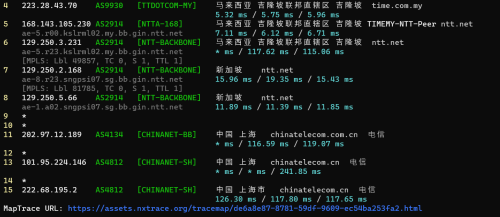 Agree. It seems that enabling IPV6 made my life a lot better. IPV6 to CT is routed through HKIX with ~90ms latency and zero packet loss. But, still, not every sites support IPV6 |
|
|
|
|
|
Sam Leong
|
Jan 8 2024, 11:20 PM
|
|
|
QUOTE(blacktubi @ Jan 8 2024, 11:01 PM) Agree. It seems that enabling IPV6 made my life a lot better. IPV6 to CT is routed through HKIX with ~90ms latency and zero packet loss. But, still, not every sites support IPV6 iinm IPV6 latency is lower for CT / CU but for some reason speed is still below 10Mbps (For my case last time) End up I just ask my friend to use his CM Shadowsocks |
|
|
|
|
|
jjj2
|
Jan 9 2024, 12:00 PM
|
|
|
QUOTE(blacktubi @ Jan 8 2024, 09:52 PM) It's 2024 now and connection to China is still horrible. Word is already spreading in one of the China Malaysia community that I happen to join. China work apps like DingTalk are affected too. 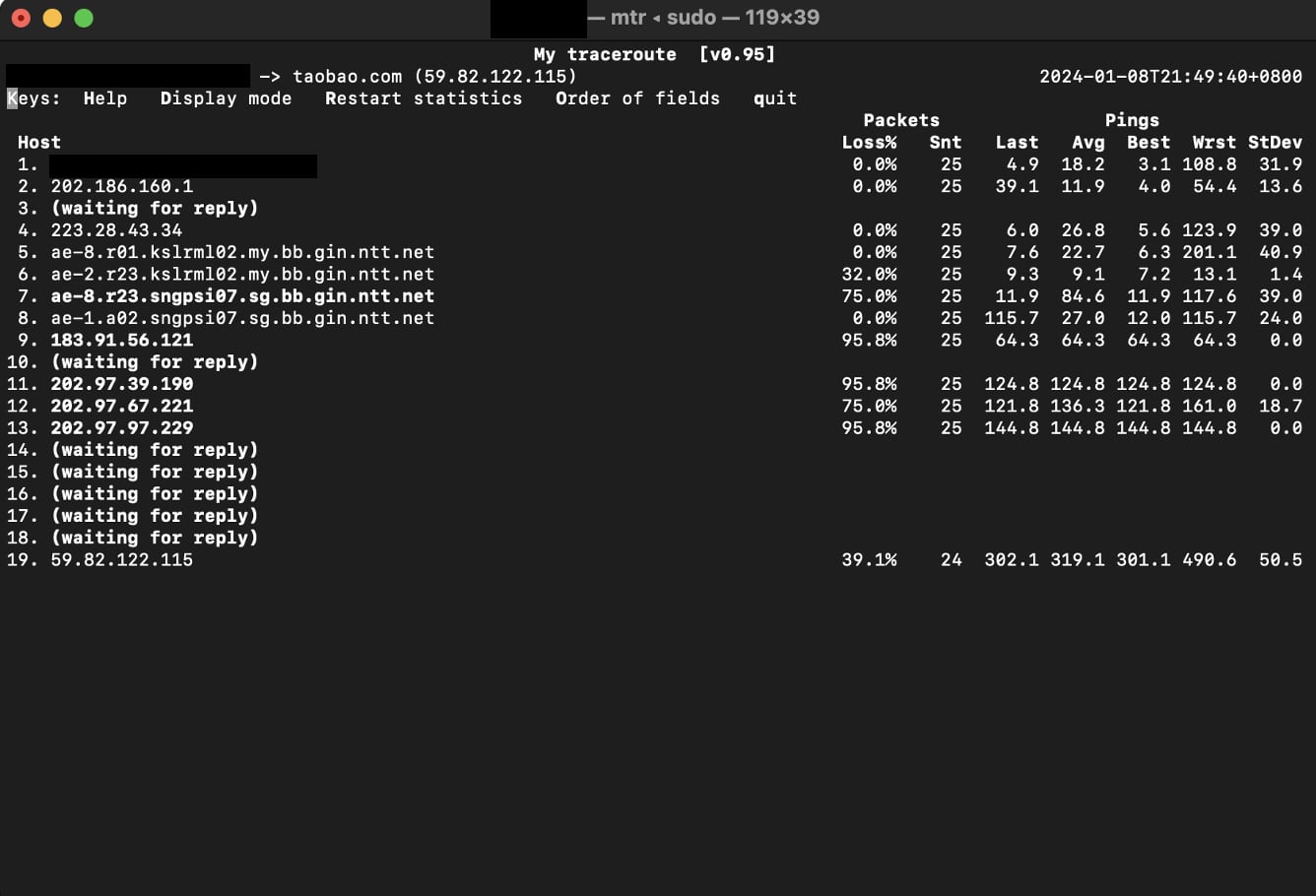 We have highlighted this issue 3 years ago when it just 'starts to happen' ... moreover social media apps are also having slowness loading videos... as expected things get dragged until now never get resolved. |
|
|
|
|
|
jjj2
|
Jan 9 2024, 12:05 PM
|
|
|
QUOTE(1234_4321 @ Jan 8 2024, 09:28 AM) I wanted to configure the weekly auto restart for every node.. Currently only available for main node.. You can only configure the Reboot feature on ONT unit. |
|
|
|
|
|
blacktubi
|
Jan 9 2024, 01:46 PM
|
-
|
QUOTE(jjj2 @ Jan 9 2024, 12:00 PM) We have highlighted this issue 3 years ago when it just 'starts to happen' ... moreover social media apps are also having slowness loading videos... as expected things get dragged until now never get resolved. I guess their NOC is not aware that China is Malaysia #1 trade partner or they probably don't even aware of such apps exist. Many China apps for work (DingTalk, Feishu, VooV and etc) are really slow when using TIME fibre, con call keep lagging. |
|
|
|
|
|
UbuntuClient
|
Jan 9 2024, 05:39 PM
|
|
|
Does Time router support port forward?
|
|
|
|
|
|
jjj2
|
Jan 9 2024, 06:09 PM
|
|
|
QUOTE(blacktubi @ Jan 9 2024, 01:46 PM) I guess their NOC is not aware that China is Malaysia #1 trade partner or they probably don't even aware of such apps exist. Many China apps for work (DingTalk, Feishu, VooV and etc) are really slow when using TIME fibre, con call keep lagging. Guess broadband business they dont really focus on improving the International Routing...unlike ID (Metro-E). |
|
|
|
|
|
jjj2
|
Jan 9 2024, 06:13 PM
|
|
|
QUOTE(UbuntuClient @ Jan 9 2024, 05:39 PM) Does Time router support port forward? If you are referring to the newer ISP customized devices like HG8145V5, WA8021V5, HG8145X6..etc.. then forget about it, better get your own router... many customers have configured & it's not working. |
|
|
|
|
|
UbuntuClient
|
Jan 9 2024, 08:27 PM
|
|
|
QUOTE(jjj2 @ Jan 9 2024, 06:13 PM) If you are referring to the newer ISP customized devices like HG8145V5, WA8021V5, HG8145X6..etc.. then forget about it, better get your own router... many customers have configured & it's not working. Do you know any model that i can look it? |
|
|
|
|
|
jjj2
|
Jan 10 2024, 08:44 AM
|
|
|
QUOTE(UbuntuClient @ Jan 9 2024, 08:27 PM) Do you know any model that i can look it? Mostly any routers out there support Port Forwarding. |
|
|
|
|
|
BladeRider88
|
Jan 10 2024, 10:11 AM
|
|
|
@jjj2 I have a question. Currently I am using ASUS AX-86U router for my Time Internet But I noticed that the installer is using Automatic IP in the WAN Connection Type instead of using PPoE in my ASUS AX-86U, and I believe he had bridge the Huawei ONR connection to my ASUS router. 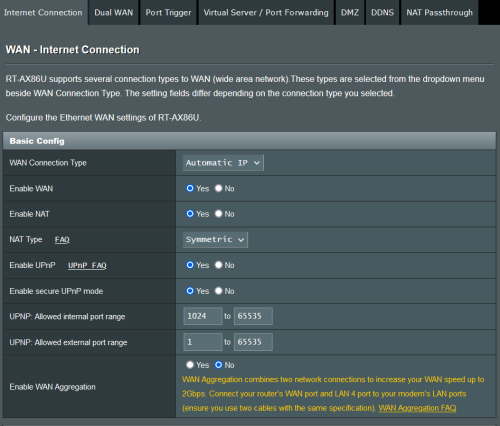 For now I can surf Internet as usual. The only caveat is I can't host my own OpenVPN server due to this error message: 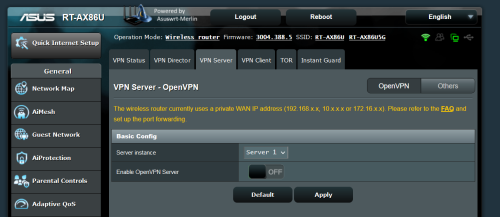 I have my PPoE credentials, what if I change my WAN Connection Type to PPoE, do I need to do any changes on the Huawei ONR? |
|
|
|
|
|
jjj2
|
Jan 10 2024, 10:24 AM
|
|
|
QUOTE(BladeRider88 @ Jan 10 2024, 10:11 AM) @jjj2 I have a question. Currently I am using ASUS AX-86U router for my Time Internet But I noticed that the installer is using Automatic IP in the WAN Connection Type instead of using PPoE in my ASUS AX-86U, and I believe he had bridge the Huawei ONR connection to my ASUS router. For now I can surf Internet as usual. The only caveat is I can't host my own OpenVPN server due to this error message: I have my PPoE credentials, what if I change my WAN Connection Type to PPoE, do I need to do any changes on the Huawei ONR? Hi, the installer did not change the ONT to bridge mode & your Asus router is running on AP mode. May I know what model is the Huawei ONT ? You need to turn this into Bridge Mode, and have your Asus router performing the PPPOE dialing. |
|
|
|
|
|
BladeRider88
|
Jan 10 2024, 10:26 AM
|
|
|
QUOTE(jjj2 @ Jan 10 2024, 10:24 AM) Hi, the installer did not change the ONT to bridge mode & your Asus router is running on AP mode. May I know what model is the Huawei ONT ? You need to turn this into Bridge Mode, and have your Asus router performing the PPPOE dialing. If I am not mistaken, should be this Huawei HG8145X6-10 |
|
|
|
|
|
jjj2
|
Jan 10 2024, 10:37 AM
|
|
|
QUOTE(BladeRider88 @ Jan 10 2024, 10:26 AM) If I am not mistaken, should be this Huawei HG8145X6-10 Hi, you can request from CS to turn it into bridge mode. |
|
|
|
|
|
BladeRider88
|
Jan 10 2024, 10:38 AM
|
|
|
QUOTE(jjj2 @ Jan 10 2024, 10:37 AM) Hi, you can request from CS to turn it into bridge mode. Alright..then follow this setps right? https://www.youtube.com/watch?v=rFlXZbTCvD8 |
|
|
|
|
|
jjj2
|
Jan 10 2024, 10:49 AM
|
|
|
QUOTE(BladeRider88 @ Jan 10 2024, 10:38 AM) Yes  and remember to connect your Asus WAN port to the Huawei ONT LAN1 port. Thanks. |
|
|
|
|
|
BladeRider88
|
Jan 10 2024, 10:56 AM
|
|
|
QUOTE(jjj2 @ Jan 10 2024, 10:49 AM) Yes and remember to connect your Asus WAN port to the Huawei ONT LAN1 port. Thanks. Ok ok thank you so much |
|
|
|
|
|
calvin
|
Jan 11 2024, 09:05 AM
|
|
|
is it possible to configure the hg8145x6-10 as a pure AP + mesh configuration ?
the provided credentials for the device has limited configurations and there seems to be no way to login as another user since the page defaults to a password entry
|
|
|
|
|
|
anderu87
|
Jan 12 2024, 12:38 PM
|
Getting Started

|
Hi, Today I test ipv6 and found that result shows TIME DNS server has no access to IPV6 websites. Could anyone help? Router setting IPV6 is enabled. I am using Huawei HG8145X6-10 router. 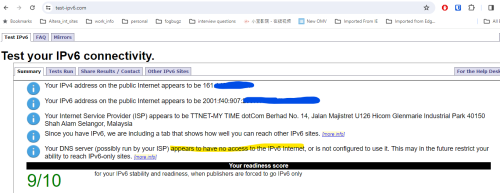 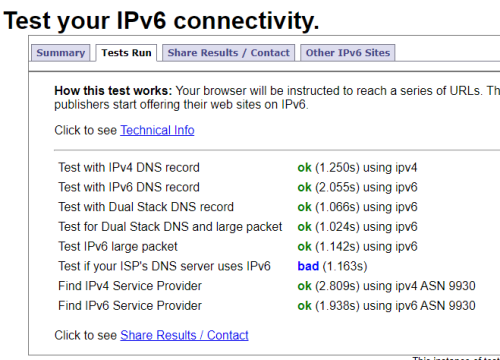 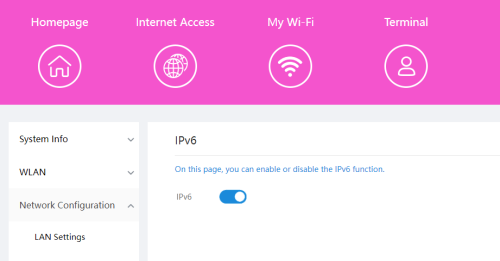 |
|
|
|
|
|
PRSXFENG
|
Jan 12 2024, 06:54 PM
|
|
|
QUOTE(anderu87 @ Jan 12 2024, 12:38 PM) Hi, Today I test ipv6 and found that result shows TIME DNS server has no access to IPV6 websites. Could anyone help? Router setting IPV6 is enabled. I am using Huawei HG8145X6-10 router. Why not just change to a 3rd party DNS Server like CloudFlare, Google, Cisco OpenDNS, Quad9 or others? |
|
|
|
|



 Quote
Quote


 0.0212sec
 1.08
1.08
 6 queries
 GZIP Disabled