Welcome Guest ( Log In | Register )

20 Pages « < 16 17 18 19 20 >Bottom

Outline · [ Standard ] · Linear+

Home Networking Maximum WiFi Speeds, ... or why my wifi so slow?

views
     
FusionXY
post Sep 25 2022, 12:54 AM

LAZZIE ON VACATION
*******
Senior Member
3,834 posts

Joined: Aug 2016

QUOTE(y@nggene @ Sep 24 2022, 09:25 PM)
Hi, I am using Dlink Covr 1200 and only can reach around 200+MBPS for unifi 300mbps
Is upgrade to Dlink AX1800 is a good choice to support 300mbps?

Thanks
*
Get ASUS for reliable with updated firmware.
Or TP-Link for budget issues.

Not a fan of D-Link related products.
BenYeeHua
post Oct 1 2022, 10:17 AM

Regular
******
Senior Member
1,873 posts

Joined: Nov 2010


QUOTE(FusionXY @ Sep 25 2022, 12:54 AM)
Get ASUS for reliable with updated firmware.
Or TP-Link for budget issues.

Not a fan of D-Link related products.
*
D-link is so so in my history, get like 2 of them during ADSL area, not bad, function 24/7 hours without issues.
The last one of them using as 2.4G AP for IoT device, without stressing the CPU(as if you connect via LAN to LAN, it is just a plain switch that at most 1% CPU usage) and the heat by WiFi chipset, already unstable and reboot itself during any usage now.

But can say the strongest WiFi signal that I used for 2.4Ghz WiFi 4 la, stronger than current UniFi orange TM NETIS router, WiFi 5 + beam forming should be stronger than this one. tongue.gif


Next D-link everyone should know it, the TM D-link bin-sharped router, very bad for the WiFi, can't reach even 20M on apartment with default settings(reboot a few times still the same).
But saw a laptop reviewer that bring this router one, so I guess need a proper setup for the best WiFi and other stuff, else it is not good enough for average people. icon_rolleyes.gif
---
TP-link, kill my heart with 2 bug that I faced. doh.gif

First is the WiFi AP/repeater(forgot which model lol), CPU bug that will drop certain WiFi packet for any device connected as n mode bangwall.gif , fixed it by flashing OpenWRT(Gargoyle as GUI) into it, then seek for Qualcomm patch and found out they got bug on corrupting the data, but fixed by OpenWRT.

Second everyone know, TM TP-link, reboot randomlly, can be reduced by factory reset each time it happen, but 70% chance will happen within 24 hours, or continue using for 1 month without reboot.
A bit off-topic, but strange and rare WiFi issues case.
» Click to show Spoiler - click again to hide... «


Anyway, it killed mine and my sister heart, tell my sister spend a higher budget (normally RM 200 is the acceptable budget for my family) to get the Asus router and trouble free now. thumbsup.gif


So yes, if don't care about anything for the generation of WiFi, prefer a router going with you for 3-5 years, just go ahead with Asus, trouble free by paying a higher fee. thumbsup.gif

As I read about WiFi 7 that incoming, it can support device connecting via 2.4+5G+6G at same times and choose the best connection, but it is not gonna bug free when it come out(and I know some phone supporting boosting WiFi stability with this tech already), so can keep going until you planned to play with NAS full of SSD or Oculus wireless VR device la. flex.gif
---
Also yes, WiFi 7 trying to solve the interference issues, so it gonna be pretty bug for first 1-2 years, so better avoid it unless you have requirement of high speed + latest flagship phone la. laugh.gif

This post has been edited by BenYeeHua: Oct 1 2022, 10:20 AM

hussain
post Nov 9 2022, 03:19 PM

Look at all my stars!!
*******
Senior Member
2,012 posts

Joined: Dec 2007
From: Malaysia


Hi sifu's i a on unifi 800mbps package with new Huawei BTU unit but crap old ac1200 router. giving me max 300 mbps. If i change to tp link Ax73 router will my wifi speeds increase ?..

OlgaC4
post Nov 25 2022, 12:35 PM

Look at all my stars!!
*******
Senior Member
5,292 posts

Joined: Nov 2006
QUOTE(hussain @ Nov 9 2022, 03:19 PM)
Hi sifu's i a on unifi 800mbps package with new Huawei BTU unit but crap old ac1200 router. giving me max 300 mbps. If i change to tp link Ax73 router will my wifi speeds increase ?..
*
Yes with 5GHZ.
OlgaC4
post Nov 26 2022, 12:02 AM

Look at all my stars!!
*******
Senior Member
5,292 posts

Joined: Nov 2006
Is not about wifi speed. Is about stability of the wifi. Wifi are meant to work best at the slowest speed.
5GHZ give me hell with AX73 less then 15meter with 1 wall using zoom meeting today.

This post has been edited by OlgaC4: Nov 26 2022, 12:06 AM
n8210
post Jan 29 2023, 12:10 PM

Look at all my stars!!
*******
Senior Member
2,678 posts

Joined: Mar 2005


Hi. I'd like to ask, after following youtube guide on how to determine optimized MTU and setting, I have this question below:

- Default Asus RT-AX55 MTU setting is 1492. When I ping google I get reply Packets needs to be fragmented and DF set.. So I start from 1500, slowly minus 10, until I discover my optimized value is 1464.

-After setting MTU to 1464, then I try the process again, and I get the same reply Packets needs to be fragmented and DF set.
Sent 4, Received 0, Lost 4

Am I doing something wrong? It seems so easy to test and find the optimized value but why after setting to optimized value, I get the not optimized readings?

Also, do I leave MRU alone or change MRU to the same value as MTU?

failed.hashcheck
post Feb 24 2023, 12:35 AM

Neighborhood plant pathologist
*******
Senior Member
2,090 posts

Joined: Aug 2009
From: Shithole Klang
QUOTE(n8210 @ Jan 29 2023, 12:10 PM)
Hi. I'd like to ask, after following youtube guide on how to determine optimized MTU and setting, I have this question below:

- Default Asus RT-AX55 MTU setting is 1492. When I ping google I get reply Packets needs to be fragmented and DF set.. So I start from 1500, slowly minus 10, until I discover my optimized value is 1464.

-After setting MTU to 1464, then I try the process again, and I get the same reply Packets needs to be fragmented and DF set.
Sent 4, Received 0, Lost 4

Am I doing something wrong? It seems so easy to test and find the optimized value but why after setting to optimized value, I get the not optimized readings?

Also, do I leave MRU alone or change MRU to the same value as MTU?
*
You are supposed to add 28 from ping value because ping length parameter only counts payload.

1464 + 28 (ip+icmp header) = 1492, +8 (pppoe) = 1500 (ethernet max)
Default 1492 mtu is already at its best no need to tweak anything.

This post has been edited by failed.hashcheck: Feb 24 2023, 12:41 AM
Raymond T.
post May 23 2023, 02:08 PM

Glock 19 Holder
******
Senior Member
1,368 posts

Joined: Aug 2010
Just wondering Deco X20 using mobile max only 300 Mbps is it normal ?

Currently using TM UNIFI 800Mbps package

user posted image
TSsoonwai
post May 23 2023, 03:02 PM


********
All Stars
11,455 posts

Joined: Oct 2007
From: KL


QUOTE(Raymond T. @ May 23 2023, 02:08 PM)
Just wondering Deco X20 using mobile max only 300 Mbps is it normal ?

Currently using TM UNIFI 800Mbps package

user posted image
*
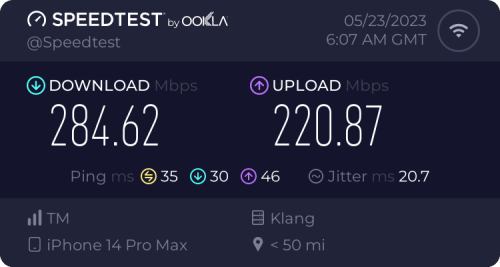
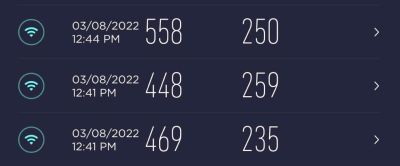
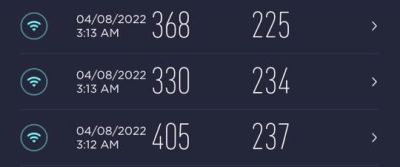
Should be faster.
https://forum.lowyat.net/index.php?showtopi...#entry105043089

user posted image
iPhone 13 Pro 2x2 80Mhz 802.11ax

user posted image
iPhone 6s 2x2 80Mhz 802.11ac

user posted image
iPhone 6 Plus 1x1 80Mhz 802.11ac

westlife
post Jul 1 2023, 05:39 PM

10k Club
********
All Stars
14,241 posts

Joined: Jan 2011
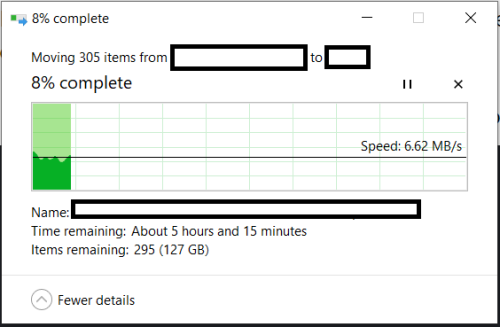
i am facing slow data transfer speeds within the computers in my home wireless LAN. i am using WiFi 5 mesh wireless.

i can get full speed for my 300Mbps unifi plan to Internet.

however, i get super slow speed when I am transferring files between the computers in this network. why is it? I had done all the necessary recommendation from the Internet sources but still the same.

user posted image
blacktubi
post Jul 2 2023, 12:34 PM

-
Group Icon
Elite
8,400 posts

Joined: Jul 2008

QUOTE(westlife @ Jul 1 2023, 05:39 PM)
i am facing slow data transfer speeds within the computers in my home wireless LAN. i am using WiFi 5 mesh wireless.

i can get full speed for my 300Mbps unifi plan to Internet.

however, i get super slow speed when I am transferring files between the computers in this network. why is it? I had done all the necessary recommendation from the Internet sources but still the same.

user posted image
*
SMB file transfer is a TCP protocol and it scales horribly when high latency is involved. Your dual-band system is probably terrible at handling congestion.

Just do a ping test and see how high is your latency when you are transferring files.

Hence, that's why newer mesh Wi-Fi in the market focus less on raw speed but more on congestion management these days.
westlife
post Jul 2 2023, 03:34 PM

10k Club
********
All Stars
14,241 posts

Joined: Jan 2011
QUOTE(blacktubi @ Jul 2 2023, 12:34 PM)
SMB file transfer is a TCP protocol and it scales horribly when high latency is involved. Your dual-band system is probably terrible at handling congestion.

Just do a ping test and see how high is your latency when you are transferring files.

Hence, that's why newer mesh Wi-Fi in the market focus less on raw speed but more on congestion management these days.
*
Mine is Tri-band mesh.
MyProLife
post Jul 2 2023, 05:59 PM

I bully wumao & MPKL
*******
Senior Member
2,073 posts

Joined: Sep 2021
From: nowhere

QUOTE(blacktubi @ Jul 2 2023, 12:34 PM)
SMB file transfer is a TCP protocol and it scales horribly when high latency is involved. Your dual-band system is probably terrible at handling congestion.

Just do a ping test and see how high is your latency when you are transferring files.

Hence, that's why newer mesh Wi-Fi in the market focus less on raw speed but more on congestion management these days.
*
QUOTE(westlife @ Jul 2 2023, 03:34 PM)
Mine is Tri-band mesh.
*
yeah sometimes microsoft also fk up the smb speed in some windows updates recently

are your pc on windows 10 or 11?
westlife
post Jul 2 2023, 06:25 PM

10k Club
********
All Stars
14,241 posts

Joined: Jan 2011
QUOTE(MyProLife @ Jul 2 2023, 05:59 PM)
yeah sometimes microsoft also fk up the smb speed in some windows updates recently

are your pc on windows 10 or 11?
*
Windows 10.
blacktubi
post Jul 2 2023, 08:58 PM

-
Group Icon
Elite
8,400 posts

Joined: Jul 2008

QUOTE(westlife @ Jul 2 2023, 03:34 PM)
Mine is Tri-band mesh.
*
I thought you are using MR8300 with WHW0101?

Anyways, those older mesh are notoriously bad at congestion management which will lead to poor SMB transfer speed.
westlife
post Jul 2 2023, 09:57 PM

10k Club
********
All Stars
14,241 posts

Joined: Jan 2011
QUOTE(blacktubi @ Jul 2 2023, 08:58 PM)
I thought you are using MR8300 with WHW0101?

Anyways, those older mesh are notoriously bad at congestion management which will lead to poor SMB transfer speed.
*
yes, MR8300 with WHW0101.

so somehow it is impossible to improve on the speed? seriously the speed of 7 to 8MB/s to me is way ridiculous and it is way far from the theoritical speed. cry.gif

but funny part is that why i can attain 300Mbps speed to Internet with no prob while transferring files between devices under the same wireless LAN can even be such low speed.
blacktubi
post Jul 2 2023, 10:08 PM

-
Group Icon
Elite
8,400 posts

Joined: Jul 2008

QUOTE(westlife @ Jul 2 2023, 09:57 PM)
yes, MR8300 with WHW0101.

so somehow it is impossible to improve on the speed? seriously the speed of 7 to 8MB/s to me is way ridiculous and it is way far from the theoritical speed.  cry.gif

but funny part is that why i can attain 300Mbps speed to Internet with no prob while transferring files between devices under the same wireless LAN can even be such low speed.
*
I will try to explain it in layman terms.

That's the nature of the SMB protocol. It's latency sensitive as the client need to "revert back" that it received the block before sending another block. A higher latency will slow down the entire process as it takes longer to "revert back".

If your mesh Wi-Fi or router is bad at congestion management, any sort of network activity will spike up the latency significantly. Hence, that will lead to even slower SMB performance.

Perhaps you can try to do a simple ping test to the router when you are copying large files over SMB and see what's the latency.
Hummingbird
post Jul 3 2023, 02:08 PM

Regular
******
Senior Member
1,007 posts

Joined: Nov 2006


QUOTE(blacktubi @ Jul 2 2023, 12:34 PM)
SMB file transfer is a TCP protocol and it scales horribly when high latency is involved. Your dual-band system is probably terrible at handling congestion.

Just do a ping test and see how high is your latency when you are transferring files.

Hence, that's why newer mesh Wi-Fi in the market focus less on raw speed but more on congestion management these days.
*
It also needs to depend on the read/write limit of your local hard disk.
Khan92
post Oct 7 2023, 06:26 PM

To live is to die
****
Junior Member
552 posts

Joined: Aug 2017


Guys quick comparison question:

Dlink Ax3000 vs TPlink Ax73.

in term of overall which one is better?
blacktubi
post Oct 8 2023, 08:05 PM

-
Group Icon
Elite
8,400 posts

Joined: Jul 2008

QUOTE(Khan92 @ Oct 7 2023, 06:26 PM)
Guys quick comparison question:

Dlink Ax3000 vs TPlink Ax73.

in term of overall which one is better?
*
Don't even talk about overall.

There's nothing the free D-Link AX3000 is better than TP-Link Archer AX73.

The AX73 is better at the CPU performance, Wi-Fi range, Wi-Fi performance, features.

20 Pages « < 16 17 18 19 20 >Top
 

Change to:
| Lo-Fi Version
0.0404sec    0.59    6 queries    GZIP Disabled
Time is now: 2nd December 2025 - 06:35 AM