Welcome Guest ( Log In | Register )

302 Pages « < 47 48 49 50 51 > » Bottom

Outline · [ Standard ] · Linear+

Home Networking WiFi Router Discussion Thread, Updated for 2023

views
     
SilentVampire
post Jun 17 2019, 04:45 PM

Networking Enthusiast
*******
Senior Member
5,714 posts

Joined: Mar 2007


QUOTE(Jason @ Jun 17 2019, 04:09 PM)
That means no VOIP phone? Sorry not sure what's the purpose of VLAN profile, do explain.
*
VLAN tagging are required for Maxis and Unifi to work as they implement VLAN tagging, so if not VLAN profile, you might not be able to implement VLAN tagging, therefore router can't work for both Unifi and Maxis.

Jason
post Jun 17 2019, 05:07 PM

Look at all my stars!!
*******
Senior Member
6,354 posts

Joined: Jan 2003
QUOTE(SilentVampire @ Jun 17 2019, 04:45 PM)
VLAN tagging are required for Maxis and Unifi to work as they implement VLAN tagging, so if not VLAN profile, you might not be able to implement VLAN tagging, therefore router can't work for both Unifi and Maxis.
*
lol. FML then. i'll report back.
chrisnly
post Jun 17 2019, 11:21 PM

New Member
*
Junior Member
16 posts

Joined: Oct 2008


QUOTE(blacktubi @ Jun 17 2019, 01:46 AM)
1. Transmit power is limited in the CFE. Flashing any firmware doesn't make any difference. Same reason to why China ASUS router always default to Chinese language no matter what firmware is flashed.

user posted image

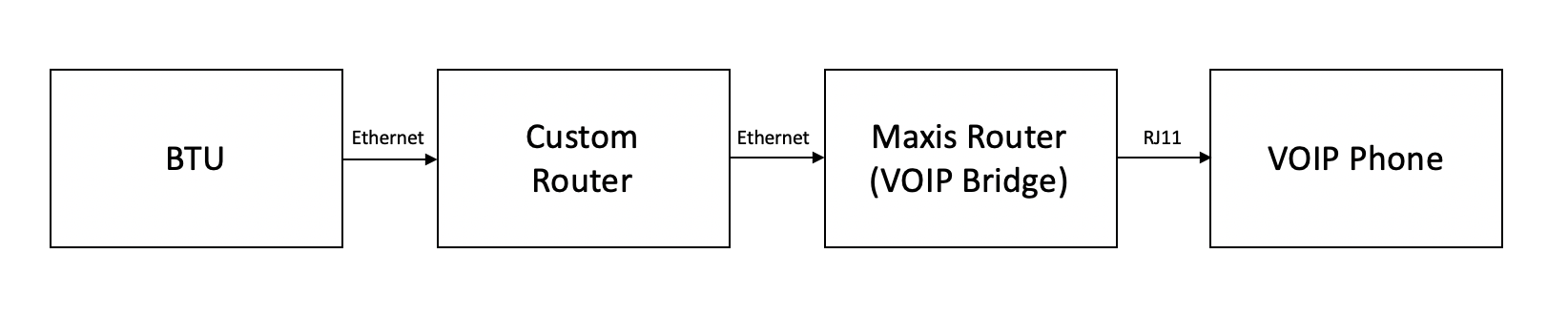
2. For ASUS Maxis use case, they will retain the old router as just a VOIP bridge. All routing is handled by ASUS router. Refer to my image above.

3. For TP-Link, if you wish to retain VOIP, you will need to use the C5V before the custom router which is counter intuitive.

Edit: Newer batches of China ASUS router may not come with VLAN profile now.
*
Refered to your comment no3 is not true. I bought a TP Link Archer A9 last week and it's so easy to setup the VOIP ..it comes with all ISP preloaded VLAN profile for TM and especially Maxis. It's just took me 5 minutes to setup and now Archer A9 as a main router and Maxis C5v as VOIP router. Surprisingly I don't even need to change any setting in the Maxis C5v router, everything just plug and play..
TSblacktubi
post Jun 18 2019, 12:51 AM

-
Group Icon
Elite
8,408 posts

Joined: Jul 2008

QUOTE(chrisnly @ Jun 17 2019, 11:21 PM)
Refered to your comment no3 is not true. I bought a TP Link Archer A9 last week and it's so easy to setup the VOIP ..it comes with all ISP preloaded VLAN profile for TM and especially Maxis. It's just took me 5 minutes to setup and now Archer A9 as a main router and Maxis C5v as VOIP router. Surprisingly I don't even need to change any setting in the Maxis C5v router, everything just plug and play..
*
Thanks for the input. I just tested last week with TP-Link Archer A7 and Archer A6 on a friend's property. Both are not working. Although there's dial tone on the VOIP phone, we cant phone or receive call.

Swapped to my own RT-AC86U and it works .

Another user on Maxis thread reported this issue as well. Example

Can you verify you actually got VOIP working and not just dial tone? Please report the firmware version and which VLAN profile you use. A screenshot will be helpful.

EDIT: This installation come with NETIS router and Huawei HG8240 ONU. Fibre installation.

This post has been edited by blacktubi: Jun 18 2019, 12:54 AM
chrisnly
post Jun 18 2019, 05:19 PM

New Member
*
Junior Member
16 posts

Joined: Oct 2008


QUOTE(blacktubi @ Jun 18 2019, 01:51 AM)
Thanks for the input. I just tested last week with TP-Link Archer A7 and Archer A6 on a friend's property. Both are not working. Although there's dial tone on the VOIP phone, we cant phone or receive call.

Swapped to my own RT-AC86U and it works .

Another user on Maxis thread reported this issue as well. Example

Can you verify you actually got VOIP working and not just dial tone? Please report the firmware version and which VLAN profile you use. A screenshot will be helpful.

EDIT: This installation come with NETIS router and Huawei HG8240 ONU. Fibre installation.
*
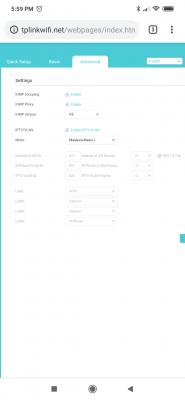
Update to the latest firmware ( month of May 2019) Use the original preinstall maxis profile. Don't do custom profile . It works on my Archer A9 router.

TSblacktubi
post Jun 18 2019, 05:26 PM

-
Group Icon
Elite
8,408 posts

Joined: Jul 2008

QUOTE(chrisnly @ Jun 18 2019, 05:19 PM)
Update to the latest firmware ( month of May 2019) Use the original preinstall maxis profile. Don't do custom profile . It works on my Archer A9 router.
*
Yup, I used the provided profile for both A6 and A7 and it is non functioning.

Mind to share a screenshot of the profile page?
chrisnly
post Jun 18 2019, 06:00 PM

New Member
*
Junior Member
16 posts

Joined: Oct 2008


QUOTE(blacktubi @ Jun 18 2019, 06:26 PM)
Yup, I used the provided profile for both A6 and A7 and it is non functioning.

Mind to share a screenshot of the profile page?
*


Attached thumbnail(s)
Attached Image
abcn1n
post Jun 18 2019, 06:20 PM

Look at all my stars!!
*******
Senior Member
2,379 posts

Joined: Sep 2017
Am using TP-link MR400. But only have 1 bar signal (both inside and outside house regardless of which telco I use). Is there anyway I can increase the bar signals to 2 or 3 ?

This post has been edited by abcn1n: Jun 18 2019, 06:22 PM
watabakiu
post Jun 18 2019, 09:11 PM

Regular
******
Senior Member
1,572 posts

Joined: Oct 2015
I am using stock hardware provided by TM. Question is, how do I check the websites accessed by users in my households?
BZP
post Jun 19 2019, 08:55 PM

New Member
*
Newbie
10 posts

Joined: Feb 2012
hi, currently my Maxis upgraded to 300Mbps package.

current device is :
BTU : TM ONU Alcatel Lucent I240G
Maxis Router : Archer c5v with VoIP

these device can tahan 300Mbps? need call Maxis ppl upgrade?


another thing is i plan to get tplink Archer A6 / tenda AC10u as AP for my house 2nd floor. (got ethernet outlet)
No problem right? or got any better advice?


SilentVampire
post Jun 20 2019, 08:02 AM

Networking Enthusiast
*******
Senior Member
5,714 posts

Joined: Mar 2007


QUOTE(BZP @ Jun 19 2019, 08:55 PM)
hi, currently my Maxis upgraded to 300Mbps package.

current device is :
BTU :  TM ONU Alcatel Lucent I240G
Maxis Router : Archer c5v with VoIP

these device can tahan 300Mbps? need call Maxis ppl upgrade?
another thing is i plan to get tplink Archer A6 / tenda AC10u as AP for my house 2nd floor. (got ethernet outlet)
No problem right? or got any better advice?
*
Yes, these should be able to support 300Mbps, and the router you suggested as an AP should be able to do it too, but all these can only support 300Mbps on 5GHz AC, so keep that in mind.
Kenneth Vong P
post Jun 20 2019, 02:18 PM

New Member
*
Probation
1 posts

Joined: Jun 2019
QUOTE(leezhijiang @ Oct 16 2018, 08:23 AM)
This is how I setup for my house la.

1. Install AC86U at the living room.
2. Buy D26G Mercury Router and connect to AC88U via WDS. You may connect your PC to D26G via LAN cable.
3. If you have remaining routers just set them up as repeaters.
Everything bought from Taobao.

AC88U : RM 542  AC2600 rating
D26G: Mercury Router RM 180  AC2600 rating

If you have more budget can buy more D26G and setup around the house and place beside your work station or buy Asus AC68U and setup as Media Bridge.

not include shipping fees yet. The setup above is already adequate

I have tried the setup above, able to achieve 300 Mbps ++
*
Hi,

I recently bought a Mercury D26G router from China. I saw your forum there that you have configured this D26G router at your house.

This router only has Chinese firmware. I tried to configure the router key in ID and password to dial up Unifi but sadly it wouldn't work, I have contacted the seller and Unifi (release mac address for old router too) but it still can't connect.

I need your advice on how to set up the D26G router, is there has any special way to configure or other setting need to change.

Thanks
Kenneth



TSblacktubi
post Jun 23 2019, 01:47 PM

-
Group Icon
Elite
8,408 posts

Joined: Jul 2008

QUOTE(Kenneth Vong @ Jun 20 2019, 02:18 PM)
Hi,

I recently bought a Mercury D26G router from China. I saw your forum there that you have configured this D26G router at your house.

This router only has Chinese firmware. I tried to configure the router key in ID and password to dial up Unifi but sadly it wouldn't work, I have contacted the seller and Unifi (release mac address for old router too) but it still can't connect.

I need your advice on how to set up the D26G router, is there has any special way to configure or other setting need to change.

Thanks
Kenneth
*
No, it will not support Unifi as it doesn't support VLAN.
Jason
post Jun 25 2019, 11:24 AM

Look at all my stars!!
*******
Senior Member
6,354 posts

Joined: Jan 2003
QUOTE(blacktubi @ Jun 17 2019, 12:46 AM)
1. Transmit power is limited in the CFE. Flashing any firmware doesn't make any difference. Same reason to why China ASUS router always default to Chinese language no matter what firmware is flashed.

user posted image

2. For ASUS Maxis use case, they will retain the old router as just a VOIP bridge. All routing is handled by ASUS router. Refer to my image above.

3. For TP-Link, if you wish to retain VOIP, you will need to use the C5V before the custom router which is counter intuitive.

Edit: Newer batches of China ASUS router may not come with VLAN profile now.
*
I am happy to confirm that 2019 manufactured China ASUS router does not come with VLAN profile. FML

Question, am I able to get a wired router, e.g. Mikrotik? and use that (so I can throw the original Maxis router in the bin) and use that to do the routing/VLAN profile/PPPOE, and link it to the AC86U for the wireless connectivity?

Which is the cheapest most stable wired router? Any model to recommend?

EDIT

This post has been edited by Jason: Jun 25 2019, 11:50 AM
Gaza
post Jun 25 2019, 02:38 PM

Casual
***
Junior Member
483 posts

Joined: Jan 2003
From: Petaling Jaya
Hi

I'm on Unifi 800 mbps, currently using stock TP Link C1200 router but Wifi does not reach some areas of my house even on 2.4G.
Thinking of upgrading to TP Link C3150. Is this the best value for its price range around or are there other routers i should consider? Budget <1k

Thanks
Zot
post Jun 25 2019, 02:54 PM

Look at all my stars!!
*******
Senior Member
7,938 posts

Joined: Mar 2014
QUOTE(Gaza @ Jun 25 2019, 02:38 PM)
Hi

I'm on Unifi 800 mbps, currently using stock TP Link C1200 router but Wifi does not reach some areas of my house even on 2.4G.
Thinking of upgrading to TP Link C3150. Is this the best value for its price range around or are there other routers i should consider? Budget <1k

Thanks
*
If you look at this comparison the reviewer gave better rating on Asus RT-AC68U.

https://www.cnet.com/reviews/tp-link-archer...-router-review/

I use Asus AC5300 and it has no problem on any corner of my 2 storey house. Can get at least around 200Mbps connection even on 5GHz if I remember it right. Use to be much higher price but now I check it is now within your budget.

You can use other Asus and if not that good can add another Asus to configure as mesh network. I know Asus can do by upgrading firmware from Asus but not sure if others have offer this capability yet.

https://iprice.my/compare/asus-rt-ac5300/

This post has been edited by Zot: Jun 25 2019, 02:56 PM
TSblacktubi
post Jun 25 2019, 03:10 PM

-
Group Icon
Elite
8,408 posts

Joined: Jul 2008

QUOTE(Gaza @ Jun 25 2019, 02:38 PM)
Hi

I'm on Unifi 800 mbps, currently using stock TP Link C1200 router but Wifi does not reach some areas of my house even on 2.4G.
Thinking of upgrading to TP Link C3150. Is this the best value for its price range around or are there other routers i should consider? Budget <1k

Thanks
*
If you got such a high budget, maybe you can consider the ASUS RT-AC86U.

One of the best router around but make sure you buy local unit.
Gaza
post Jun 25 2019, 03:40 PM

Casual
***
Junior Member
483 posts

Joined: Jan 2003
From: Petaling Jaya
Thanks guys. I'll check out the Asus AC86. Is the extra RM300-400 translate into better performance vs the TP Link?
TSblacktubi
post Jun 25 2019, 04:09 PM

-
Group Icon
Elite
8,408 posts

Joined: Jul 2008

QUOTE(Gaza @ Jun 25 2019, 03:40 PM)
Thanks guys. I'll check out the Asus AC86. Is the extra RM300-400 translate into better performance vs the TP Link?
*
The RT-AC86U comes with a faster 1.8Ghz Dual Core processor and uses a newer Broadcom wireless chipset (BCM4366E) with better MU-MIMO support.

Expect better WiFi coverage than the C3150.
Gaza
post Jun 26 2019, 11:51 PM

Casual
***
Junior Member
483 posts

Joined: Jan 2003
From: Petaling Jaya
QUOTE(Gaza @ Jun 25 2019, 03:40 PM)
Thanks guys. I'll check out the Asus AC86. Is the extra RM300-400 translate into better performance vs the TP Link?
*
After reading up on it and checking the dimensions, the router is not gonna fit my shelf cause without antenna is already 6” height and my shelf can only fit router 7” height. 😅 So need to find a router with more conventional shape. Or should i use it without antenna? Unfortunately can’t really place it anywhere else...

So i should get the Asus AC68 instead? Any other model worth considering since the AC68 sounds like it’s already a few years old or it’s still a good router at this stage?

302 Pages « < 47 48 49 50 51 > » Top
 

Change to:
| Lo-Fi Version
0.0223sec    0.44    6 queries    GZIP Disabled
Time is now: 6th December 2025 - 02:05 PM