Welcome Guest ( Log In | Register )

Outline · [ Standard ] · Linear+

Home Networking WiFi Router Discussion Thread, Updated for 2023

views
     
Gaza
post Jun 25 2019, 02:38 PM

Casual
***
Junior Member
483 posts

Joined: Jan 2003
From: Petaling Jaya
Hi

I'm on Unifi 800 mbps, currently using stock TP Link C1200 router but Wifi does not reach some areas of my house even on 2.4G.
Thinking of upgrading to TP Link C3150. Is this the best value for its price range around or are there other routers i should consider? Budget <1k

Thanks
Gaza
post Jun 25 2019, 03:40 PM

Casual
***
Junior Member
483 posts

Joined: Jan 2003
From: Petaling Jaya
Thanks guys. I'll check out the Asus AC86. Is the extra RM300-400 translate into better performance vs the TP Link?
Gaza
post Jun 26 2019, 11:51 PM

Casual
***
Junior Member
483 posts

Joined: Jan 2003
From: Petaling Jaya
QUOTE(Gaza @ Jun 25 2019, 03:40 PM)
Thanks guys. I'll check out the Asus AC86. Is the extra RM300-400 translate into better performance vs the TP Link?
*
After reading up on it and checking the dimensions, the router is not gonna fit my shelf cause without antenna is already 6” height and my shelf can only fit router 7” height. 😅 So need to find a router with more conventional shape. Or should i use it without antenna? Unfortunately can’t really place it anywhere else...

So i should get the Asus AC68 instead? Any other model worth considering since the AC68 sounds like it’s already a few years old or it’s still a good router at this stage?
Gaza
post Jul 1 2019, 11:15 PM

Casual
***
Junior Member
483 posts

Joined: Jan 2003
From: Petaling Jaya
Ended up getting the Asus AC86U since ALL IT had it for RM999 but had to put it next to my TV instead of in the cabinet. Speeds are 3x faster than my old router and coverage is much better compared to my old router. I'm also quite impressed with the band steering/smart connect so now i don't have to manually select 2.4ghz/5ghz and the router will automatically select the best one since you can choose to only have 1 wifi network instead of separate 2.4ghz/5ghz.

Do older routers like the Asus AC68U have (reliable) band steering as well? Thinking of getting 2 for my parents house so can do the AI Mesh thing.
Gaza
post Nov 1 2020, 12:58 PM

Casual
***
Junior Member
483 posts

Joined: Jan 2003
From: Petaling Jaya
for unifi 300 mbps & double storey bungalow is deco m4 or deco m9 better? planning to add on for my parents house
Gaza
post Nov 1 2020, 12:59 PM

Casual
***
Junior Member
483 posts

Joined: Jan 2003
From: Petaling Jaya
edit double post

This post has been edited by Gaza: Nov 1 2020, 12:59 PM
Gaza
post Feb 2 2021, 06:53 PM

Casual
***
Junior Member
483 posts

Joined: Jan 2003
From: Petaling Jaya
I am thinking of changing my stock TM router to Deco M9. Need extra LAN ports for CCTV and all so will get a network switch for the extra ports. But will i lose ability to watch Hypptv after this or does it work ok with network switch? Not a deal breaker, just thought better to know the facts up front.
Gaza
post Feb 2 2021, 10:03 PM

Casual
***
Junior Member
483 posts

Joined: Jan 2003
From: Petaling Jaya
QUOTE(FusionXY @ Feb 2 2021, 08:04 PM)
You can follow Blacktubi advise here to use more ports on your setup here.
*
Unfortunately in the comments Blacktubi says this method no longer works cry.gif
Gaza
post Feb 3 2021, 06:26 PM

Casual
***
Junior Member
483 posts

Joined: Jan 2003
From: Petaling Jaya
QUOTE(cannavaro @ Feb 3 2021, 12:45 AM)
I am using Deco M5 with TL-SG108E v5.0
After configuring it to be used with unifi white stb, there are 4 free working ports.

Guide here (this is a different model but it's easy to figure it out)
https://ahot.home.blog/2019/03/04/tm-unifi-...any-router-1-2/

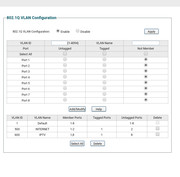
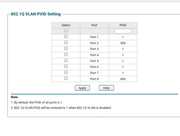
My only issue is, if I turn off or put my STB in standby mode long enough,  upon turning it on again the unifi playtv won't work.. black screen but EPG viewable (multicast fail). I managed to get it to work again by merely power cycling the STB, but somehow that only worked once! Could not repeat it again despite numerous tries. The working solution for me is to reboot the ONU.
user posted image
user posted image
*
Need to use smart switch with VLAN capable only can use Hypptv is it? If those normal unmanaged switch probably cannot?
Gaza
post Feb 4 2021, 09:23 AM

Casual
***
Junior Member
483 posts

Joined: Jan 2003
From: Petaling Jaya
QUOTE(soonwai @ Feb 3 2021, 07:02 PM)
Yeah cause it needs to be able to split the vlans to separate ports. Normal dumb switch cannot do that. Alternatively you can also look for 2nd hand routers that can handle vlans but which people dun want already because it is too slow as a router. I bought a few Mikrotik RB750GL for RM50 about a year or 2 ago. It’s got 5 gigabit ports and handles vlans just fine.
*
I see, thanks
Gaza
post Dec 7 2022, 11:22 PM

Casual
***
Junior Member
483 posts

Joined: Jan 2003
From: Petaling Jaya
Hi everyone. I'm currently using unifi 300mbps and my router is located at the red X and i find the connection is not strong at the back room/back toilet at the yellow X. Currently i'm using Asus RT-AC86U router and generally i'm happy with the performance of the it but since its been a few years and i'm thinking of upgrading my router.

Assuming i dont change the location of the router,
1. If i get mesh will it help my wifi coverage? And where would be the ideal location of the mesh unit? Previously i thought mesh more applicable for multi storey houses but i see some ppl recommend for larger single floor units like condo as well.
2. Since i play online shooters (my PC is in the back room with the yellow X) quite often will mesh be worse performance for gaming than gaming router? Is the trade off for better coverage worth it?

Edit: Please recommend router budget RM1k or below, thanks.
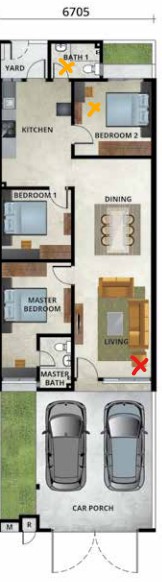
user posted image

This post has been edited by Gaza: Dec 8 2022, 10:58 AM

 

Change to:
| Lo-Fi Version
0.0285sec    0.28    7 queries    GZIP Disabled
Time is now: 7th December 2025 - 07:00 AM