Welcome Guest ( Log In | Register )

Outline · [ Standard ] · Linear+

Home Networking WiFi Router Discussion Thread, Updated for 2023

views
     
Jason
post Jun 16 2019, 02:36 AM

Look at all my stars!!
*******
Senior Member
6,354 posts

Joined: Jan 2003
Have experience using TP Link Archer C7 with Unifi 100mbps. Good performance, lousy range, stable.

Today installed Maxis 30 mbps fiber and they gave TP Link Archer C5v... biggest problem is it’s unstable. Will disconnect after a while. Want to upgrade.

What’s a good WiFi router with good range. Budget around RM600~700

Asus RT-AC86U good choice?
Or the TP Link AC2300?

Which has better range and stability.
Jason
post Jun 16 2019, 09:57 AM

Look at all my stars!!
*******
Senior Member
6,354 posts

Joined: Jan 2003
QUOTE(SilentVampire @ Jun 16 2019, 08:58 AM)
Asus RT-AC86U, but for your budget, just go for the TP-Link AC2300.
*
For me the Asus RT-AC86U is cheaper than the TP-Link AC2300.

So it’s within budget. Still buy TP-Link?
Jason
post Jun 16 2019, 11:19 AM

Look at all my stars!!
*******
Senior Member
6,354 posts

Joined: Jan 2003
QUOTE(SilentVampire @ Jun 16 2019, 10:56 AM)
If the Asus RT-AC86U is not from China and have local warranty, go for it. If not, I would suggest the TP-Link.
*
It is. What’s the issue with China units? Do share your insight.
Jason
post Jun 16 2019, 01:30 PM

Look at all my stars!!
*******
Senior Member
6,354 posts

Joined: Jan 2003
QUOTE(SilentVampire @ Jun 16 2019, 12:31 PM)
If you see this thread here: https://forum.lowyat.net/topic/4399963/+760, many people said that there are issues with China units, so up to you.
*
Thanks for pointing to that topic. Seems that local units affected too. With so many units dying, it’s the opposite of stable.

Guess the TP Link AC2300 is the way to go.
Jason
post Jun 16 2019, 10:17 PM

Look at all my stars!!
*******
Senior Member
6,354 posts

Joined: Jan 2003
QUOTE(FusionXY @ Jun 16 2019, 02:53 PM)
Hi, C2300 is definitely the best choice for your case.
Are you using both Maxis and Unifi?
Or which?

If Maxis, need to reuse old router for VOIP.
Just disable Wi-Fi connection on the main router.
If not using, then use C2300 as main router.

Thanks.
*
I am using Maxis Fiber in this case.


QUOTE(blacktubi @ Jun 16 2019, 02:54 PM)
RT-AC86U is one of the consumer routers with the best range in the market right now. Ranked top 5 on SNB.

But make sure you buy local unit. China version are cheaper for a reason. Their transmit power is limited.
Please correct your post.

All TP-Link routers do not support Maxis VOIP on router mode.

Only ASUS routers offer full Maxis VOIP for now.
*
Question, I thought the Asus RT-AC86U have international firmware, and the transmit power is dependent on the region set?

Also, when you say ASUS routers offer full Maxis VOIP (and TP-Link doesn't), does it mean the ASUS can completely replace the Maxis TP-Link C5v router? I think its pretty redundant if I still need to keep the original router which sucks.

Jason
post Jun 17 2019, 04:09 PM

Look at all my stars!!
*******
Senior Member
6,354 posts

Joined: Jan 2003
QUOTE(blacktubi @ Jun 17 2019, 12:46 AM)
Edit: Newer batches of China ASUS router may not come with VLAN profile now.
*
That means no VOIP phone? Sorry not sure what's the purpose of VLAN profile, do explain.
Jason
post Jun 17 2019, 05:07 PM

Look at all my stars!!
*******
Senior Member
6,354 posts

Joined: Jan 2003
QUOTE(SilentVampire @ Jun 17 2019, 04:45 PM)
VLAN tagging are required for Maxis and Unifi to work as they implement VLAN tagging, so if not VLAN profile, you might not be able to implement VLAN tagging, therefore router can't work for both Unifi and Maxis.
*
lol. FML then. i'll report back.
Jason
post Jun 25 2019, 11:24 AM

Look at all my stars!!
*******
Senior Member
6,354 posts

Joined: Jan 2003
QUOTE(blacktubi @ Jun 17 2019, 12:46 AM)
1. Transmit power is limited in the CFE. Flashing any firmware doesn't make any difference. Same reason to why China ASUS router always default to Chinese language no matter what firmware is flashed.

user posted image

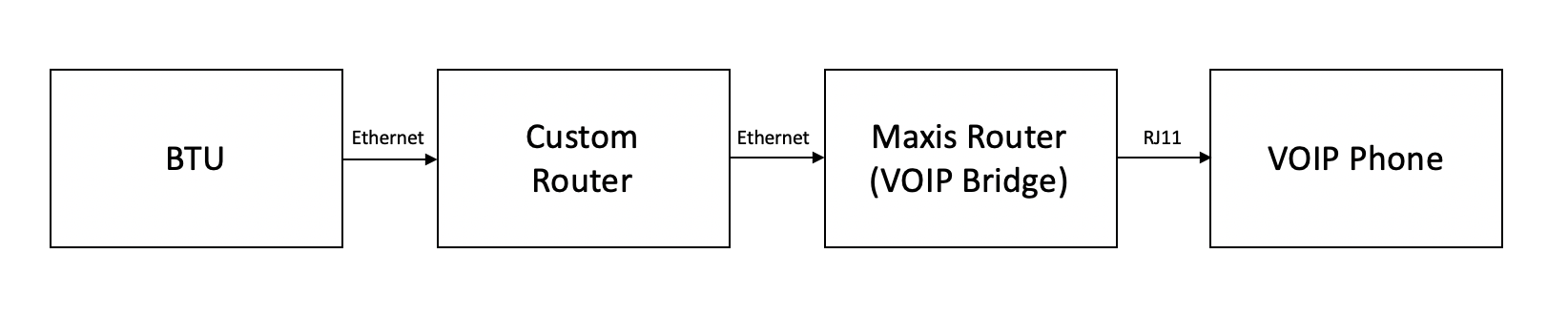
2. For ASUS Maxis use case, they will retain the old router as just a VOIP bridge. All routing is handled by ASUS router. Refer to my image above.

3. For TP-Link, if you wish to retain VOIP, you will need to use the C5V before the custom router which is counter intuitive.

Edit: Newer batches of China ASUS router may not come with VLAN profile now.
*
I am happy to confirm that 2019 manufactured China ASUS router does not come with VLAN profile. FML

Question, am I able to get a wired router, e.g. Mikrotik? and use that (so I can throw the original Maxis router in the bin) and use that to do the routing/VLAN profile/PPPOE, and link it to the AC86U for the wireless connectivity?

Which is the cheapest most stable wired router? Any model to recommend?

EDIT

This post has been edited by Jason: Jun 25 2019, 11:50 AM
Jason
post Oct 2 2024, 10:35 AM

Look at all my stars!!
*******
Senior Member
6,354 posts

Joined: Jan 2003
100mbps unifi plan
Objective is coverage since any decent router can handle 100mbps these days. < 10 devices in total. Landed semi d.

Should I buy
1x AX55 to use as main router, and the original unifi DLINK 3060z as mesh node?

Or get a DLINK 3000z as a node using the 3060z as main router?

And I have to say ASUS AC86U is yyds.. using in my own place since 2019…

Jason
post Oct 2 2024, 10:54 AM

Look at all my stars!!
*******
Senior Member
6,354 posts

Joined: Jan 2003
QUOTE(blacktubi @ Oct 2 2024, 10:45 AM)
I will suggest not to cross brand EasyMesh, save yourself some headache in future

Crossing brands will be prone to roaming, speed drop and a bunch of other issues

And, I will stay away from using the provided router too, it's kinda slow
*
Anything from DLINK can use as master? And reuse original router as node?
Jason
post Oct 15 2024, 07:09 PM

Look at all my stars!!
*******
Senior Member
6,354 posts

Joined: Jan 2003
100mbps unifi
House is big so problem is coverage not speed

Which mesh to buy to pair with this fiberhome router? Goal is spend the least amount of money…
Attached Image
Jason
post Oct 17 2024, 08:21 AM

Look at all my stars!!
*******
Senior Member
6,354 posts

Joined: Jan 2003
QUOTE(Omochao @ Oct 15 2024, 09:03 PM)
Get a used router mesh, tp link will be your best option to hunt for. Since is a 100mbps unifi, then better get Wifi6 AX1800 rated.

How big is your house? 1.4ksqft? 3ksqft? Im staying in a double storey semi-d, 3 nodes altogether. Upper floor I have to use a cat5e backhaul to it. Set the router as AP, and enough to cover the upper floor 3 rooms.
*
Thanks for the tip. Place is 3k++ sqft bu detached

Went with a 3 pack WiFi 5 triple antenna mesh… fingers crossed it’ll work.

Ethernet back haul challenging. In any case don’t need high speed for rest of house. Can get min 30mbps enough already.


Change to:
| Lo-Fi Version
0.0212sec    0.43    7 queries    GZIP Disabled
Time is now: 7th December 2025 - 10:18 AM