Welcome Guest ( Log In | Register )

301 Pages « < 44 45 46 47 48 > » Bottom

Outline · [ Standard ] · Linear+

Home Networking WiFi Router Discussion Thread, Updated for 2023

views
     
paradiseisland8
post May 24 2019, 11:14 AM

Getting Started
**
Junior Member
278 posts

Joined: May 2018
Hi on blacktubi tp-link a9 review it says " It has 3 non-removable external antennas and an additional 4th antennas inside for the 2.4Ghz band.", does it mean the external antennas only used for 5g wifi? Do they extend the range of 2.4g wifi?
OOKAS
post May 24 2019, 12:04 PM

New Member
*
Newbie
47 posts

Joined: Sep 2012
From: South City Plaza
QUOTE(paradiseisland8 @ May 24 2019, 11:14 AM)
Hi on blacktubi tp-link a9 review it says " It has 3 non-removable external antennas and an additional 4th antennas inside for the 2.4Ghz band.", does it mean the external antennas only used for 5g wifi? Do they extend the range of 2.4g wifi?
*
That 3 antennas are dual band (2.4Ghz + 5Ghz)
TSblacktubi
post May 24 2019, 10:19 PM

-
Group Icon
Elite
8,405 posts

Joined: Jul 2008

QUOTE(paradiseisland8 @ May 24 2019, 11:14 AM)
Hi on blacktubi tp-link a9 review it says " It has 3 non-removable external antennas and an additional 4th antennas inside for the 2.4Ghz band.", does it mean the external antennas only used for 5g wifi? Do they extend the range of 2.4g wifi?
*
Those are dual band antennas.

Separating antennas for each band don't make it better and more antennas doesn't mean it is better either. Common misconception in WiFi router.
andrew9292
post May 27 2019, 07:44 PM

-/Livin' On A Prayer/-
*****
Senior Member
955 posts

Joined: Sep 2008
From: Petaling Jaya


Hi all! Need recommendation or advise for 100Mbps (Maxis) @ 2-story home about 2000sq-ft. Current router stock TP-Link C5v, installed at ground floor living hall - wired LAN connection no problem

Problem:
- Not enough wireless bandwidth and stability due to media heavy usage. 11 device minimum simultaneously, up to 20+ at max

A. Current router 2.4Ghz band can only max 40Mbps despite standing right in front of router
B. 5Ghz band max 90Mbps on ground floor, 60Mbps at 1st floor common hall, 25Mbps in bedrooms. Also, 5Ghz frequent dc anywhere on first floor

Looking for:
1. Advise on 5Ghz range & speed: Is it technically possible full 100Mbps be achieved at 1st floor on our setup? So far, heard from many to forget about 5Ghz unless somewhat line-of-sight or door-less rooms
2. Budget about 500 - 800, should I: Get a router or get a wireless mesh setup?
3. Good router / wifi mesh recommendation within budget? Also, recommendations to consider (out of budget)?

This post has been edited by andrew9292: May 27 2019, 07:54 PM
FusionXY
post May 27 2019, 07:55 PM

LAZZIE ON VACATION
*******
Senior Member
3,834 posts

Joined: Aug 2016

QUOTE(andrew9292 @ May 27 2019, 07:44 PM)
Hi all! Need recommendation or advise for 100Mbps (Maxis) @ 2-story home about 2000sq-ft. Current router stock TP-Link C5v, installed at ground floor living hall - wired LAN connection no problem

Problem:
- Not enough wireless bandwidth and stability

A. Current router 2.4Ghz band can only max 40Mbps despite standing right in front of router
B. 5Ghz band max 90Mbps on ground floor, 60Mbps at 1st floor common hall, 25Mbps in bedrooms. Also, 5Ghz frequent dc anywhere on first floor

Looking for:
1. Advise on 5Ghz range & speed: Is it technically possible full 100Mbps be achieved at 1st floor on our setup? So far, heard from many friends to forget about 5Ghz unless somewhat line-of-sight or door-less rooms
2. Budget about 500 - 800, should I: Get a router or try a wireless mesh setup?
3. Good router / wifi mesh recommendation within budget? Also, recommendations to consider (out of budget)?
*
Hi, I would like to recommend you TP-Link Deco M5 ( 3 pack ) to suit your case.
Or you can get TP-Link C2300.
Since you're using Maxis. Are you using VOIP?
If yes, need to use back existing router for VOIP and set new router as an Access Point ( AP ).
You can get from OOKAS in Laada.

Thanks.

andrew9292
post May 27 2019, 08:24 PM

-/Livin' On A Prayer/-
*****
Senior Member
955 posts

Joined: Sep 2008
From: Petaling Jaya


QUOTE(FusionXY @ May 27 2019, 07:55 PM)
Hi, I would like to recommend you TP-Link Deco M5 ( 3 pack ) to suit your case.
Or you can get TP-Link C2300.
Since you're using Maxis. Are you using VOIP?
If yes, need to use back existing router for VOIP and set new router as an Access Point ( AP ).
You can get from OOKAS in Laada.

Thanks.
*
Thanks for recommending, i've read a bit about this and considering. Do you know if:

1. My understanding, for some devices that do not have '2.4G only' or '5G only' setting, those devices cannot force band and will depend entirely on the M5 Mesh band steering, is that correct? And is this due to only single SSID visible?

2. If i set a device that can setting to either 'only 2.4G' or 'only 5G', the Mesh will still be visible and Mesh will accept the band required by client, is that it? Or will it be invinsible if it thinks that the particular device shouldnt be on that band?

This post has been edited by andrew9292: May 27 2019, 08:39 PM
FusionXY
post May 27 2019, 08:48 PM

LAZZIE ON VACATION
*******
Senior Member
3,834 posts

Joined: Aug 2016

QUOTE(andrew9292 @ May 27 2019, 08:24 PM)
Thanks for recommending, i've read a bit about this and considering. Do you know if:

1. My understanding, for some devices that do not have '2.4G only' or '5G only' setting, those devices cannot force band and will depend entirely on the M5 Mesh band steering, is that correct? And is this due to only single SSID visible?

2. If i set a device that can setting to either 'only 2.4G' or 'only 5G', the Mesh will still be visible and Mesh will accept the band required by client, is that it? Or will it be invinsible if it thinks that the particular device shouldnt be on that band?
*
Hi, Deco Mesh Wi-Fi systems have a single SSID.

If device supports 5GHz will connect to 5GHz band automatically if it is near the Deco node.
If further away will connect to 2.4GHz. Receiving will connect to the best band on the Deco node.

Thanks.
andrew9292
post May 27 2019, 10:53 PM

-/Livin' On A Prayer/-
*****
Senior Member
955 posts

Joined: Sep 2008
From: Petaling Jaya


QUOTE(FusionXY @ May 27 2019, 08:48 PM)
Hi, Deco Mesh Wi-Fi systems have a single SSID.

If device supports 5GHz will connect to 5GHz band automatically if it is near the Deco node.
If further away will connect to 2.4GHz. Receiving will connect to the best band on the Deco node.

Thanks.
*
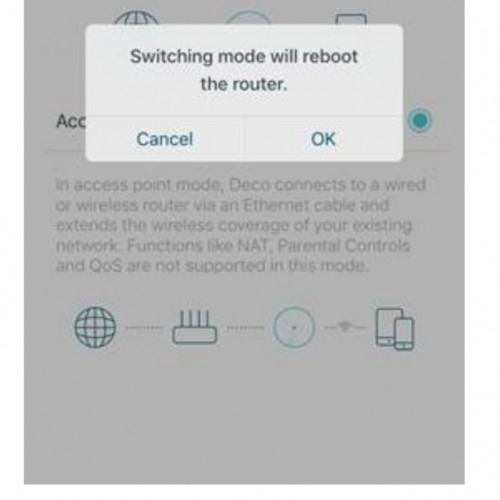
Thanks! Also want to ask, in AP mode, there must be first M5 connect to Maxis router with Lan cable?

What about the other two M5? In 3 pack, do all three M5 need to be connect with Lan cable or only the first M5?

user posted image

This post has been edited by andrew9292: May 27 2019, 10:59 PM
FusionXY
post May 27 2019, 11:12 PM

LAZZIE ON VACATION
*******
Senior Member
3,834 posts

Joined: Aug 2016

QUOTE(andrew9292 @ May 27 2019, 10:53 PM)
Thanks! Also want to ask, in AP mode, there must be first M5 connect to Maxis router with Lan cable?

What about the other two M5? In 3 pack, do all three M5 need to be connect with Lan cable or only the first M5?

user posted image
*
Hi, only the first M5 connect with LAN Cable.

The rest need to pair with Bluetooth Connection.
The other two can use LAN Cable connection to get full speed due to Wi-Fi interference.

Thanks.
Hou_JaI
post Jun 2 2019, 10:32 AM

Regular
******
Senior Member
1,129 posts

Joined: Jan 2003


just managed to install Archer c9 and from my phone can reach 500 mbps. but on my desktop which is using a wifi dongle, tplink t4uh, it only can reach 250/300 mbps ...

do i need to upgrade the dongle to t9uh which is ac1900?

archer c9 is ac1900...
FusionXY
post Jun 2 2019, 11:35 AM

LAZZIE ON VACATION
*******
Senior Member
3,834 posts

Joined: Aug 2016

QUOTE(Hou_JaI @ Jun 2 2019, 10:32 AM)
just managed to install Archer c9 and from my phone can reach 500 mbps. but on my desktop which is using a wifi dongle, tplink t4uh, it only can reach 250/300 mbps ...

do i need to upgrade the dongle to t9uh which is ac1900?

archer c9 is ac1900...
*
Hi, you may switch to T9UH.

Someone changed from T4UH to T9UH and the result was impressive.
Does your desktop has an USB 3.0 Port?

Thanks.
Hou_JaI
post Jun 2 2019, 12:01 PM

Regular
******
Senior Member
1,129 posts

Joined: Jan 2003


QUOTE(FusionXY @ Jun 2 2019, 11:35 AM)
Hi, you may switch to T9UH.

Someone changed from T4UH to T9UH and the result was impressive.
Does your desktop has an USB 3.0 Port?

Thanks.
*
Yes. Its USB 3. Alright. Getting a t9uh. Fingers cross it would get better
getalong6165
post Jun 2 2019, 12:14 PM

Getting Started
**
Junior Member
177 posts

Joined: Jul 2012
Is Archer A9 a good purchase for under rm300 for unifi 100mbps ? Using Mikrotik RB952Ui-5ac2nD now but only getting 30 mbps on the 1st floor with wifi usb from tp link TL-WN722N
FusionXY
post Jun 2 2019, 12:59 PM

LAZZIE ON VACATION
*******
Senior Member
3,834 posts

Joined: Aug 2016

QUOTE(Hou_JaI @ Jun 2 2019, 12:01 PM)
Yes. Its USB 3. Alright. Getting a t9uh. Fingers cross it would get better
*
You will notice a difference after installed.
Give it a try.

QUOTE(getalong6165 @ Jun 2 2019, 12:14 PM)
Is Archer A9 a good purchase for under rm300 for unifi 100mbps ? Using Mikrotik RB952Ui-5ac2nD now but only getting 30 mbps on the 1st floor with wifi usb from tp link TL-WN722N
*
Hi, may I know what's your current router model?

And your Wi-Fi USB Adapter is very old. Using old technology. I suggested you to get T4UH.

Thanks.
getalong6165
post Jun 2 2019, 01:53 PM

Getting Started
**
Junior Member
177 posts

Joined: Jul 2012
QUOTE(FusionXY @ Jun 2 2019, 12:59 PM)
You will notice a difference after installed.
Give it a try.
Hi, may I know what's your current router model?

And your Wi-Fi USB Adapter is very old. Using old technology. I suggested you to get T4UH.

Thanks.
*
Mikrotik RB952Ui-5ac2nD - current router which i am using. Wifi card should be better than a wifi usb, no ?
OOKAS
post Jun 2 2019, 02:11 PM

New Member
*
Newbie
47 posts

Joined: Sep 2012
From: South City Plaza
QUOTE(getalong6165 @ Jun 2 2019, 12:14 PM)
Is Archer A9 a good purchase for under rm300 for unifi 100mbps ? Using Mikrotik RB952Ui-5ac2nD now but only getting 30 mbps on the 1st floor with wifi usb from tp link TL-WN722N
*
Hi, Archer A9 will have slightly better on 2.4Ghz compare to your current router. But we recommend you to change the adapter to dual band adapter (Ex: T4U) and connect to 5Ghz instead of 2.4Ghz, just change the router will not help much on your case.
getalong6165
post Jun 2 2019, 02:17 PM

Getting Started
**
Junior Member
177 posts

Joined: Jul 2012
QUOTE(OOKAS @ Jun 2 2019, 02:11 PM)
Hi, Archer A9 will have slightly better on 2.4Ghz compare to your current router. But we recommend you to change the adapter to dual band adapter (Ex: T4U) and connect to 5Ghz instead of 2.4Ghz, just change the router will not help much on your case.
*
Because prior i am eyeing on the archer a6, but saw the price diff is just about rm1xx with the a9. Wifi card would be better than wifi usb if i may ask ?
OOKAS
post Jun 2 2019, 02:36 PM

New Member
*
Newbie
47 posts

Joined: Sep 2012
From: South City Plaza
QUOTE(getalong6165 @ Jun 2 2019, 02:17 PM)
Because prior i am eyeing on the archer a6, but saw the price diff is just about rm1xx with the a9. Wifi card would be better  than wifi usb if i may ask ?
*
Archer A9 will have better performance than A6, and with this promo price now, it is really a good buy. However, we don't think you can experience much different if you are not changing your adapter to dual band adapter that can connect to 5Ghz. Yes, to some users experience, PCI-E card can have more stable performance compare to USB connection.
getalong6165
post Jun 2 2019, 04:00 PM

Getting Started
**
Junior Member
177 posts

Joined: Jul 2012
QUOTE(OOKAS @ Jun 2 2019, 02:36 PM)
Archer A9 will have better performance than A6, and with this promo price now, it is really a good buy. However, we don't think you can experience much different if you are not changing your adapter to dual band adapter that can connect to 5Ghz. Yes, to some users experience, PCI-E card can have more stable performance compare to USB connection.
*
Alright . Thanks for the advice.
myron649
post Jun 6 2019, 04:05 PM

Getting Started
**
Junior Member
54 posts

Joined: Dec 2014


QUOTE(blacktubi @ Apr 25 2019, 04:52 PM)
Since you are already on the Asus ecosystem, why not get the RT-AC86U and use the RT-AC68U as AiMesh node

The best of both worlds. smile.gif
*
for the router to be Aimesh node.... does this router can be wifi connected to the parent router or must go with LAN?

301 Pages « < 44 45 46 47 48 > » Top
 

Change to:
| Lo-Fi Version
0.0204sec    0.69    6 queries    GZIP Disabled
Time is now: 4th December 2025 - 08:15 PM