Welcome Guest ( Log In | Register )

Outline · [ Standard ] · Linear+

Home Networking WiFi Router Discussion Thread, Updated for 2023

views
     
andrew9292
post May 27 2019, 07:44 PM

-/Livin' On A Prayer/-
*****
Senior Member
955 posts

Joined: Sep 2008
From: Petaling Jaya


Hi all! Need recommendation or advise for 100Mbps (Maxis) @ 2-story home about 2000sq-ft. Current router stock TP-Link C5v, installed at ground floor living hall - wired LAN connection no problem

Problem:
- Not enough wireless bandwidth and stability due to media heavy usage. 11 device minimum simultaneously, up to 20+ at max

A. Current router 2.4Ghz band can only max 40Mbps despite standing right in front of router
B. 5Ghz band max 90Mbps on ground floor, 60Mbps at 1st floor common hall, 25Mbps in bedrooms. Also, 5Ghz frequent dc anywhere on first floor

Looking for:
1. Advise on 5Ghz range & speed: Is it technically possible full 100Mbps be achieved at 1st floor on our setup? So far, heard from many to forget about 5Ghz unless somewhat line-of-sight or door-less rooms
2. Budget about 500 - 800, should I: Get a router or get a wireless mesh setup?
3. Good router / wifi mesh recommendation within budget? Also, recommendations to consider (out of budget)?

This post has been edited by andrew9292: May 27 2019, 07:54 PM
andrew9292
post May 27 2019, 08:24 PM

-/Livin' On A Prayer/-
*****
Senior Member
955 posts

Joined: Sep 2008
From: Petaling Jaya


QUOTE(FusionXY @ May 27 2019, 07:55 PM)
Hi, I would like to recommend you TP-Link Deco M5 ( 3 pack ) to suit your case.
Or you can get TP-Link C2300.
Since you're using Maxis. Are you using VOIP?
If yes, need to use back existing router for VOIP and set new router as an Access Point ( AP ).
You can get from OOKAS in Laada.

Thanks.
*
Thanks for recommending, i've read a bit about this and considering. Do you know if:

1. My understanding, for some devices that do not have '2.4G only' or '5G only' setting, those devices cannot force band and will depend entirely on the M5 Mesh band steering, is that correct? And is this due to only single SSID visible?

2. If i set a device that can setting to either 'only 2.4G' or 'only 5G', the Mesh will still be visible and Mesh will accept the band required by client, is that it? Or will it be invinsible if it thinks that the particular device shouldnt be on that band?

This post has been edited by andrew9292: May 27 2019, 08:39 PM
andrew9292
post May 27 2019, 10:53 PM

-/Livin' On A Prayer/-
*****
Senior Member
955 posts

Joined: Sep 2008
From: Petaling Jaya


QUOTE(FusionXY @ May 27 2019, 08:48 PM)
Hi, Deco Mesh Wi-Fi systems have a single SSID.

If device supports 5GHz will connect to 5GHz band automatically if it is near the Deco node.
If further away will connect to 2.4GHz. Receiving will connect to the best band on the Deco node.

Thanks.
*
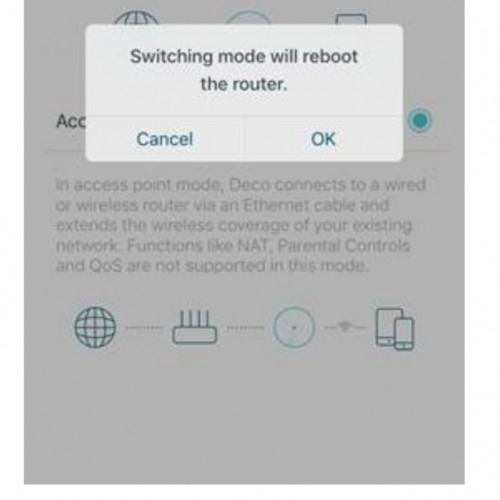
Thanks! Also want to ask, in AP mode, there must be first M5 connect to Maxis router with Lan cable?

What about the other two M5? In 3 pack, do all three M5 need to be connect with Lan cable or only the first M5?

user posted image

This post has been edited by andrew9292: May 27 2019, 10:59 PM


Change to:
| Lo-Fi Version
0.1573sec    0.56    7 queries    GZIP Disabled
Time is now: 4th December 2025 - 09:10 PM