

QUOTE(cyclone2 @ Dec 25 2018, 12:22 AM)
finally my ac86u arrived today..... box got dent but no impact on device.
havent replace with my ac68u

how much the damagehavent replace with my ac68u
How to buy cheap ASUS RT-AC68U router, come have a look
|
|
 Dec 25 2018, 03:06 PM Dec 25 2018, 03:06 PM
|
 
Senior Member
707 posts Joined: Jul 2016  
|
QUOTE(cyclone2 @ Dec 25 2018, 12:22 AM) finally my ac86u arrived today..... box got dent but no impact on device. how much the damagehavent replace with my ac68u |
|
|
|
|
|
Dec 25 2018, 03:16 PM
|

All Stars
14,908 posts Joined: Jul 2005 
|
QUOTE(cyclone2 @ Dec 25 2018, 12:22 AM) havent replace with my ac68u Remember to set the wireless region to Australia to get the best wireless coverageQUOTE(CKC_1 @ Dec 25 2018, 02:18 PM) it didn't ask for any PPPOE thing Doesn't matterGo to LAN > IPTV > Select ISP Profle > Choose UniFi Home > Apply Then go to WAN > Internet Connection > Account Settings > Type your UniFi PPPoE username & password > Apply |
|
|
Dec 25 2018, 03:43 PM
|

Senior Member
552 posts Joined: May 2006  
|
QUOTE(sHawTY @ Dec 25 2018, 03:16 PM) Remember to set the wireless region to Australia to get the best wireless coverage Doesn't matter Go to LAN > IPTV > Select ISP Profle > Choose UniFi Home > Apply Then go to WAN > Internet Connection > Account Settings > Type your UniFi PPPoE username & password > Apply 
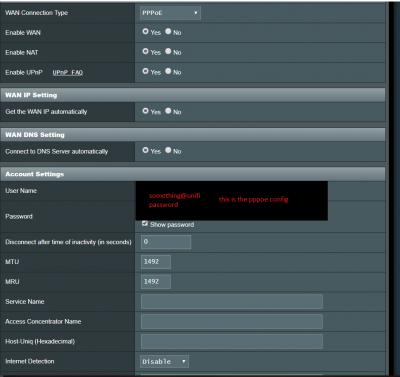

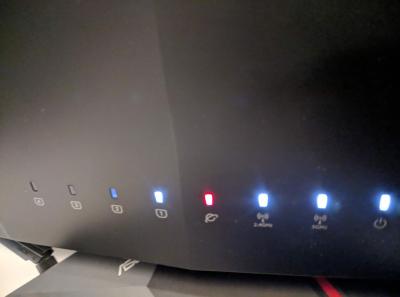
Still no internet...sigh Is this wiring correct? 

This post has been edited by CKC_1: Dec 25 2018, 03:57 PM |
|
|
Dec 25 2018, 03:48 PM
Show posts by this member only | IPv6 | Post
#1424
|
|
Junior Member
427 posts Joined: Mar 2010
|
QUOTE(gotgiant @ Dec 25 2018, 03:06 PM) how much the damage About RM 500 including shipment charges. I also got bought other things together haha... |
|
|
Dec 25 2018, 03:52 PM
Show posts by this member only | IPv6 | Post
#1425
|
|
Junior Member
427 posts Joined: Mar 2010
|
QUOTE(CKC_1 @ Dec 25 2018, 03:43 PM)
Still no internet...sigh |
|
|
Dec 25 2018, 03:54 PM
|
|
Senior Member
552 posts Joined: May 2006
|
QUOTE(cyclone2 @ Dec 25 2018, 03:52 PM) so weird.... i'm using ac5300, but setting should be same among asus router. Double check again, maybe you left out something. I know.. I'm so confused...Can you please check my wiring in the previous post? |
|
|
|
|
|
Dec 25 2018, 04:16 PM
Show posts by this member only | IPv6 | Post
#1427
|
|
Junior Member
427 posts Joined: Mar 2010
|
QUOTE(CKC_1 @ Dec 25 2018, 03:54 PM) I know.. I'm so confused... My ac5300 WAN port is connected to LAN 1 on the BTU. But yours seem connected to LAN 4?Can you please check my wiring in the previous post? Did you try to change to different LAN port on BTU? |
|
|
Dec 25 2018, 04:21 PM
|
|
Senior Member
552 posts Joined: May 2006
|
QUOTE(cyclone2 @ Dec 25 2018, 04:16 PM) My ac5300 WAN port is connected to LAN 1 on the BTU. But yours seem connected to LAN 4? Oh..god damnit..that was the problem... Did you try to change to different LAN port on BTU? Hahaha thank you so much!!  I'm guessing LAN4 is for IPTV only |
|
|
Dec 25 2018, 04:24 PM
|

Senior Member
2,661 posts Joined: Apr 2007
|
Does anyone know how to change region on AiMesh node? Seems like only main mesh router changed but the nodes still operates in China region resulting in the channels being different
|
|
|
Dec 25 2018, 05:08 PM
Show posts by this member only | IPv6 | Post
#1430
|
|
Junior Member
427 posts Joined: Mar 2010
|
QUOTE(CKC_1 @ Dec 25 2018, 04:21 PM) Oh..god damnit..that was the problem... Good... at least found the problem. The IPTV is connected to the router LAN port, not on the BTU. The ISP profile you selected is already preset the IPTV port(can't remember is port 4 or port 1) if using unifi home.Hahaha thank you so much!! I'm guessing LAN4 is for IPTV only |
|
|
Dec 25 2018, 05:23 PM
|
|
All Stars
14,908 posts Joined: Jul 2005
|
QUOTE(CKC_1 @ Dec 25 2018, 04:21 PM) I'm guessing LAN4 is for IPTV only HyppTV must be connected to LAN port 4 on the router, not the modemIf you don't use the HyppTV at all, you can choose UniFi-Business in the ISP profile, this way you can connect other device to the port 4 |
|
|
Dec 26 2018, 11:44 AM
|

Junior Member
216 posts Joined: Jan 2007
|
My AC86U arrived on Monday and I just got to pick it up today due to holiday. Can't wait to go back and try it.
|
|
|
Dec 26 2018, 04:08 PM
|

Senior Member
2,347 posts Joined: Apr 2008
|
QUOTE(CKC_1 @ Dec 25 2018, 03:43 PM)
Still no internet...sigh Is this wiring correct?
|
|
|
|
|
|
Dec 27 2018, 11:04 AM
|
|
Junior Member
216 posts Joined: Jan 2007
|
Some updates after testing the AC86U last night for a couple of hours (comparing it to my Tenda AC18 with Merlin):
1) 2.4GHz signal is a little bit stronger 2) 5GHz signal is stronger 3) Web firmware interface is more responsive 4) Performance is about the same since only 6 devices are connected at the same time 5) Haven't tried any of the fancy features yet (WTFast etc.) Overall, not bad. Are you guys using Merlin with your AC86U? |
|
|
Dec 27 2018, 11:53 AM
|
|
All Stars
14,908 posts Joined: Jul 2005
|
QUOTE(fli_guy84 @ Dec 27 2018, 11:04 AM) Are you guys using Merlin with your AC86U? If you use MESH network, then stay with stock firmwareIf you don't use MESH network, then go with Merlin |
|
|
Dec 27 2018, 01:06 PM
Show posts by this member only | IPv6 | Post
#1436
|

Senior Member
562 posts Joined: Feb 2009 From: klang valley
|
Bought ac86 on 11.11, only managed to setup today. I just uploaded the settings from ws880 XWRT-VORTEX, everything works well. 😁
|
|
|
Dec 27 2018, 01:31 PM
|

Junior Member
309 posts Joined: Jul 2012
|
What is different ac68u for t-mobile version, us version and china version in terms of settings and firmware. Is it all of them can update to stock firmware, if want use merlin is it these versions support it? i have read it, but still confuse which one version should i choose.. thanks..
|
|
|
Dec 27 2018, 09:55 PM
|

Senior Member
6,373 posts Joined: May 2007
|
QUOTE(sHawTY @ Dec 17 2018, 11:25 PM) Try this: already change, but still same. Set the Wireless Mode to N/AC Mixed Set the Channel Bandwidth to 80 MHz   |
|
|
Dec 28 2018, 01:48 AM
|
|
All Stars
14,908 posts Joined: Jul 2005
|
QUOTE(fkinmeng @ Dec 27 2018, 09:55 PM) already change, but still same. Possible incompatiblity issues between Cypress BCM43596 chipset and the Broadcom chipset in the Huawei WS880*Cypress BCM43596 is the Wi-Fi / Bluetooth chipset used in Huawei P20 Pro If other routers can supply 300Mb/s to your Huawei P20 Pro then the issue is with the Huawei WS880 router This post has been edited by sHawTY: Dec 28 2018, 01:49 AM |
|
|
Dec 28 2018, 08:33 AM
Show posts by this member only | IPv6 | Post
#1440
|
|
Senior Member
4,381 posts Joined: Jan 2003
|
Huawei router n phone not compatible? What a joke right since both under same company. May due to other issue such as connection settings etc. Do you try to use other hp to connect and test?
QUOTE(sHawTY @ Dec 28 2018, 01:48 AM) Possible incompatiblity issues between Cypress BCM43596 chipset and the Broadcom chipset in the Huawei WS880 This post has been edited by jhleo1: Dec 28 2018, 08:39 AM*Cypress BCM43596 is the Wi-Fi / Bluetooth chipset used in Huawei P20 Pro If other routers can supply 300Mb/s to your Huawei P20 Pro then the issue is with the Huawei WS880 router |
| Change to: |  0.0255sec 0.0255sec
 0.38 0.38
 6 queries 6 queries
 GZIP Disabled GZIP Disabled
Time is now: 4th December 2025 - 10:04 AM |
 Quote
Quote