Outline ·
[ Standard ] ·
Linear+
How to buy cheap ASUS RT-AC68U router, come have a look
|
blstz
|
 Dec 19 2018, 08:51 AM Dec 19 2018, 08:51 AM
|

|
QUOTE(mlamlam @ Dec 18 2018, 11:07 AM) My logistic company advised me before all electronic stuff shall post thru hong kong, last time 11/11 bought xiaomi robot and no issue at all this time same, i ask my logistic company post to malaysia thru Hong Kong, shall be receiving by this thur or fri 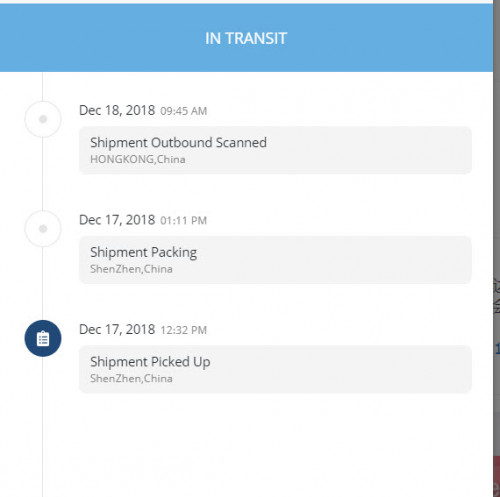 mind to share which logistics co. you using? |
|
|
|
|
|
junclj
|
Dec 19 2018, 09:59 AM
|
|
|
QUOTE(cwk0713 @ Dec 18 2018, 08:09 PM) God damn.... finger crossed for my shipment... Hope they cleared it after the inspection, or check the sender details, since ASUS didn't manufacture/sold speaker products..... I use every website I can find for tracking, all same results... Already sent email to DEX-I to follow up too... Need to find a way to contact this 西马直送仓...  still no luck for yours? Mine already reached Malaysia customs clearance processing. 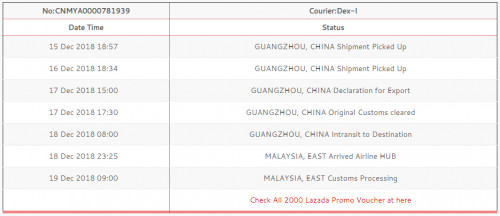 |
|
|
|
|
|
cwk0713
|
Dec 19 2018, 12:31 PM
|
Getting Started

|
QUOTE(junclj @ Dec 19 2018, 09:59 AM) still no luck for yours? Mine already reached Malaysia customs clearance processing. Mine update just now.... Scare the shit out of me...... Dec 19, 2018 09:00 AM Original Customs cleared GUANGZHOU, CHINA |
|
|
|
|
|
mlamlam
|
Dec 19 2018, 02:16 PM
|
|
|
QUOTE(blstz @ Dec 19 2018, 08:51 AM) mind to share which logistics co. you using? a bit slow than expected..may be only next monday receive https://www.tracking.my/comone/73311560766 |
|
|
|
|
|
cwk0713
|
Dec 20 2018, 09:39 PM
|
Getting Started
|
QUOTE(vernon91 @ Dec 17 2018, 09:18 PM) no worries, my item is same batch as urs and same status, mine is not router but clothing. Just wait probably this batch of clearance has illegal item in it  How's your parcel doing? Don't know mine whether still stuck on China customs or otw to Malaysia.... Hope is Dex-I slow update problem... This post has been edited by cwk0713: Dec 20 2018, 09:39 PM Attached thumbnail(s)
|
|
|
|
|
|
vernon91
|
Dec 20 2018, 09:49 PM
|
|
|
QUOTE(cwk0713 @ Dec 20 2018, 09:39 PM) How's your parcel doing? Don't know mine whether still stuck on China customs or otw to Malaysia.... Hope is Dex-I slow update problem... same status as yours. Still in china but already cleared China custom, now probably waiting to fly to malaysia, just continue waiting relax, the last update is just yesterday  This post has been edited by vernon91: Dec 20 2018, 09:51 PM This post has been edited by vernon91: Dec 20 2018, 09:51 PM |
|
|
|
|
|
Corsair0418
|
Dec 21 2018, 07:54 PM
|
|
|
wow.. interesting. parking parking.
waiting for the next good deal. hopefully i can get it at 849RMB haha
|
|
|
|
|
|
cyclone2
|
Dec 25 2018, 12:22 AM
|
|
|
finally my ac86u arrived today..... box got dent but no impact on device.
havent replace with my ac68u
|
|
|
|
|
|
cwk0713
|
Dec 25 2018, 12:28 PM
|
Getting Started
|
My Blue Cave arrived yesterday, setup today morning, now up and running... Pretty good for an internal antenna router, can get 4 bar at my room on first floor and after a wall!!!! Now wait for my ldnio universal socket...
This post has been edited by cwk0713: Dec 25 2018, 12:29 PM
|
|
|
|
|
|
CKC_1
|
Dec 25 2018, 02:18 PM
|
|
|
Anyone here tried setting up the RT86U on unifi? I went through the settings, it didn't ask for any PPPOE thing, and straight away finished after setting up user and pass. It now says Internet Status: Disconnected.
Any ides?
|
|
|
|
|
|
cyclone2
|
Dec 25 2018, 02:26 PM
|
|
|
QUOTE(CKC_1 @ Dec 25 2018, 02:18 PM) Anyone here tried setting up the RT86U on unifi? I went through the settings, it didn't ask for any PPPOE thing, and straight away finished after setting up user and pass. It now says Internet Status: Disconnected. Any ides? You need to select ppoe internet type. And select isp profile as unifi home or unifi business. |
|
|
|
|
|
CKC_1
|
Dec 25 2018, 02:28 PM
|
|
|
QUOTE(cyclone2 @ Dec 25 2018, 02:26 PM) You need to select ppoe internet type. And select isp profile as unifi home or unifi business. When I'm going through Quick connect settings, I didn't ask me to do any of that. Where do I do that now? |
|
|
|
|
|
cyclone2
|
Dec 25 2018, 02:35 PM
|
|
|
QUOTE(CKC_1 @ Dec 25 2018, 02:28 PM) When I'm going through Quick connect settings, I didn't ask me to do any of that. Where do I do that now? Refer the link below. https://www.asus.com/my/support/FAQ/1005485/ |
|
|
|
|
|
CKC_1
|
Dec 25 2018, 02:48 PM
|
|
|
QUOTE(cyclone2 @ Dec 25 2018, 02:35 PM) The pppoe showed up for some reason and i was able to input it, however, after it's done, it still says internet status: disconnected? |
|
|
|
|
|
cyclone2
|
Dec 25 2018, 02:51 PM
|
|
|
QUOTE(CKC_1 @ Dec 25 2018, 02:48 PM) The pppoe showed up for some reason and i was able to input it, however, after it's done, it still says internet status: disconnected? You need to manually select isp profile. Because unifi required vlan tagging. The link below will help from balcktubi. https://www.blacktubi.com/unifi/setup-asus-router-for-unifi/This post has been edited by cyclone2: Dec 25 2018, 02:53 PM |
|
|
|
|
|
CKC_1
|
Dec 25 2018, 03:00 PM
|
|
|
QUOTE(cyclone2 @ Dec 25 2018, 02:51 PM) You need to manually select isp profile. Because unifi required vlan tagging. The link below will help from balcktubi. https://www.blacktubi.com/unifi/setup-asus-router-for-unifi/My setup page is completely different from what is shown there. Now it suddenly stops asking for pppoe settings. Seriously, what is going on? |
|
|
|
|
|
jhleo1
|
Dec 25 2018, 03:01 PM
|
|
|
You may ask any friend who know little bit of IT to help you. Much easier than you do your own. QUOTE(CKC_1 @ Dec 25 2018, 03:00 PM) My setup page is completely different from what is shown there. Now it suddenly stops asking for pppoe settings. Seriously, what is going on? |
|
|
|
|
|
CKC_1
|
Dec 25 2018, 03:05 PM
|
|
|
QUOTE(jhleo1 @ Dec 25 2018, 03:01 PM) You may ask any friend who know little bit of IT to help you. Much easier than you do your own. I mean, all the guides are telling me to click quick settings and your type in pppoe config. My router just isn't showing these info 9/10 times. |
|
|
|
|



 Quote
Quote




 0.0262sec
 0.39
0.39
 6 queries
 GZIP Disabled