

Is this the same one? https://detail.tmall.com/item.htm?spm=a220o...d=3100432909364
How to buy cheap ASUS RT-AC68U router, come have a look
How to buy cheap ASUS RT-AC68U router, come have a look
|
|
 Aug 22 2018, 11:58 PM Aug 22 2018, 11:58 PM
Return to original view | Post
#1
|
 
Senior Member
552 posts Joined: May 2006   
|
Is this the same one? https://detail.tmall.com/item.htm?spm=a220o...d=3100432909364
|
|
|
|
|
|
Aug 23 2018, 10:38 PM
Return to original view | Post
#2
|
|
Senior Member
552 posts Joined: May 2006
|
QUOTE(matt_rix @ Aug 23 2018, 09:27 PM) this is new unit i think Okay, thanks! |
|
|
Dec 25 2018, 02:18 PM
Return to original view | Post
#3
|
|
Senior Member
552 posts Joined: May 2006
|
Anyone here tried setting up the RT86U on unifi? I went through the settings, it didn't ask for any PPPOE thing, and straight away finished after setting up user and pass. It now says Internet Status: Disconnected.
Any ides? |
|
|
Dec 25 2018, 02:28 PM
Return to original view | Post
#4
|
|
Senior Member
552 posts Joined: May 2006
|
QUOTE(cyclone2 @ Dec 25 2018, 02:26 PM) You need to select ppoe internet type. And select isp profile as unifi home or unifi business. When I'm going through Quick connect settings, I didn't ask me to do any of that. Where do I do that now? |
|
|
Dec 25 2018, 02:48 PM
Return to original view | Post
#5
|
|
Senior Member
552 posts Joined: May 2006
|
QUOTE(cyclone2 @ Dec 25 2018, 02:35 PM) The pppoe showed up for some reason and i was able to input it, however, after it's done, it still says internet status: disconnected? |
|
|
Dec 25 2018, 03:00 PM
Return to original view | Post
#6
|
|
Senior Member
552 posts Joined: May 2006
|
QUOTE(cyclone2 @ Dec 25 2018, 02:51 PM) You need to manually select isp profile. Because unifi required vlan tagging. My setup page is completely different from what is shown there. Now it suddenly stops asking for pppoe settings. Seriously, what is going on?The link below will help from balcktubi. https://www.blacktubi.com/unifi/setup-asus-router-for-unifi/ |
|
|
|
|
|
Dec 25 2018, 03:05 PM
Return to original view | Post
#7
|
|
Senior Member
552 posts Joined: May 2006
|
QUOTE(jhleo1 @ Dec 25 2018, 03:01 PM) You may ask any friend who know little bit of IT to help you. Much easier than you do your own. I mean, all the guides are telling me to click quick settings and your type in pppoe config. My router just isn't showing these info 9/10 times. |
|
|
Dec 25 2018, 03:43 PM
Return to original view | Post
#8
|
|
Senior Member
552 posts Joined: May 2006
|
QUOTE(sHawTY @ Dec 25 2018, 03:16 PM) Remember to set the wireless region to Australia to get the best wireless coverage Doesn't matter Go to LAN > IPTV > Select ISP Profle > Choose UniFi Home > Apply Then go to WAN > Internet Connection > Account Settings > Type your UniFi PPPoE username & password > Apply 
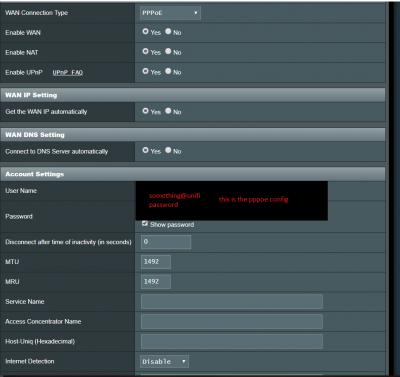

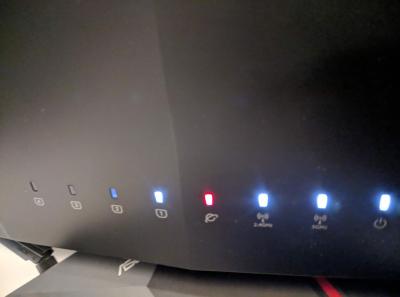
Still no internet...sigh Is this wiring correct? 

This post has been edited by CKC_1: Dec 25 2018, 03:57 PM |
|
|
Dec 25 2018, 03:54 PM
Return to original view | Post
#9
|
|
Senior Member
552 posts Joined: May 2006
|
QUOTE(cyclone2 @ Dec 25 2018, 03:52 PM) so weird.... i'm using ac5300, but setting should be same among asus router. Double check again, maybe you left out something. I know.. I'm so confused...Can you please check my wiring in the previous post? |
|
|
Dec 25 2018, 04:21 PM
Return to original view | Post
#10
|
|
Senior Member
552 posts Joined: May 2006
|
QUOTE(cyclone2 @ Dec 25 2018, 04:16 PM) My ac5300 WAN port is connected to LAN 1 on the BTU. But yours seem connected to LAN 4? Oh..god damnit..that was the problem... Did you try to change to different LAN port on BTU? Hahaha thank you so much!!  I'm guessing LAN4 is for IPTV only |
| Change to: |  0.0536sec 0.0536sec
 1.50 1.50
 7 queries 7 queries
 GZIP Disabled GZIP Disabled
Time is now: 4th December 2025 - 12:03 PM |
 Quote
Quote