Welcome Guest ( Log In | Register )

28 Pages « < 19 20 21 22 23 > » Bottom

Outline · [ Standard ] · Linear+

 Astro Version 13A, All about Astro Malaysia offerings

views
     
yongtjunkit
post Dec 12 2020, 10:42 AM

Look at all my stars!!
*******
Senior Member
2,517 posts

Joined: Mar 2016
QUOTE(joshhd @ Dec 12 2020, 08:29 AM)
No... I don't think so.

First of all, not everyone are fancy of that 4K UHD stuff, plus not everyone uses UHD TV at home, and not everyone cares about 4K UHD stuff, so in my opinion, Astro might as well save cost by introducing another downsize version of Ultra Box, at least can offer those main features like adaptive streaming Video On Demand, Play From Start, cloud recording, also good enough already lo... Also, these features can also be enjoyed even for those on Family pack. Cuz for Ultra Box, you must be on Starter Pack and above.

Plus, DCSS LNB also has its limitations, such as cable length from dish to the STB (Ultra Box) must not exceed 15 metres, otherwise it'll become no satellite signal. The usual Universal LNB's limitation doesn't reach to that extent of straight away no satellite signal due to cable length too long.
*
Maybe Astro could also replace all new HD box installation with this new “connected HD box”?

Since not connecting it to the internet = normal HD box
yongtjunkit
post Dec 19 2020, 10:42 AM

Look at all my stars!!
*******
Senior Member
2,517 posts

Joined: Mar 2016
QUOTE(ChiaW3n @ Dec 19 2020, 10:39 AM)
Yes now I am waiting the agent to call back. But I read it if upgrade to ultra box means need to go through another 24 months contract?
*
Yup, there's a 24 months contract for the ultra box upgrade
yongtjunkit
post Dec 28 2020, 08:39 AM

Look at all my stars!!
*******
Senior Member
2,517 posts

Joined: Mar 2016
QUOTE(as613591 @ Dec 27 2020, 10:01 PM)
Awesome, you can use ultra box remote to control your device using bluetooth
*
How to pair it with a Bluetooth device hmm.gif

Is there a way to put it into pairing mode?

This post has been edited by yongtjunkit: Dec 28 2020, 08:40 AM
yongtjunkit
post Jan 12 2021, 01:10 PM

Look at all my stars!!
*******
Senior Member
2,517 posts

Joined: Mar 2016
QUOTE(joshhd @ Jan 11 2021, 10:11 PM)
Ok. MCO is back again.... 13 Jan until 26 Jan 2021.
Source: https://www.malaymail.com/news/malaysia/202...-jan-13/1939422

So what's next?
"Please open up all channels again like last year..."  biggrin.gif  biggrin.gif  biggrin.gif
"I want to terminate Astro account, but they don't let me to."


Still remember their uncontactable customer service disaster?
https://forum.lowyat.net/index.php?showtopi...post&p=97148450
https://forum.lowyat.net/index.php?showtopi...post&p=96337271

I wonder how would it look like this time in this MCO 2.0 sweat.gif
*
QUOTE
18. Ordinan-ordinan yang bertujuan untuk memerangi sabotaj ekonomi, monopoli dan kenaikan harga barang secara keterlaluan dalam masa pandemik juga boleh dimasyhurkan oleh Seri Paduka Baginda. Tindakan penguatkuasaan yang lebih tegas dan hukuman yang lebih berat boleh dikenakan untuk tujuan ini.


hmm.gif I wonder if astro is now even allowed to do prevent customers from terminating their account?

source: https://www.astroawani.com/berita-malaysia/...uhyiddin-277288

This post has been edited by yongtjunkit: Jan 12 2021, 01:12 PM
yongtjunkit
post Jan 24 2021, 02:02 PM

Look at all my stars!!
*******
Senior Member
2,517 posts

Joined: Mar 2016
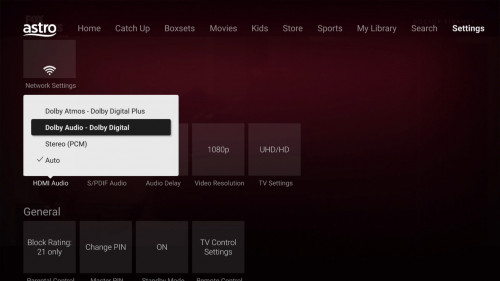
joshHD if I were to enable Dolby digital audio on the ultra box how do I do it?

LG soundbar with 2.1 audio connected via HDMI ARC
yongtjunkit
post Jan 24 2021, 04:59 PM

Look at all my stars!!
*******
Senior Member
2,517 posts

Joined: Mar 2016
QUOTE(joshhd @ Jan 24 2021, 04:40 PM)
By default, the HDMI Audio setting is set to "Auto".
Dolby Digital audio will be used automatically whenever the channel/content has Dolby audio, and your TV or whatever audio devices supports Dolby audio.
user posted image
Not every content on Astro has Dolby 5.1 audio, so don't be surprised when you see your favourite shows is only in Stereo ya...
» Click to show Spoiler - click again to hide... «

*
hmm.gif somehow it was preconfigured to stereo(PCM)

What about the top option, Dolby digital plus(for
Additional knowledge, my soundbar doesn’t support it)?

This post has been edited by yongtjunkit: Jan 24 2021, 05:19 PM
yongtjunkit
post Jan 25 2021, 01:16 PM

Look at all my stars!!
*******
Senior Member
2,517 posts

Joined: Mar 2016
joshHD after upgrading from a 1080P tv to a 4K tv, I’ve noticed that the UI seems a bit pixelated as well as the HD content, is this normal

At least was able to pair a LG remote to the ultra box but not the ultra box remote to the TV ( already tried resetting the remote by pressing and holding the 7 and 9 key )
yongtjunkit
post Jan 25 2021, 03:50 PM

Look at all my stars!!
*******
Senior Member
2,517 posts

Joined: Mar 2016
QUOTE(joshhd @ Jan 25 2021, 02:54 PM)
Go to your TV's Picture Settings, and change the Sharpness setting to all the way down to zero (0).
Note: Some TV models have a zero setting in the centre of the control, so lowering it beyond that point might actually soften the image.
If you feel like the picture quality looks too "blurry" to you, as if it looks like you have short sighted eye vision, then try change the Sharpness setting to not more than 50/100 or 5/10 (depending on TV model).

And also, try look deeper at your TV's "Advanced Picture settings" or "Expert Settings", and look for options that mentions the following, or similar (depending on your TV brand and model):
- Digital Clean View (for Samsung TVs)
- Noise Reduction
- MPEG Noise Reduction (also known as MPEG NR for some Panasonic TVs)
- Super Resolution (for LG TV)
- Dot Noise Reduction
- Detail Enhancer
- Edge Enhancer
- Edge Enhancement


Make sure all these picture settings listed above (or similar names) is set to "None" or "Off". Once done, check if the picture quality now looks more "natural looking" to you.
*
I see, noticed that channel 780 looks clear but the others including their UI looks bad
Attached Image
Attached Image Attached Image

Apparently changing the video resolution to 1080i makes the blurry Astro UI go away, except that now contents are not showing as 4K?

This post has been edited by yongtjunkit: Jan 25 2021, 03:58 PM
yongtjunkit
post Jan 25 2021, 05:55 PM

Look at all my stars!!
*******
Senior Member
2,517 posts

Joined: Mar 2016
QUOTE(stasio @ Jan 25 2021, 05:36 PM)
Software matter ?
*
It seems like the ultra box UI was designed for 1080P screen instead of 4K(not sure though) doh.gif

Not sure if it's the ultrabox not upscalling the content properly, don't think it's the TV since ch780 looks sharp as how it should be

This post has been edited by yongtjunkit: Jan 25 2021, 05:55 PM
yongtjunkit
post Jan 25 2021, 10:44 PM

Look at all my stars!!
*******
Senior Member
2,517 posts

Joined: Mar 2016
QUOTE(joshhd @ Jan 25 2021, 06:15 PM)
Hmmm... Nice discovery. This one u should ask the software engineer guys at Astro already... 😅

I guess is because in order not to create too much unnecessary burden to the Ultra Box hardware, the software guys decides to make its UI to render as up to 1080p resolution, even when the Ultra Box output resolution is in 2160p.
After all, most importantly is the picture quality/sharpness from the 2160p UHD content, and user may not bother much to think whether the UI resolution is in 2160p resolution or not, cuz as long user can use/interact with the software without issues is more important?
Perhaps by rendering the UI as 1080p, it could also make Ultra Box to easily achieve exact or almost 50fps on the visual animations of the UI too, meanwhile if the UI is in 2160p, it could cause drop/skip frames on the visual animations, which gives an negative impression to users like us by thinking the Ultra Box is sluggish and lag?

Wah. I feel like I can work as a technical advisor for Astro's UI/UX designer already HAHAHA... 😂😂
*
That’s a possibility, setting it to 2160P makes everything look bad except UHD content on Astro

Maybe this is a message from Astro that “our ultra box is have half baked 4K UHD capabilities, please select 1080i/1080P and let your 4K UHD TV do the upscaling” 😂😂

It even makes their HD content look better hmm.gif

This post has been edited by yongtjunkit: Jan 25 2021, 10:45 PM
yongtjunkit
post Jan 26 2021, 07:50 AM

Look at all my stars!!
*******
Senior Member
2,517 posts

Joined: Mar 2016
QUOTE(Qash-M @ Jan 25 2021, 11:25 PM)
So that option is better even when the TV in 4K...ight imma select for awhile. laugh.gif
*
QUOTE(joshhd @ Jan 25 2021, 11:31 PM)
Is it really that bad?  hmm.gif  hmm.gif  hmm.gif  hmm.gif
I don't see any visible difference when watching Full HD content on these resolutions: 1080i/1080p/2160p

But if watching 4K UHD content on Ultra Box, and if I compare the quality by switching between 1080i/1080p/2160p, then yes, I can see the difference.
The one at 2160p provides much more picture detail than 1080p.

Btw I'm using Samsung UHD TV.
*
hmm.gif interesting, yup setting 1080i makes the GUI sharper and clearer

Even subtitles looks clearer doh.gif

As for UHD channel, didn’t really bother since it’s just only 1 sports channel( 4K vod content seems similar in quality to me )?

Or maybe it’s just their low bitrate till the TV can enhance the picture quality with it’s built in processing?

Setting to 1080i would result in interlacing artifact as well and sometimes it would be choppy hmm.gif must be the processing on the TV


Using an LG UHD TV

This post has been edited by yongtjunkit: Jan 26 2021, 01:02 PM
yongtjunkit
post Jan 26 2021, 10:45 AM

Look at all my stars!!
*******
Senior Member
2,517 posts

Joined: Mar 2016
New place to waste bandwidth? On radio channel

user posted image

This post has been edited by yongtjunkit: Jan 26 2021, 10:45 AM
yongtjunkit
post Jan 29 2021, 07:49 AM

Look at all my stars!!
*******
Senior Member
2,517 posts

Joined: Mar 2016
QUOTE(joshhd @ Jan 28 2021, 11:18 PM)
Even after April 2021, there will still be a few handful of SD channels on Astro...

The one that will be SD for sure, and Astro cannot do anything about it:
1. ART Variety
2. Makkal TV
3. Chutti TV
4. Adithya TV
5. Celestial Classic Movies
6. ABC Australia

Astro in-house channels that is still in SD only, and of course they have the choice of upgrading them into HD if they want to:
7. Astro Vellithirai
8. Astro Awani
9. Astro Tutor TV UPSR
10. Astro Tutor TV PT3
11. Astro Tutor TV SPM
12. Astro TVIQ
13. iNjoi (For Njoi viewers only)

Astro AOD catch up channels is unlikely to upgrade to HD, since you can catch up the episodes in HD quality via On Demand and Astro Go:
14. Astro AOD 351
15. Astro AOD 352
16. Astro AOD 353
17. Astro AOD 354
18. Astro AOD 355

National FTA TV stations shall continue to be in SD on Astro if both Astro and the respective TV station (e.g. RTM, Media Prima) still don't make the first move to offer broadcast its channels in HD.
19. TV1
20. TV2
21. TV3
22. NTV7
23. 8TV
24. TV9
25. TV Al Hijrah
26. RTM TV Okey
27. Bernama

The only one channel that Astro isn't seems interested to offer in HD is:
28. CNBC Asia 🤣

Total: 28 SD channels.
*
NJOI user need to pay $ to use their service now since their free channels were all in SD?

This post has been edited by yongtjunkit: Jan 29 2021, 07:49 AM
yongtjunkit
post Jan 29 2021, 03:05 PM

Look at all my stars!!
*******
Senior Member
2,517 posts

Joined: Mar 2016
QUOTE(joshhd @ Jan 29 2021, 01:46 PM)
What you mean?
The only thing that NJOI customers need to pay money, is subscribing to their prepaid channels. The rest are free to view.

Or unless Njoi customers being upselled to become Astro subscriber.

---
Btw correction. The more accurate answer is 27 SD channels, not 28. Cuz Astro AOD HD CH 311 and CH 351 SD are actually simulcast. Missed out that... 😅😅
*
I mean their free to view channels, some channel like Astro AEC for example is only available in SD for free(HD version need to pay)
yongtjunkit
post Jan 29 2021, 06:40 PM

Look at all my stars!!
*******
Senior Member
2,517 posts

Joined: Mar 2016
QUOTE(schoe @ Jan 29 2021, 06:03 PM)
hi. any good offer for astro + maxis?
*
Hi, here's the rate card for astro&broadband(maxis) -> usual pricing I belive
Maxis 30 mbps + family pack is 98.95(for new customers without existing Astro DTH at the premise)

Attached File  Astro_broadband_ratecard.pdf ( 3.97mb ) Number of downloads: 54


This post has been edited by yongtjunkit: Jan 29 2021, 06:44 PM
yongtjunkit
post Jan 29 2021, 06:49 PM

Look at all my stars!!
*******
Senior Member
2,517 posts

Joined: Mar 2016
QUOTE(schoe @ Jan 29 2021, 06:47 PM)
the price seems same with the website. is with SST or before SST?
*
Price listed Before sst

This post has been edited by yongtjunkit: Jan 29 2021, 06:50 PM
yongtjunkit
post Feb 7 2021, 12:06 AM

Look at all my stars!!
*******
Senior Member
2,517 posts

Joined: Mar 2016
QUOTE(joshhd @ Feb 6 2021, 11:14 PM)
Yes. It is a wise decision to attach the file here, also for archive purposes too (cuz Astro can modify or take down the PDF file from their website anytime they want).

And yeah, it appears that "newer batch" of Ultra Box units would include the revised version of Astro Ultra Remote control, with re-introduced buttons like rewind, forward, pause, and a few more.

I hope we can easily purchase this newer version of Astro Ultra remote control through Go Shop, easier for everyone to get accessories item from Astro also.  sweat.gif
*
hmm.gif can complain to Astro said that their ultra remote cannot pair to LG TV and get new one for free ah ? 😂

Can’t seem to pair the ultra box remote to the LG TV

This post has been edited by yongtjunkit: Feb 7 2021, 12:07 AM
yongtjunkit
post Feb 7 2021, 10:27 AM

Look at all my stars!!
*******
Senior Member
2,517 posts

Joined: Mar 2016
QUOTE(cdspins @ Feb 7 2021, 09:38 AM)
Just complaint. You never know what's the outcome. You don't loose anything.

But just curious, your intention is to use astro remote to control your LG TV or the other way round?
*
Basic control of the LG TV(such as input select) from the ultra box remote

This post has been edited by yongtjunkit: Feb 7 2021, 10:27 AM
yongtjunkit
post Feb 7 2021, 02:28 PM

Look at all my stars!!
*******
Senior Member
2,517 posts

Joined: Mar 2016
QUOTE(joshhd @ Feb 7 2021, 01:33 AM)
You try lo  tongue.gif
*
QUOTE(cdspins @ Feb 7 2021, 09:38 AM)
Just complaint. You never know what's the outcome. You don't loose anything.

But just curious, your intention is to use astro remote to control your LG TV or the other way round?
*
How long is the warranty for the ultra box and the remote?

Now high number of COVID 19 cases, would be better if to hold off for the time being (main concern about their technician coming to diagnose it)

This post has been edited by yongtjunkit: Feb 7 2021, 02:29 PM
yongtjunkit
post Feb 7 2021, 07:22 PM

Look at all my stars!!
*******
Senior Member
2,517 posts

Joined: Mar 2016
QUOTE(cdspins @ Feb 7 2021, 06:29 PM)
Are you able to pair successfully following the instruction. I mean do you see the green flash twice?
Kind of strange that the remote is working on your ultrabox but not able to control TV if pairing is successful.

Usually if remote spoilt, everything goes...
*
Nope, it gives me solid red light after entering the code and when I click ok the red light goes away without the green flash

28 Pages « < 19 20 21 22 23 > » Top
 

Change to:
| Lo-Fi Version
0.0447sec    0.45    7 queries    GZIP Disabled
Time is now: 22nd December 2025 - 05:08 AM