Tried and it works! Thanks! I never though that ultrabox can exclusively operated with iptv mode even i’m not using maxis fibre at home. Currently I connect my ultrabox via lan cable to my unifi 500mbps router. Anyway, can i keep using this iptv mode permanently? For sure the rain fade issue will not happen with iptv mode. But one downside that I noticed is the picture quality takes about 2-3 seconds to stabilize into the correct resolution.
You should read the following post for more details about the IPTV plug and play mode
The VLAN of 823 (Linear TV) must to be enabled from TM's side, which they have to internally change that setting for your BTU (fibre modem), then only you can use it.
So if they didn't enable VLAN 823 for you, you don't even need to bother trying, cuz it definitely won't work. That Plug & Play mode will work on any Malaysia ISP, as long Internet is fast and stable (>10Mbps).
Starting from Ulti/Ultra Box version
May 18 2021 21.1.4.24, you will be able to switch between
STB Operating Modes only when you Restore Factory Settings (home>Settings>Reset>Restore Factory Settings>Default PIN 0000):
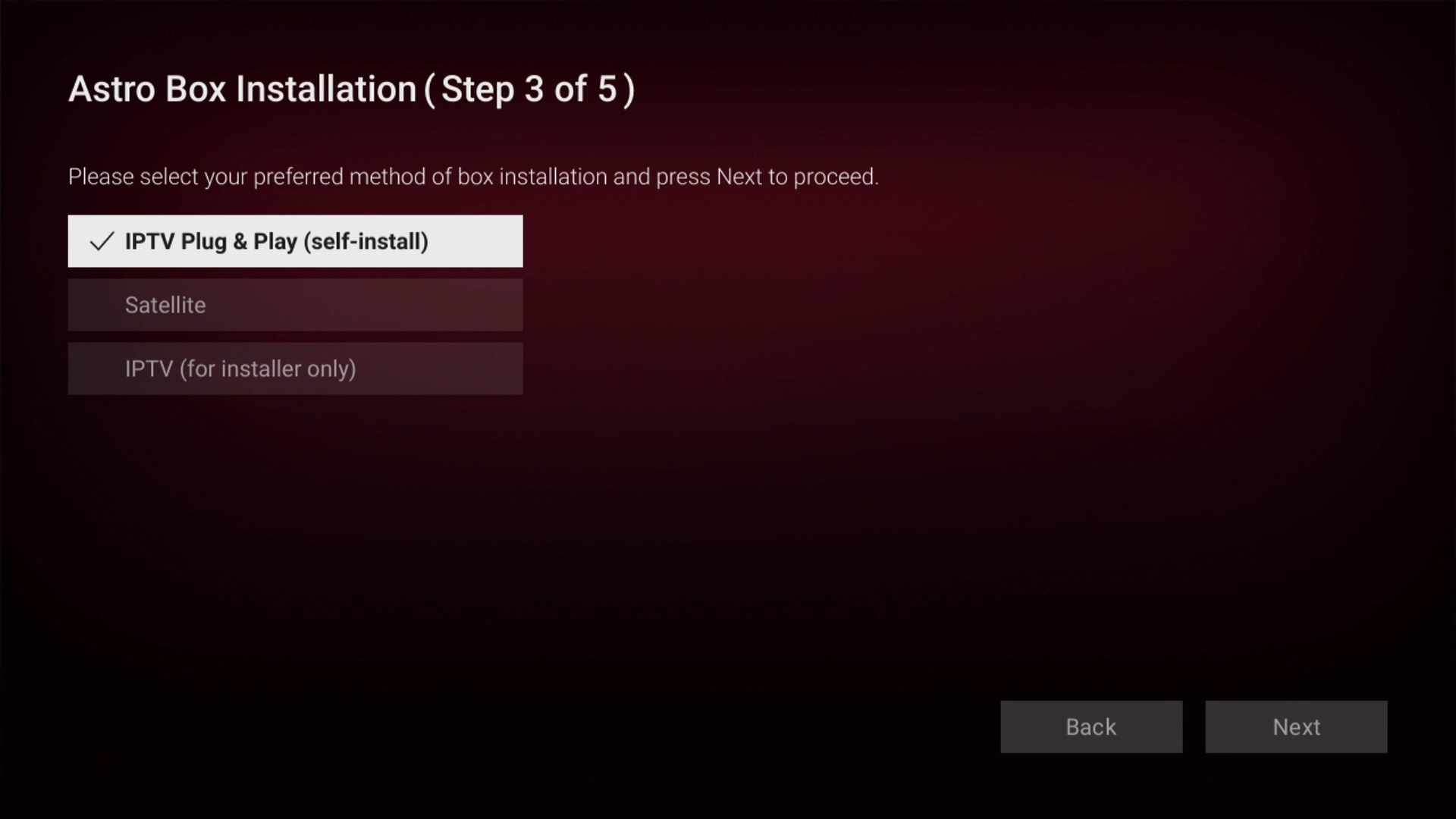
| Option | Also technically known as: |
| IPTV Plug & Play (self-install) | Unicast |
| Satellite | DTH (Direct-to-Home) |
| IPTV (for installer only) | Multicast |
In case you got lost or don't know how to change back to the original settings later on:
If you are using normal Astro (that connects to Astro satellite dish) or Astro & Broadband user, select "Satellite".
If you are an Astro IPTV user, select "IPTV (for installer only)"Attention: Once you change to
IPTV Plug & Play (self-install) mode, these list of channels below will "disappear" from your channel list, hence making you unable to access to the channel at all:
- Star Chinese Channel (315)
- Fox Movies (413)
- Fox Family Movies (414)
- Fox Action Movies (415)
- All Astro First & Astro Best channels (471-489)
- Sky News (514)
- ABC Australia (518)
- Nat Geo Wild (550)
- National Geographic (551)
- Baby TV (618)
- Fox Life (703)
- Fox (704)
- Nat Geo People (710)
- All digital radio channels (852-882)
To gain back access to these TV channels, you have to Restore Factory Settings again, and then select "
Satellite" or "
IPTV (for installer only)".
If you change some settings previously (e.g. default subtitle language, 5.1 audio,...), these are the main settings that will reset to default once you Restore Factory Settings, so do remember to change back to your previously preferred settings:
LanguagesAudio:
EnglishSubtitles:
Bahasa MalaysiaAudio/VideoHDMI Audio:
Stereo (PCM)S/PDIF Audio:
Stereo (PCM)Audio Delay:
20msIt seems to me that Astro have not publicly announce this mode yet, probably because the Plug & Play (Unicast) is still under testing, so do expect some issues or missing features/options here and there.
In the meantime, this will be the only workaround for Ultra Box users that wish to watch Euro 2020 in 4K UHD (CH 781/782) but the box is connected to a Universal LNB on the satellite dish, or building's centralise Astro dish that haven't upgrade to support Ultra Box (DCSS system).
Recommended >30Mbps speed required to smoothly stream 4K UHD channels/content.


 Mar 29 2021, 07:06 PM


 Quote
Quote




 0.0399sec
 0.65
0.65
 7 queries
 GZIP Disabled