QUOTE(joshhd @ Sep 16 2020, 10:19 AM)
The ultra box apparently came preloaded with that firmware out of the box The decoder doesn’t have set up screen when the installer came to install the ultra box
Astro Version 13A, All about Astro Malaysia offerings
|
|
Sep 16 2020, 11:30 AM
Return to original view | IPv6 | Post
#381
|
![]() ![]() ![]() ![]() ![]() ![]() ![]()
Senior Member
2,517 posts Joined: Mar 2016 |
QUOTE(joshhd @ Sep 16 2020, 10:19 AM) The ultra box apparently came preloaded with that firmware out of the box The decoder doesn’t have set up screen when the installer came to install the ultra box joshhd liked this post
|
|
|
|
|
|
Sep 16 2020, 02:20 PM
Return to original view | IPv6 | Post
#382
|
![]() ![]() ![]() ![]() ![]() ![]() ![]()
Senior Member
2,517 posts Joined: Mar 2016 |
QUOTE(joshhd @ Sep 16 2020, 10:19 AM) How do I perform the workaround to watch TV with the "Play from start" feature when it's raining(SCNA)? Pressing the OK button doesn't bring up the option menu for me to select "Play from start" |
|
|
Sep 16 2020, 10:49 PM
Return to original view | IPv6 | Post
#383
|
![]() ![]() ![]() ![]() ![]() ![]() ![]()
Senior Member
2,517 posts Joined: Mar 2016 |
QUOTE(joshhd @ Sep 16 2020, 06:35 PM) First, simply tune to any other channel than the first, then on TV Guide, navigate to the show you want to watch, press OK, then select Play from Start. That worked for me Example: 1) Now you're on AXN 701, and it shows SCNA, and you want the channel to load via Internet instead of satellite. 2) You simply tune to any other channel first (you want to just press ch+ button to go to Hello ch702 also can) 3) Open TV Guide ("..." button on Ultra Remote), then navigate to AXN's current programme, then press OK 4) From there, select Play from Start Btw is it normal to have tuner 1 to have high quality when compared to tuner 2 with quality on low for some reason(signal strength is the same),, the installer replaced the LNB with DCSS LNB already This post has been edited by yongtjunkit: Sep 16 2020, 10:50 PM |
|
|
Sep 21 2020, 10:54 PM
Return to original view | IPv6 | Post
#384
|
![]() ![]() ![]() ![]() ![]() ![]() ![]()
Senior Member
2,517 posts Joined: Mar 2016 |
joshHD, What's the minimum internet speed for the ultra box to stream content properly?
|
|
|
Sep 21 2020, 11:38 PM
Return to original view | IPv6 | Post
#385
|
![]() ![]() ![]() ![]() ![]() ![]() ![]()
Senior Member
2,517 posts Joined: Mar 2016 |
QUOTE(joshhd @ Sep 21 2020, 11:36 PM) Astro recommends best minimum is 10Mbps. Nope, more like feels like the internet quality went down but only noticed that it would peak at 13 mbps though But most of the time, around 4Mbps is good enough. Why? You experience some streaming issues? Maybe the router needs a reboot to go back to normal |
|
|
Sep 22 2020, 12:05 AM
Return to original view | IPv6 | Post
#386
|
![]() ![]() ![]() ![]() ![]() ![]() ![]()
Senior Member
2,517 posts Joined: Mar 2016 |
|
|
|
|
|
|
Sep 22 2020, 10:04 AM
Return to original view | IPv6 | Post
#387
|
![]() ![]() ![]() ![]() ![]() ![]() ![]()
Senior Member
2,517 posts Joined: Mar 2016 |
QUOTE(joshhd @ Sep 22 2020, 12:13 AM) ...or, your Ultra Box needs to be restarted. Ultra box version: 20.1.7.27bAnd what is your Ultra Box software version again? And the date? Actually, as long you are able to stream your shows without intermittent buffering issues, then it's fine... date: Aug 9 2020 joshhd liked this post
|
|
|
Oct 14 2020, 11:03 AM
Return to original view | IPv6 | Post
#388
|
![]() ![]() ![]() ![]() ![]() ![]() ![]()
Senior Member
2,517 posts Joined: Mar 2016 |
QUOTE(Zot @ Oct 14 2020, 09:49 AM) The speed is not the problem. Used to be using Astro IPTV (PVR box),, pixelation issue did happen since few months ago(while I was using Astro IPTV)... even Microsoft Teams video call is pixelated for some reason... downgraded back to DTH and switched to another ISP,, problem disappears(and adds a new feature: the rain detector service)Wait. The low speed will not pixelate the picture but stuttering it Whether pixelation is common or not has nothing to do with satellite or IPTV. Service providers operate on available bandwidth they paid for. They will try to maximize the available bandwidth. In order to put more channel they have to reduce aux (just term I created for necessary but not absolute must) bandwidth. Each data frame consisted of error correction code (ECC). The receiving device will made correction to corrupt data based on ECC. Transmission implement FEC (Forward Error Correction) where data is encoded to create data redundancy. In order to get more bandwidth, the ECC is reduced, thus the transmitted data will be more prone to error. So, corrupted data in transmission due to noise in transmission will less likely be able to be corrected. So, picture pixelated. I think Astro is squeezing as much as possible from bandwidth right now since they need to introduce more HD channels. Astro IPTV uses a dedicated bandwidth(for live TV), not the same as your internet speed This post has been edited by yongtjunkit: Oct 14 2020, 11:05 AM joshhd liked this post
|
|
|
Oct 14 2020, 01:04 PM
Return to original view | IPv6 | Post
#389
|
![]() ![]() ![]() ![]() ![]() ![]() ![]()
Senior Member
2,517 posts Joined: Mar 2016 |
QUOTE(Zot @ Oct 14 2020, 11:11 AM) It is called QoS (Quality of Service). Service provider can allocate which data packets get priority over the others. Normally the normal traffic will be the last one to get through. It is not really dedicated bandwidth I believe in this case, although this also can be done. Even you can set QoS in your router for your home intranet. Recalled setting QOS up on my router and still pixelated for Microsoft teams For Astro IPTV it’s on a separate vlan which I don’t have control over on my ASUS router |
|
|
Oct 14 2020, 02:23 PM
Return to original view | IPv6 | Post
#390
|
![]() ![]() ![]() ![]() ![]() ![]() ![]()
Senior Member
2,517 posts Joined: Mar 2016 |
QUOTE(chuah_ph @ Oct 14 2020, 02:19 PM) Ya, it call something like ecast if view in router status and is this explain this pixelation only happen on broadcast channel but no issue for on demand movie since it used fiber 300mbps speed? Thx Sounds like an issue with astro side,, didn't bother calling astro IPTV CS when I had this issue since was planing to switch ISP at that time already |
|
|
Oct 15 2020, 06:18 PM
Return to original view | IPv6 | Post
#391
|
![]() ![]() ![]() ![]() ![]() ![]() ![]()
Senior Member
2,517 posts Joined: Mar 2016 |
QUOTE(wearwolf @ Oct 15 2020, 05:48 PM) *** ASTRO ULTRA BOX (New Samsung player with Cloud recording) *** According to the manual “it’s reserved for future use” and there’s no news on that function being activated as of now even though you can see the option in the ultra box settingsAnybody has any news/update on the requirement for the USB-HDD? I'm a little P!$$3D-off that i cannot "pause" live TV *(in case SOME of you dont know; you can actually "Pause" live TV. You just have to "PLAY FROM START" and FF to your timing.). UNFORTUNATELY; few times already i've noticed that the Documentaries my son watches; the AUDIO LANGUAGE when PLAY FROM START is in Dubbed BM. and i tried changing it but the stream is already locked to that language problem. So I'm hoping that if i can just insert one of my leftover USB.3. HDD's as a LIVE TV BUFFER; i can have PROPER PAUSE LIVE TV. Just tried the experiment with an old 500GB Seagate; Ultra Box beeping error messages about drive problems. So wondering if anybody got the requirements. Yes i tried reading all 300 pages of the forum... eyes gone bonkers.. |
|
|
Oct 19 2020, 12:40 PM
Return to original view | IPv6 | Post
#392
|
![]() ![]() ![]() ![]() ![]() ![]() ![]()
Senior Member
2,517 posts Joined: Mar 2016 |
QUOTE(joshhd @ Oct 18 2020, 09:11 PM) Pretty much any routers (doesn't matter from TP-Link, D-Link, Asus....) that supports VLAN Tagging will be able to support IPTV function for Astro IPTV or even TM's Unifi TV. For maxis infra You might need to configure the router settings (especially VLAN Tagging settings) by yourself for it to work. Internet :11 IPTV :17 Do keep in mind that VOD will not work with 3rd party router since it’s somehow maxis merge both of the vlan on maxis router(not standard with 3rd party consumer router at least), this also mean that the Ultra box will operate as a “HD Decoder” on Astro IPTV with 3rd party router( assuming they didn’t change anything from astro PVR box) Unifi doesn’t merge both internet and IPTV vlan on their router,, their IPTV setup is the same as 3rd party router(dedicated lan port for IPTV) QUOTE(chuah_ph @ Oct 18 2020, 10:55 PM) Google around and not easy to get 3rd party router works on Astro IPTV channels broadcast and VOD. Sign ...😭 ....TPlink C5V wireless signal and performance kind of bad, the easy way just get 3rd party router as AP saja....thx Yup,, only maxis router as far as I know can do both at the same time Recent ditched Astro IPTV few months ago since their service isn’t reliable at all during mco This post has been edited by yongtjunkit: Oct 19 2020, 01:54 PM |
|
|
Nov 20 2020, 02:20 PM
Return to original view | IPv6 | Post
#393
|
![]() ![]() ![]() ![]() ![]() ![]() ![]()
Senior Member
2,517 posts Joined: Mar 2016 |
QUOTE(ronnie @ Nov 20 2020, 01:54 PM) Like what joshHD said as long as it can control Astro HD/PVR boxes then it would work with the ultra box Doesn’t matter if it’s an IR blaster app on ur phone/ physical remote Control -> the IR blaster app on your phone just emulate the physical remote only |
|
|
|
|
|
Nov 20 2020, 03:11 PM
Return to original view | IPv6 | Post
#394
|
![]() ![]() ![]() ![]() ![]() ![]() ![]()
Senior Member
2,517 posts Joined: Mar 2016 |
QUOTE(NimalKumar @ Nov 20 2020, 02:59 PM) Assuming you're an Android user like most of us, yes there is an app called Astro Remote where it uses an IR Blaster (if you have it in your phone). Usually all Xiaomi phones come with the IR Blaster. Additionally, Xiaomi phones have have their native remote control app called Mi Remote. On the latest version, the support for Astro is also available though some keys are missing. The myAstro app doesn’t work with the ultra box but works with the PVR box Bear in mind that your phone should have the IR Blaster in order for these apps to work. If you don't have an IR Blaster yet want to explore ways to use remote from phone then consider installing the Astro app (not Astro Go). In the app you'll find an option called remote control. Make sure to connect your phone and the Decoder to the same network for it to work. .......................... K now my issue ... When will Assteruk bring Vellithirai HD and atleast another new channel for us Indians 😔😔😔 ... Didn’t know that xiaomi added support for Astro decoder on their app NimalKumar liked this post
|
|
|
Nov 20 2020, 03:40 PM
Return to original view | IPv6 | Post
#395
|
![]() ![]() ![]() ![]() ![]() ![]() ![]()
Senior Member
2,517 posts Joined: Mar 2016 |
QUOTE(NimalKumar @ Nov 20 2020, 03:22 PM) I worked great for me on the PVR Box using the Astro app ( though I don't use it often). I'm unsure why it didn't work for Ultra. I'm a PVR user. The Xiaomi app before this didn't have the support for Astro decoders as it only supoorted mainly China payTV only. Lately they were added. yup,, just paired it with the ultra box and it's somewhat functional, some function such as vol+,vol- isn't working(grayed out) |
|
|
Nov 20 2020, 03:41 PM
Return to original view | IPv6 | Post
#396
|
![]() ![]() ![]() ![]() ![]() ![]() ![]()
Senior Member
2,517 posts Joined: Mar 2016 |
QUOTE(Zot @ Nov 20 2020, 03:30 PM) This is perplexing. I'm still using old remote control on my UBox. Every single button functions I think. This same remote is used on PVR. The HD/PVR remote control does work with ultra box, what I meant is the Myastro app where it can control the PVR box via your phone, it doesn't work for ultra box anymore(the app can't detect the ultra box) |
|
|
Nov 20 2020, 05:45 PM
Return to original view | IPv6 | Post
#397
|
![]() ![]() ![]() ![]() ![]() ![]() ![]()
Senior Member
2,517 posts Joined: Mar 2016 |
QUOTE(Zot @ Nov 20 2020, 05:37 PM) That is what I meant. The Apps should emulate the IR signal from the remote to be able to control the PVR. Since old remote can control UBox, then why the apps cannot? What is the point of making it different controlling from remote and the phone? The Myastro app doesn't use IR to control the decoder(even iphone can control the PVR box), it uses wifi(Local network) to control the decoder which does not support the ultra boxohter app that uses IR blaster such as mi remote, peel smart remote can control the Ultra box as it emulates the phyiscal remote This post has been edited by yongtjunkit: Nov 20 2020, 05:47 PM |
|
|
Nov 21 2020, 10:38 AM
Return to original view | IPv6 | Post
#398
|
![]() ![]() ![]() ![]() ![]() ![]() ![]()
Senior Member
2,517 posts Joined: Mar 2016 |
QUOTE(joshhd @ Nov 20 2020, 10:50 PM) I have a feeling that Astro have depreciate the smartphone remote control function for Ultra Box, or maybe it's not their priority at all, for now. Seriously, Ultra Box still has lots of shortcomings compared to PVR box Maybe astro replaced it with the astro go app? Both PVR box and your device must be connected to the same home WiFi network in order for it to work. I tried out this function when I use PVR box before I change to Ultra Box, and yes it works and looks cool. But after some time, that curiosity dies off. Then I don't bother about it anymore. It is technically possible to be implemented, but whether majority of users would use it regularly or not, that's what Astro cares about. They would rather focus on something that what does the customers the general would like more from Astro, rather than fancy features like these. Yeah, a very realistic world indeed... In my opinion, using actual physical Astro remote control to press buttons is much easier and convenient, rather than using smartphone app to tap the buttons on screen. Like you can schedule recording,etc on the app itself |

|
|
Dec 4 2020, 10:06 PM
Return to original view | IPv6 | Post
#399
|
![]() ![]() ![]() ![]() ![]() ![]() ![]()
Senior Member
2,517 posts Joined: Mar 2016 |
Anyone here having issue with Astro Go/ ultra box play from start/ playing recorded program functionality?
|
|
|
Dec 11 2020, 09:33 PM
Return to original view | IPv6 | Post
#400
|
![]() ![]() ![]() ![]() ![]() ![]() ![]()
Senior Member
2,517 posts Joined: Mar 2016 |
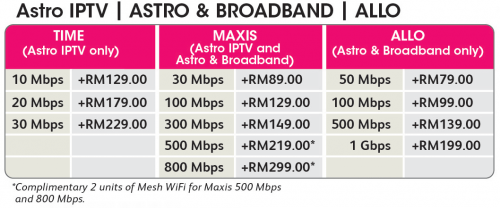
QUOTE(joshhd @ Dec 11 2020, 09:18 PM) The answer is both Yes and No. Yes, only if you upgrade to Astro Ultra Box IPTV. No, if you use Astro & Broadband or Astro DTH (the usual Astro that relies on satellite dish) on Ultra Box. The workaround is, you can use Play from Start feature to restart the programme from beginning. But it won't be live TV anymore. In conclusion, if your area has Maxis Fibre coverage or Allo (TNB's City Broadband), then just upgrade to Astro IPTV with Ultra Box. ![]() |
| Change to: | 0.0433sec
0.61
7 queries
GZIP Disabled
Time is now: 22nd December 2025 - 01:28 AM |