QUOTE(yongtjunkit @ Mar 12 2020, 07:48 PM)
Improvement to the bitrate? Or decreasing the bitrate even more?

It appears the video bitrate has slightly increased, but not on all HD channels. Will continue to monitor from time to time.Astro Version 13A, All about Astro Malaysia offerings
|
|
 Mar 12 2020, 08:58 PM Mar 12 2020, 08:58 PM
Show posts by this member only | IPv6 | Post
#3501
|
 
Senior Member
7,801 posts Joined: Dec 2014 From: Malaysia  
|
QUOTE(yongtjunkit @ Mar 12 2020, 07:48 PM) Improvement to the bitrate? Or decreasing the bitrate even more? It appears the video bitrate has slightly increased, but not on all HD channels. Will continue to monitor from time to time. |
|
|
|
|
|
Mar 12 2020, 09:00 PM
Show posts by this member only | IPv6 | Post
#3502
|
|
Senior Member
7,801 posts Joined: Dec 2014 From: Malaysia
|
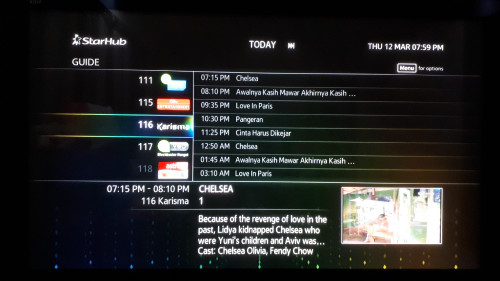
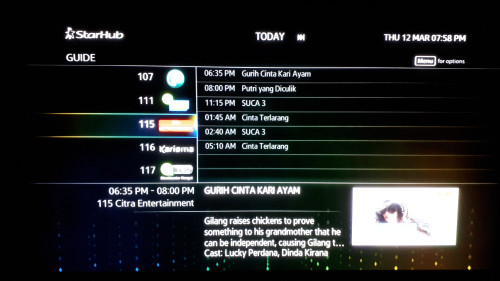
QUOTE(chuppachop @ Mar 12 2020, 08:49 PM) Just sharing Starhub TV new launches (Citra Entertainment, Karishma & Pawagam Indonesia)..... The latter channel is a SVOD Channel, not available for free preview, the 3 new chs are replacing the 3 dropped chs (IDX Channel, Infotainment & MNC Channel): Oh? Seems like Starhub TV is now trying to target more on Singaporean Malay viewers now, since more and more viewers are slowly moving away from pay TV services.» Click to show Spoiler - click again to hide... « |
|
|
Mar 12 2020, 09:58 PM
Show posts by this member only | IPv6 | Post
#3503
|
|
Senior Member
957 posts Joined: Apr 2010
|
The IDX Channel is a business news channel while Infotainment also draws very little viewership, so makes sense to drop these 2. With younger viewers watching less TV, logical to target the homemakers and seniors who are paying for TV, to make them happy and glued to serials on the newly launched chs, lol.
|
|
|
Mar 13 2020, 08:07 AM
|

Senior Member
7,938 posts Joined: Mar 2014
|
QUOTE(joshhd @ Mar 12 2020, 08:58 PM) It appears the video bitrate has slightly increased, but not on all HD channels. Will continue to monitor from time to time. What bitrate Astro is using? |
|
|
Mar 13 2020, 08:56 AM
|
|
Senior Member
2,517 posts Joined: Mar 2016
|
QUOTE(joshhd @ Mar 12 2020, 08:58 PM) It appears the video bitrate has slightly increased, but not on all HD channels. Will continue to monitor from time to time. Astro might be testing it at the moment? Then finalize if they should upgrade all the channel bitrate on 1st April? Or maybe decide to do an April fools joke on that day too |
|
|
Mar 13 2020, 08:57 AM
Show posts by this member only | IPv6 | Post
#3506
|

All Stars
18,505 posts Joined: Oct 2007 From: P.Jaya
|
QUOTE(Zot @ Mar 13 2020, 08:07 AM) What bitrate Astro is using? How to check bitrate..? |
|
|
|
|
|
Mar 13 2020, 09:14 AM
|
|
Senior Member
7,938 posts Joined: Mar 2014
|
QUOTE(stasio @ Mar 13 2020, 08:57 AM) How to check bitrate..? The only way for TV is I guess people who knows about after asking Astro, perphaps  Maybe can use HDMI as input source to a PC and get apps to measure it? Maybe something in the UBox menu? I did not check  This post has been edited by Zot: Mar 13 2020, 09:15 AM |
|
|
Mar 13 2020, 09:16 AM
Show posts by this member only | IPv6 | Post
#3508
|
|
Senior Member
2,517 posts Joined: Mar 2016
|
QUOTE(Zot @ Mar 13 2020, 09:14 AM) The only way for TV is I guess people who knows about after asking Astro, perphaps You’ll get HDCP error instead if you plug in Hdmi from Astro to a PC Maybe can use HDMI as input source to a PC and get apps to measure it? Maybe something in the UBox menu? I did not check I don’t think that Astro would put in the bitrate Information into the decoder, that would probably cause PR nightmare This post has been edited by yongtjunkit: Mar 13 2020, 09:19 AM |
|
|
Mar 13 2020, 09:19 AM
Show posts by this member only | IPv6 | Post
#3509
|

Junior Member
465 posts Joined: Oct 2011 From: KL 
|
QUOTE(joshhd @ Mar 12 2020, 12:59 AM) Hmm yea can also. You might have to search online for third party Astro installers. You can search keywords like "Astro installers" on Facebook search too. Strength 45% Quality 100%Assuming you're using either HD or PVR box, press "home" button on remote, then Settings>STB Diagnostics. Then, on top corner of your TV screen, what is the % readings shown for Strength and Quality? Is it normal? |
|
|
Mar 13 2020, 09:56 AM
|
|
Senior Member
7,938 posts Joined: Mar 2014
|
QUOTE(yongtjunkit @ Mar 13 2020, 09:16 AM) You’ll get HDCP error instead if you plug in Hdmi from Astro to a PC HDPC error you get because the other port probably not HDPC compliance. You just need to buy a cheap HDMI splitter and the error is gone I don’t think that Astro would put in the bitrate Information into the decoder, that would probably cause PR nightmare Bitrate is nothing secret not to reveal. The transmission is probably using VBR (variable bit rate), so it constantly changes and rate controlled by compression method used. The important parameter is probably setting the min rate and how many bit reserved for shade of color. Otherwise you'll see color banding. The Unifi TV had better picture and more color rich if you compare the picture, based on my observation. |
|
|
Mar 13 2020, 10:21 AM
|

Junior Member
123 posts Joined: Jan 2008 From: Putrajaya
|
Does anyone know who/how can I get in touch with Astro to ask them to install the new 4K decoder?
I used the form on their website and but until today, I never received any call from their so called 'customer support'. I wonder if that form is even working.. lousy website |
|
|
Mar 13 2020, 10:22 AM
Show posts by this member only | IPv6 | Post
#3512
|
|
Senior Member
7,801 posts Joined: Dec 2014 From: Malaysia
|
QUOTE(frostfrench @ Mar 13 2020, 09:19 AM) Strength 45% Quality 100% Oh no... 45% is way too low. That's the reason why you face that issue. Satellite signals appears to be pretty weak. Is it normal? Better is at least 70% and above. Check your satellite cable, make sure it's properly connected. If the connector appears to be too loose, consider re-terminate your RG6 cable (the satellite cable). You can watch YouTube tutorial videos on how to do it. If there's no issue with the cable, then probably is your satellite dish needs to be realigned. |
|
|
Mar 13 2020, 12:04 PM
Show posts by this member only | IPv6 | Post
#3513
|
|
Senior Member
7,801 posts Joined: Dec 2014 From: Malaysia
|
QUOTE(Zot @ Mar 13 2020, 08:07 AM) What bitrate Astro is using? QUOTE(stasio @ Mar 13 2020, 08:57 AM) How to check bitrate..? Astro uses variable bit rate, so it is constantly changing all the time, depending on the scene and motion of the video. QUOTE(Zot @ Mar 13 2020, 09:14 AM) The only way for TV is I guess people who knows about after asking Astro, perphaps Nope. Maybe can use HDMI as input source to a PC and get apps to measure it? Maybe something in the UBox menu? I did not check I use the TS Capture method. Record the transport stream of the entire transponder, then use computer software to analyse the bitrate information. There's no option for Ultra Box to do that. If you found out ways to do that, do let me know... Hahaha QUOTE(yongtjunkit @ Mar 13 2020, 09:16 AM) You’ll get HDCP error instead if you plug in Hdmi from Astro to a PC Good that you know lor... I don’t think that Astro would put in the bitrate Information into the decoder, that would probably cause PR nightmare Not everyone is interested to know the bitrate anyway. Cuz when customer complain bad picture quality, for sure they'll say is your satellite dish problem 😌 It's not necessarily means they (including the technical engineer persons in Astro) don't understand your question, they just don't want to admit so they pretend like nothing happen, or they just disagree with you statements. Why? Because they know, it will cause PR disaster. 😏 |
|
|
|
|
|
Mar 13 2020, 12:19 PM
Show posts by this member only | IPv6 | Post
#3514
|
|
Senior Member
7,801 posts Joined: Dec 2014 From: Malaysia
|
QUOTE(latios507 @ Mar 13 2020, 10:21 AM) Does anyone know who/how can I get in touch with Astro to ask them to install the new 4K decoder? It's called Ultra Box. I used the form on their website and but until today, I never received any call from their so called 'customer support'. I wonder if that form is even working.. lousy website Alternatively, you can have a live chat with Astro via WhatsApp here: https://www.astro.com.my/contactus |
|
|
Mar 13 2020, 01:38 PM
|
|
Senior Member
2,517 posts Joined: Mar 2016
|
QUOTE(joshhd @ Mar 13 2020, 12:04 PM) Nope. So means that you've connected the satellite dish to your PCI use the TS Capture method. Record the transport stream of the entire transponder, then use computer software to analyse the bitrate information. There's no option for Ultra Box to do that. If you found out ways to do that, do let me know... Hahaha QUOTE(joshhd @ Mar 13 2020, 12:04 PM) Good that you know lor... I think an average consumer will see it as something like internet speed, lower internet speed = poorer qualityNot everyone is interested to know the bitrate anyway. Cuz when customer complain bad picture quality, for sure they'll say is your satellite dish problem 😌 It's not necessarily means they (including the technical engineer persons in Astro) don't understand your question, they just don't want to admit so they pretend like nothing happen, or they just disagree with you statements. Why? Because they know, it will cause PR disaster. 😏 |
|
|
Mar 13 2020, 02:24 PM
|
|
Senior Member
7,938 posts Joined: Mar 2014
|
QUOTE(joshhd @ Mar 13 2020, 12:04 PM) Astro uses variable bit rate, so it is constantly changing all the time, depending on the scene and motion of the video. Still in the VBR, you can set the min and max bit rate. If too low, then when you see something like flash or sparkling water (fro example), it will look blocky because the data is compressed to max since the difference between pixel is almost none.  |
|
|
Mar 13 2020, 02:24 PM
|

Junior Member
185 posts Joined: Nov 2009
|
QUOTE(joshhd @ Mar 12 2020, 08:58 PM) It appears the video bitrate has slightly increased, but not on all HD channels. Will continue to monitor from time to time. so my eyes are not deceiving me right..  |
|
|
Mar 13 2020, 03:48 PM
|
|
Junior Member
465 posts Joined: Oct 2011 From: KL
|
QUOTE(joshhd @ Mar 13 2020, 10:22 AM) Oh no... 45% is way too low. That's the reason why you face that issue. Satellite signals appears to be pretty weak. Thank you. Will call a contractor to fix it.Better is at least 70% and above. Check your satellite cable, make sure it's properly connected. If the connector appears to be too loose, consider re-terminate your RG6 cable (the satellite cable). You can watch YouTube tutorial videos on how to do it. If there's no issue with the cable, then probably is your satellite dish needs to be realigned. |
|
|
Mar 13 2020, 03:48 PM
Show posts by this member only | IPv6 | Post
#3519
|
|
Senior Member
7,801 posts Joined: Dec 2014 From: Malaysia
|
QUOTE(yongtjunkit @ Mar 13 2020, 01:38 PM) So means that you've connected the satellite dish to your PC Wah... Not literally "connect satellite dish to PC" la... I think an average consumer will see it as something like internet speed, lower internet speed = poorer quality You'll just need a satellite receiver/equipment that can do TS Capture (or record entire transport stream on that frequency) to an external storage, then you analyse that recorded .ts file on a computer software. And some people may find this to be troublesome... That's the most I can tell you. Can't reveal too much info...  QUOTE(Zot @ Mar 13 2020, 02:24 PM) Still in the VBR, you can set the min and max bit rate. If too low, then when you see something like flash or sparkling water (fro example), it will look blocky because the data is compressed to max since the difference between pixel is almost none. It's called "video compression artifacts". Tell those people, it is nothing got to do with the signal strength, or satellite dish, or how new or old is the Astro box, or whatsoever. It is something that can be done on their broadcast transmission site, where they set the bitrate, as well as other technical stuff, which is mostly handled by "upstairs people", such as technical broadcast engineer persons. So when it comes to ordinary customer service agents, particularly Astro, tbh they're just carrying out tasks as ordered/instructed/told to do so. All those too technical thing, they all don't know. Even if they know, they won't say also. Why? Later "PR disaster". When it comes to video bitrate, you can see whether Astro is focus on quantity or quality. Put 12 HD channels in a single 36MHz transponder, and the FEC 5/6, it proves everything. Last time Astro wasn't like that. They'd assume customers won't notice much difference also, and if they do, they'd put the blame back to customer by saying "must be customer's TV got problem". Case closed. QUOTE(suffeylp @ Mar 13 2020, 02:24 PM) so my eyes are not deceiving me right.. Full HD, or Ultra HD itself are already sharp enough, but most TVs in the market tend to sharpen the image again by default, to make it look attractive for consumers to buy it, especially when displaying the TV sets in electrical shops. Actually, this makes the overall picture sharpness to look unnatural, or "watercolour painting" like. To ensure that your TV is not adding "artificial sharpening" effect which makes overall picture look awful, I strongly advice you guys to adjust the Sharpness setting on your TV's picture settings to zero (0), like this: 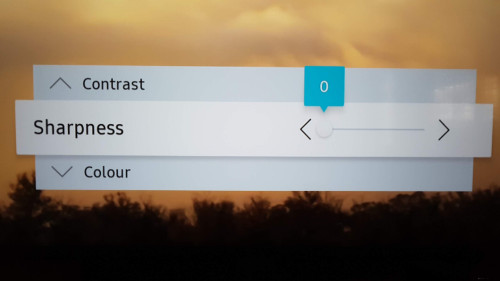 *Picture above is for Samsung UHD TV More info here: https://www.cnet.com/how-to/turn-down-your-...rpness-control/ You could also explore other picture related settings on your TV, such as Noise Reduction, Image Enhancer, Clean View and so on. Cuz if setting these settings as "High", it would also make picture quality look unnatural to some extent too. Consider just "Low" or "Auto", so that your TV won't overly enhance the original source picture into something that look too "fake" and undesired results. |
|
|
Mar 13 2020, 06:34 PM
Show posts by this member only | IPv6 | Post
#3520
|
|
Senior Member
2,517 posts Joined: Mar 2016
|
QUOTE(joshhd @ Mar 13 2020, 03:48 PM) Wah... Not literally "connect satellite dish to PC" la... Better 🤫, later Astro found out and try to “partner up with mcmc” and create news againYou'll just need a satellite receiver/equipment that can do TS Capture (or record entire transport stream on that frequency) to an external storage, then you analyse that recorded .ts file on a computer software. And some people may find this to be troublesome... That's the most I can tell you. Can't reveal too much info... Btw do you plan on recording on what happens if you are watching live TV when Astro changes try LCN? This post has been edited by yongtjunkit: Mar 13 2020, 09:14 PM |
| Change to: |  0.0256sec 0.0256sec
 0.51 0.51
 6 queries 6 queries
 GZIP Disabled GZIP Disabled
Time is now: 21st December 2025 - 08:18 AM |
 Quote
Quote