Welcome Guest ( Log In | Register )

1082 Pages « < 728 729 730 731 732 > » Bottom

Outline · [ Standard ] · Linear+

 Astro Version 13A, All about Astro Malaysia offerings

views
     
linkinstreet
post Nov 8 2022, 12:44 PM

Red Bull Addict
Group Icon
Moderator
9,275 posts

Joined: Jan 2005
From: KL. Best place in Malaysia. Nuff said

QUOTE(xiaoxiaoshen @ Nov 8 2022, 11:58 AM)
a way to work perfect on TV for the astro go acc. get a mini PC (2nd market) size smaller than a Ulti box. then logon and use TV as monitor.

user posted image
*
But he wasn't asking for how to watch. He is asking on if he can get a multiroom without subscribing to a main Astro account

Also, Astro GO on browser/app is only limited to 720p 25FPS tho. Multiroom Smart TV is 1080p 50FPS
linkinstreet
post Nov 9 2022, 06:30 AM

Red Bull Addict
Group Icon
Moderator
9,275 posts

Joined: Jan 2005
From: KL. Best place in Malaysia. Nuff said

Hmm. I presume a lot of pirated IPTV sellers are going to have very angry customers today with what Astro did
wong_86
post Nov 9 2022, 10:01 AM

DUDE
****
Junior Member
565 posts

Joined: Oct 2007
From: MARS


QUOTE(linkinstreet @ Nov 9 2022, 06:30 AM)
Hmm. I presume a lot of pirated IPTV sellers are going to have very angry customers today with what Astro did
*

Astro did what ? Please enlighten me notworthy.gif
linkinstreet
post Nov 9 2022, 10:14 AM

Red Bull Addict
Group Icon
Moderator
9,275 posts

Joined: Jan 2005
From: KL. Best place in Malaysia. Nuff said

QUOTE(wong_86 @ Nov 9 2022, 10:01 AM)
Astro did what ? Please enlighten me notworthy.gif
*
Patched a previous Astrogo loophole
Dozz
post Nov 9 2022, 11:30 PM

Look at all my stars!!
*******
Senior Member
2,149 posts

Joined: Aug 2005
From: Malaysia


QUOTE(linkinstreet @ Nov 9 2022, 10:14 AM)
Patched a previous Astrogo loophole
*
you are right! many of my friends complain most astro channels doesnt work in those famous TV box now...
joshhd
post Nov 9 2022, 11:58 PM

Look at all my stars!!
*******
Senior Member
7,799 posts

Joined: Dec 2014
From: Malaysia


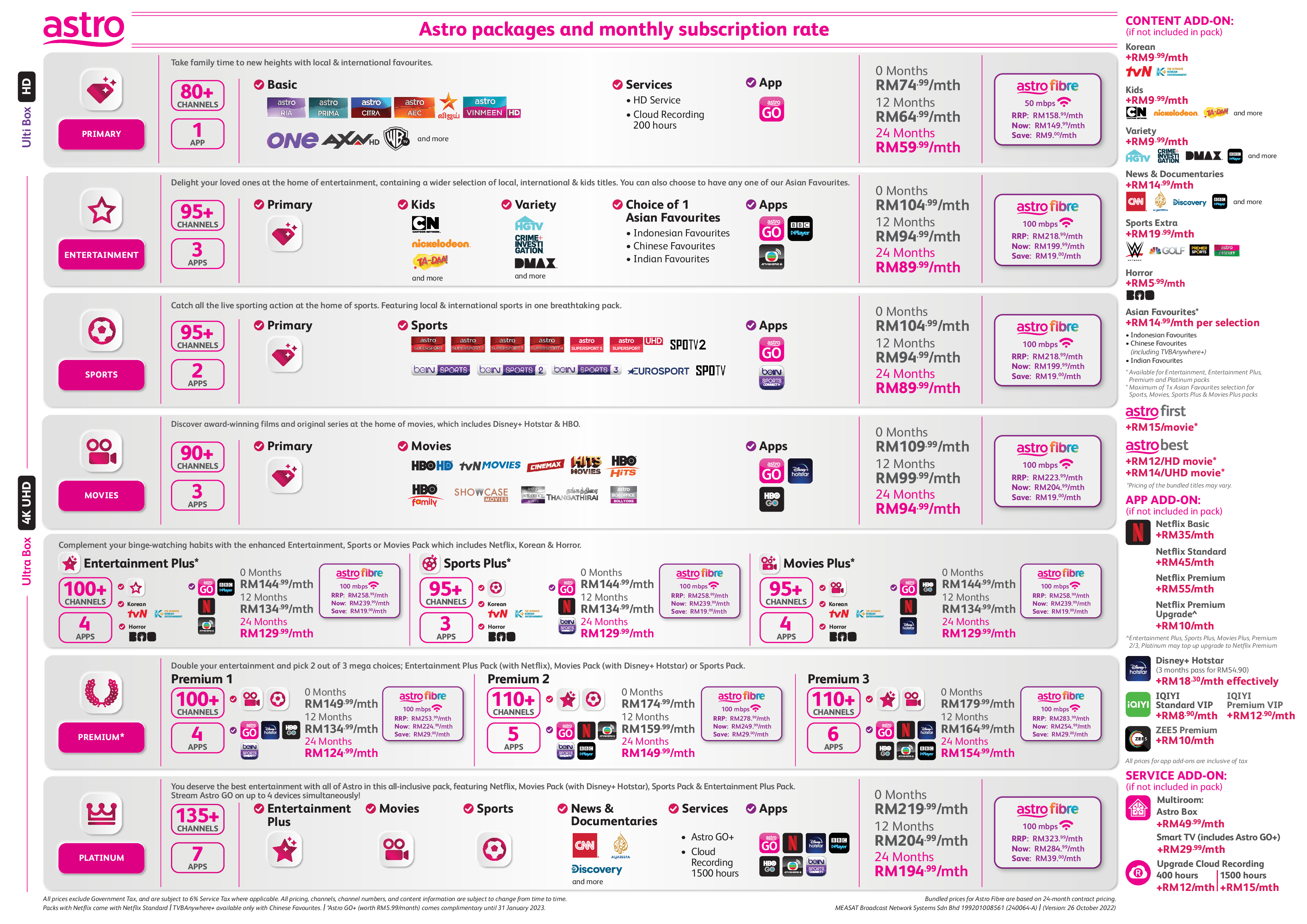
Astro Subscription Rate Card - October 2022
user posted image

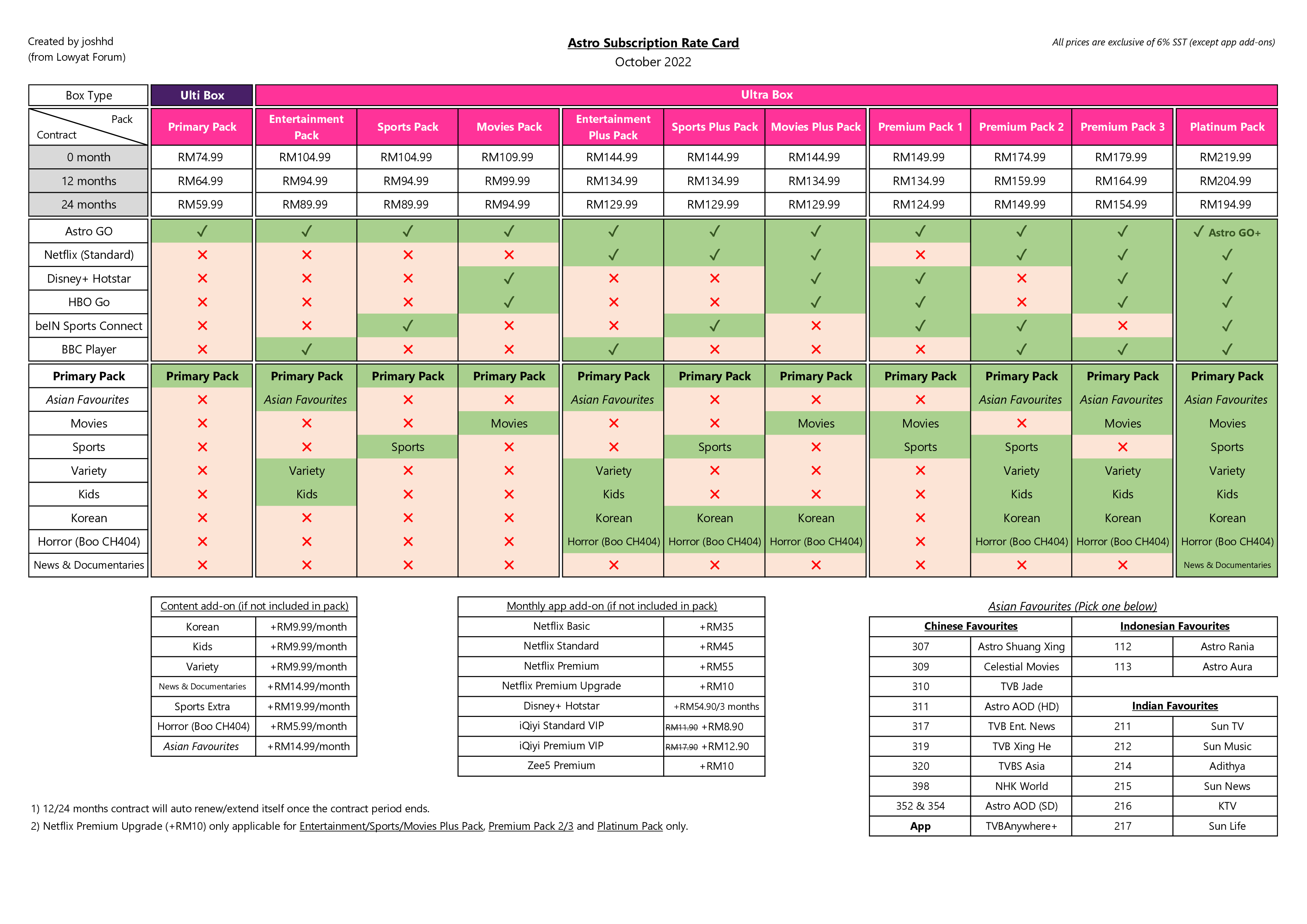
Too confusing/complicated to understand the rate card above?
Here are my version of their rate card:
user posted image

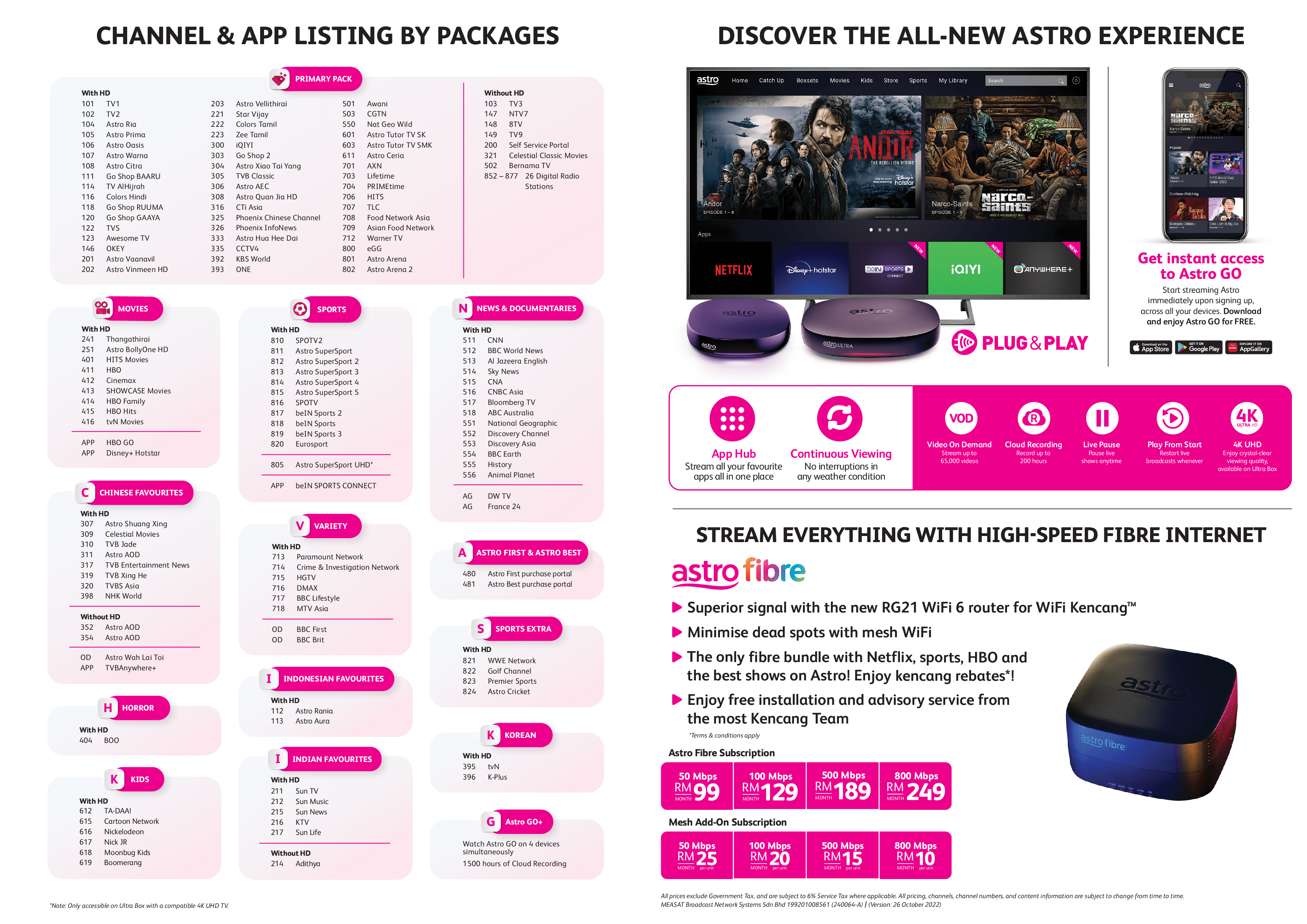
Channel List
user posted image

Do note that the rate card you see above, are the original/retail price of Astro packs.
The "heavily discounted prices" you see on Astro website ( https://product.astro.com.my/TV ) is likely offer to targeted customers only, such as new Astro customers.


This post has been edited by joshhd: Nov 10 2022, 12:08 AM
joshhd
post Nov 9 2022, 11:59 PM

Look at all my stars!!
*******
Senior Member
7,799 posts

Joined: Dec 2014
From: Malaysia


It’s 1 year anniversary of Astro’s new packs. According to my first post about this last year ( https://forum.lowyat.net/index.php?showtopi...#entry102870411 ), there have been some changes since then, so here’s an update:

Are you still a legacy pack customer?
If you’re still on one of these packages like Family Pack, Starter Pack, Value Pack, Super Pack Lite, Super Pack, or Super Pack Plus, then you are considered a “legacy pack customer”, also known as a customer who is on the “old” packs.
Or in other words, if you did not make any changes to your Astro package subscription (change or upgrade box doesn’t count) before 8 November 2021, then you are considered a legacy pack customer.

Thinking about switching to new packs? Here’s 10 things you should know

1. These channels listed below, are automatically available to everyone. No other add-ons are needed.
Once you are on new TV packs, regardless of what race you are, you will automatically gain access to these vernacular channels (Malay or Chinese or Indian), as it is included in Primary Pack.
No more those Mustika pack or Chakravarthy pack anymore, cuz it simply doesn’t exist in the new packs.
The most basic and lowest Astro package available now is called Primary Pack, price starts from RM59.99/month with 24 months contract. The legendary Astro's Family Pack which costs RM39.95 that you used to know, has literally no more.
Segment Channels
Malay Astro Warna (107), Astro Citra (108)
Indian Star Vijay (221), Colors Tamil (222), Zee Tamil (223)
Chinese CTI Asia (316), Phoenix Chinese Channel (325), Phoenix InfoNews (326), Astro Hua Hee Dai (333)
English Warner TV (712)
Warner TV, which was previously under Variety Pack, is now considered a "basic channel", so every Astro customer under new TV packs will have access to this channel now.

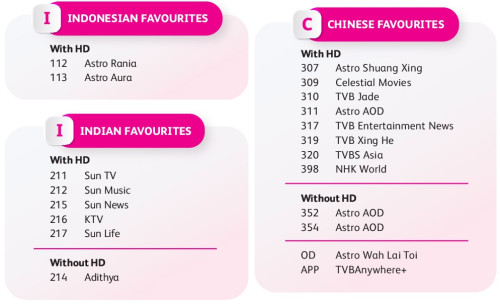
2. Want more vernacular channels? Introducing ‘Asian Favourites’
It consists of 3 types, which are Indonesian Favourites, Chinese Favourites, Indian Favourites. In comparison to the legacy packs, it is equivalent to Indo Pek, Dynasty pack and Maharaja pack respectively.
user posted image

If you subscribe to either Entertainment Pack, Entertainment Plus, Premium Pack 2 or 3 or Platinum Pack, then you are eligible to choose one (1) of Asian Favourites add-on of your choice, without additional charge.
Otherwise, each Asian Favourites add-on costs RM14.99 per month. Therefore, if those vernacular channels are a must for you, then don’t forget to include the respective Asian Favourites add-on to your subscription.
For example, if the Tamil channel Sun TV (channel 211) is a must for you or your family, then make sure you have Indian Favourites included or added to your package subscription.

3. You might lose access to these channels once you switch over to the new packs…

Affected channels Which pack or add-on do you need to access the channels again
Thangathirai (241) & BollyOne (251) Movies Pack
Celestial Movies (309) Chinese Favourites
tvN (395) Korean
HITS Movies (401) Movies Pack
Premier League: SuperSport 1, 2, 3 (811/812/813) Sports Pack*

* Premier League pack does not exist on the new TV packs. You'll have to opt for bundles that include Sports Pack to access channel 811, 812, and 813 again.

Are you able to watch some or all of these channels now on your existing legacy packs? Perhaps you are aware that the listed channels are included in your legacy pack, or didn’t even realise that you can access the listed channels above.
But once you switch to the new Astro packs, you need to make sure you have the required add-ons (refer to the table above) to continue access to the respective channels that you wanted to watch, or else you will lose access to some or all channels listed on the table above.

For example, you've been able to watch Astro SuperSport 1, 2, 3 because you are on Value Pack (and it has Premier League pack included in it). You probably watch some live sports occasionally, but not to say a hardcore fan of sports, or you might be the ones that are not so willing to pay so much for Astro.
Now you switch to Entertainment Plus Pack (because it has Netflix in it).
One day, you feel like watching some sports, so you tune in to channel 811, 812 or 813. Then you will start to wonder, "Eh, how come I can't watch these sports channels anymore? I thought previously I can watch them?"
That is because:
  • Premier League pack does not exist in the new Astro packs.
  • Entertainment Plus Pack itself, does not include Sports Pack.
  • You need to subscribe to either Sports Pack, Sports Plus Pack, Premium Pack 1, Premium Pack 2 or Platinum pack to gain access to channel 811, 812 and 813 again.
Now you regret also no point because you can't turn back to legacy packs anymore. So do your research thoroughly before you switch to new packs. However, if you don't watch any of these channels listed above, then you can just skip to the next point.

==

For those who are on Chuen Min pack (also known as Chinese Family pack, the one that excludes 104, 105, 201), do note that Celestial Movies (309) is not a "free" channel anymore. You'll need to opt for the Chinese Favourites add-on to continue accessing Celestial Movies channel upon switching to the new TV packs.

4. You want to maintain your current legacy packs, but Astro don’t want that
Just because you love your existing legacy packs for various reasons, that doesn’t mean Astro love to see that.
According to their general T&C, they have the right to change whatever business rules anytime as they please. To force encourage as many customers as possible to move to the new packs, there have been tons of restrictions imposed on legacy pack customers, such as cannot add/remove/replace/upgrade/downgrade any Astro package, and even add Multiroom box. The best way to get your freedom back is to switch to the new pack altogether.
Ok, here’s some happier news:
You can upgrade to Ulti or Ultra Box while maintaining your legacy packs, but only on certain exceptions, including but not limited to:
  • If your existing Astro box is being replaced due to technical problems, they no longer offer you either HD or PVR box as a box replacement. Even if you’re using a PVR box and unfortunately it spoils and needs to be replaced, they will likely offer you Ulti Box as a box replacement. When that happens, bid farewell to your PVR box as the Astro installer will collect it from you upon box upgrade.
  • Existing Astro IPTV customers that are being offered or requests to “upgrade” to Ulti or Ultra Box, but you will eventually be using either Satellite (if your box is connected to the Astro dish) or Plug & Play mode, and you won’t be using IPTV Multicast service thereafter. Astro do plans to cease Astro IPTV service someday, and the migration process has already ongoing. But since Ulti and Ultra Box has the Continuous Viewing feature that allows you to continue watching TV channel when there’s no satellite signal (e.g. bad weather) by manually switching from satellite to internet streaming, then it’s likely not a major concern to most people.

5. No more standalone "News" and "Learning" mini packages
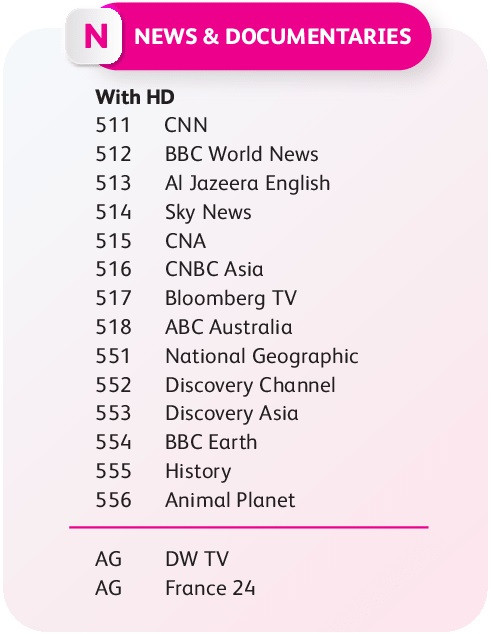
Both Mini Packages mentioned are now consolidated as a single add-on, named "News & Documentaries", and the only package bundle that comes with it, is the most expensive Platinum Pack.
Otherwise, a-la-carte price for "News & Documentaries" will be RM14.99 per month.
user posted image
If you've been subscribed to the Learning pack but did not subscribe to the News pack, or vice versa, then unfortunately, once you switch to the new packs, it’s no longer an option for you to choose either one of them. It’s 2-in-1 now, whether you like it or not.
But if you've already subscribed to both of them previously, well... no difference for you then.

6. Still has a remaining contract on your legacy packs but want to switch to the new packs?
Then you have to choose the contract period option that is greater than your existing remaining contract period.
For example, you have an ongoing 24-month contract, and still have 7 months remaining before your contract ends, and now you are interested to switch to the new packs. You have to select at least 12 months contract then. The 0-month contract option is not available for you.
And vice versa, if you still have 15 months contract remaining, then you’ll have to select the 24 months contract option upon switching to the new packs.

This post has been edited by joshhd: Nov 10 2022, 02:54 AM

joshhd
post Nov 9 2022, 11:59 PM

Look at all my stars!!
*******
Senior Member
7,799 posts

Joined: Dec 2014
From: Malaysia


7. Introducing, contract auto-renewal
Imagine subscribing to Astro TV packs and getting a 24-month contract, which lasts from the year 2022-2024 for example.
Just 1 month before your contract period ends, you will receive an SMS reminder from Astro, saying that your contract will auto renew itself on the next month.
If you do nothing by the next month and continue living your life as usual, then the system will automatically renew/extend another 24 months contract. So, instead of your contract suppose to end in 2024, now it extends itself to 2026.

If you don't want any contract after completing the 24 months (which means you don't want it to auto-renew or extend the contract further), then you’ll need to contact Astro customer service before the contract period ends, and they'll advise you further whether you want to proceed with the No Contract option rate or the 12 month contract option rate thereafter. For example:

Primary Pack
  • RM59.99/month for 24 month contract
  • RM64.99/month for 12 month contract
  • RM74.99/month for 0 month contract (No Contract)
You've been paying Primary Pack price of RM59.99 per month for the past 24 months. Now you've decided that you don't want the contract (so that you could terminate Astro anytime), therefore from the 25th month onwards, your Astro subscription fee will become RM74.99 per month instead of RM59.99 per month like what you've been enjoying for the past 24 months. That’s right, you don't want it to auto-renew also means you got to pay the rate for the 0-month contract option thereafter.

Or maybe you want to have a shorter commitment (perhaps you intend to terminate Astro within 1-2 years). In this case, you can consider extending the contract but with 12 month contract option instead. If you do that, then your Primary Pack subscription will increase from RM59.99/month (24 month rate) to RM64.99/month (12 month rate) upon the expiry/renewal of your contract period. Even so, the 12 month contract will still be on an auto renewal basis. So do contact Astro if you want to make changes/re-evaluate your auto renewal contract options when the time comes.

In case you wonder, this "rule" does state in their T&C. So, the moment you sign up for these new Astro packs, it also means you are deemed consent; you agree with the contract auto-renewal rule.
Therefore, whether you want to pay more or pay less thereafter, the choice is yours.

There shall be no penalty fee if you terminate right before the contract auto-renewal kicks in, as long you give them a 1 month notice in advance.

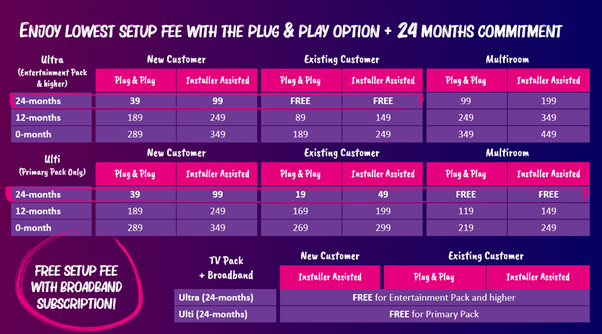
8. No Contract option costs up to RM25/month more expensive compared to 24 month contract option
Compare between 0 month vs 24 month contract option, the difference in monthly fees would be around RM15/month to RM25/month higher.
For 0 month vs 12 month contract option, it’ll be between RM10/month to RM15/month higher. Not only that, a one-time installation fee and/or activation fee may apply if you opt for either 0 month or 12 month contract option too.
user posted image
Source: https://support.astro.com.my/question/what-...on-the-new-pack

"Installer Assisted" usually refers to the regular satellite dish installation.
If you opt for Plug & Play, usually they'll ship the box to your doorstep through courier, and you set it up yourself.

Basically, FREE standard installation or setup fee is only eligible for:
  • Existing Astro customers that upgrade to Ultra Box, and then subscribe to at least Entertainment Pack (24-month contract) and above.
  • For those who opt for Ulti Box for Multiroom with 24-month contract
  • Whoever subscribes to Astro Fibre (Non-standard installation charges may apply if the installation involves additional works such as over-ceiling cabling, over-roof cabling, underground cabling, etc.)
Meanwhile, if you opt for Astro Fibre, then the only contract option for you is 24 months, and the standard installation is free. 0 month or 12-month contract option simply doesn’t exist for Astro Fibre.

If you terminate the service within or before the contract ends, penalty fees for Ultra Box are RM1000 prorated, non-Ultra Box is RM600 prorated, meanwhile Astro Fibre (Internet service itself) is RM100 x remaining months of the contract period.
More info here: https://support.astro.com.my/question/how-a...-fee-calculated

9. No RM10 switching fee for existing legacy pack users that switches to the new packs
You want to switch to the new packs, and the total price is lower than what you’ve been paying on your legacy packs. Don’t worry, they won’t charge you a RM10 switching fee for that. But it is only just this time, ya.
And definitely, once you move to the new packs, you can’t go back to the legacy packs anymore, so it is a one-way ticket, definitely not a round-trip ticket.

10. Primary Pack customers will not be getting Ultra Box
This rule applies especially for new Astro customer:
If you subscribe to Primary Pack, you will be getting Ulti Box.
If you want Ultra Box, then you have to subscribe to higher tier packs than Primary Pack, such as Entertainment Pack (RM89.99/month for 24m contract) or higher.
HD Zapper and PVR box won’t be offered to Astro customers anymore, so no need to think about that, no matter how much you love it.

Back in legacy pack days, all you need is at least on Starter Pack (RM61.32 per month) and above to get Ultra Box.
But today if you want to get Ultra Box, you need to choose Entertainment Pack (from RM89.99 per month) or any higher package tier to be eligible.

This post has been edited by joshhd: Nov 10 2022, 03:23 AM
joshhd
post Nov 10 2022, 03:01 AM

Look at all my stars!!
*******
Senior Member
7,799 posts

Joined: Dec 2014
From: Malaysia


10 things you should know about Netflix on Astro
If anyone asks, or anyone you know that may find this post helpful, do direct them the link to this post.

Netflix bundle = Astro packs that include Netflix subscription (referring to Entertainment/Sports/Movies Plus Pack, Premium Pack 2/3 and Platinum Pack)
Netflix add-on = The opposite meaning of “Netflix bundle”; the usual Netflix price being charged into your Astro bill, which is RM35, RM45 or RM55 for Basic, Standard or Premium plans respectively,

1. As long you're using Ultra or Ulti Box, you’ll be able to access to Netflix app there. It doesn’t matter whether you’re on legacy or new packs.
If you already have an existing Netflix account, just launch the app (CH741) and log in to your Netflix account and start streaming.
As much as how Astro would love you to subscribe to their Netflix bundle or move to the new packs, but still, you don’t have to force yourself to migrate from legacy packs to the new packs just for the sake of using the Netflix app on your Ultra Box.
So don’t worry, just treat it like how you would launch Netflix app on your smart TV or Android TV. biggrin.gif

2. Subscribe to Netflix or OTT bundles for the first time? Then you’ll get a 12/24 month contract.
If you choose packs that includes OTT bundles for the very first time, such as Netflix or Disney+ Hotstar, then you must commit at least 12 or 24 months contract on that bundle. The 0-month contract is not an option for you, yet.
If you downgrade your packs from a Netflix bundle to a non-Netflix bundle within the contract period, then early termination fees will apply.

3. Ultra or Ulti Box won’t let you launch Netflix app if you stop paying your Astro bills
Account suspended due to late or no payment? Then the Ultra or Ulti Box will block you from launching Netflix or any other OTT apps there.
If you subscribe to the Netflix bundle through Astro, then the entire Netflix account will stop working, even if the account is logged in on other devices, until your Astro account is back Active status again (e.g. clear your outstanding balance).
If your Astro account is terminated, then that one even no need to say lah.

4. You can use the Netflix account you get from Astro to log in across your devices, just like a normal Netflix account
There is no such nonsense as “You can only use that Netflix account on your Astro Ultra Box only” just because you subscribe to Netflix bundle or Netflix add-on through Astro billing.
You can still use the same Netflix account to log in across your devices and share with others. Just treat it like the usual Netflix account. There is no special treatment here.

5. Whatever Netflix bundles you get from Astro, is up to Netflix Standard plan (2 screens) only.
Netflix Standard plan (2 screens) refers to Netflix’s RM45/month plan.
Any Netflix bundles from Astro only comes with the Netflix Standard plan by default. But you have the choice to top-up another RM9.43/month (After 6% SST will become RM10/month) to upgrade the default Netflix Standard plan into a Netflix Premium plan.
Only then, you will be able to stream Netflix in 4K UHD across your supported devices.
If you change your mind later, you can downgrade from Netflix Premium to Netflix Standard anytime (even within the contract period, if have one), and there will be no penalty charges on that.
joshhd
post Nov 10 2022, 03:02 AM

Look at all my stars!!
*******
Senior Member
7,799 posts

Joined: Dec 2014
From: Malaysia


6. You need a Netflix Premium plan (4 screens) to stream Netflix in 4K UHD, while Ulti Box supports up to Full HD only
You can enjoy 4K UHD + HDR + Dolby Atmos when streaming Netflix on Ultra Box and across your supported devices. But for that to happen, you need to make sure you are on the Netflix Premium plan.
However, if you are on Netflix Standard plan and even you are using Ultra Box, you will only get to stream Netflix up to Full HD quality only, not in 4K UHD.
The same rule applies regardless of where you get that Netflix Premium (4 screens) plan from (i.e. Netflix bundle, Netflix add-on, or your own existing Netflix account),

Do note that Ulti Box supports up to Full HD quality only; does not support 4K UHD.

7. What happens once you subscribed to the Netflix bundle, and you launch Netflix app on Ultra or Ulti Box?
Usually, you will receive an activation link via email or SMS, and you can proceed with setting up Netflix by following the instructions there.
But if you prefer to activate Netflix entitlement through Astro Self Service online portal (https://selfservice.astro.com.my/), login to your Astro ID first, and then it will prompt you to activate Netflix.
From there at first, it will show your Astro ID's email address as your Netflix account.
If you don't want that email address to be used for your Netflix account, or you have a different/existing Netflix account that you want to link to, select "link a different account" and just follow the steps there.

Alternatively, if you prefer to perform the activation right on your Ultra Box, then launch the Netflix app on your Ultra Box first, then you will see a message that says "Great news! Netflix is included in your Astro package."
Select "Get Started", enter the email address and password of your existing Netflix account (if have), or you can sign up for a new Netflix account on the spot.

If you login to your existing Netflix account, and if it detects that your current Netflix plan is already on the Netflix Premium plan (RM55), it will ask "Would you rather keep your Netflix Premium plan?" and then reminds you that if you press "Yes, start watching" now, you will be charged an additional RM9.43/month (after 6% SST will be RM10/month) on your Astro bill.
Like I said earlier, Netflix bundles from Astro only comes with Netflix Standard. So, if you wish to continue enjoying Netflix Premium, you'll have to top-up RM10/month incl. 6% SST on your Astro bill for the Netflix Premium Upgrade.
If you wish not to be charged for the Netflix Premium upgrade, select "Plan options" and then choose Netflix Standard plan.

However, if it detects that your current Netflix account is NOT on the Netflix Premium plan (e.g. RM35 or RM45 plan), then you will be given options whether to proceed with Netflix Standard or upgrade to Netflix Premium by adding RM10/month.

Once the setup and confirmation process is completed, select "Accept and start watching" to begin enjoying Netflix. Once Netflix detects that the Netflix account is tagged onto your Astro account which is already on a Netflix bundle, Netflix will no longer bill your previous payment method (stop charging further from your debit/credit card), and your Netflix account's payment method will transition itself into Astro. You don't need to manually cancel your current Netflix subscription if you opt for a Netflix bundle from Astro.

8. What happens if you don’t subscribe to the Netflix bundle, and you launch Netflix app on Ultra or Ulti Box?
As you launch the Netflix app on Ultra Box, you will see a message that says "Watch TV shows and movies anytime, anywhere" with the buttons of "Join now" and "Sign in".
If you have an existing Netflix account, just "Sign in" and start watching as it is. There will be no changes to your current Netflix payment method.
For example, if your Netflix account is on the Premium plan (RM55) and the payment method is via debit/credit card, then it will remain as it is. It will not transition to Astro billing, so don't worry.

If you don't have a Netflix account, select "Join now", and it will create a new Netflix account for you on the spot as you enter your email address and password.
As you proceed further from this point, your Netflix add-on subscription (e.g. RM35, RM45 or RM55) shall be charged through your Astro bill.
As usual, because this is not considered a "Netflix bundle", it means you can cancel the Netflix add-on anytime, and there will be no penalty charges or contracts whatsoever.

9. What if I want to pay my standalone Netflix subscription fees through Astro billing?
So, you already have an existing Netflix account, and you prefer it to be billed through Astro billing rather than your current payment method (e.g. debit/credit card or through telco carrier billing), yes you can do that.
But first, you’ll need to Cancel Membership on your current Netflix account first, and then continue to enjoy Netflix as usual until the end of its billing cycle.
Don't worry, you will still be able to login into your Netflix account later. Therefore, stuffs like your 5 viewing profiles, My List, viewing history/suggestions will still retain. biggrin.gif
Once that Netflix account doesn’t allow you to stream shows anymore, then launch the Netflix app on Ultra or Ulti Box and login to that account. Follow the on-screen instructions, and with a confirmation message to proceed further, your Netflix add-on subscription (e.g., RM45 or RM55) shall be charged through your Astro bill.

10. Astro HD box and PVR box users won’t be getting Netflix
Netflix app is not coming to Astro HD or PVR box, so no need to put hopes there.
-oc-gassa
post Nov 10 2022, 09:19 AM

Enthusiast
*****
Senior Member
967 posts

Joined: Jan 2003
From: setapak
for any content add-on(Korean,Kids, News, etc) have a time contract such a minimum of 3 months?

This post has been edited by -oc-gassa: Nov 10 2022, 11:22 AM
fruitie
post Nov 10 2022, 10:48 AM

Rise and Shine
Group Icon
Staff
72,862 posts

Joined: Sep 2005
From: KUL

QUOTE(joshhd @ Nov 6 2022, 11:40 PM)
Just black screen? What error message do you see?
And, do you hear the audio of the channel in the background when you tune to 805?
*
Just black screen when I was using "Universal". After switching to DCSS, it managed to get everything running on 805. However, it stopped working after a while and SCNA error appeared.
Finally, the supplier for our building came to my house yesterday to inspect, it was solved after he reinserted the cable again. Nevertheless, he did mention to my MO rep (he was also present) that this may not work on long term as the signal from my house to the riser is too strong. He suggested to make a direct connection from my house to the riser, they will need to change the port. Too technical for me to understand actually, not sure if I get the details correctly. Coincidentally, after the visit I left my KL house and came back to hometown last evening. I will test it extensively when I'm back again after the GE15. Most likely, I will need to change the port as per what the supplier suggested.
kinseong
post Nov 10 2022, 12:24 PM

Casual
***
Junior Member
373 posts

Joined: Jan 2003
From: ~Peejay~


Hi all,

Anyone know whether all Sony TV model can install Astro Go?

I plan to get Sony X75K, anyone have this model and can confirm whether Astro Go can be installed from Play Store?

Thanks!!
aniq8676
post Nov 10 2022, 12:41 PM

Regular
******
Senior Member
1,524 posts

Joined: Dec 2020
From: Perak


QUOTE(kinseong @ Nov 10 2022, 12:24 PM)
Hi all,

Anyone know whether all Sony TV model can install Astro Go?

I plan to get Sony X75K, anyone have this model and can confirm whether Astro Go can be installed from Play Store?

Thanks!!
*
Do you mean Astro app for Android TV? Yes

user posted image

This post has been edited by aniq8676: Nov 10 2022, 12:50 PM
kinseong
post Nov 10 2022, 12:58 PM

Casual
***
Junior Member
373 posts

Joined: Jan 2003
From: ~Peejay~


QUOTE(aniq8676 @ Nov 10 2022, 12:41 PM)
Do you mean Astro app for Android TV? Yes

user posted image
*
Yea, this is the app to watch Astro right? haha... it's called Astro Go on smartphones.

and your Sony model is X75K as well?
John42
post Nov 10 2022, 01:04 PM

Getting Started
**
Junior Member
256 posts

Joined: Aug 2019
QUOTE(kinseong @ Nov 10 2022, 12:24 PM)
Hi all,

Anyone know whether all Sony TV model can install Astro Go?

I plan to get Sony X75K, anyone have this model and can confirm whether Astro Go can be installed from Play Store?

Thanks!!
*
I bought this TV during 25.7 sales. If you plan to you the TV for longer period for ex let's say more than 5 years, please get X80K and above. X75K is very bad when it comes to dark scenes. The TV is too dim for it. I bought the 43 inch for RM 1464 during the sales and I will be using it as a temporary TV till Sony launches the 48 inch OLED model.
doubleM2
post Nov 11 2022, 01:35 AM

Regular
******
Senior Member
1,026 posts

Joined: Jun 2019
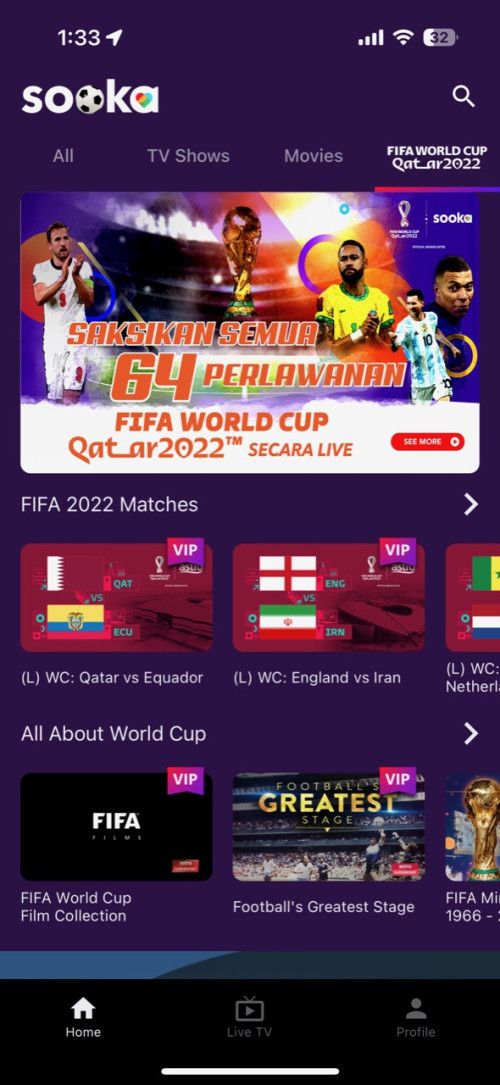
sooka app now has a dedicated FIFA World Cup Qatar 2022 section, with 2 live channels and on-demand library.

user posted image
Mushwashan
post Nov 11 2022, 12:43 PM

Getting Started
**
Junior Member
64 posts

Joined: Sep 2013
From: Perak


QUOTE(John42 @ Nov 10 2022, 01:04 PM)
I bought this TV during 25.7 sales. If you plan to you the TV for longer period for ex let's say more than 5 years, please get X80K and above. X75K is very bad when it comes to dark scenes. The TV is too dim for it. I bought the 43 inch for RM 1464 during the sales and I will be using it as a temporary TV till Sony launches the 48 inch OLED model.
*
padam

This post has been edited by Mushwashan: Nov 11 2022, 12:45 PM
Mushwashan
post Nov 11 2022, 12:45 PM

Getting Started
**
Junior Member
64 posts

Joined: Sep 2013
From: Perak


QUOTE(kinseong @ Nov 10 2022, 12:24 PM)
Hi all,

Anyone know whether all Sony TV model can install Astro Go?

I plan to get Sony X75K, anyone have this model and can confirm whether Astro Go can be installed from Play Store?

Thanks!!
*
better get x80k above
me currently using x85k 55" (last Saturday buy) pair with ultra box marvelous
upgraded for world cup purpose hehehe

my LG plasma since (Tevez Still in Man Utd) still solid now


John42
post Nov 11 2022, 12:47 PM

Getting Started
**
Junior Member
256 posts

Joined: Aug 2019
QUOTE(Mushwashan @ Nov 11 2022, 12:43 PM)
padam
*
But I can sell back the TV 😎

1082 Pages « < 728 729 730 731 732 > » Top
 

Change to:
| Lo-Fi Version
0.0260sec    0.58    6 queries    GZIP Disabled
Time is now: 15th December 2025 - 08:55 PM