Welcome Guest ( Log In | Register )

7 Pages « < 2 3 4 5 6 > » Bottom

Outline · [ Standard ] · Linear+

 Build your own NAS and Homelab with cheap PCs!, UnRaid, Xpenology, NAS4Free, Freenas,OMV

views
     
soul_gamerz
post Oct 29 2019, 02:18 PM

Casual
***
Junior Member
446 posts

Joined: Feb 2010
QUOTE(C-Fu @ Oct 8 2019, 05:56 PM)
If you use Xpenology...
RAID type  > Can be changed to…
Basic > RAID 1 & 5
RAID 1  > RAID 5
RAID 5  > RAID 6
SHR-1  > SHR-2

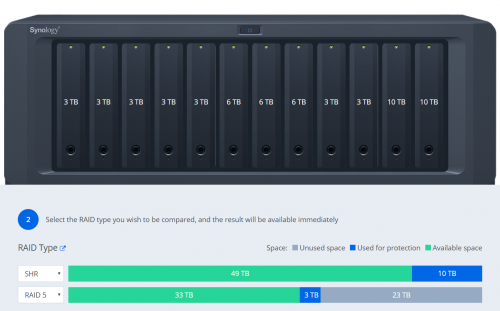
I personally recommend SHR, simply because it maximises the use of space in all of your mixed-capacity drives.

In my case...
user posted image

It's not an issue if all of your drives are the same capacities.

Also bear in mind that with SHR and BTRFS, should you have a catastrophic RAID failure (3 drives dead, etc), you can just use an usb disk with ubuntu live on it, boot it and mount the remaining drives and you can still recover whatever files that's left.
*
boss..is it a good idea to mix up the controller for the disk? I want to use the 6 bay disk enclosre but the original mobo i plan to use which has 6 SATA port just died after i stress it for a while sweat.gif ..now i have second board which only have 4 port, then i want to buy 2 or 4-port PCI-Express Expansion Card *link in shoppe*. Can i use 4 internal SATA port and then additional 2 port from the expansion card? Will Xpenology detect it correctly?
TSC-Fu
post Oct 29 2019, 02:36 PM

Ninja-Fu
******
Senior Member
1,051 posts

Joined: Apr 2005
From: Brisbane, QLD, Ostolia


QUOTE(soul_gamerz @ Oct 29 2019, 02:18 PM)
boss..is it a good idea to mix up the controller for the disk? I want to use the 6 bay disk enclosre but the original mobo i plan to use which has 6 SATA port just died after i stress it for a while  sweat.gif ..now i have second board which only have 4 port, then i want to buy 2 or 4-port PCI-Express Expansion Card *link in shoppe*. Can i use 4 internal SATA port and then additional 2 port from the expansion card? Will Xpenology detect it correctly?
*
yes. but that's a port multiplier. it means it takes 1 sata port and splits the speed into four.

also it runs very very hot, even with just one port used.

you need a lsi card. some are 3G, some are 6G. the 3G kind supports a max of 2TB per drive, so get 6G version if possible.

if you need more slots, get a LSI card, and an expander card.
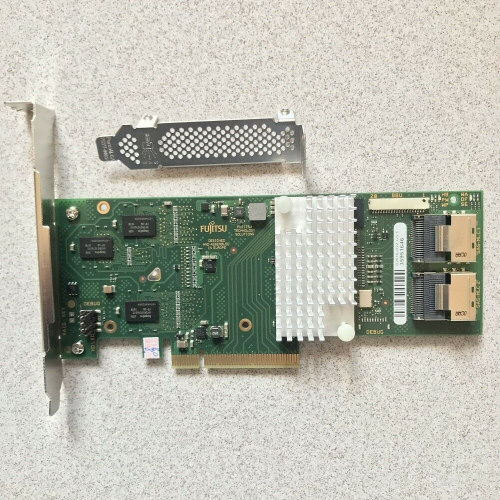
the (rebranded, so cheaper) LSI card:

user posted image
https://www.ebay.com.my/itm/Fujitsu-D2616-L...XEAAOSw9mpaLmFu

the card must be flashed to IT mode so the software (unraid/freenas/xigmanas/xpenology) will handle the raid. flashing is as easy as flashing mobo bios.
there are a billion models available, this is just the cheapest that I found on ebay using the search term "lsi 6G" but there are cheaper cards (I bought mine for RM60, can't remember the model name).

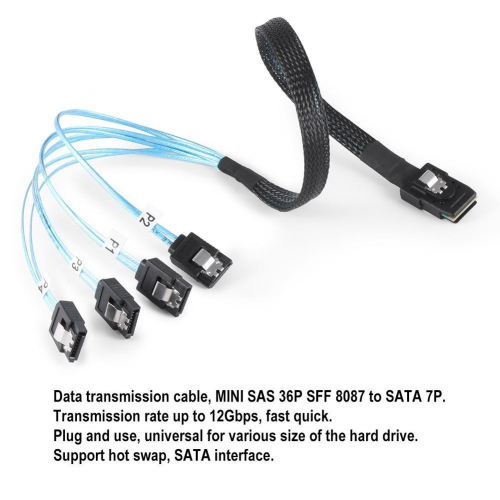
the card as 2 sas ports, so you can connect 2x4 sata ports using this SFF 8087 cable:

user posted image
https://www.lazada.com.my/products/cabledec...5I6eg3&search=1

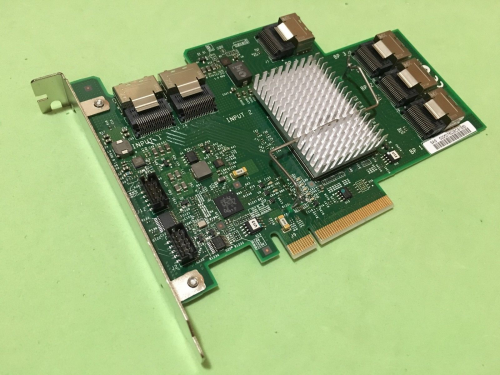
expander card:

user posted image
https://www.ebay.com.my/itm/IBM-ServeRAID-6...VUAAOSw-kdXzYni


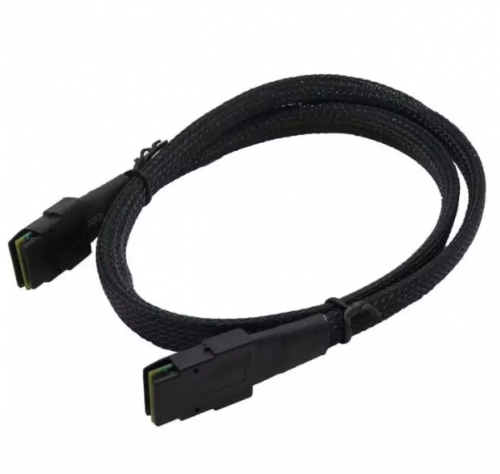
if you wanna connect it to the expander, you need two of this cable to connect to the above expander

user posted image
https://www.lazada.com.my/products/07m-inte...8fP0LD&search=1

and 4x SFF 8087 breakout cable from the expander, giving you 4x4 sata ports.

there are other ways, but this is the cheapest that I know of.

on one of my boards, I mixed the onboard sata ports with 1 lsi 2 ports card, 1 expander, and 1 lsi 4 ports card.
soul_gamerz
post Oct 29 2019, 02:46 PM

Casual
***
Junior Member
446 posts

Joined: Feb 2010
QUOTE(C-Fu @ Oct 29 2019, 02:36 PM)
yes. but that's a port multiplier. it means it takes 1 sata port and splits the speed into four.

also it runs very very hot, even with just one port used.

you need a lsi card. some are 3G, some are 6G. the 3G kind supports a max of 2TB per drive, so get 6G version if possible.

if you need more slots, get a LSI card, and an expander card.
the (rebranded, so cheaper) LSI card:

user posted image
https://www.ebay.com.my/itm/Fujitsu-D2616-L...XEAAOSw9mpaLmFu

the card must be flashed to IT mode so the software (unraid/freenas/xigmanas/xpenology) will handle the raid. flashing is as easy as flashing mobo bios.
there are a billion models available, this is just the cheapest that I found on ebay using the search term "lsi 6G" but there are cheaper cards (I bought mine for RM60, can't remember the model name).

the card as 2 sas ports, so you can connect 2x4 sata ports using this SFF 8087 cable:

user posted image
https://www.lazada.com.my/products/cabledec...5I6eg3&search=1

expander card:

user posted image
https://www.ebay.com.my/itm/IBM-ServeRAID-6...VUAAOSw-kdXzYni
if you wanna connect it to the expander, you need two of this cable to connect to the above expander

user posted image
https://www.lazada.com.my/products/07m-inte...8fP0LD&search=1

and 4x SFF 8087 breakout cable from the expander, giving you 4x4 sata ports.

there are other ways, but this is the cheapest that I know of.

on one of my boards, I mixed the onboard sata ports with 1 lsi 2 ports card, 1 expander, and 1 lsi 4 ports card.
*
ah i see..thank you for the information sifu notworthy.gif
1kokies
post Nov 3 2019, 12:46 AM

On my way
****
Senior Member
532 posts

Joined: Aug 2011


Thanks to CFU for the summarized contents, will try to contribute. Agreed DIY means learning the complications, which is better than depending on adverts and general here say, for ready made NAS.

Sharing from my experience ya

First rule of NAS

1. Secure your data
2. Back up your data
3. Take care of your data

Second rule of NAS

1. Choose OS wisely
2. Choose hardware wisely
3. Have back up hardware that is repeatable

Third rule of NAS

1. Contribute to community
2. Expand network relevant to the chosen OS
3. Pool resources

There are 2 parts to NAS-Data & Services
soul_gamerz
post Dec 5 2019, 08:42 AM

Casual
***
Junior Member
446 posts

Joined: Feb 2010
QUOTE(C-Fu @ Sep 29 2019, 12:22 PM)
uh no, you're not booting 6.1..... yet. the installer is just an installer, it'll work even in socket 775 cpu. once you put in the .pat file then it'll install the DSM 6.1. or 6.2.

try it on a test hdd first, if it works then you're set!

if you have only 2GB of RAM then I don't suggest you to use a lot of apps, maybe just the really essential ones like download station and SMB/Windows/NFS/WebDAV file share.

that enclosure is fine, but I've yet to see anybody test the heat performance anywhere so you'll be the first then biggrin.gif as long as you understand that it's for 2.5" hdd biggrin.gif
*
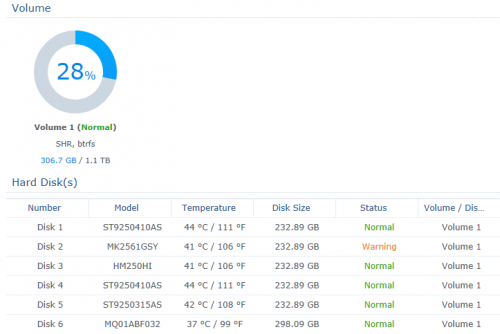
Here are the temperature for the disks. all of this is only temporary as i will replaced them all with high capacity down the road rclxm9.gif . using SHR i can replaced 1 disk with high capacity and it will expand right?

user posted image
darude87
post Dec 5 2019, 03:48 PM

hhhoooiii!!!
******
Senior Member
1,412 posts

Joined: Jun 2005


hmm, this is an interesting thread, now I think my old phenom II will have a new purpose laugh.gif

something I'm worried about which is power consumption, if I were to build my NAS with phenom II and running it 24/7, any idea will it cost a lot for my electricity bill?
edministrator
post Dec 5 2019, 11:50 PM

Regular
******
Senior Member
1,940 posts

Joined: Nov 2004
From: Soviet Sarawak


QUOTE(C-Fu @ Oct 29 2019, 02:36 PM)

expander card:

user posted image
https://www.ebay.com.my/itm/IBM-ServeRAID-6...VUAAOSw-kdXzYni
if you wanna connect it to the expander, you need two of this cable to connect to the above expander

and 4x SFF 8087 breakout cable from the expander, giving you 4x4 sata ports.

there are other ways, but this is the cheapest that I know of.

on one of my boards, I mixed the onboard sata ports with 1 lsi 2 ports card, 1 expander, and 1 lsi 4 ports card.
*
Hi bro, just wondering what is the difference between getting 2 SAS cards vs 1 SAS card + 1 Expander? Both would result in 16 HDDs config
edministrator
post Dec 6 2019, 08:57 AM

Regular
******
Senior Member
1,940 posts

Joined: Nov 2004
From: Soviet Sarawak


QUOTE(soul_gamerz @ Dec 5 2019, 08:42 AM)
Here are the temperature for the disks. all of this is only temporary as i will replaced them all with high capacity down the road  rclxm9.gif . using SHR i can replaced 1 disk with high capacity and it will expand right?

user posted image
*
no, the biggest capacity usually used as redundancy
soul_gamerz
post Dec 6 2019, 12:56 PM

Casual
***
Junior Member
446 posts

Joined: Feb 2010
QUOTE(edministrator @ Dec 6 2019, 08:57 AM)
no, the biggest capacity usually used as redundancy
*
I see..if i replaced few of them? Eventually i want to replace all of it with 2tb drives
satanhead2003
post Dec 6 2019, 06:32 PM

On my way
****
Senior Member
551 posts

Joined: Dec 2005
Im using intel 4590 as esxi & xpenology ds918 image. Passthrough the onboard intel gpu & onboard sata for xpenology...boom ... U got esxi & nas all in 1. Why ds918?simple, gpu transcoding. Emby server is working, nas is working, bunch of vm is working, docker in xpenology is working. Only VMM inside xpenology not working since it needed nested hw in esxi
TSC-Fu
post Dec 7 2019, 12:23 AM

Ninja-Fu
******
Senior Member
1,051 posts

Joined: Apr 2005
From: Brisbane, QLD, Ostolia


QUOTE(darude87 @ Dec 5 2019, 03:48 PM)
hmm, this is an interesting thread, now I think my old phenom II will have a new purpose laugh.gif

something I'm worried about which is power consumption, if I were to build my NAS with phenom II and running it 24/7, any idea will it cost a lot for my electricity bill?
*
I have no idea sorry. It's too vague. Phenom II I think is 125W at max, and need to calculate drives (15W per drive) and mobo+ram sticks (50? 100? Can't remember). Some enable hdd spindowns, but since you won't save that much with spindowns but introduce more wear and tears, I'd personally recommend AGAINST it.

Then it comes to your house tariff. 100kWh? 300kWh? 100kWh is 33.40 cents. so if your rig is at max load 24/7 and using 130W + 60W (4drives) + 100W = 300W, that would mean 0.3kWh x RM0.35 x 24h x 30 = RM75.60 per month, the absolute worst-case scenario. Hence a good efficient PSU will be your best first investment, second is a low-powered proc (like E5 2650L instead of E5 2650).


QUOTE(edministrator @ Dec 5 2019, 11:50 PM)
Hi bro, just wondering what is the difference between getting 2 SAS cards vs 1 SAS card + 1 Expander? Both would result in 16 HDDs config
*
Effectively no difference other than costs.


QUOTE(edministrator @ Dec 6 2019, 08:57 AM)
no, the biggest capacity usually used as redundancy
*
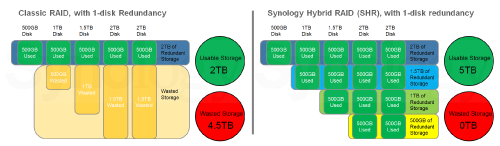
Not quite. Syno's RAID implementation is different than normal RAID.
user posted image
You don't use the biggest just for redundancy, but you use all/most drives for redundancy AND space to minimize wasted space.

Try it here https://www.synology.com/en-my/support/RAID_calculator


QUOTE(satanhead2003 @ Dec 6 2019, 06:32 PM)
Im using intel 4590 as esxi & xpenology ds918 image. Passthrough the onboard intel gpu & onboard sata for xpenology...boom ... U got esxi & nas all in 1. Why ds918?simple, gpu transcoding. Emby server is working, nas is working, bunch of vm is working, docker in xpenology is working. Only VMM inside xpenology not working since it needed nested hw in esxi
*
you can enable nested hw in esxi. but if you're already using esxi, might as well use esxi's VM implementation instead of VMM.
darude87
post Dec 7 2019, 04:01 PM

hhhoooiii!!!
******
Senior Member
1,412 posts

Joined: Jun 2005


QUOTE(C-Fu @ Dec 7 2019, 12:23 AM)
I have no idea sorry. It's too vague. Phenom II I think is 125W at max, and need to calculate drives (15W per drive) and mobo+ram sticks (50? 100? Can't remember). Some enable hdd spindowns, but since you won't save that much with spindowns but introduce more wear and tears, I'd personally recommend AGAINST it.

Then it comes to your house tariff. 100kWh? 300kWh? 100kWh is 33.40 cents. so if your rig is at max load 24/7 and using 130W + 60W (4drives) + 100W = 300W, that would mean 0.3kWh x RM0.35 x 24h x 30 = RM75.60 per month, the absolute worst-case scenario. Hence a good efficient PSU will be your best first investment, second is a low-powered proc (like E5 2650L instead of E5 2650).
very detailed explanation there, really appreciate the breakdown and easier for me to do some planning. I guess if i were to carry on with Phenom II, might need to try to downclock + downvolt to achieve better power efficiency, but testing stability may be another hassle. Will see how to move on from there

TSC-Fu
post Dec 8 2019, 12:17 AM

Ninja-Fu
******
Senior Member
1,051 posts

Joined: Apr 2005
From: Brisbane, QLD, Ostolia


QUOTE(darude87 @ Dec 7 2019, 04:01 PM)
very detailed explanation there, really appreciate the breakdown and easier for me to do some planning. I guess if i were to carry on with Phenom II, might need to try to downclock + downvolt to achieve better power efficiency, but testing stability may be another hassle. Will see how to move on from there
*
I don't think you need to. a more accurate or average estimate would be to calculate using idle cpu wattage since it's not gonna be 100% all the time. even if you use things like plex that uses cpu transcoding for videos, it'll happen during the duration of the video only.

only way to be sure is to use a watt meter, set the cost according to your place, and leave it for a week and see for yourself.

user posted image

This post has been edited by C-Fu: Dec 8 2019, 12:21 AM
thankyou
post Apr 21 2020, 11:08 PM

Regular
******
Senior Member
1,941 posts

Joined: Jan 2003
QUOTE(edministrator @ Dec 5 2019, 11:50 PM)
Hi bro, just wondering what is the difference between getting 2 SAS cards vs 1 SAS card + 1 Expander? Both would result in 16 HDDs config
*
I assume the purpose is to build a large logical drive instead of 2 logical drive with 2 cards?

edministrator
post Apr 22 2020, 11:36 AM

Regular
******
Senior Member
1,940 posts

Joined: Nov 2004
From: Soviet Sarawak


QUOTE(thankyou @ Apr 21 2020, 11:08 PM)
I assume the purpose is to build a large logical drive instead of 2 logical drive with 2 cards?
*
nope. 2 cards can also build single logical drive using raid from freenas, DSM, etc. using passthrough/IT mode.

This post has been edited by edministrator: Apr 22 2020, 11:37 AM
thankyou
post Apr 22 2020, 12:18 PM

Regular
******
Senior Member
1,941 posts

Joined: Jan 2003
QUOTE(edministrator @ Apr 22 2020, 11:36 AM)
nope. 2 cards can also build single logical drive using raid from freenas, DSM, etc. using passthrough/IT mode.
*
Oh, I didn't mean software RAID from freenas etc... I mean from hardware RAID point of view where expander required as compared to 2 raid cards.

Anyway, I've been googling about flashing firmware for Fujitsu D2616 and it doesn't seems to be supported... Can anyone able to confirm?

Considering building an unraid NAS for Plex...
edministrator
post Apr 22 2020, 12:54 PM

Regular
******
Senior Member
1,940 posts

Joined: Nov 2004
From: Soviet Sarawak


QUOTE(thankyou @ Apr 22 2020, 12:18 PM)
Oh, I didn't mean software RAID from freenas etc... I mean from hardware RAID point of view where expander required as compared to 2 raid cards.

Anyway, I've been googling about flashing firmware for Fujitsu D2616 and it doesn't seems to be supported... Can anyone able to confirm?

Considering building an unraid NAS for Plex...
*
RAID-Controller - SAS 6 Gb/s RAID 5/6 512 MB (D2616) = LSI SAS2108 6 Gb/s RAID-on-Chip

so far SAS2108 does not support IT mode
TSC-Fu
post Apr 22 2020, 02:18 PM

Ninja-Fu
******
Senior Member
1,051 posts

Joined: Apr 2005
From: Brisbane, QLD, Ostolia


QUOTE(thankyou @ Apr 22 2020, 12:18 PM)
Oh, I didn't mean software RAID from freenas etc... I mean from hardware RAID point of view where expander required as compared to 2 raid cards.

Anyway, I've been googling about flashing firmware for Fujitsu D2616 and it doesn't seems to be supported... Can anyone able to confirm?

Considering building an unraid NAS for Plex...
*
you wouldn't want hardware raid on unraid, let alone on freenas.

you can, but you would want the software raid to handle most if not everything.

Also there's a total of ONE thread out there that states how to crossflash D2616 to LSI IT firmware, but links are either dead or my internet's dead.
KenC
post Jul 18 2020, 12:11 PM

Getting Started
**
Junior Member
78 posts

Joined: Feb 2009


C-Fu,
Thanks for taking the time to write this beautiful post. notworthy.gif
Very inspiring for this "another" old uncle. notworthy.gif

Inspired by you, I enthusiastically (which doesnt happen for a long while) pull out my i5-2400 from storage and did some refurbishing. Now it has 16GB ram (was 4GB), a new RM80 128GB SSD + 3TB HDD (was 500GB), a RX580 (was GT something-something) and a new bronze 500W PSU (was the gray box stuff) I picked up online for cheap, one at a time, mostly used items. None of the following fun would happen if I did any sort of budgeting... LOL

Still trying out most of the NAS softwares you listed by creating new VM,s bruce.gif to see what are the things I need. As I have no idea what I want doh.gif ... All in the name of science LOL flex.gif

After fiddling for about 2 months, what I have currently running is Ubuntu 20.04 LTS because I am kedekut and because I reckon the lighter Linux Os will benefit my old girl AND it just came out in April 2020. As for the Virtualization, I use the in-built virtual machine in the kernel KVM with VirtManager GUI don't know what to call it, a hypervisor? anyway, it works rclxm9.gif . I can not notice any difference in performance running SolidWorks and Autocad in VM from running in local machine. Ya, both are as slow as you can imagine with this Sandy-bridge i5. The important point is still can-use-la.... btw, the RX580 with 8Gb does give the rendering a huge boost.

Ubuntu 20.04LTS of course you can choose other distro such as PoP! Arch etc etc everyone is releasing their new LTS 5 year support version.
https://releases.ubuntu.com/20.04/

Manage virtual machines with virt-manager
https://virt-manager.org/

In case you are interested in how I GPU passthrough I just followed the following blog to the teeth...
https://heiko-sieger.info/running-windows-1...hics_processors

Pinyin input is important to me,
https://pinyinjoe.com/linux/ubuntu-18-gnome...inese-setup.htm

SAMBA is my pick to serve files to my other devices, (which dont really happen very often...) and I really don't have much data to store for now... This may change since I now have the superpower to create a NAS when I want with a few click on the keyboard and buying a few HDD moneyflies.gif
https://linuxconfig.org/how-to-configure-sa...cal-fossa-linux

I also fiddling with Jellyfin now and I am thinking of retiring my Pi music streamer...
https://jellyfin.org/

As I continue to fiddle with stuff, I realized I am stuffing more work for the poor i5-2400 with just 4 core w/0 hyper-threading.... My current temptation is an XEON E3-1230V2 which is 4C/8T.... about RM200... a huge price cut from the i7-3770 with nearly same performance. which is about the biggest LGA1155 socket can take... no, wont change the mobo unless I get one for free... at least for now..

My old girl may accidentally rejuvenate into a Virtualization Server bruce.gif .... who would ever guess that 3 months ago.. LOL

OR my kiddo come hijack this old girl when he see papa playing Steam games at 1080p ultra setting bangwall.gif ,,,
mmmm... better not put any RGB light near the box brows.gif don't need the attention...
https://linuxize.com/post/how-to-install-st...n-ubuntu-20-04/

This post has been edited by KenC: Jul 19 2020, 03:42 PM
TSC-Fu
post Jul 20 2020, 03:01 PM

Ninja-Fu
******
Senior Member
1,051 posts

Joined: Apr 2005
From: Brisbane, QLD, Ostolia


That's AWESOME! Congrats!

Whatever people say, 2nd gen is MORE THAN CAPABLE for normal use. As you have noticed, pretty much everything still works.

For Xpenology on QEMU/KVM, a good guide is here.


few notes:
Hypervisor=kvm=VMM
For intel 2nd gen, max you can go is E3-12**v2. On top of my head, I can't remember if E3-1xxx series has a igpu built-in or not - I think it doesn't. iGPU is important if you want to use something like plex/emby/jellyfin for video transcoding purpose. if you want h264/mp4 video transcoding, I believe you need at minimum a 4th gen cpu. if you want a GPU to help with that, just get a minimum 1050 or 1050Ti for extra memory for more video transcoding at the same time. Some 1050Ti cards have no need for external power, so might be a very useful and cheap card for multiple clients.

jellyfin supports amd video transcoding, but performance wise isn't as good as nvidias. But if it works, it works.

you don't have to use virtmanager. there are alternatives, my preferred way are web-based ones.
https://github.com/mistio/mist-ce
https://ovirt.org/
Proxmox (my fav, a standalone OS, a bit complex to set up in the beginning, but totally worth it)
https://github.com/retspen/webvirtcloud (try this first)
https://github.com/kimchi-project/kimchi (try this first also)


QUOTE(KenC @ Jul 18 2020, 12:11 PM)
C-Fu,
Thanks for taking the time to write this beautiful post.  notworthy.gif 
Very inspiring for this "another" old uncle.  notworthy.gif

Inspired by you, I enthusiastically (which doesnt happen for a long while) pull out my i5-2400 from storage and did some refurbishing. Now it has 16GB ram (was 4GB), a new RM80 128GB SSD + 3TB HDD (was 500GB), a RX580 (was GT something-something) and a new bronze 500W PSU (was the gray box stuff) I picked up online for cheap, one at a time, mostly used items. None of the following fun would happen if I did any sort of budgeting... LOL

Still trying out most of the NAS softwares you listed by creating new VM,s  bruce.gif  to see what are the things I need. As I have no idea what I want  doh.gif ... All in the name of science LOL  flex.gif

After fiddling for about 2 months, what I have currently running is Ubuntu 20.04 LTS because I am kedekut and because I reckon the lighter Linux Os will benefit my old girl AND it just came out in April 2020. As for the Virtualization, I use the in-built virtual machine in the kernel KVM with VirtManager GUI don't know what to call it, a hypervisor? anyway, it works  rclxm9.gif . I can not notice any difference in performance running SolidWorks and Autocad in VM from running in local machine. Ya, both are as slow as you can imagine with this Sandy-bridge i5. The important point is still can-use-la.... btw, the RX580 with 8Gb does give the rendering a huge boost.

Ubuntu 20.04LTS  of course you can choose other distro such as PoP! Arch etc etc everyone is releasing their new LTS 5 year support version.
https://releases.ubuntu.com/20.04/

Manage virtual machines with virt-manager
https://virt-manager.org/

In case you are interested in how I GPU passthrough I just followed the following blog to the teeth...
https://heiko-sieger.info/running-windows-1...hics_processors

Pinyin input is important to me,
https://pinyinjoe.com/linux/ubuntu-18-gnome...inese-setup.htm

SAMBA is my pick to serve files to my other devices, (which dont really happen very often...) and I really don't have much data to store for now... This may change since I now have the superpower to create a NAS when I want with a few click on the keyboard and buying a few HDD moneyflies.gif
https://linuxconfig.org/how-to-configure-sa...cal-fossa-linux

I also fiddling with Jellyfin now and I am thinking of retiring my Pi music streamer...
https://jellyfin.org/

As I continue to fiddle with stuff, I realized I am stuffing more work for the poor i5-2400 with just 4 core w/0 hyper-threading.... My current temptation is an XEON E3-1230V2 which is 4C/8T.... about RM200... a huge price cut from the i7-3770 with nearly same performance. which is about the biggest LGA1155 socket can take... no, wont change the mobo unless I get one for free... at least for now.. 

My old girl may accidentally rejuvenate into a Virtualization Server bruce.gif .... who would ever guess that 3 months ago.. LOL

OR my kiddo come hijack this old girl when he see papa playing Steam games at 1080p ultra setting bangwall.gif ,,,
mmmm... better not put any RGB light near the box brows.gif don't need the attention...
https://linuxize.com/post/how-to-install-st...n-ubuntu-20-04/
*

7 Pages « < 2 3 4 5 6 > » Top
 

Change to:
| Lo-Fi Version
0.0222sec    0.35    5 queries    GZIP Disabled
Time is now: 15th December 2025 - 09:47 AM