Welcome Guest ( Log In | Register )

7 Pages < 1 2 3 4 > » Bottom

Outline · [ Standard ] · Linear+

 Build your own NAS and Homelab with cheap PCs!, UnRaid, Xpenology, NAS4Free, Freenas,OMV

views
     
TSC-Fu
post Sep 6 2018, 03:37 PM

Ninja-Fu
******
Senior Member
1,051 posts

Joined: Apr 2005
From: Brisbane, QLD, Ostolia


QUOTE(xxboxx @ Sep 6 2018, 10:52 AM)
I read somewhere the tech guy say make sure have hardware raid controller, if just software raid it is too unreliable. How true is that?
*
you should ask amazon, google, oracle, as to why they almost exclusively use software RAID biggrin.gif

generally yes, but in the computing world, you can't really use "generally" la.

the thing about hardware raid is that hardwares fail all the time, especially in enterprise situations. performance also are limited to the chips that are present, some are super fast (and super expensive, especially if it uses some proprietary battery), some are inconsistent (still needs SSD as cache, and that also tengok pada the type of SSD u got, AND hopefully your OS/NAS got the driver for it), and some are just fake hardware RAID that depends on your processor (like software RAID).

only major advantage is that it has memory built-in that stores your currently-used data if suddenly no power. software RAID solves this somewhat by leveraging on your RAM and CPU.

rule of thumb: if you're willing to spend thousands for a hardware raid card, and don't mind paying hundreds more for a fresh new battery for it, and can guarantee your OS got the drivers, then go for it.

rule of thumb #2: if you plan on using only SSDs for your NAS and demand max performance, get a hardware raid (since you've already spend tens of thousands for the SSDs anyway, so the total cost of ownership after adding hardware RAID isn't that much extra), or get a fast CPU.


in this case, ZFS, Synology RAID, Linux MD RAID is far superior overall. flexibility and free alone makes it much better than hardware RAID. dulu2 yes la hardware card is needed. ZFS was built because of the limitations and problems of hardware RAID after all.

in 2018:
H/ware RAID: not use in enterprise or data center anymore
S/ware RAID: used from your laptop to enterprise and data centers
xxboxx
post Sep 6 2018, 11:10 PM

The mind is for having ideas, not holding them
*******
Senior Member
5,261 posts

Joined: Oct 2004
From: J@Y B33


Thanks for the detailed explanation.

So if using software raid only it's better to use ecc ram.

But how software raid solve the issue of when write half the OS crash or power outage, how do it know whether the date was compromised or failed?
aras
post Sep 6 2018, 11:15 PM

New Member
*
Junior Member
35 posts

Joined: Aug 2010
thumbup.gif please continue sharing information

TSC-Fu
post Sep 7 2018, 07:02 PM

Ninja-Fu
******
Senior Member
1,051 posts

Joined: Apr 2005
From: Brisbane, QLD, Ostolia


QUOTE(xxboxx @ Sep 6 2018, 11:10 PM)
Thanks for the detailed explanation.

So if using software raid only it's better to use ecc ram.

But how software raid solve the issue of when write half the OS crash or power outage, how do it know whether the date was compromised or failed?
*
good question.

like hardware raid also, it depends on the implementation.
generally speaking of there's a corruption, two things will occur:
- the NAS OS/raid will trigger a scrubbing process, data will be restored from parity
- no error will be reported

xpenology/synology/btrfs will trigger. ZFS will trigger. others I can't remember. But it's likely that by now most software RAIDs will trigger some sort of error that error-checking/fixing will occur either automatically or you'd be notified in some ways.


one common mistake is that people think ZFS needs ecc. that's not true. ECC is very important in an enterprise situation, but normal usage you won't see any difference between ECC and normal RAM. there IS a chance that you'll get flip bits - 1 in 115,792,089,237,316,195,423,570,985,008,687,907,853,269,984,665,640,564,039,457,584,007,913,129,639,936 tongue.gif


tl;dr version: a bad ram stick will damage your data faster than power outage.
tippman
post Sep 12 2018, 01:14 PM

Regular
******
Senior Member
1,650 posts

Joined: Feb 2009
Hi

I would like to ask, can I put movie in NAS and stream it across on Apple TV 4K? Most of the file are 4k movie average about 70gb size. How efficient is this in the of speed and etc?

Thanks

TSC-Fu
post Sep 15 2018, 12:44 AM

Ninja-Fu
******
Senior Member
1,051 posts

Joined: Apr 2005
From: Brisbane, QLD, Ostolia


QUOTE(tippman @ Sep 12 2018, 01:14 PM)
Hi

I would like to ask, can I put movie in NAS and stream it across on Apple TV 4K? Most of the file are 4k movie average about 70gb size. How efficient is this in the of speed and etc?

Thanks
*
yes. it depends on your NAS really. if your NAS can stream 4k then it'll work. a tip:
- your NAS' CPU capable of decoding 4K - nothing really in the market, although getting a beefy CPU that can handle H264 H265 is a must, provided
- your file is also H264 H265 encoded to avoid transcoding, so it'll be direct play.
- Gigabit connection from NAS to your gigabit router/switch to your Apple TV. Wifi will be a hit/miss thing.

if your 4K media comes from bluray, then most likely it's actually 2K upscaled, as that's pretty much how most 4K bluray are currently.

if you really want 4K, consider using Emby with it, as only Emby (currently) uses GPU for transcoding or 4K.


but if you're using 4K, there's no point to transcode really. just make sure your media are mp4/h265/ac3 and a current/previous gen PC should do fine.
tippman
post Sep 15 2018, 07:33 AM

Regular
******
Senior Member
1,650 posts

Joined: Feb 2009
QUOTE(C-Fu @ Sep 15 2018, 12:44 AM)
yes. it depends on your NAS really. if your NAS can stream 4k then it'll work. a tip:
- your NAS' CPU capable of decoding 4K - nothing really in the market, although getting a beefy CPU that can handle H264 H265 is a must, provided
- your file is also H264 H265 encoded to avoid transcoding, so it'll be direct play.
- Gigabit connection from NAS to your gigabit router/switch to your Apple TV. Wifi will be a hit/miss thing.

if your 4K media comes from bluray, then most likely it's actually 2K upscaled, as that's pretty much how most 4K bluray are currently.

if you really want 4K, consider using Emby with it, as only Emby (currently) uses GPU for transcoding or 4K.
but if you're using 4K, there's no point to transcode really. just make sure your media are mp4/h265/ac3 and a current/previous gen PC should do fine.
*
Thank you for the information. I will do more study on this

TSC-Fu
post Sep 16 2018, 12:56 AM

Ninja-Fu
******
Senior Member
1,051 posts

Joined: Apr 2005
From: Brisbane, QLD, Ostolia


QUOTE(tippman @ Sep 15 2018, 07:33 AM)
Thank you for the information. I will do more study on this
*
no worries. 4K is really an uncharted territory, kinda like how 1080p back then needs something like GeForce 8800 10 years ago in order for it to play smoothly. once CPUs have built-in AVX and AVX2 instructions then and only then 1080p medias started being common. so at the moment the "best" we have is H265, so if your medias are encoded as H265, should be relatively OK with semi-current hardware setup.
naqib0307
post Nov 28 2018, 03:13 PM

Enthusiast
*****
Junior Member
732 posts

Joined: Nov 2013
Interesting project to do soon! Nice sharing. For now I just use Plex and windows file sharing for home network.
TSC-Fu
post Nov 28 2018, 10:07 PM

Ninja-Fu
******
Senior Member
1,051 posts

Joined: Apr 2005
From: Brisbane, QLD, Ostolia


There's a new tool that has everything that you need to install quite a bit easier. I'm gonna test it out and update the tutorial later biggrin.gif ALL DONE! flex.gif

Also, I just tried installing DS3671xs on a haswell/4th gen machine, and it is super, super fast compared to DS3615 on a socket 775 machine biggrin.gif

Also, there's a new bootloader for a new NAS machine based off DS918+ that's reportedly are far faster (if you have a newer machine for this).

This post has been edited by C-Fu: Nov 29 2018, 12:28 AM
chanti-sama
post Jan 8 2019, 02:03 PM

Enthusiast
*****
Senior Member
710 posts

Joined: Jan 2003
From: In the backyard. Up to no good!


Hi.... if in event of power trip. how do u keep the nas intact?

do u let the nas box trip and reboot when power comes back?

the buffalo was hit a few times, end up the hdd went dead.
calistoga
post Jan 8 2019, 02:20 PM

New Member
*
Junior Member
32 posts

Joined: Jan 2003
Good sharing and thanks for writing this up.
TSC-Fu
post Jan 8 2019, 08:18 PM

Ninja-Fu
******
Senior Member
1,051 posts

Joined: Apr 2005
From: Brisbane, QLD, Ostolia


QUOTE(chanti-sama @ Jan 8 2019, 02:03 PM)
Hi.... if in event of power trip. how do u keep the nas intact?

do u let the nas box trip and reboot when power comes back?

the buffalo was hit a few times, end up the hdd went dead.
*
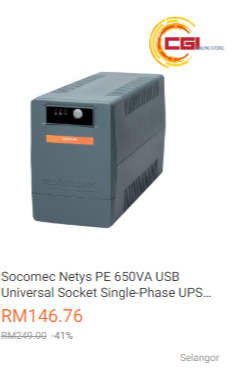
best way is by using UPS with USB.

plug the UPS into your PC's USB port, and some/most NAS OSes like Xpenology will detect it.


As for auto reboot, there are a few ways.

In BIOS, enable
Wake On LAN - you can ping the machine, and it'll reboot. you can set a cheap PC/machine like Raspberry Pi to auto ping your NAS every few minutes to bring it back to life once the RPi is also back to life biggrin.gif
Wake On RTC/Clock/Alarm - auto turn on machine at a set time everyday, so even if everything else fails, your machine will at least turn on once at a specified time once a day everyday.
On Power Loss - Always Turn On - so whenever power is back on, machine is turned on.

If you DIY and use battery-powered RAID card, then your data is safe in the event of power failure. this is one of the big reason why I chose the DIY way - I hate how we pay premium price, especially here in Msia, for a really crappy (essentially) PC.

as for to save your HDD's life, best way is via UPS IMO. No other better way. After 7 years and frequent power trips for the last few months, one of my 3TB WD Red started showing bad sectors. One of the reason why I gladly pay premium and only use NAS-grade HDDs like IronWolfs and WD Reds and HGST Heliums. I rather get NAS-grades than risk using normal/consumer grade harddisks and get peace of mind.
chanti-sama
post Jan 8 2019, 10:13 PM

Enthusiast
*****
Senior Member
710 posts

Joined: Jan 2003
From: In the backyard. Up to no good!


Thank you. I did thought about setting up a small nas for home archiving purpose and also serve as some repository for my dvr files.

Apc smart ups iirc are those active ups that has those agent that graceful shutdown the nas rite?

Isnt these ups costs quite prohibitive for home use?
TSC-Fu
post Jan 9 2019, 01:31 PM

Ninja-Fu
******
Senior Member
1,051 posts

Joined: Apr 2005
From: Brisbane, QLD, Ostolia


QUOTE(chanti-sama @ Jan 8 2019, 10:13 PM)
Thank you. I did thought about setting up a small nas for home archiving purpose and also serve as some repository for my dvr files.

Apc smart ups iirc are those active ups that has those agent that graceful shutdown the nas rite?

Isnt these ups costs quite prohibitive for home use?
*
user posted image

just search for usb ups in lazada or shopee or wherever. The cost is more less about the same as a cheap 80+ PSU. I think 150-200 is a small price to pay for peace of mind smile.gif
Two5Kid
post Jun 10 2019, 06:34 PM

On my way
****
Senior Member
629 posts

Joined: Jan 2003
From: Kota Bharu


Correct me if I'm wrong, I'm looking to run concurrently Windows 10 (for gaming) and MacOS Mojave (for the rest), is this HomeLab build the right path or am I heading in the wrong direction.
TSC-Fu
post Jun 11 2019, 03:28 AM

Ninja-Fu
******
Senior Member
1,051 posts

Joined: Apr 2005
From: Brisbane, QLD, Ostolia


QUOTE(Two5Kid @ Jun 10 2019, 06:34 PM)
Correct me if I'm wrong, I'm looking to run concurrently Windows 10 (for gaming) and MacOS Mojave (for the rest), is this HomeLab build the right path or am I heading in the wrong direction.
*
lebih kurang. apart from needing two gpus for each OS (for best performance), the base OS needs to be xcp-ng, esxi or unraid. setup a VM with resources that you want for Win10 and Mojave, and perhaps another VM for Xpenology.
Two5Kid
post Jun 11 2019, 01:15 PM

On my way
****
Senior Member
629 posts

Joined: Jan 2003
From: Kota Bharu


QUOTE(C-Fu @ Jun 11 2019, 03:28 AM)
lebih kurang. apart from needing two gpus for each OS (for best performance), the base OS needs to be xcp-ng, esxi or unraid. setup a VM with resources that you want for Win10 and Mojave, and perhaps another VM for Xpenology.
*
Thanks for the quick reply. Have you heard about ProxMox? What I want to build is something like this YouTube video, just less resource intensive. I don't do 4K video editing nor do I play graphics-intensive games.


https://www.youtube.com/watch?v=jdYyfoZcgJI

Edit: No idea why it isn't showing up.

This post has been edited by Two5Kid: Jun 11 2019, 01:16 PM
Fubar20
post Jun 11 2019, 02:11 PM

Regular
******
Senior Member
1,187 posts

Joined: Apr 2011
From: Nowhere


QUOTE(Two5Kid @ Jun 11 2019, 01:15 PM)
Thanks for the quick reply. Have you heard about ProxMox? What I want to build is something like this YouTube video, just less resource intensive. I don't do 4K video editing nor do I play graphics-intensive games.


https://www.youtube.com/watch?v=jdYyfoZcgJI

Edit: No idea why it isn't showing up.
*
Can run Hassio also brows.gif
» Click to show Spoiler - click again to hide... «


This post has been edited by Fubar20: Jun 11 2019, 02:14 PM
Two5Kid
post Jun 11 2019, 02:56 PM

On my way
****
Senior Member
629 posts

Joined: Jan 2003
From: Kota Bharu


QUOTE(Fubar20 @ Jun 11 2019, 02:11 PM)
Can run Hassio also  brows.gif
» Click to show Spoiler - click again to hide... «

*
True but it's a bit overkill. Haha! Thanks for the help!


7 Pages < 1 2 3 4 > » Top
 

Change to:
| Lo-Fi Version
0.0173sec    0.78    5 queries    GZIP Disabled
Time is now: 15th December 2025 - 11:12 PM