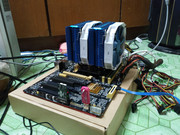
Yes, 2nd gen Sandy bridge still solid when it comes to real work. Autocad, Solidworks very stable and snappy with the aid of a "dated" mid-range gpu (RX580), more ram and SSD. Still can keep up with most real workload, though a bit slower in rendering but a minute or 2 is never a life and death situation. If I still has the need for a CAD workstation, I will not hesitate to bring this old girl back online. Will keep a VM packed with CAD on the side... never know what life will bring
Transcoding is be something I want to figure out sooner or later... at the moment, no dire need... LOL old uncle dont watch much porn LOL
ALL XEON don't come with iGPU. so a GPU is mandatory. I am not in a hurry or in real need of anything. Will wait for the price drop after AMD and Intel have their new release. Ive-bridge 3rd gen i7-3770K is best la, can play overclock some more but the cheapest LGA1155 4C/8T is the E3-1230V2 for now.... if can cheaper lagi best la... if any of the 3770k, 3770, 1270v2, 1240v2 drop below 200 buck I grab also wan I just want more threads... period
Lately, while digging for ideas to put this old girl to good use, I sesat jalan and ran into Machine Learning, Deep learning, Computer Vision stuff, looks interesting. Contemplating the idea of a GTX 1060 6GB to transform it to a machine learning rig too 1050ti will be very affordable but ram tak cukup... 1070 8GB would be nice but too expensive for a toy. Will be cool to play scissor paper stone with the pc.
Apparently, NVIDIA is more useful in the real world.... no wonder more expensive la
Thanks for the heads up on the web-base hypervisors and Proxmax. That will keep me busy for a while.
I think some how this built is slowly transforming into a FunStation... You are right about VM is something I didint know I need LOL...BUT I don't want to draw any conclusion just yet, let it evolve into whatever it will be...
It would be great to squeeze another 5 years of use from this old girl, which is looking promising at the moment.
Macam participant in Junkyard War...
This post has been edited by KenC: Jul 21 2020, 12:18 AM
It would be great to squeeze another 5 years of use from this old girl, which is looking promising at the moment.
Macam participant in Junkyard War...
5 years? People have been using 1st gen intel for NAS since 7 years ago till today
1st gen's advantage is it's the same slot as the xeon counterpart. it also supports ECC, and some boards can actually support up to 48GB ECC ram (3 channels x 3 sticks x 4GB per stick).
also protip: if you can get a really good deal with 1st gen and above, or lga2011 dual slot mobos (or chinese variants called "x79 motherboards), don't hesitate!
imagine, 4c/4t cpu for RM30. or a 8c/16t for RM100, and lga2011 board for RM300. in 2020 and in malaysia, currently the best bang for the buck, for our purpose, is this slot.
for transcoding via plex/jellyfin/emby, rule of thumb is MP4/h264 needs a min of 4th gen intel (any 4th gen non xeon will do, as all uses the same iGPU) MKV/h265/hevc file needs a min of 8th gen intel nvenc via a min of 1050 for h264+h265
no need a lot of porn, once you know a deep secret about RM40/month gsuite, you'll start going down the rabbit path of sonarr+radarr+bazarr+a billion more "companion" web apps
If you ever want to move, copy, or sync to Google Drive, or any other cloud service provider, I recommend using RClone. It requires work to set up, but once you do, just like building your own NAS, you'll thinking how you've ever live without it Best of all, it's free, portable, and works on most (if not all) systems out there. Ubuntu, general linux, xpe, proxmox, windows, raspberry pi, macos, and even (rooted) android!
Why google drive?
» Click to show Spoiler - click again to hide... «
pasal sekarang kalau bayar RM40/sebulan untuk gdrive, takde kuota. unlimited storage.
Learning time: About 1 hour
Basic idea. 1. Install/Download RClone. 2. Create a new remote (share) 3. Choose cloud provider. Here I'm showing you Google Drive integration, so pick Google Drive 4. Get a new id from google's console, so it allows external access to/from your google drive, and put it in #3 5. Open a generated link to link rclone to your GDrive. 6. Mount your google drive somewhere. 7. Repeat Step 1-3, but choose Encrypt/decrypt a folder. This way even if somebody hacks your google drive, they wouldn't know what are the files in there.
I'm going to use Xpenology for this guide. Enable ssh from control panel, and use something like putty to ssh into your NAS box.
1. download rclone temporarily into a folder, like /volume1/Downloads and run the install script. curl https://rclone.org/install.sh | sudo bash 2. run rclone config, new remote name (example: gdrive) choose google drive. from your google drive, enable the api access to drive. get a new client id and client secret and put it there. full access, everything else empty, and don't use autoconfig. copy paste the url into a browser, put the authorization code and you're set. 3. run rclone config again, this time choose encrypt/decrypt a remote (example name: crypt). for the folder, use something from #2, and the folder name you want encrypted files like movies to be. example: gdrive:crypt. encrypt filenames & dir names, choose a password. Step #3 is only needed if you are using gdrive for movies. 3a. run rclone lsd gdrive: or rclone lsd crypt: to see it working (lsd is like ls) 4. you then need to mount the crypt folder to a xpenology's shared folder or wherever you want (example: in /volume1/Gdrive/crypt). create a script called mountcrypt.sh somewhere (example: /volume1/mystuff/mountcrypt.sh). insert this. #!/bin/bash rclone mount --daemon --allow-other --dir-cache-time 48h --vfs-read-chunk-size 32M --vfs-read-chunk-size-limit 2G --buffer-size 512M --vfs-cache-mode writes --log-level INFO --stats 1m --allow-non-empty crypt: /volume1/Gdrive/crypt 5. from DSM's Control Panel, go to Task Scheduler. Create a new triggered task, event on boot-up. user: root. under Task Settings, script is: bash /volume1/mystuff/mountcrypt.sh >> /volume1/mystuff/mountcrypt.txt 2>&1 AND SAVE THE TASK. the ">> /volume1/mystuff/mountcrypt.txt 2>&1" part means it will generate a txt file for whatever that happens, like a log. Click OK, then right click on the task and run. open the text file to see any errors that might appear. 6. to copy/sync/move files, say from /volume1/Movies folder to your google drive (example: GoogleDrive/crypt/Movies), create a scheduled task with the script /volume1/mystuff/movemovies.sh >> /volume1/mystuff/movemovies.txt 2>&1 and save. the movemovies.sh contents are /bin/rclone move /volume1/Movies crypt:Movies -v --retries 1 --size-only --no-update-modtime and you're set. replace move with sync or copy if you want. It looks complicated, and depending on how far you want it to work, it can look complicated I guess. But at most, you only need an hour or two of your life understanding the process. the second time you wanna do it, it'll take 5 minutes. Rclone is good for the simple fact that it's portable, and works on almost every system out there - raspberry pi, ubuntu, windows, proxmox, (rooted) android you name it.
i use an old samsung laptop to build Synology NAS follow tutorial on Youtube for fun its working fine, photo will auto backup when i open the app
just that laptop temperature will increase to 42-46 Celsius degree during day time but i also can't put it into aircon room my electricity bill will cost me alot
i use an old samsung laptop to build Synology NAS follow tutorial on Youtube for fun its working fine, photo will auto backup when i open the app
just that laptop temperature will increase to 42-46 Celsius degree during day time but i also can't put it into aircon room my electricity bill will cost me alot
for laptops it depends on your bios, see if you can increase the fan speed have you tried changing the fan speed setting in Control Panel?
for laptops it depends on your bios, see if you can increase the fan speed have you tried changing the fan speed setting in Control Panel?
changing fan speed in bios setting or the synology os setting? i even put the laptop upside down to reduce heat from bottom btw old laptop is samsung rv413, 4gb ram, amd e300 processor
changing fan speed in bios setting or the synology os setting? i even put the laptop upside down to reduce heat from bottom btw old laptop is samsung rv413, 4gb ram, amd e300 processor
syno OS. it's surprising that amd e300 works. which loader and dsm version?
just wondering what's the best cost efficient setup for DIY NAS now?
trying to find one but still new to this..
Getting second hand hardware. Complete desktop PC for less than 1k, you only need to get HDD and extra RAM if running VM or many dockers. If you want it to transcode video too then need more latest CPU or GPU. Intel 8th gen IINM start to support x.265 or if use GPU, GTX1060.
This post has been edited by xxboxx: Sep 18 2021, 10:35 PM
just wondering what's the best cost efficient setup for DIY NAS now?
trying to find one but still new to this..
- I'm not soliciting a sale, but just sharing my experience on price of hardware -
So it just happened that I was free, and decided to see what to do with my old computers. I have an Intel D945GCLF board (Intel original boards have a very long MTBF) with an embedded low power Atom 230, 2 GB RAM in mini-ITX form factor. Unfortunately it only has 10/100 networking, so I added a Gigabit network card. The board has 2 SATA ports.
I have run Xpenology (Synology DSM 6.1.7 update 3), and OpenMediaVault 5 on it, absolutely stable, and frankly, faster than the Synology "J" model I had before. At current prices, it should be about RM 200, without the hard drives. I think this is incredible value, for a NAS that does more than just file serving for me.
My current "production" NAS is also an older computer. Intel i3-2120 with 8 GB DDR3 RAM, 1 x SSD, 1 x HDD, in a tiny Jonsbo C2 case. It runs OMV5, and the power consumption is about 27W in normal usage. Again, incredible value at a price of maybe RM 400, bought as a second hand computer. Of course I didn't buy it, it is just hardware that was re-purposed because supposedly End-Of-Life.
I admit there is a bit of learning curve with setting up your own NAS, but it is not impossible to do once you start. Synology, and Qnap, and Asustor, and all the NAS manufacturers before have done a good job getting these units into the home, but here's the thing: I think the NAS landscape is going to change tremendously in the near future. Changes in storage technology and form factors, processor power and types, Single-Board-Computers with storage HATs are all going to be driving this change. Your next NAS, complete with storage, might be the size of a standard ATX power supply. It is for this reason I decided not to buy a ready-built NAS at RM 1.8k.
I'm not the smartest person around, but if I can set up a NAS, anyone could. And I think they should. Good luck.
Getting second hand hardware. Complete desktop PC for less than 1k, you only need to get HDD and extra RAM if running VM or many dockers. If you want it to transcode video too then need more latest CPU or GPU. Intel 8th gen IINM start to support x.265 or if use GPU, GTX1060.
Thank you, yes am looking at having it as a backup for phones and media too..
QUOTE(stormer.lyn @ Sep 18 2021, 10:45 PM)
- I'm not soliciting a sale, but just sharing my experience on price of hardware -
So it just happened that I was free, and decided to see what to do with my old computers. I have an Intel D945GCLF board (Intel original boards have a very long MTBF) with an embedded low power Atom 230, 2 GB RAM in mini-ITX form factor. Unfortunately it only has 10/100 networking, so I added a Gigabit network card. The board has 2 SATA ports.
I have run Xpenology (Synology DSM 6.1.7 update 3), and OpenMediaVault 5 on it, absolutely stable, and frankly, faster than the Synology "J" model I had before. At current prices, it should be about RM 200, without the hard drives. I think this is incredible value, for a NAS that does more than just file serving for me.
My current "production" NAS is also an older computer. Intel i3-2120 with 8 GB DDR3 RAM, 1 x SSD, 1 x HDD, in a tiny Jonsbo C2 case. It runs OMV5, and the power consumption is about 27W in normal usage. Again, incredible value at a price of maybe RM 400, bought as a second hand computer. Of course I didn't buy it, it is just hardware that was re-purposed because supposedly End-Of-Life.
I admit there is a bit of learning curve with setting up your own NAS, but it is not impossible to do once you start. Synology, and Qnap, and Asustor, and all the NAS manufacturers before have done a good job getting these units into the home, but here's the thing: I think the NAS landscape is going to change tremendously in the near future. Changes in storage technology and form factors, processor power and types, Single-Board-Computers with storage HATs are all going to be driving this change. Your next NAS, complete with storage, might be the size of a standard ATX power supply. It is for this reason I decided not to buy a ready-built NAS at RM 1.8k.
I'm not the smartest person around, but if I can set up a NAS, anyone could. And I think they should. Good luck.
Thanks for the sharing, you got me to research more on older motherboards that can be repurposed for NAS..
If you want it to transcode video too then need more latest CPU or GPU. Intel 8th gen IINM start to support x.265 or if use GPU, GTX1060.
How do you reconcile your statement about Gen8 processors, and the GTX1060, when the Synology DS418play from 2016, with a Celeron J3355 processor, supports 4k H.265 decoding (edited to add) in hardware?
This post has been edited by stormer.lyn: Sep 19 2021, 11:36 AM
How do you reconcile your statement about Gen8 processors, and the GTX1060, when the Synology DS418play from 2016, with a Celeron J3355 processor, supports 4k H.265 decoding (edited to add) in hardware?
I said if I remember correctly. Earlier Intel iGPU support 4k x.265 transcode?
If you want h265 transcoding, a minimum of 7TH GENERATION INTEL iGPU is needed.
4k, SD, HD, doesn't matter. J, i3, celeron, doesn't matter. Difference between J and i3 is big. Difference between i3 and i7 is not as much. In terms of amount of transcoding streams that is.
but if you want 10bit aka HDR transcoding, you need 8TH GEN INTEL.
quality wise, intel igpu's qsv is average to above average, while RTX 2xxx and 3xxx is very high quality.
hope this helps.
This post has been edited by C-Fu: Sep 19 2021, 07:27 PM
just wondering what's the best cost efficient setup for DIY NAS now?
trying to find one but still new to this..
hardware cost-wise, for any NAS OS out there you need
CPU - Intel 1st gen CPU - the one with i3/i5/i7 and three digit model name, like i7 750. You can go older with DSM, but only if you know what you're doing. Mobo + RAM - 1st gen can have 6 slots of DDR3 memory of up to 24GB of RAM (6x 4GB DDR3 RAM). very rare mobo models can go up to 48GB. Usually they have 6 or 8 SATA ports. PSU - Assume CPU +Fans + Mobo + RAM takes 250Watts. 20Watts per HDD. Add them all, plus another 20%, and get a PSU (preferably gold or bronze) rated for that. Turn on hdd spindown in BIOS, and it will sip power.
If you're new, go with intel 2nd gen and above just because 2nd gen has iGPU for display for first time configuration. makes it easier. or get 1st gen with a cheap small GPU.
I'm surprised you can remember something that does not happen. For Intel, it is no where near Gen8 onwards And I don't know any commercial NAS that requires GTX1060 level graphics, and then only it is able to decode H.265.
I'm seriously curious to know how you came up with this advice
Actually, forget about it. Doesn't matter to me what advice strangers on the internet give other strangers on the internet.
Well, you still take time to post something that doesn't matter to you, so let me clarify. It's not about GTX1060 level graphic, it's the hardware transcoding capability. x.265 got 8 bit, 10 bit or 12 bit. As C-Fu said, 10 bit aka HDR need 8th gen Intel. Can see this to understand more about different gen support for different x.265 https://en.wikipedia.org/wiki/Intel_Quick_S...ng_and_encoding
And just because it support doesn't mean it can run it without problem, especially those low powered CPU. I got mini pc Intel N4020 with Win10. x.265 4k 10 bit keep stuttering. x.265 8 bit 1080p is smooth. x.264 4k also run smoothly.
hardware cost-wise, for any NAS OS out there you need
CPU - Intel 1st gen CPU - the one with i3/i5/i7 and three digit model name, like i7 750. You can go older with DSM, but only if you know what you're doing. Mobo + RAM - 1st gen can have 6 slots of DDR3 memory of up to 24GB of RAM (6x 4GB DDR3 RAM). very rare mobo models can go up to 48GB. Usually they have 6 or 8 SATA ports. PSU - Assume CPU +Fans + Mobo + RAM takes 250Watts. 20Watts per HDD. Add them all, plus another 20%, and get a PSU (preferably gold or bronze) rated for that. Turn on hdd spindown in BIOS, and it will sip power.
If you're new, go with intel 2nd gen and above just because 2nd gen has iGPU for display for first time configuration. makes it easier. or get 1st gen with a cheap small GPU.
Thanks I asked in the rig suggestion thread and this is what I got..


 Jul 21 2020, 12:16 AM


 1050ti will be very affordable but ram tak cukup... 1070 8GB would be nice but too expensive for a toy.


 Quote
Quote


 thinking how you've ever live without it





 0.0276sec
 0.49
0.49
 5 queries
 GZIP Disabled