Welcome Guest ( Log In | Register )

7 Pages < 1 2 3 4 5 > » Bottom

Outline · [ Standard ] · Linear+

 Build your own NAS and Homelab with cheap PCs!, UnRaid, Xpenology, NAS4Free, Freenas,OMV

views
     
TSC-Fu
post Jun 12 2019, 03:33 PM

Ninja-Fu
******
Senior Member
1,051 posts

Joined: Apr 2005
From: Brisbane, QLD, Ostolia


QUOTE(Two5Kid @ Jun 11 2019, 01:15 PM)
Thanks for the quick reply. Have you heard about ProxMox? What I want to build is something like this YouTube video, just less resource intensive. I don't do 4K video editing nor do I play graphics-intensive games.

*
proxmox is also fine. just that in most comparison promox is often considered to be for a more advanced user. you can use whichever host OS that you want.

personally after trying them all (with my limited skillset), in order of ease of use to paling mafan:

esxi
xcp-ng (can use xen tutorial)
unraid (once you understand this should be the best IMO)
proxmox

but if proxmox makes sense to you, use it! nobody's stopping you biggrin.gif

doesn't matter if you're an exclusively solitaire player, if you want your VM OS to see your GPU, you need a host OS with GPU passthrough. in this sense, Xpenology can only passthrough intel iGPU. and while all of the above OS can indeed do software RAID, it's just not as good as a dedicated NAS OS like freenas or xpe. hence, my earlier reply

QUOTE(C-Fu @ Jun 11 2019, 03:28 AM)
lebih kurang. apart from needing two gpus for each OS (for best performance), the base OS needs to be xcp-ng, esxi or unraid. setup a VM with resources that you want for Win10 and Mojave, and perhaps another VM for Xpenology.
*
Note that if you like your hair, only use radeon with hackintosh.

This post has been edited by C-Fu: Jun 12 2019, 03:39 PM
Two5Kid
post Jun 12 2019, 03:56 PM

On my way
****
Senior Member
629 posts

Joined: Jan 2003
From: Kota Bharu


QUOTE(C-Fu @ Jun 12 2019, 03:33 PM)
proxmox is also fine. just that in most comparison promox is often considered to be for a more advanced user. you can use whichever host OS that you want.

personally after trying them all (with my limited skillset), in order of ease of use to paling mafan:

esxi
xcp-ng (can use xen tutorial)
unraid (once you understand this should be the best IMO)
proxmox

but if proxmox makes sense to you, use it! nobody's stopping you biggrin.gif

doesn't matter if you're an exclusively solitaire player, if you want your VM OS to see your GPU, you need a host OS with GPU passthrough. in this sense, Xpenology can only passthrough intel iGPU. and while all of the above OS can indeed do software RAID, it's just not as good as a dedicated NAS OS like freenas or xpe. hence, my earlier reply
Note that if you like your hair, only use radeon with hackintosh.
*
Thanks for the heads-up. Interesting to know. Will research on it further.
TSC-Fu
post Jun 12 2019, 05:10 PM

Ninja-Fu
******
Senior Member
1,051 posts

Joined: Apr 2005
From: Brisbane, QLD, Ostolia


QUOTE(Two5Kid @ Jun 12 2019, 03:56 PM)
Thanks for the heads-up. Interesting to know. Will research on it further.
*
no worries.


OS like unraid and esxi are a different purpose than a NAS OS. although in the case of unraid and proxmox, it does have some of NAS OS's features, there are features that are not readily available (like offsite backup methods for instance, or a built-in web office suite like google docs).
Two5Kid
post Jun 13 2019, 10:36 AM

On my way
****
Senior Member
629 posts

Joined: Jan 2003
From: Kota Bharu


Probably not going to run the CPU as a NAS, I was just itching for something which I only need to boot once, and I can use both Windows and MacOS on two screens. Maybe play a non-resource intensive game while waiting for MacOS to render some travel videos.

The other reason why I was considering this was that I could probably save half a PC or even half the price of an iMac, with the ability to upgrade the hardware when the time comes. Instead of buying a PC and an iMac at the same time.
TristanX
post Jun 14 2019, 09:10 AM

Where is my stars?
Group Icon
Elite
24,351 posts

Joined: Nov 2004
From: Setapak, Kuala Lumpur


I'm considering moving to Ryzen 3 3200G with MSI X470 Gaming Plus setup. My Corsair Carbide 400R has 6 + 4 bays. Intel security issue is scary.

Currently running IIS, PHP 5 and 7 (can set PHP version per folder), MySQL, Windows File Transfer, Universal Media Server, Media Streaming, Torrent.

This post has been edited by TristanX: Jun 14 2019, 09:27 AM
TSC-Fu
post Jun 14 2019, 12:27 PM

Ninja-Fu
******
Senior Member
1,051 posts

Joined: Apr 2005
From: Brisbane, QLD, Ostolia


QUOTE(TristanX @ Jun 14 2019, 09:10 AM)
I'm considering moving to Ryzen 3 3200G with MSI X470 Gaming Plus setup. My Corsair Carbide 400R has 6 + 4 bays. Intel security issue is scary.

Currently running IIS, PHP 5 and 7 (can set PHP version per folder), MySQL, Windows File Transfer, Universal Media Server, Media Streaming, Torrent.
*
From what I know, with Xpenology:
IIS - only on windows, no linux version, no docker version
PHP 5 and 7 - built in once you install a few of the core apps like calendar, or just install extra ones via docker
MySQL - syno app is available, but I prefer using via docker for each project. plus can easily shift to MariaDB with docker with no issues
Windows File Transfer - turn on samba/windows file sharing
Universal Media Server, Media Streaming - there's the official synology video station, but I prefer the super powerful Plex. there's a bunch more of DLNA apps available anyway.
Torrent - the official Download Station is more than enough, supports torrent youtube and so much more. but can always install deluge, transmission, and a few others.

Xpenology with Ryzen has more issues than with Intel, so put temporary hdds and the usb boot disk to see if everything works. Start with 3617, if that doesn't work, 3615. if 3617 works, try ds918.
UsernameCopied
post Jun 22 2019, 12:43 PM

Getting Started
**
Junior Member
190 posts

Joined: Dec 2016
Is there a video tutorial to set up and build my own NAS?
TSC-Fu
post Jun 22 2019, 03:31 PM

Ninja-Fu
******
Senior Member
1,051 posts

Joined: Apr 2005
From: Brisbane, QLD, Ostolia


QUOTE(UsernameCopied @ Jun 22 2019, 12:43 PM)
Is there a video tutorial to set up and build my own NAS?
*
Probably

but the fifth step is super easy, can't get any easier than that
TSC-Fu
post Aug 20 2019, 02:24 PM

Ninja-Fu
******
Senior Member
1,051 posts

Joined: Apr 2005
From: Brisbane, QLD, Ostolia


Placeholder for VM tutorial biggrin.gif
soul_gamerz
post Sep 27 2019, 03:37 PM

Casual
***
Junior Member
446 posts

Joined: Feb 2010
Is Xpenology not working well with AMD hardware? I have one AMD board with 6 Sata port which i would like to use..but from the reading only version 6.1 is compatible using the old loader. Any feature i will be missing out if using the old version?

This post has been edited by soul_gamerz: Sep 27 2019, 03:41 PM
TSC-Fu
post Sep 27 2019, 08:24 PM

Ninja-Fu
******
Senior Member
1,051 posts

Joined: Apr 2005
From: Brisbane, QLD, Ostolia


QUOTE(soul_gamerz @ Sep 27 2019, 03:37 PM)
Is Xpenology not working well with AMD hardware? I have one AMD board with 6 Sata port which i would like to use..but from the reading only version 6.1 is compatible using the old loader. Any feature i will be missing out if using the old version?
*
nope. all of the major feature differences between 6.1 & 6.2 are mainly the splitting of some functions into separate apps, like replication. if 6.1 works well for you, I suggest you to wait until got confirmation that your hardware works.

since I have no idea on your hardware, a quick search reveals this:

- Outcome of the update: SUCCESSFUL
- DSM version prior update: DSM 6.2.1-23824-1
- Loader version and model: JUN'S LOADER v1.04b - DS918+
- Using custom extra.lzma: NO
- Installation type: BAREMETAL - Gigabyte B450 (AMD Ryzen 3600)
- Additional comment: reboot required

I'd suggest you to get an additional usb, with a spare drive and try a fresh install. DSM 6.2-23739 works well for me, and I've got no time to try since the newest current update won't work with my DS3617xs.

Well if you really wanna try 6.2, install esxi, and passthrough your drives (or better yet, connect your drives to a LSI card and passthrough that). this would be the easiest
https://mega.nz/#!eWokUSiS!6_vFRKsB...8sl58aF9otD0Gbc
admin:synology2019$$$
mac1=0011322CA785

Once everything is set up, shutdown the VM, and save snapshot. you should be able to update at least to 6.2.2-24922 Update 2, but if it screws up, just restore the snapshot.

Save 2 cores for ESXi, or 1 core if it's low usage. at least you can get better VM performance than xpenology's VMM. Hell you can even install hackintosh using spare cores if your CPU has them.
https://www.sysnettechsolutions.com/en/vmwa...mware-esxi-6-7/
soul_gamerz
post Sep 29 2019, 11:09 AM

Casual
***
Junior Member
446 posts

Joined: Feb 2010
QUOTE(C-Fu @ Sep 27 2019, 08:24 PM)
nope. all of the major feature differences between 6.1 & 6.2 are mainly the splitting of some functions into separate apps, like replication. if 6.1 works well for you, I suggest you to wait until got confirmation that your hardware works.

since I have no idea on your hardware, a quick search reveals this:

- Outcome of the update:  SUCCESSFUL
- DSM version prior update: DSM 6.2.1-23824-1
- Loader version and model: JUN'S LOADER v1.04b - DS918+
- Using custom extra.lzma: NO
- Installation type: BAREMETAL - Gigabyte B450 (AMD Ryzen 3600)
- Additional comment: reboot required

I'd suggest you to get an additional usb, with a spare drive and try a fresh install. DSM 6.2-23739 works well for me, and I've got no time to try since the newest current update won't work with my DS3617xs.

Well if you really wanna try 6.2, install esxi, and passthrough your drives (or better yet, connect your drives to a LSI card and passthrough that). this would be the easiest
https://mega.nz/#!eWokUSiS!6_vFRKsB...8sl58aF9otD0Gbc
admin:synology2019$$$
mac1=0011322CA785

Once everything is set up, shutdown the VM, and save snapshot. you should be able to update at least to 6.2.2-24922 Update 2, but if it screws up, just restore the snapshot.

Save 2 cores for ESXi, or 1 core if it's low usage. at least you can get better VM performance than xpenology's VMM. Hell you can even install hackintosh using spare cores if your CPU has them.
https://www.sysnettechsolutions.com/en/vmwa...mware-esxi-6-7/
*
My hardware is quite an old one.. sweat.gif below is the spec:
Mobo: Asrock 960GC-GS FX
CPU: AMD Phenom II X2 B59
RAM: 2GB DDR2

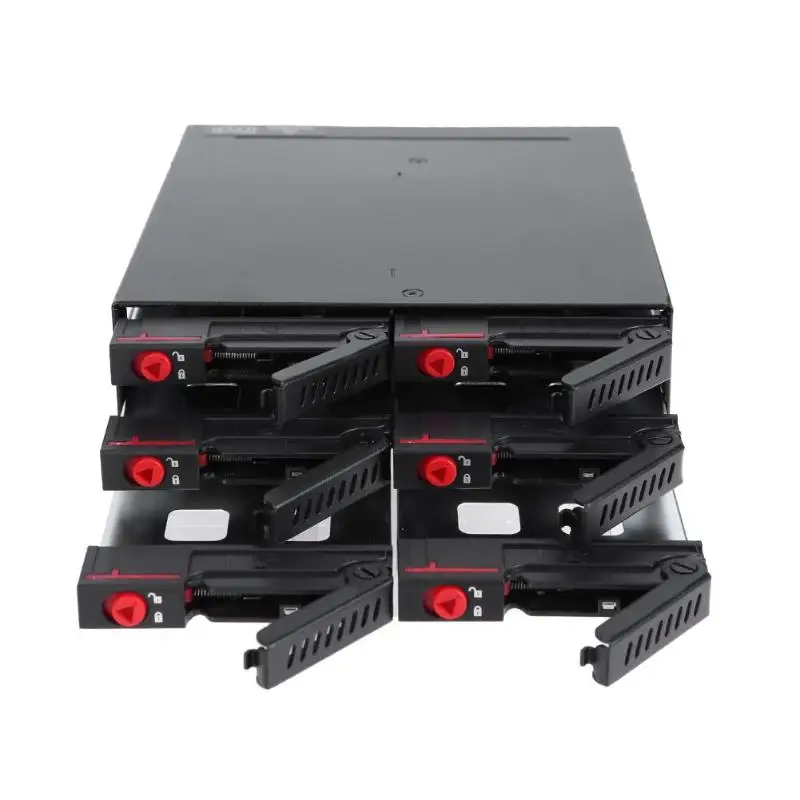
so far I'm able to boot up the v6.1..but since i missing some sata cable to test as it need hdd detected before can continue. I'm planning to use below enclosure to house all the 6 Hdd. hopefully the project is a success..i have a lot of data to park inside rclxm9.gif
user posted image

This post has been edited by soul_gamerz: Sep 29 2019, 11:17 AM
TSC-Fu
post Sep 29 2019, 12:22 PM

Ninja-Fu
******
Senior Member
1,051 posts

Joined: Apr 2005
From: Brisbane, QLD, Ostolia


QUOTE(soul_gamerz @ Sep 29 2019, 11:09 AM)
so far I'm able to boot up the v6.1..but since i missing some sata cable to test as it need hdd detected before can continue. I'm planning to use below enclosure to house all the 6 Hdd. hopefully the project is a success..i have a lot of data to park inside  rclxm9.gif
user posted image
*
uh no, you're not booting 6.1..... yet. the installer is just an installer, it'll work even in socket 775 cpu. once you put in the .pat file then it'll install the DSM 6.1. or 6.2.

try it on a test hdd first, if it works then you're set!

if you have only 2GB of RAM then I don't suggest you to use a lot of apps, maybe just the really essential ones like download station and SMB/Windows/NFS/WebDAV file share.

that enclosure is fine, but I've yet to see anybody test the heat performance anywhere so you'll be the first then biggrin.gif as long as you understand that it's for 2.5" hdd biggrin.gif

This post has been edited by C-Fu: Sep 29 2019, 12:23 PM
soul_gamerz
post Sep 29 2019, 02:25 PM

Casual
***
Junior Member
446 posts

Joined: Feb 2010
QUOTE(C-Fu @ Sep 29 2019, 12:22 PM)
uh no, you're not booting 6.1..... yet. the installer is just an installer, it'll work even in socket 775 cpu. once you put in the .pat file then it'll install the DSM 6.1. or 6.2.

try it on a test hdd first, if it works then you're set!

if you have only 2GB of RAM then I don't suggest you to use a lot of apps, maybe just the really essential ones like download station and SMB/Windows/NFS/WebDAV file share.

that enclosure is fine, but I've yet to see anybody test the heat performance anywhere so you'll be the first then biggrin.gif as long as you understand that it's for 2.5" hdd biggrin.gif
*
Ah yaa..didnt managed to get past the pat file yet. Ram can be added later..that all i have at hand right now that is compatible with the board. Yup..2.5" it have integrated fans inside the bay..hopefully thermal is not an issue
TSC-Fu
post Sep 29 2019, 02:58 PM

Ninja-Fu
******
Senior Member
1,051 posts

Joined: Apr 2005
From: Brisbane, QLD, Ostolia


FYI soul_gamerz my DS3615 is still running well on my E8400 socket 775 system. It was a surprise even till this day lol.

Well try out and lemme know! If the pat is listed in Xpenology_Tools program then it should work.
trencher10
post Oct 8 2019, 04:19 PM

Long-term AFK ...
****
Senior Member
665 posts

Joined: Jan 2003


Question, question: If starting a DIY NAS, and start with only 2 4TB HDDs, want to start with RAID 1, then what is the migration plan to RAID 5 or 6 when want to add more HDD?
TSC-Fu
post Oct 8 2019, 05:56 PM

Ninja-Fu
******
Senior Member
1,051 posts

Joined: Apr 2005
From: Brisbane, QLD, Ostolia


QUOTE(trencher10 @ Oct 8 2019, 04:19 PM)
Question, question: If starting a DIY NAS, and start with only 2 4TB HDDs, want to start with RAID 1, then what is the migration plan to RAID 5 or 6 when want to add more HDD?
*
If you use Xpenology...


RAID type > Can be changed to…
Basic > RAID 1 & 5
RAID 1 > RAID 5
RAID 5 > RAID 6
SHR-1 > SHR-2

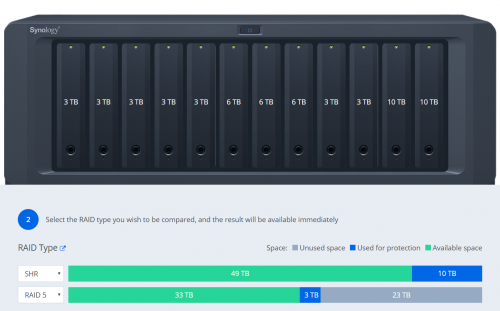
I personally recommend SHR, simply because it maximises the use of space in all of your mixed-capacity drives.

In my case...

user posted image

It's not an issue if all of your drives are the same capacities.

Also bear in mind that with SHR and BTRFS, should you have a catastrophic RAID failure (3 drives dead, etc), you can just use an usb disk with ubuntu live on it, boot it and mount the remaining drives and you can still recover whatever files that's left.

This post has been edited by C-Fu: Oct 8 2019, 05:59 PM
trencher10
post Oct 8 2019, 06:04 PM

Long-term AFK ...
****
Senior Member
665 posts

Joined: Jan 2003


^
Hmmm. I thinking going OMV or FreeNAS route. More like OMV route becoz FreeNAS prefers-more-like-requires Intel.

Considering my main reason for NAS remains file-storage-reliability, so ABSOLUTELY no need for superfluous transcoding, Plex media streaming, torrent, UNLIKELY-TO Internet port forward NAS (yet), or running anything other than on-off file transfers/syncs.

It is, cold-store NAS.

EDIT: Also quick Googles say SHR is on the way to being deprecated? Xpenology already disabling it in DSM?

This post has been edited by trencher10: Oct 8 2019, 06:47 PM
aepock
post Oct 8 2019, 06:16 PM

Getting Started
**
Junior Member
181 posts

Joined: Nov 2005
parking

TSC-Fu
post Oct 8 2019, 06:48 PM

Ninja-Fu
******
Senior Member
1,051 posts

Joined: Apr 2005
From: Brisbane, QLD, Ostolia


QUOTE(trencher10 @ Oct 8 2019, 06:04 PM)
^
Hmmm. I thinking going OMV or FreeNAS route. More like OMV route becoz FreeNAS prefers-more-like-requires Intel.

Considering my main reason for NAS remains file-storage-reliability, so no need for superfluous transcoding, 24/7 Internet port forward NAS (yet), or running anything other than on-off file transfers/syncs.

EDIT: Also quick Googles say SHR is on the way to being deprecated? Xpenology already disabling it in DSM?
*
Not quite.

SHR is a feature enabled by default on selected models. It's not enabled on DS3615, 3617 and ds918. So you have to enable it yourself by editing 2 lines in a config file.

Steps:
1. install putty on your windows machine.
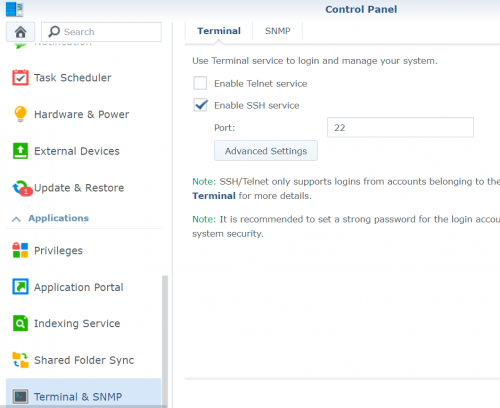
2. enable SSH in your DSM web ui.

user posted image

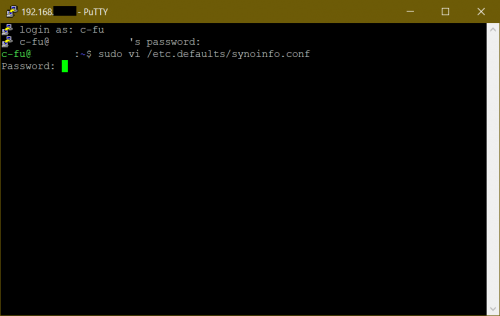
3. Use PuTTy to ssh into your machine - insert the IP and port number. login using your account.
type this:
CODE
sudo vi /etc.defaults/synoinfo.conf

user posted image

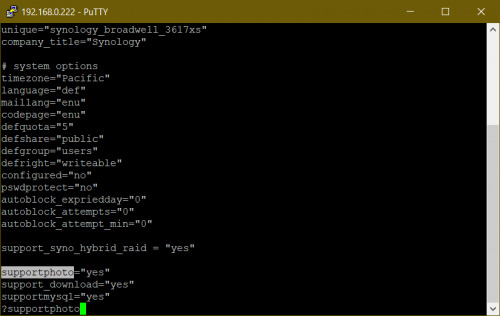
4. type ?supportphoto then press i. insert support_syno_hybrid_raid = "yes" above it, and press Esc to exit insert mode.

user posted image

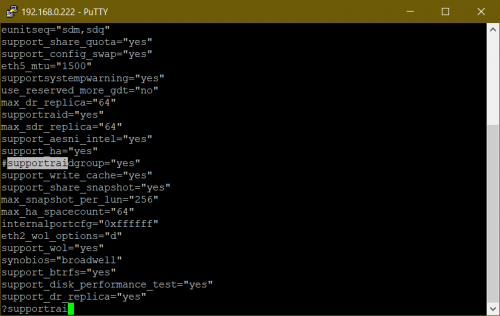
5. type ?supportraidgroup, press i and add # in front of it. press Esc.

user posted image

6. type
CODE
:wq
to save and exit, reboot. and you're set.


SHR advantages:
+ sits on top of BTRFS, so in the event of a raid failure your data is still available as long as the drive is physically OK
+ maximises your disk space
+ parity is split in all drives, different than most other software raid where 1 or more disks are just for parity/protection.
+ snapshot in case file becomes corrupted
+ VERY fast
+ survives fresh DSM install where you can just migrate the disks to other xpenology/synology system

SHR to me has been very reliable and solid for years.

FreeNAS, XigmaNAS, uses ZFS. OMV supports ZFS with a plugin. ZFS too is reliable, but less flexible. In my case I have a lot of drives with mixed capacities so SHR is the only way to go. You can 100% use OMV if you want, nobody's stopping you biggrin.gif but since OMV uses btrfs by default, might as well go with xpe and run omv as a VM in it if you really need some omv apps/plugins that's not available in Xpe (I found none, but I wasn't looking hard enough).

FreeNAS is a total beast, and while it used in enterprise setting, to me it's overkill for a NAS, not to mention the high(er) hardware requirements. But you don't need ECC ram for ZFS, no matter what people say biggrin.gif It's a little scary, but your risk of losing everything in your ZFS pool is 1 in 115,792,089,237,316,195,423,570,985,008,687,907,853,269,984,665,640,564,039,457,584,007,913,129,639,936. it benefits greatly with ECC though.

If you just need fileserving function, Xpe fully works with a RM200 PC smile.gif can't beat that yo

This post has been edited by C-Fu: Oct 8 2019, 07:15 PM

7 Pages < 1 2 3 4 5 > » Top
 

Change to:
| Lo-Fi Version
0.0266sec    0.72    5 queries    GZIP Disabled
Time is now: 15th December 2025 - 11:11 PM