

continue broo..i'm always interested to build my own NAS. Got some LGA775 board with Xeon proc lying around
Build your own NAS and Homelab with cheap PCs!, UnRaid, Xpenology, NAS4Free, Freenas,OMV
Build your own NAS and Homelab with cheap PCs!, UnRaid, Xpenology, NAS4Free, Freenas,OMV
|
|
 Apr 25 2018, 08:48 AM Apr 25 2018, 08:48 AM
Return to original view | Post
#1
|
Junior Member
446 posts Joined: Feb 2010 
|
continue broo..i'm always interested to build my own NAS. Got some LGA775 board with Xeon proc lying around
|
|
|
|
|
|
Sep 27 2019, 03:37 PM
Return to original view | Post
#2
|
|
Junior Member
446 posts Joined: Feb 2010
|
Is Xpenology not working well with AMD hardware? I have one AMD board with 6 Sata port which i would like to use..but from the reading only version 6.1 is compatible using the old loader. Any feature i will be missing out if using the old version?
This post has been edited by soul_gamerz: Sep 27 2019, 03:41 PM |
|
|
Sep 29 2019, 11:09 AM
Return to original view | Post
#3
|
|
Junior Member
446 posts Joined: Feb 2010
|
QUOTE(C-Fu @ Sep 27 2019, 08:24 PM) nope. all of the major feature differences between 6.1 & 6.2 are mainly the splitting of some functions into separate apps, like replication. if 6.1 works well for you, I suggest you to wait until got confirmation that your hardware works. My hardware is quite an old one.. since I have no idea on your hardware, a quick search reveals this: - Outcome of the update: SUCCESSFUL - DSM version prior update: DSM 6.2.1-23824-1 - Loader version and model: JUN'S LOADER v1.04b - DS918+ - Using custom extra.lzma: NO - Installation type: BAREMETAL - Gigabyte B450 (AMD Ryzen 3600) - Additional comment: reboot required I'd suggest you to get an additional usb, with a spare drive and try a fresh install. DSM 6.2-23739 works well for me, and I've got no time to try since the newest current update won't work with my DS3617xs. Well if you really wanna try 6.2, install esxi, and passthrough your drives (or better yet, connect your drives to a LSI card and passthrough that). this would be the easiest https://mega.nz/#!eWokUSiS!6_vFRKsB...8sl58aF9otD0Gbc admin:synology2019$$$ mac1=0011322CA785 Once everything is set up, shutdown the VM, and save snapshot. you should be able to update at least to 6.2.2-24922 Update 2, but if it screws up, just restore the snapshot. Save 2 cores for ESXi, or 1 core if it's low usage. at least you can get better VM performance than xpenology's VMM. Hell you can even install hackintosh using spare cores if your CPU has them. https://www.sysnettechsolutions.com/en/vmwa...mware-esxi-6-7/   below is the spec: below is the spec:Mobo: Asrock 960GC-GS FX CPU: AMD Phenom II X2 B59 RAM: 2GB DDR2 so far I'm able to boot up the v6.1..but since i missing some sata cable to test as it need hdd detected before can continue. I'm planning to use below enclosure to house all the 6 Hdd. hopefully the project is a success..i have a lot of data to park inside  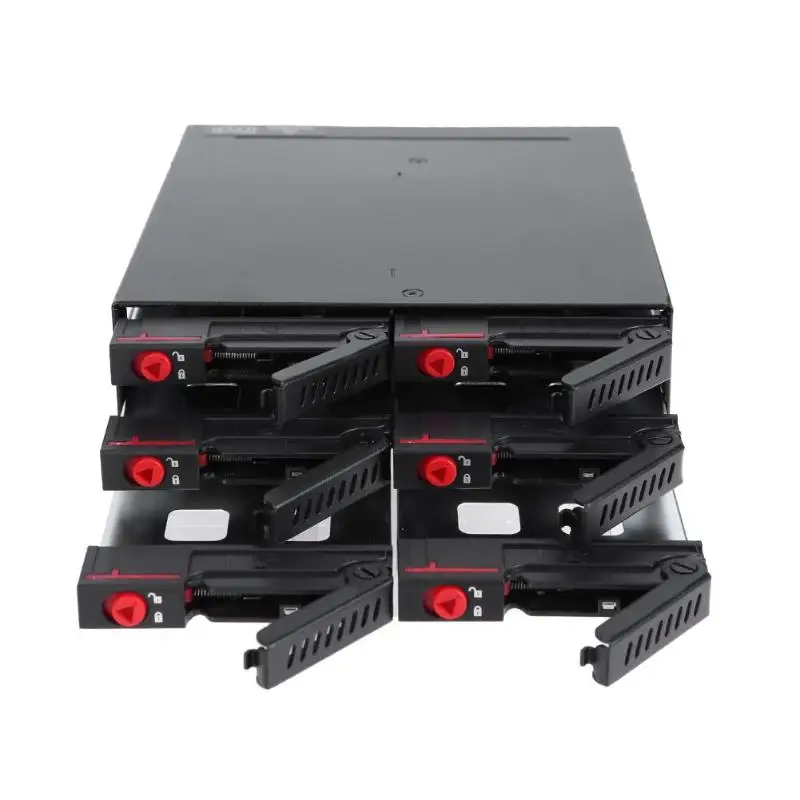 This post has been edited by soul_gamerz: Sep 29 2019, 11:17 AM |
|
|
Sep 29 2019, 02:25 PM
Return to original view | IPv6 | Post
#4
|
|
Junior Member
446 posts Joined: Feb 2010
|
QUOTE(C-Fu @ Sep 29 2019, 12:22 PM) uh no, you're not booting 6.1..... yet. the installer is just an installer, it'll work even in socket 775 cpu. once you put in the .pat file then it'll install the DSM 6.1. or 6.2. Ah yaa..didnt managed to get past the pat file yet. Ram can be added later..that all i have at hand right now that is compatible with the board. Yup..2.5" it have integrated fans inside the bay..hopefully thermal is not an issuetry it on a test hdd first, if it works then you're set! if you have only 2GB of RAM then I don't suggest you to use a lot of apps, maybe just the really essential ones like download station and SMB/Windows/NFS/WebDAV file share. that enclosure is fine, but I've yet to see anybody test the heat performance anywhere so you'll be the first then  as long as you understand that it's for 2.5" hdd as long as you understand that it's for 2.5" hdd |
|
|
Oct 29 2019, 02:18 PM
Return to original view | Post
#5
|
|
Junior Member
446 posts Joined: Feb 2010
|
QUOTE(C-Fu @ Oct 8 2019, 05:56 PM) If you use Xpenology... boss..is it a good idea to mix up the controller for the disk? I want to use the 6 bay disk enclosre but the original mobo i plan to use which has 6 SATA port just died after i stress it for a while RAID type > Can be changed to… Basic > RAID 1 & 5 RAID 1 > RAID 5 RAID 5 > RAID 6 SHR-1 > SHR-2 I personally recommend SHR, simply because it maximises the use of space in all of your mixed-capacity drives. In my case... 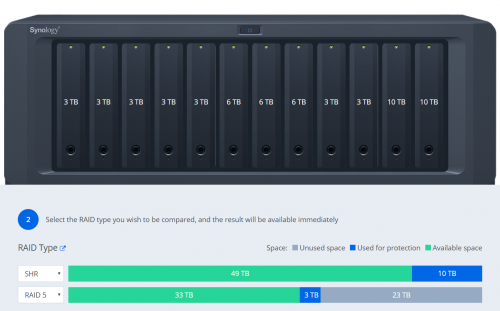 It's not an issue if all of your drives are the same capacities. Also bear in mind that with SHR and BTRFS, should you have a catastrophic RAID failure (3 drives dead, etc), you can just use an usb disk with ubuntu live on it, boot it and mount the remaining drives and you can still recover whatever files that's left. ..now i have second board which only have 4 port, then i want to buy 2 or 4-port PCI-Express Expansion Card *link in shoppe*. Can i use 4 internal SATA port and then additional 2 port from the expansion card? Will Xpenology detect it correctly? |
|
|
Oct 29 2019, 02:46 PM
Return to original view | Post
#6
|
|
Junior Member
446 posts Joined: Feb 2010
|
QUOTE(C-Fu @ Oct 29 2019, 02:36 PM) yes. but that's a port multiplier. it means it takes 1 sata port and splits the speed into four. ah i see..thank you for the information sifu also it runs very very hot, even with just one port used. you need a lsi card. some are 3G, some are 6G. the 3G kind supports a max of 2TB per drive, so get 6G version if possible. if you need more slots, get a LSI card, and an expander card. the (rebranded, so cheaper) LSI card: 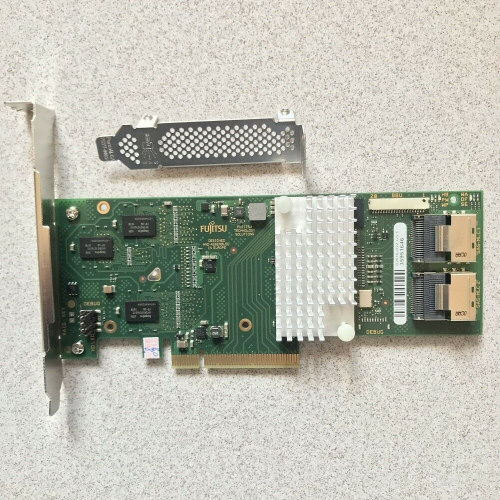 https://www.ebay.com.my/itm/Fujitsu-D2616-L...XEAAOSw9mpaLmFu the card must be flashed to IT mode so the software (unraid/freenas/xigmanas/xpenology) will handle the raid. flashing is as easy as flashing mobo bios. there are a billion models available, this is just the cheapest that I found on ebay using the search term "lsi 6G" but there are cheaper cards (I bought mine for RM60, can't remember the model name). the card as 2 sas ports, so you can connect 2x4 sata ports using this SFF 8087 cable: 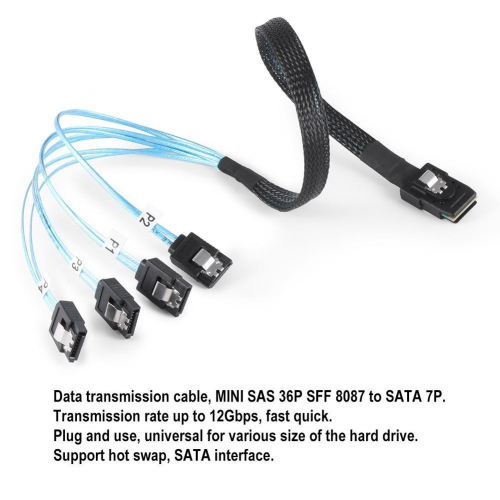 https://www.lazada.com.my/products/cabledec...5I6eg3&search=1 expander card: 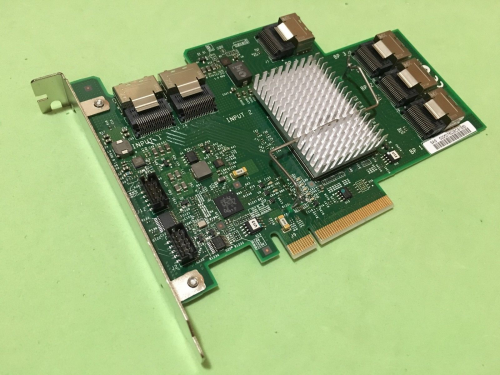 https://www.ebay.com.my/itm/IBM-ServeRAID-6...VUAAOSw-kdXzYni if you wanna connect it to the expander, you need two of this cable to connect to the above expander 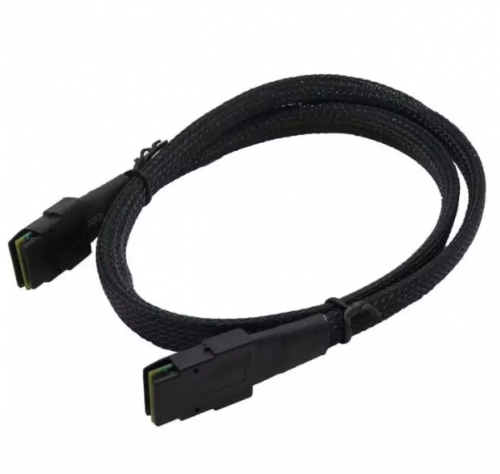 https://www.lazada.com.my/products/07m-inte...8fP0LD&search=1 and 4x SFF 8087 breakout cable from the expander, giving you 4x4 sata ports. there are other ways, but this is the cheapest that I know of. on one of my boards, I mixed the onboard sata ports with 1 lsi 2 ports card, 1 expander, and 1 lsi 4 ports card.  |
|
|
Dec 5 2019, 08:42 AM
Return to original view | Post
#7
|
|
Junior Member
446 posts Joined: Feb 2010
|
QUOTE(C-Fu @ Sep 29 2019, 12:22 PM) uh no, you're not booting 6.1..... yet. the installer is just an installer, it'll work even in socket 775 cpu. once you put in the .pat file then it'll install the DSM 6.1. or 6.2. Here are the temperature for the disks. all of this is only temporary as i will replaced them all with high capacity down the road try it on a test hdd first, if it works then you're set! if you have only 2GB of RAM then I don't suggest you to use a lot of apps, maybe just the really essential ones like download station and SMB/Windows/NFS/WebDAV file share. that enclosure is fine, but I've yet to see anybody test the heat performance anywhere so you'll be the first then as long as you understand that it's for 2.5" hdd . using SHR i can replaced 1 disk with high capacity and it will expand right? 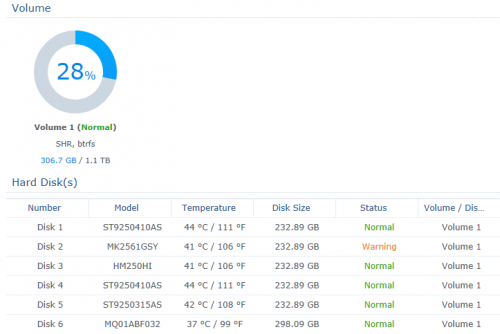 |
|
|
Dec 6 2019, 12:56 PM
Return to original view | Post
#8
|
|
Junior Member
446 posts Joined: Feb 2010
|
QUOTE(edministrator @ Dec 6 2019, 08:57 AM) no, the biggest capacity usually used as redundancy I see..if i replaced few of them? Eventually i want to replace all of it with 2tb drives |
| Change to: |  0.0241sec 0.0241sec
 0.37 0.37
 6 queries 6 queries
 GZIP Disabled GZIP Disabled
Time is now: 16th December 2025 - 07:49 AM |
 Quote
Quote