Welcome Guest ( Log In | Register )

7 Pages < 1 2 3 4 5 > » Bottom

Outline · [ Standard ] · Linear+

 Aztech FG7008GR(AC) AC2400 MU-MIMO WiFi Router, Awesome router but for the firmware...

views
     
lol0919
post Sep 17 2018, 09:37 PM

Getting Started
**
Junior Member
168 posts

Joined: Sep 2018
QUOTE(miloaisdino @ Sep 17 2018, 08:38 PM)
I always use advanced settings. Configuration steps are the same as innacomm cos they are almost the same since broadcom.

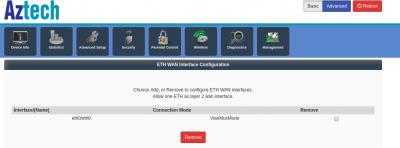
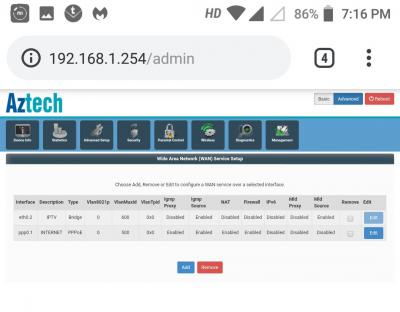
What i did: go to advanced setup, delete everything under WAN and ETH if possible, then under WAN create interface with vlan 500, priority 0 but name INTERNET (case sensitive and v impt be exact), choose pppoe and enter credentials + custom dns. Done.

Repeat same thing for hypptv, create interface vlan 600 name IPTV, choose Bridging, done.
Then go to advanced setup, interface grouping, assign lan port 4 to iptv interface.

Lastly, delete every entry under the QoS settings page, disable ipv6 everywhere, enable upnp (optional)

Once everything works and your wireless ssid + password + channel ok alr, pls DO NOT ever try to change the config again. Keep backup of the config file to be safe. This router firmware is the most shitty i have ever seen, worse than all of the tm router. This aztech is just a beefed up innacomm that support turbo and fast wireless lmao
*
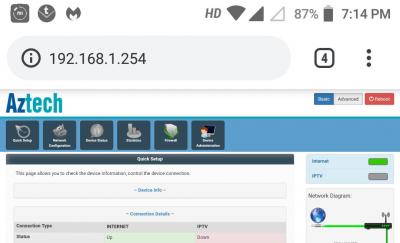
Done with some of the settings, but still not working.
Anything i missed?

Attached Image

Attached Image

Attached Image

Attached Image
miloaisdino
post Sep 17 2018, 09:57 PM

Regular
******
Senior Member
1,418 posts

Joined: Jul 2015
QUOTE(lol0919 @ Sep 17 2018, 09:37 PM)
Done with some of the settings, but still not working.
Anything i missed?

Attached Image

Attached Image

Attached Image

Attached Image
*
Correct leh... maybe reboot router (mine was liddat). If not it means u need to go with .003 firmware sad.gif

This post has been edited by miloaisdino: Sep 17 2018, 09:58 PM
lol0919
post Sep 17 2018, 10:20 PM

Getting Started
**
Junior Member
168 posts

Joined: Sep 2018
QUOTE(miloaisdino @ Sep 17 2018, 09:57 PM)
Correct leh... maybe reboot router (mine was liddat). If not it means u need to go with .003 firmware sad.gif
*
So the newest firmware confirm cannot use?
Is it safe to flash the firmware? I'm afraid i will bricked the device, lol.
how come they dare to sell something like this sweat.gif

This post has been edited by lol0919: Sep 17 2018, 10:45 PM
miloaisdino
post Sep 17 2018, 11:32 PM

Regular
******
Senior Member
1,418 posts

Joined: Jul 2015
QUOTE(lol0919 @ Sep 17 2018, 10:20 PM)
So the newest firmware confirm cannot use?
Is it safe to flash the firmware? I'm afraid i will bricked the device, lol.
how come they dare to sell something like this  sweat.gif
*
.007 is not newest, but still incompatible. Only .003 and below compatible for unifi

Now u know why this router so cheap... but if u know how to configure then worth it la lol

This post has been edited by miloaisdino: Sep 17 2018, 11:33 PM
lol0919
post Sep 17 2018, 11:57 PM

Getting Started
**
Junior Member
168 posts

Joined: Sep 2018
QUOTE(miloaisdino @ Sep 17 2018, 11:32 PM)
.007 is not newest, but still incompatible. Only .003 and below compatible for unifi

Now u know why this router so cheap... but if u know how to configure then worth it la lol
*
The internet is UP after flashed to .003 but IPTV still not working,
and having some issue with my wireless connection which 2.4ghz's signal is very weak and slow,
even 5ghz can reach my room on first floor, but speed also slower than my innacom rg4332 bangwall.gif ....
what are the optimal settings for wireless?

This post has been edited by lol0919: Sep 18 2018, 02:22 AM
miloaisdino
post Sep 18 2018, 08:53 AM

Regular
******
Senior Member
1,418 posts

Joined: Jul 2015
QUOTE(lol0919 @ Sep 17 2018, 11:57 PM)
The internet is UP after flashed to .003 but IPTV still not working,
and having some issue with my wireless connection which 2.4ghz's signal is very weak and slow,
even 5ghz can reach my room on first floor, but speed also slower than my innacom rg4332 bangwall.gif ....
what are the optimal settings for wireless?
*
Iptv i think u try play with the igmp settings abit (eg on off snooping and multicast etc trial and error until it works)

Wireless what channel and region are u on? Can use some sort of wireless analyser to screenshot the bandwidth and channel etc here tks

Cos if u encounter certain bandwidth bugs, need to execute some commands in telnet (some old post above)

This post has been edited by miloaisdino: Sep 18 2018, 08:54 AM
enduser
post Sep 18 2018, 01:00 PM

Regular
******
Senior Member
1,280 posts

Joined: Jan 2003
I suggest get proper router for main use n use this router as an ap...more suited i think smile.gif
lol0919
post Sep 18 2018, 03:19 PM

Getting Started
**
Junior Member
168 posts

Joined: Sep 2018
QUOTE(miloaisdino @ Sep 18 2018, 08:53 AM)
Iptv i think u try play with the igmp settings abit (eg on off snooping and multicast etc trial and error until it works)

Wireless what channel and region are u on? Can use some sort of wireless analyser to screenshot the bandwidth and channel etc here tks

Cos if u encounter certain bandwidth bugs, need to execute some commands in telnet (some old post above)
*
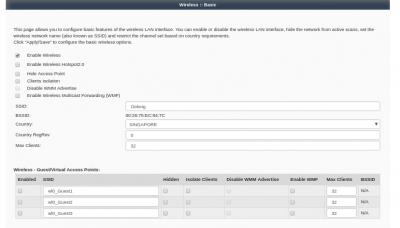
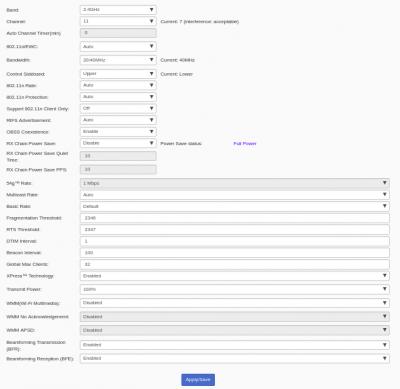
For wireless, i use Singapore and channel 11, any different by using different region?
Attached Image
Attached Image
Attached Image

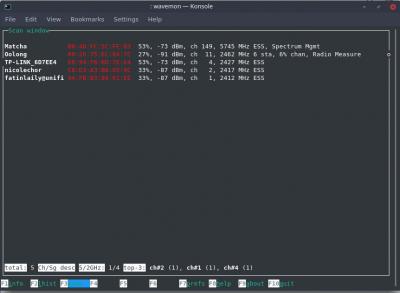
the 2.4ghz 's signal is very weak and unstable, even not far away from it, 5ghz seems works fine.
Isn't 2.4ghz has better range coverage than 5ghz??

Matcha=5ghz, Oolong=2.4ghz

Living room, 2-3meter away from router
Attached Image


dining area 4-5m away from router, block by 1 wall+
Attached Image

kitchen, 7-9m away from router, block by 2 wall+
Attached Image

This post has been edited by lol0919: Sep 18 2018, 05:07 PM


Attached thumbnail(s)
Attached Image
miloaisdino
post Sep 18 2018, 04:33 PM

Regular
******
Senior Member
1,418 posts

Joined: Jul 2015
QUOTE(lol0919 @ Sep 18 2018, 03:19 PM)
For wireless, i use Singapore and channel 11, any different by using different region?
Attached Image
Attached Image
Attached Image

the 2.4ghz 's signal is very weak and unstable, even not far away from it, 5ghz seems works fine.
Isn't 2.4ghz has better range coverage than 5ghz??

Living room, 2-3meter away from router
Attached Image
dining area 4-5m away from router, block by 1 wall+
Attached Image

kitchen, 7-9m away from router, block by 2 wall+
Attached Image
*
Ok, u have to disable 40mhz on the 2.4ghz band. Normally aztech 40mhz support poor because theres little space to test in sg.. wifi too congested
Anyway the upper/lower control sideband from the pic looks broken, so i think 40mhz is wonky.. So change to 20mhz should solve alr

Also, WMM must be enabled or else will cap at 54mbps link rate (try this first it might be the real issue lol)

This post has been edited by miloaisdino: Sep 18 2018, 04:38 PM
neooren
post Sep 18 2018, 06:58 PM

Getting Started
**
Junior Member
237 posts

Joined: Sep 2009


hi, tried to configure my fg700gr fw .007 out of the box

internet..OK
IPTV..NO


miloaisdino
post Sep 18 2018, 07:17 PM

Regular
******
Senior Member
1,418 posts

Joined: Jul 2015
QUOTE(neooren @ Sep 18 2018, 06:58 PM)
hi, tried to configure my fg700gr fw .007 out of the box

internet..OK
IPTV..NO
*
Your .007 works unifi out of the box??!
Lucky you
Iptv try the bridging and play the igmp settings abit. Can your hypptv stb obtain ip from tm server yet?
neooren
post Sep 18 2018, 07:29 PM

Getting Started
**
Junior Member
237 posts

Joined: Sep 2009


QUOTE(miloaisdino @ Sep 18 2018, 07:17 PM)
Your .007 works unifi out of the box??!
Lucky you
Iptv try the bridging and play the igmp settings abit. Can your hypptv stb obtain ip from tm server yet?
*
Attached Image
Attached Image
Attached Image
Attached Image

How to check whether stb got ip from tm server?
This network test at stb
Attached Image
miloaisdino
post Sep 18 2018, 07:53 PM

Regular
******
Senior Member
1,418 posts

Joined: Jul 2015
https://www.tp-link.com/au/faq-346.html
Set vlan600 to priorty 5 maybe?
neooren
post Sep 18 2018, 08:05 PM

Getting Started
**
Junior Member
237 posts

Joined: Sep 2009


QUOTE(miloaisdino @ Sep 18 2018, 07:53 PM)
https://www.tp-link.com/au/faq-346.html
Set vlan600 to priorty 5 maybe?
*
Thanks bro..
Will try again this weekend

Need to stop testing.. My wife bad mood already😂
miloaisdino
post Sep 18 2018, 08:10 PM

Regular
******
Senior Member
1,418 posts

Joined: Jul 2015
QUOTE(neooren @ Sep 18 2018, 07:29 PM)
Attached Image
Attached Image
Attached Image
Attached Image

How to check whether stb got ip from tm server?
This network test at stb
Attached Image
*
Under network, ethernet.. do u see the ip address? What range issit?
neooren
post Sep 18 2018, 08:16 PM

Getting Started
**
Junior Member
237 posts

Joined: Sep 2009


QUOTE(miloaisdino @ Sep 18 2018, 08:10 PM)
Under network, ethernet.. do u see the ip address? What range issit?
*
ip from router dhcp 192.168.1.2

This post has been edited by neooren: Sep 18 2018, 08:16 PM
miloaisdino
post Sep 18 2018, 08:46 PM

Regular
******
Senior Member
1,418 posts

Joined: Jul 2015
QUOTE(neooren @ Sep 18 2018, 08:16 PM)
ip from router dhcp 192.168.1.2
*
Crap then i need to do more testing to fix the config lol.
Anyway i just fked up my aztech config migjt need to reset too ohmy.gif
The router suddenly change its gateway from .1.254 to .1.1 -- conflict with my main gateway zzzz

This post has been edited by miloaisdino: Sep 18 2018, 08:58 PM
lol0919
post Sep 18 2018, 08:59 PM

Getting Started
**
Junior Member
168 posts

Joined: Sep 2018
QUOTE(miloaisdino @ Sep 18 2018, 04:33 PM)
Ok, u have to disable 40mhz on the 2.4ghz band. Normally aztech 40mhz support poor because theres little space to test in sg.. wifi too congested
Anyway the upper/lower control sideband from the pic looks broken, so i think 40mhz is wonky.. So change to 20mhz should solve alr

Also, WMM must be enabled or else will cap at 54mbps link rate (try this first it might be the real issue lol)
*
changed to 20mhz but the problem is still there,
the 2.4ghz signal strength was very weak and drops easily even not very far away.
Was so much different with RG4332's signal

Matcha=5ghz
Oolong=2.4ghz
We Are Happy Family=2.4ghz RG4332

Attached Image

Attached Image

is this suppose to be like this?? or is the radio parts for 2.4ghz is failing sad.gif

Attached Image


miloaisdino
post Sep 18 2018, 09:03 PM

Regular
******
Senior Member
1,418 posts

Joined: Jul 2015
QUOTE(lol0919 @ Sep 18 2018, 08:59 PM)
changed to 20mhz but the problem is still there,
the 2.4ghz signal strength was very weak and drops easily even not very far away.
Was so much different with RG4332's signal

Matcha=5ghz
Oolong=2.4ghz
We Are Happy Family=2.4ghz RG4332

Attached Image

Attached Image

is this suppose to be like this?? or is the radio parts for 2.4ghz is failing sad.gif

Attached Image
*
Yaaa. Anyway my region is set to US so that might help

By any chance can i have yr rg4332 config (with pppoe crednetials cancelled ofc) cos migjt br able to 'transplant' the config over due to both being broadcom

This post has been edited by miloaisdino: Sep 18 2018, 09:28 PM
TSsoonwai
post Sep 18 2018, 09:28 PM


********
All Stars
11,455 posts

Joined: Oct 2007
From: KL


QUOTE(lol0919 @ Sep 18 2018, 08:59 PM)
...
the 2.4ghz signal strength was very weak and drops easily even not very far away.
...

is this suppose to be like this?? or is the radio parts for 2.4ghz is failing sad.gif

...
*
The 2.4 Ghz is quite low power 100mW (20dBm). Maybe that's why.
The 5Ghz is 1W which is what I like.
Info from Aztech's IDA SG approval.
ftp://ftp.aztech.com/support/SINGAPORE/Ce...EGISTRATION.pdf

7 Pages < 1 2 3 4 5 > » Top
 

Change to:
| Lo-Fi Version
0.0256sec    0.74    6 queries    GZIP Disabled
Time is now: 1st December 2025 - 08:05 AM