

This firmware really piece of shit. Esp the 5ghz menu. @soonwai may i know what channel u using and country? Tks
Aztech FG7008GR(AC) AC2400 MU-MIMO WiFi Router, Awesome router but for the firmware...
Aztech FG7008GR(AC) AC2400 MU-MIMO WiFi Router, Awesome router but for the firmware...
|
|
 Aug 8 2018, 03:11 PM Aug 8 2018, 03:11 PM
Show posts by this member only | IPv6 | Post
#21
|
 
Senior Member
1,418 posts Joined: Jul 2015 
|
This firmware really piece of shit. Esp the 5ghz menu. @soonwai may i know what channel u using and country? Tks
|
|
|
|
|
|
Aug 8 2018, 03:33 PM
Show posts by this member only | IPv6 | Post
#22
|

All Stars
11,455 posts Joined: Oct 2007 From: KL 
|
QUOTE(miloaisdino @ Aug 8 2018, 03:11 PM) This firmware really piece of shit. Esp the 5ghz menu. @soonwai may i know what channel u using and country? Tks I forgot, I sold mine already. But I usually have wifi on auto. Can't remember what country I set it on. Malaysia or Singapore I think. |
|
|
Aug 8 2018, 04:50 PM
|
|
Senior Member
1,418 posts Joined: Jul 2015
|
Haha got it working. Link rate 866mbps only cos aztech no 1024qam, but have lots of spatial stream. Anyway with note 8 can get 500mbps download
 Haha rm75... |
|
|
Aug 8 2018, 08:37 PM
|
|
Senior Member
6,230 posts Joined: Jun 2006
|
lol... I just got the local RM199 unit today... it's also configured for SG... has the "latest" ....007 firmware... haven't played with it yet...
|
|
|
Aug 8 2018, 09:05 PM
|
|
Senior Member
6,230 posts Joined: Jun 2006
|
QUOTE(miloaisdino @ Aug 8 2018, 04:50 PM) Haha got it working. Link rate 866mbps only cos aztech no 1024qam, but have lots of spatial stream. Anyway with note 8 can get 500mbps download Hi... got it working with Unifi? 003 firmware? Thanks.Haha rm75... |
|
|
Aug 8 2018, 09:34 PM
|
|
Senior Member
1,418 posts Joined: Jul 2015
|
QUOTE(dwRK @ Aug 8 2018, 09:05 PM) Hi... got it working with Unifi? 003 firmware? Thanks. I using as ap only. I using 011 firmware. Extremely unstable wifi. Going to revert soon. My router was labelled version 007 out of the box, wonder whether a lower 003 will work.. |
|
|
|
|
|
Aug 8 2018, 10:23 PM
|
|
Senior Member
6,230 posts Joined: Jun 2006
|
QUOTE(miloaisdino @ Aug 8 2018, 09:34 PM) I using as ap only. thanks. my plan was to use as ap too but will try to get pppoe working...looks like i need to delete all the wan config and start new...I using 011 firmware. Extremely unstable wifi. Going to revert soon. My router was labelled version 007 out of the box, wonder whether a lower 003 will work.. loaded soonwai's 003 config into 007 firmware...it drops internet but fire up iptv...lol.. after reboot crashes big time need to do hard reset... what a fucuk firmware also hard reset doesn't get it fully back to pre-003 conf... too bad i didn't make 007 backup...  looking at their ftp server... really cant tell if 011 is the latest from the file creation date |
|
|
Aug 8 2018, 11:37 PM
Show posts by this member only | IPv6 | Post
#28
|
|
All Stars
11,455 posts Joined: Oct 2007 From: KL
|
QUOTE(dwRK @ Aug 8 2018, 10:23 PM) thanks. my plan was to use as ap too but will try to get pppoe working...looks like i need to delete all the wan config and start new... 2-011 is not the latest. 3-007 is the latest but the latest that works with UniFi when I was testing it is 3-003.loaded soonwai's 003 config into 007 firmware...it drops internet but fire up iptv...lol.. after reboot crashes big time need to do hard reset... what a fucuk firmware also hard reset doesn't get it fully back to pre-003 conf... too bad i didn't make 007 backup... looking at their ftp server... really cant tell if 011 is the latest from the file creation date |
|
|
Aug 9 2018, 01:41 AM
|
|
Senior Member
6,230 posts Joined: Jun 2006
|
QUOTE(soonwai @ Aug 8 2018, 11:37 PM) 2-011 is not the latest. 3-007 is the latest but the latest that works with UniFi when I was testing it is 3-003. Thanks.I flash 3-003 n uploaded your conf... change to my login...no internet Change to bridging... connect to my router... nothing Restart . . . reset... now nothing is working... can't even get back to the web menu ... Update: manual ip, & reflash back to 007... working normal as AP now Btw... router came with 007A as the latest firmware This post has been edited by dwRK: Aug 9 2018, 02:05 AM |
|
|
Aug 9 2018, 10:12 AM
|
|
Senior Member
1,418 posts Joined: Jul 2015
|
Im working on custom 5ghz config. The aztech is actually a router in a router. Broadcom on the outside, quantenna with its own processor on the inside. Can telnet into quantenna soc to hv a look.
telnet 192.168.1.254 48599 nc 1.1.1.2 23 Then backspace all the way, and type root then press enter cd /mnt/jffs2/ echo "mode=ap&bw=80&vht=1®ion=us&channel=153&bf=1&pwr=19&scs=0&vsp=0&staticip=1&" > wireless_conf.txt (edit this to yr liking) sync exit reboot This post has been edited by miloaisdino: Aug 9 2018, 10:13 AM |
|
|
Aug 9 2018, 04:18 PM
|
|
Senior Member
1,418 posts Joined: Jul 2015
|
If yr connection is unstable, remember to reboot Then apply 1.0.0.0/8 static route
|
|
|
Aug 17 2018, 05:52 AM
Show posts by this member only | IPv6 | Post
#32
|
|
Junior Member
248 posts Joined: Aug 2018
|
QUOTE(miloaisdino @ Aug 9 2018, 10:12 AM) Im working on custom 5ghz config. The aztech is actually a router in a router. Broadcom on the outside, quantenna with its own processor on the inside. Can telnet into quantenna soc to hv a look. Thanks bro, my router finally works!! Bravo!!!telnet 192.168.1.254 48599 nc 1.1.1.2 23 Then backspace all the way, and type root then press enter cd /mnt/jffs2/ echo "mode=ap&bw=80&vht=1®ion=us&channel=153&bf=1&pwr=19&scs=0&vsp=0&staticip=1&" > wireless_conf.txt (edit this to yr liking) sync exit reboot However, there is one last thing to make my router perfect, which is my 5GHz turns into 20MHz channel instead of 80MHz, and I tried the method above, but I was stuck at the nc 1.1.1.2 23 step, since after telnet 192.168.1.254 48599, it asked for log in name and password, I tried admin admin and I got the connection but it shows error when I typed "nc 1.1.1.2 23", I'm wondering what is the step by step I should have done, and what method did you used to telnet? Windwos PowerShield or putty? Thanks ya! |
|
|
Aug 17 2018, 08:12 AM
|
|
Senior Member
1,418 posts Joined: Jul 2015
|
QUOTE(heidarren @ Aug 17 2018, 05:52 AM) Thanks bro, my router finally works!! Bravo!!! Hi. I experience this 20mhz bug at times also. Solution is to reflash your router firmware (if u using as ap only i recommend 006) then perform broadcom 30-30-30 reset (google for info) and then again press restore to default in the webpage (stupid but to reload the webui files from firmware into jffs)However, there is one last thing to make my router perfect, which is my 5GHz turns into 20MHz channel instead of 80MHz, and I tried the method above, but I was stuck at the nc 1.1.1.2 23 step, since after telnet 192.168.1.254 48599, it asked for log in name and password, I tried admin admin and I got the connection but it shows error when I typed "nc 1.1.1.2 23", I'm wondering what is the step by step I should have done, and what method did you used to telnet? Windwos PowerShield or putty? Thanks ya! Telnet if password wrong error is for security. U can overcome by changing password for admin user in the web ui to anhthing else thrn can use new password to login telnet If nc 1.1.1.2 23 cannot connect, remember to remove 1.0.0.0/8 static route then try again. Alternatively u can call_qcsapi_sockrpc --host 1.1.1.2 xx yy zz Where xx yy zz is from https://github.com/RMerl/asuswrt-merlin/blo...t/call_qcsapi.c and https://github.com/RMerl/asuswrt-merlin/blo...stateless-slave for instant effect (should be able to override 20mhz bw to 80mhz) Try call_qcsapi_sockrpc --host 1.1.1.2 set_bw wifi0 80 (i cant rmb the exact command if not its wifi0 0 80) If u get random disconnect problem acting up for ap mode, i can post my config Edit: i got 160mbps on 20mhz 2.4ghz haha This post has been edited by miloaisdino: Aug 17 2018, 08:20 AM |
|
|
|
|
|
Aug 17 2018, 02:32 PM
Show posts by this member only | IPv6 | Post
#34
|
|
Junior Member
248 posts Joined: Aug 2018
|
QUOTE(miloaisdino @ Aug 17 2018, 08:12 AM) Hi. I experience this 20mhz bug at times also. Solution is to reflash your router firmware (if u using as ap only i recommend 006) then perform broadcom 30-30-30 reset (google for info) and then again press restore to default in the webpage (stupid but to reload the webui files from firmware into jffs) So I just open telnet and Telnet if password wrong error is for security. U can overcome by changing password for admin user in the web ui to anhthing else thrn can use new password to login telnet If nc 1.1.1.2 23 cannot connect, remember to remove 1.0.0.0/8 static route then try again. Alternatively u can call_qcsapi_sockrpc --host 1.1.1.2 xx yy zz Where xx yy zz is from https://github.com/RMerl/asuswrt-merlin/blo...t/call_qcsapi.c and https://github.com/RMerl/asuswrt-merlin/blo...stateless-slave for instant effect (should be able to override 20mhz bw to 80mhz) Try call_qcsapi_sockrpc --host 1.1.1.2 set_bw wifi0 80 (i cant rmb the exact command if not its wifi0 0 80) If u get random disconnect problem acting up for ap mode, i can post my config Edit: i got 160mbps on 20mhz 2.4ghz haha telnet 192.168.1.254 log-in:admin pwd:admin call_qcsapi_sockrpc --host 1.1.1.2 set_bw wifi0 80 reboot Is the steps above correct? Sorry coz I not really know telnet well, gonna ask step by step ^^ I'm using it as router so gonna stuck in 003 firmware, it just turns into 20MHz if I change the channel, but no problem in 007 firmware. I wanna use 5G wifi as region AU, channel 104 bw 80MHz, I found this is the best range and power for this model, even better than channel 153 bw 80MHz region AU/US. |
|
|
Aug 17 2018, 03:25 PM
|
|
Senior Member
1,418 posts Joined: Jul 2015
|
QUOTE(heidarren @ Aug 17 2018, 02:32 PM) So I just open telnet and Oops i missed out a step.telnet 192.168.1.254 log-in:admin pwd:admin call_qcsapi_sockrpc --host 1.1.1.2 set_bw wifi0 80 reboot Is the steps above correct? Sorry coz I not really know telnet well, gonna ask step by step ^^ I'm using it as router so gonna stuck in 003 firmware, it just turns into 20MHz if I change the channel, but no problem in 007 firmware. I wanna use 5G wifi as region AU, channel 104 bw 80MHz, I found this is the best range and power for this model, even better than channel 153 bw 80MHz region AU/US. Its: Trying 192.168.1.254... Connected to 192.168.1.254. Escape character is '^]'. BCM963139 Broadband Router Login: admin Password: admin (or whatever u set) > sh (i missed out u have to type 'sh' then press enter...) BusyBox v1.17.2 (2016-04-05 16:23:38 SGT) built-in shell (ash) Enter 'help' for a list of built-in commands. (This brings you into the main linux shell) # call_qcsapi_sockrpc --host 1.1.1.2 get_bw wifi0 (this retrieves your current bw. In your case it shd be '20') 80 # call_qcsapi_sockrpc --host 1.1.1.2 set_bw wifi0 80 (This sets yr bw to 80) |
|
|
Sep 9 2018, 04:04 PM
|
|
All Stars
11,455 posts Joined: Oct 2007 From: KL
|
Just got one from Lazada for RM142. 9/9 sale. Hopefully next week can get back to trying this sucker out. Now if only TM will give me my 800mbps upgrade.
Aztech FG7008GR is RM149 + 4.75 shipping at Lazada. Used LAZSB99 for additional RM12 off. 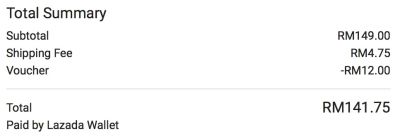 Not sure how good as router but 4x4 5Ghz kicks ass especially at this price. This post has been edited by soonwai: Sep 11 2018, 06:17 PM |
|
|
Sep 17 2018, 03:10 PM
|

Junior Member
168 posts Joined: Sep 2018
|
Just received my fg7008gr but not able to setup, when I connect using LAN cable, I can't access the web ui,
Only able to access web ui once, but can't get to work, so I reboot it. But after that can't access again, all the indicator lights are off except power. On and off for many times already but still no different, tried press the reset button for 10s and release, no changes.... |
|
|
Sep 17 2018, 07:26 PM
Show posts by this member only | IPv6 | Post
#38
|
|
All Stars
11,455 posts Joined: Oct 2007 From: KL
|
QUOTE(lol0919 @ Sep 17 2018, 03:10 PM) Just received my fg7008gr but not able to setup, when I connect using LAN cable, I can't access the web ui, Wait, later I try mine. Got it already also but haven’t had time to set it up.Only able to access web ui once, but can't get to work, so I reboot it. But after that can't access again, all the indicator lights are off except power. On and off for many times already but still no different, tried press the reset button for 10s and release, no changes.... IP address correct? Don’t connect PC to the wan port. Try connecting with wifi? This post has been edited by soonwai: Sep 17 2018, 07:27 PM |
|
|
Sep 17 2018, 08:13 PM
|
|
Junior Member
168 posts Joined: Sep 2018
|
QUOTE(soonwai @ Sep 17 2018, 07:26 PM) Wait, later I try mine. Got it already also but haven’t had time to set it up. can't get ip address, and even manually set it still cannot ping to router. for wifi, the password provided on the sticker cannot be use, even SSID is different.IP address correct? Don’t connect PC to the wan port. Try connecting with wifi? UPDATE: it is working now after 30/30/30 reset, can access to Web UI and SSID and password on sticker works. But i find it very hard to setup this router added entries in Quick Setting Page but it gone after clicking save, after awhile when i load back my info is there, but may i know how to connect? the connect button is non clickable button..really don't understand this UI 
And in advance mode, trying to modify setting but getting following message, even reboot  
|
|
|
Sep 17 2018, 08:38 PM
|
|
Senior Member
1,418 posts Joined: Jul 2015
|
QUOTE(lol0919 @ Sep 17 2018, 08:13 PM) can't get ip address, and even manually set it still cannot ping to router. for wifi, the password provided on the sticker cannot be use, even SSID is different. I always use advanced settings. Configuration steps are the same as innacomm cos they are almost the same since broadcom.UPDATE: it is working now after 30/30/30 reset, can access to Web UI and SSID and password on sticker works. But i find it very hard to setup this router added entries in Quick Setting Page but it gone after clicking save, after awhile when i load back my info is there, but may i know how to connect? the connect button is non clickable button..really don't understand this UI
And in advance mode, trying to modify setting but getting following message, even reboot
What i did: go to advanced setup, delete everything under WAN and ETH if possible, then under WAN create interface with vlan 500, priority 0 but name INTERNET (case sensitive and v impt be exact), choose pppoe and enter credentials + custom dns. Done. Repeat same thing for hypptv, create interface vlan 600 name IPTV, choose Bridging, done. Then go to advanced setup, interface grouping, assign lan port 4 to iptv interface. Lastly, delete every entry under the QoS settings page, disable ipv6 everywhere, enable upnp (optional) Once everything works and your wireless ssid + password + channel ok alr, pls DO NOT ever try to change the config again. Keep backup of the config file to be safe. This router firmware is the most shitty i have ever seen, worse than all of the tm router. This aztech is just a beefed up innacomm that support turbo and fast wireless lmao This post has been edited by miloaisdino: Sep 17 2018, 08:52 PM |
| Change to: |  0.0284sec 0.0284sec
 0.28 0.28
 6 queries 6 queries
 GZIP Disabled GZIP Disabled
Time is now: 2nd December 2025 - 08:28 AM |
 Quote
Quote