Welcome Guest ( Log In | Register )

Outline · [ Standard ] · Linear+

 Aztech FG7008GR(AC) AC2400 MU-MIMO WiFi Router, Awesome router but for the firmware...

views
     
TSsoonwai
post Mar 14 2018, 02:49 AM, updated 7y ago


********
All Stars
11,458 posts

Joined: Oct 2007
From: KL


Aztech FG7008GR(AC)
Trying out this new router. Well, not that new, I think it came out in 2015. Specs wise it looks great. Broadcom dual-core 1GHz SoC, 4 chain 5GHz + 3 chain 2.4GHz wifi. AC2400. MU-MIMO some more, not bad right? Price on Shopee ranges from RM400-RM700.

It's got a pretty good processor. According to wikidevi, the same SoC as Asus DSL-AC88U.

Tech Specs
CPUBCM63138 ARM Cortex A9 1GHz Dual Core
user posted image
RAM256MB, 136MB Free
user posted image
Flash128MB
OSLinux 3.4.11-rt19
EthernetWAN x 1 GBe, LAN x 4 GBe
USBUSB3 x 2
Power12V DC 3A

WiFi
Bands2.4Ghz (BCM43602) and 5Ghz (Quantenna)
Antenna3 chain 2.4GHz + 4 chain 5GHz MU-MIMO AC2400 (600+1800)
Antenna GainUnknown
Max TX Power 30dBm (1000mW)

Features
SNMPNo
Print ServerYes
FTP ServerNo
DLNA ServerNo
Bittorrent ClientYes
SambaYes
WebDAVNo
TelnetYes
SSHYes
DDNSdyndns & TZO
VPNPPTP Server & Client

Issues

Firmware from here: ftp://ftp.aztech.com/support/SINGAPORE/ADSL/
Don't expect too much of firmware updates from Aztech. The last one was v322.6s.3-007 from 2016.

Firmware Again
The latest firmware v322.6s.3-007 does not work with UniFi. PPPoE tries to connect but fails. The latest working firmware for UniFi is v322.6s.3-003.

1.0.0.0/8 Route
There's a 1.0.0.0/8 route to the local bridge. Anything going to those addresses will disappear. This route cannot be deleted. A few years ago, this would have been ok as 1.0.0.0/8, while not defined as a private address, has always been reserved and publicly unroutable. Even Cisco uses 1.1.1.1 for their WLCs. However, it has since been assigned to APNIC and is now in active use. I'm sure you've seen 1.9.1.9 before. It's one of TM DNS. Firmware v322.6s.3-007 fixes this but is not compatible with UniFi.

The solution to this is to create the same route 1.0.0.0/8 to ppp0. I don't know why but it takes precedence over the pre-existing route.

Dynamic DNS
Only dyndns.org & TZO supported. Both of which are no longer free.

Tips & Tricks

Default IP Address
Default router IP address is 192.168.1.254 not your usual .0 or .1.

Passwords
Default user password is {blank}. Default admin password is admin. Highly recommended that you change it.

Dynamic DNS
Only dyndns.org & TZO supported. Both of which are no longer free. So don't throw away your old DIR-615 or any DLink device. Use it to register a free dlinkddns.com address and use it here with dyndns.org.

Speedtests
user posted image
iPhone 6s N 2.4Ghz 20MHz

user posted image
iPhone 6s AC 5Ghz

user posted image user posted image
MacBook Pro Retina 15" Late 2013 N 2.4Ghz 20MHz MCS23 217Mbps Link

user posted image user posted image
MacBook Pro Retina 15" Late 2013 AC 5Ghz 80MHz MCS7 975Mbps Link

This post has been edited by soonwai: Sep 9 2018, 06:13 PM
TSsoonwai
post Mar 15 2018, 12:39 AM


********
All Stars
11,458 posts

Joined: Oct 2007
From: KL


More Speedtests: iPerf3
user posted image
800Mbps+ iPerf3 from MacBook Pro Retina 2013 (USB3 GBe Ethernet) to MacBook Pro Retina 2013 (5Ghz AC 80MHz)

This post has been edited by soonwai: Mar 15 2018, 12:39 AM
TSsoonwai
post Aug 6 2018, 10:43 PM


********
All Stars
11,458 posts

Joined: Oct 2007
From: KL


QUOTE(miloaisdino @ Aug 6 2018, 10:36 PM)
This is for wifi speed bro, not switching speed
*
Yep, no routing or NAT here. Of course, no way for me to test routing speed yet. So have to wait for Turbo 10x to come in first.

I plan to use as an AP so I was more interested in its wifi performance.

This post has been edited by soonwai: Aug 6 2018, 10:45 PM
TSsoonwai
post Aug 6 2018, 11:04 PM


********
All Stars
11,458 posts

Joined: Oct 2007
From: KL


This is the config for UniFi. IIRC, it has vlans 400, 500, 600 all configured. Should be used with firmware v322.6s.3-003. Earlier also can I think.

Attached File  unifisettings.conf.zip ( 5.14k ) Number of downloads: 47


This post has been edited by soonwai: Aug 6 2018, 11:06 PM
TSsoonwai
post Aug 8 2018, 03:33 PM


********
All Stars
11,458 posts

Joined: Oct 2007
From: KL


QUOTE(miloaisdino @ Aug 8 2018, 03:11 PM)
This firmware really piece of shit. Esp the 5ghz menu. @soonwai may i know what channel u using and country? Tks
*
I forgot, I sold mine already. But I usually have wifi on auto. Can't remember what country I set it on. Malaysia or Singapore I think.
TSsoonwai
post Aug 8 2018, 11:37 PM


********
All Stars
11,458 posts

Joined: Oct 2007
From: KL


QUOTE(dwRK @ Aug 8 2018, 10:23 PM)
thanks. my plan was to use as ap too but will try to get pppoe working...looks like i need to delete all the wan config and start new...

loaded soonwai's 003 config into 007 firmware...it drops internet but fire up iptv...lol..  after reboot crashes big time need to do hard reset... what a fucuk firmware

also hard reset doesn't get it fully back to pre-003 conf... too bad i didn't make 007 backup... sad.gif

looking at their ftp server... really cant tell if 011 is the latest from the file creation date
*
2-011 is not the latest. 3-007 is the latest but the latest that works with UniFi when I was testing it is 3-003.
TSsoonwai
post Sep 9 2018, 04:04 PM


********
All Stars
11,458 posts

Joined: Oct 2007
From: KL


Just got one from Lazada for RM142. 9/9 sale. Hopefully next week can get back to trying this sucker out. Now if only TM will give me my 800mbps upgrade.

Aztech FG7008GR is RM149 + 4.75 shipping at Lazada.
Used LAZSB99 for additional RM12 off.
user posted image

Not sure how good as router but 4x4 5Ghz kicks ass especially at this price.


This post has been edited by soonwai: Sep 11 2018, 06:17 PM
TSsoonwai
post Sep 17 2018, 07:26 PM


********
All Stars
11,458 posts

Joined: Oct 2007
From: KL


QUOTE(lol0919 @ Sep 17 2018, 03:10 PM)
Just received my fg7008gr but not able to setup, when I connect using LAN cable, I can't access the web ui,
Only able to access web ui once, but can't get to work, so I reboot it. But after that can't access again, all the indicator lights are off except power.
On and off for many times already but still no different, tried press the reset button for 10s and release, no changes....
*
Wait, later I try mine. Got it already also but haven’t had time to set it up.

IP address correct? Don’t connect PC to the wan port. Try connecting with wifi?

This post has been edited by soonwai: Sep 17 2018, 07:27 PM
TSsoonwai
post Sep 18 2018, 09:28 PM


********
All Stars
11,458 posts

Joined: Oct 2007
From: KL


QUOTE(lol0919 @ Sep 18 2018, 08:59 PM)
...
the 2.4ghz signal strength was very weak and drops easily even not very far away.
...

is this suppose to be like this?? or is the radio parts for 2.4ghz is failing sad.gif

...
*
The 2.4 Ghz is quite low power 100mW (20dBm). Maybe that's why.
The 5Ghz is 1W which is what I like.
Info from Aztech's IDA SG approval.
ftp://ftp.aztech.com/support/SINGAPORE/Ce...EGISTRATION.pdf
TSsoonwai
post Sep 19 2018, 12:33 AM


********
All Stars
11,458 posts

Joined: Oct 2007
From: KL


QUOTE(lol0919 @ Sep 19 2018, 12:29 AM)
do you know which setting from router to solve image loading problems of facebook and instagram?
all devices from my network cannot load images in fb and ig...
*
That may be the 1.0.0.0/8 route problem. Check the first post.
TSsoonwai
post Sep 19 2018, 01:29 AM


********
All Stars
11,458 posts

Joined: Oct 2007
From: KL


QUOTE(lol0919 @ Sep 19 2018, 12:45 AM)
okay, thanks rclxms.gif
*
No prob, hope it works. are you on turbo speed already? Would love to see a Speedtest. I'm still waiting for 800Mbps so cannot test anything yet.
TSsoonwai
post Sep 20 2018, 02:58 AM


********
All Stars
11,458 posts

Joined: Oct 2007
From: KL


QUOTE(lepo @ Sep 20 2018, 02:18 AM)
Guys,

i just bought this router from Lazada,

using firmware 003.

However i noticed that both facebook and instagram cant properly loading. But when using VPN, slow loading not happen..

Anyone with same issues as me?
*
That may be the 1.0.0.0/8 route problem. Check the first post.
TSsoonwai
post Sep 20 2018, 08:11 PM


********
All Stars
11,458 posts

Joined: Oct 2007
From: KL


Finally unboxed my FG7008GR and did some quick tests. At least I know my first Aztech wasn't a fluke.

iPerf3 30-sec test from Ubuntu server to MacBook Pro Retina 15" which is 3x3. Link speed was 1300Mbps TX on the mbpr. Can't see the RX link speed but assume it's also 1300 Mbps.

[ ID] Interval Transfer Bitrate Retr
[ 5] 0.00-30.00 sec 1.53 GBytes 438 Mbits/sec 0 sender
[ 5] 0.00-30.00 sec 1.53 GBytes 438 Mbits/sec receiver
[ 7] 0.00-30.00 sec 1.53 GBytes 438 Mbits/sec 0 sender
[ 7] 0.00-30.00 sec 1.53 GBytes 437 Mbits/sec receiver
[SUM] 0.00-30.00 sec 3.06 GBytes 876 Mbits/sec 0 sender
[SUM] 0.00-30.00 sec 3.05 GBytes 875 Mbits/sec blink.gif receiver

What a lovely router, I mean AP. Have not tried it as a router yet.

More info here:
https://forum.lowyat.net/index.php?showtopic=4658454
TSsoonwai
post Sep 20 2018, 08:26 PM


********
All Stars
11,458 posts

Joined: Oct 2007
From: KL


QUOTE(miloaisdino @ Sep 20 2018, 08:20 PM)
Wow. Dunno why my note 8 always can only negotiate max 866mbps even tho is 3x3 ac..

How about nat throughput tho?
*
I have the same problem with iPhone 6s which 2x2. It connects only at 1x1 with the Aztech. I can't actually see that but the iPhone iperfs at a constant 300 Mbps. So I tested an iPad 2017 which is also 2x2 and that was fine. Around 515 Mbps.

Don't have Turbo yet so have not tested the router part of the Aztech.

This post has been edited by soonwai: Sep 20 2018, 08:27 PM
TSsoonwai
post Sep 21 2018, 03:39 AM


********
All Stars
11,458 posts

Joined: Oct 2007
From: KL


QUOTE(heidarren @ Sep 20 2018, 01:34 PM)
Now I use it as AP, it has very good hardware but the firmware is a joke. I bought YouHua WR1200JS as router, this model has dual-core 880MHz and 128MB RAM, with Padavan It can handle my 500mbps easily even with adblock on! Which is kindy surprise me due to I just paid about RM60 for this unit, the only cons for this is weak wifi, FG7008GR(AC) has good wifi but bad firmware, so I put them together makes them a strong team, strongly recommended. You may find some details on klseet website
*
Nice. A steal at RM60. It's practically identical to the Mikrotik RB750Gr3 except for the wifi and less ram. The Mikrotik is RM250.
TSsoonwai
post Oct 15 2018, 04:40 PM


********
All Stars
11,458 posts

Joined: Oct 2007
From: KL


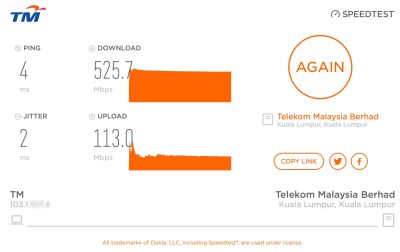
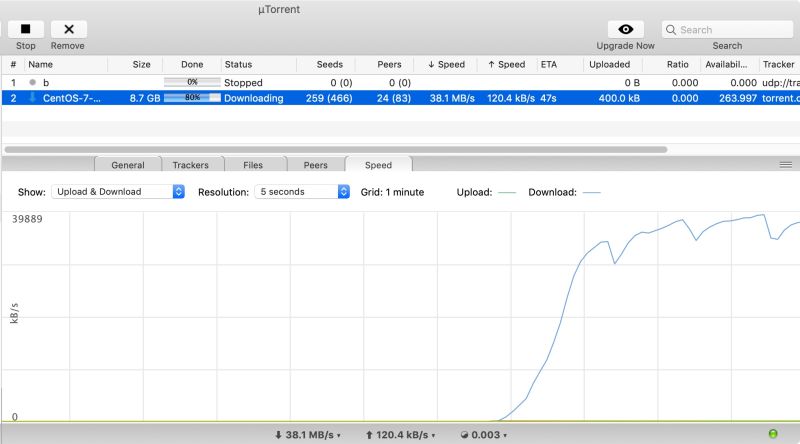
Did a couple of tests on the FG7008GR as router. Firmware: 322.6s.3-003. All tests on ethernet.

user posted image
speedtest.tm.com.my

user posted image
Torrent. Can't seem to go higher than 38MBps.

This post has been edited by soonwai: Oct 16 2018, 03:04 PM
TSsoonwai
post Feb 23 2019, 06:47 PM


********
All Stars
11,458 posts

Joined: Oct 2007
From: KL


QUOTE(imalmighty @ Feb 23 2019, 06:41 PM)
Custom firmware like merlin is no go?
*
Unfortunately not. Not popular enough for anyone to take notice of this wifi router,
TSsoonwai
post Jul 15 2019, 11:57 PM


********
All Stars
11,458 posts

Joined: Oct 2007
From: KL


QUOTE(heLL_bOy @ Jul 15 2019, 11:53 PM)
Hi guys,

currently i am using Aztech FG7009GR i had problem encounter that i unable to load any website on 1.x.x.x ip range.. may i know how to fix this issue?  icon_question.gif  icon_question.gif  icon_question.gif
*
See the first post under the Issues section.

This post has been edited by soonwai: Jul 15 2019, 11:57 PM
TSsoonwai
post Jul 16 2019, 02:37 AM


********
All Stars
11,458 posts

Joined: Oct 2007
From: KL


QUOTE(heLL_bOy @ Jul 16 2019, 12:00 AM)
i tried that way but doesn't work.. but my ISP isn't UNIFI

due note that my connection is not PPoe type is IPoe
*
Check the connection name of your setup and use that instead of ppp0.
TSsoonwai
post Jul 16 2019, 07:54 PM


********
All Stars
11,458 posts

Joined: Oct 2007
From: KL


QUOTE(heLL_bOy @ Jul 16 2019, 10:00 AM)
can i have the tutorial how to do ?

icon_question.gif  icon_question.gif
*
Sorry but I don’t have the FG7008 with me now. It’s somewhere in Advanced/Routing I presume. Maybe someone else can help you.

If you can post screenshots of the routing section of the router config, that might jog my memory.

This post has been edited by soonwai: Jul 16 2019, 11:22 PM

2 Pages  1 2 >Top
 

Change to:
| Lo-Fi Version
0.0253sec    0.56    7 queries    GZIP Disabled
Time is now: 9th December 2025 - 04:31 PM