QUOTE(dwRK @ Nov 20 2020, 02:55 PM)
you playing the .m2ts ?

yup..Nvidia Shield TV 2017
|
|
 Nov 20 2020, 07:41 PM Nov 20 2020, 07:41 PM
|
 
All Stars
10,859 posts Joined: Jan 2003 From: Sarawak  
|
QUOTE(dwRK @ Nov 20 2020, 02:55 PM) you playing the .m2ts ? yup.. |
|
|
|
|
|
Nov 20 2020, 09:01 PM
|

Senior Member
6,230 posts Joined: Jun 2006
|
QUOTE(ben3003 @ Nov 20 2020, 07:41 PM) yup.. maybe can try a different player like vlc or mx player... some players won't accept m2ts directly even though the codecs and containers are correct/supported... |
|
|
Nov 21 2020, 01:48 PM
|
 
Moderator
9,275 posts Joined: Jan 2005 From: KL. Best place in Malaysia. Nuff said 
|
QUOTE(ben3003 @ Nov 20 2020, 07:41 PM) yup.. Use MakeMKV to remux the files into an MKV container. It won't encode it or anything, just make it easier for media players to play the file |
|
|
Nov 21 2020, 05:55 PM
|
|
All Stars
10,859 posts Joined: Jan 2003 From: Sarawak
|
QUOTE(linkinstreet @ Nov 21 2020, 01:48 PM) Use MakeMKV to remux the files into an MKV container. It won't encode it or anything, just make it easier for media players to play the file ohh okok.. it will also have the menu too? cos spears munsil bluray is for calibrating the TV.. without the menu then susah lol. |
|
|
Nov 21 2020, 06:34 PM
|
|
Moderator
9,275 posts Joined: Jan 2005 From: KL. Best place in Malaysia. Nuff said
|
QUOTE(ben3003 @ Nov 21 2020, 05:55 PM) ohh okok.. it will also have the menu too? cos spears munsil bluray is for calibrating the TV.. without the menu then susah lol. That one I can't really say  |
|
|
Nov 22 2020, 03:26 PM
|
|
Senior Member
6,230 posts Joined: Jun 2006
|
QUOTE(ben3003 @ Nov 21 2020, 05:55 PM) ohh okok.. it will also have the menu too? cos spears munsil bluray is for calibrating the TV.. without the menu then susah lol. probably not... the menus are created at the last authoring step to create the iso image for burning... |
|
|
|
|
|
Nov 23 2020, 10:43 AM
|

Junior Member
312 posts Joined: Apr 2015
|
QUOTE(gobiomani @ Nov 20 2020, 06:39 PM) Cheap can look for Gamesir wired controller Noted with thanks There is a thread in nvidia's shield tv forum with a complete list of compatible controllers.  |
|
|
Nov 30 2020, 09:11 PM
|

Senior Member
2,661 posts Joined: Apr 2007
|
QUOTE(tharmaraj @ Nov 20 2020, 02:42 PM) Guys, can you recommend cheap game controller which works perfectly good with NVIDIA Shield TV PRO and can be bought here? I use 8bitdo SN30Pro+. Works with shield for gamestream, works with my Sony android TV for gamestream, works with switch as switch pro controller together with gyro, works with laptop to play emulator including gyro support. The battery pack can be switched our and replace with rechargable AAA. Usb C controller.Thanks in advance. Roughly the battery life lasts about 2weeks of heavy use. tharmaraj liked this post
|
|
|
Dec 6 2020, 08:10 PM
|
|
Senior Member
1,865 posts Joined: Jan 2003 From: XBOX Live
|
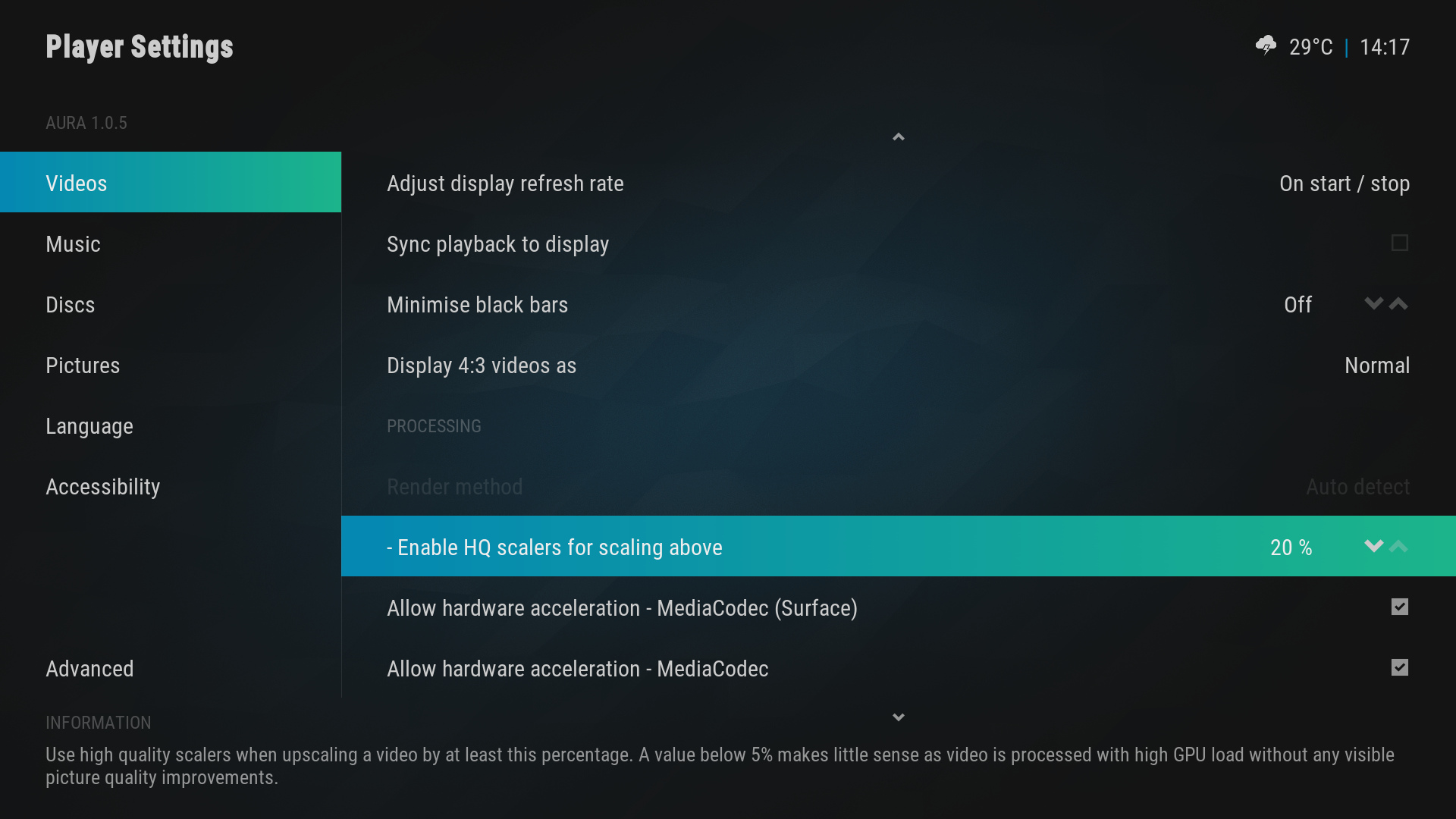
is there an option to enable HDR playback on Kodi for nvidia Shield 2017 ?
 most of my HDR streams aren't passing the metadata to AV receiver, but playing through Plex works fine most of my HDR streams aren't passing the metadata to AV receiver, but playing through Plex works fine  |
|
|
Dec 7 2020, 12:24 AM
|

Junior Member
562 posts Joined: Oct 2012 From: Out of the world...
|
QUOTE(calvin @ Dec 6 2020, 08:10 PM) is there an option to enable HDR playback on Kodi for nvidia Shield 2017 ? Just need to make sure that both hardware acceleration is enabled under settings>players>videos for HDR. most of my HDR streams aren't passing the metadata to AV receiver, but playing through Plex works fine The bolded part, do u mean Kodi able to play some HDR video or not at all? Does it work when NS is connected directly to the TV? Are u using Kodi 18.9 with default Kodi settings? |
|
|
Dec 7 2020, 10:26 AM
|
|
Senior Member
1,865 posts Joined: Jan 2003 From: XBOX Live
|
QUOTE(juzmafia @ Dec 7 2020, 12:24 AM) Just need to make sure that both hardware acceleration is enabled under settings>players>videos for HDR. The AV receiver failed to pick up any HDR metadata if the file was played through Kodi, however it’s fine playing through Plex.The bolded part, do u mean Kodi able to play some HDR video or not at all? Does it work when NS is connected directly to the TV? Are u using Kodi 18.9 with default Kodi settings? I’m currently on Kodi 18.9 but don’t seem to see the HDR option you mentioned despite enabling Expert view in Settings. My NV is connected through the AV with HDMI pass through . |
|
|
Dec 7 2020, 02:48 PM
|
|
Junior Member
562 posts Joined: Oct 2012 From: Out of the world...
|
QUOTE(calvin @ Dec 7 2020, 10:26 AM) The AV receiver failed to pick up any HDR metadata if the file was played through Kodi, however it’s fine playing through Plex. That's weird..the option should be there, need to scroll down to Processing.I’m currently on Kodi 18.9 but don’t seem to see the HDR option you mentioned despite enabling Expert view in Settings. My NV is connected through the AV with HDMI pass through . The Mediacodec(Surface) is required for HDR playback & iinm, it should be enabled by default. Example: » Click to show Spoiler - click again to hide... « Just curious aside Plex, can u try other app like VLC or Nova Player & see if the AV able to detect HDR metadata. |
|
|
Dec 7 2020, 05:41 PM
|
|
Senior Member
1,865 posts Joined: Jan 2003 From: XBOX Live
|
QUOTE(juzmafia @ Dec 7 2020, 02:48 PM) That's weird..the option should be there, need to scroll down to Processing. Interestingly Nova Player works perfectly fine passing the required HDR metadata to AV receiver.. The Mediacodec(Surface) is required for HDR playback & iinm, it should be enabled by default. Example: » Click to show Spoiler - click again to hide... « Just curious aside Plex, can u try other app like VLC or Nova Player & see if the AV able to detect HDR metadata. I have double checked on the Kodi settings, and its the same as yours. Just that no idea why its not sending the HDR metadata as needed edit: reinstalling Kodi seems to have resolved that.. This post has been edited by calvin: Dec 7 2020, 05:50 PM juzmafia liked this post
|
|
|
|
|
|
Dec 7 2020, 09:48 PM
|
|
Junior Member
562 posts Joined: Oct 2012 From: Out of the world...
|
QUOTE(calvin @ Dec 7 2020, 05:41 PM) Interestingly Nova Player works perfectly fine passing the required HDR metadata to AV receiver.. Good to hear that..I have double checked on the Kodi settings, and its the same as yours. Just that no idea why its not sending the HDR metadata as needed edit: reinstalling Kodi seems to have resolved that.. That was the final suggestion i was going to recommend to you anyway  |
|
|
Dec 10 2020, 12:45 PM
Show posts by this member only | IPv6 | Post
#935
|
|
Probation
11 posts Joined: Oct 2019
|
Guys, I have a Sony 4k X90h TV and it has android TV, do I need a Nvidia Shield?
What is the difference? |
|
|
Dec 10 2020, 03:17 PM
|
|
Junior Member
562 posts Joined: Oct 2012 From: Out of the world...
|
QUOTE(PumpIt @ Dec 10 2020, 12:45 PM) Guys, I have a Sony 4k X90h TV and it has android TV, do I need a Nvidia Shield? Not necessary because u'll be getting similar performance since that model comes with newer SoC(MT5895).What is the difference? Don't think so u'll be missing any features from Shield TV infact in some area X90H have advantage compare to Shield TV. Unless ur usage need; > local playback with HD Audio(if ur AVR only support arc) > Plex media server > Gigabit ethernet(uncompressed 4k remux plsyback) |
|
|
Dec 16 2020, 05:53 PM
|
|
Senior Member
1,865 posts Joined: Jan 2003 From: XBOX Live
|
anyone tried ordering the Shield directly from Amazon ? currently its running for $179 rather than its usual $199 , still cheaper after all the shipment and additional charge overhead.
However still a concern if it would be held at the customs or whatnot... This post has been edited by calvin: Dec 16 2020, 05:54 PM |
|
|
Dec 16 2020, 08:54 PM
|

Senior Member
7,118 posts Joined: Oct 2011 From: Wakanda
|
QUOTE(calvin @ Dec 16 2020, 05:53 PM) anyone tried ordering the Shield directly from Amazon ? currently its running for $179 rather than its usual $199 , still cheaper after all the shipment and additional charge overhead. No one can tell the future where customs are concerned... If I told you it's all clear to import and later you kena customs charge? Whatchu gon do? Not pay and ask them to send it back? I don't think so. So basically, if you have done the maths, want the device and no mind to pay? Just do it. The only way to find out if you'll get held is if it's sent.However still a concern if it would be held at the customs or whatnot... |
|
|
Dec 16 2020, 10:30 PM
|
|
Junior Member
562 posts Joined: Oct 2012 From: Out of the world...
|
QUOTE(calvin @ Dec 16 2020, 05:53 PM) anyone tried ordering the Shield directly from Amazon ? currently its running for $179 rather than its usual $199 , still cheaper after all the shipment and additional charge overhead. When u buy from Amazon & shipped it to Malaysia via Amazon Global Shipping, the final charges will include shipping & tax.However still a concern if it would be held at the customs or whatnot... Currently the final charges is:- $179.99(Shield TV Pro)+$22.23(Shipping)+$21.59(Estimated Tax) = $222.82 *More info on Amazon Import fees charges >> https://www.amazon.com/gp/help/customer/dis...msg_viewed_help Amazon appointed courier will handle the custom clearance except Sirim Permit which buyer can choose to apply or appoint agent to do it but it is pretty easy to apply by yourself once u have the relevant documents and good news is that the new charges for Sirim permit for personal device is only RM20 since April 2020. The permit can be applied thru their Ecomm website. More info:- https://ecomm.sirim.my/ https://www.sirim-qas.com.my/introduction-o...al-application/ p/s: if u plan to buy it thru Amazon, do pay in USD due to Amazon exchange rate is usually higher than ur bank exchange rate. This post has been edited by juzmafia: Dec 16 2020, 10:36 PM tharmaraj liked this post
|
|
|
Dec 17 2020, 12:21 AM
|
|
Senior Member
1,865 posts Joined: Jan 2003 From: XBOX Live
|
QUOTE(voncrane @ Dec 16 2020, 08:54 PM) No one can tell the future where customs are concerned... If I told you it's all clear to import and later you kena customs charge? Whatchu gon do? Not pay and ask them to send it back? I don't think so. So basically, if you have done the maths, want the device and no mind to pay? Just do it. The only way to find out if you'll get held is if it's sent. QUOTE(juzmafia @ Dec 16 2020, 10:30 PM) When u buy from Amazon & shipped it to Malaysia via Amazon Global Shipping, the final charges will include shipping & tax. thanks for the feedback guys Currently the final charges is:- $179.99(Shield TV Pro)+$22.23(Shipping)+$21.59(Estimated Tax) = $222.82 *More info on Amazon Import fees charges >> https://www.amazon.com/gp/help/customer/dis...msg_viewed_help Amazon appointed courier will handle the custom clearance except Sirim Permit which buyer can choose to apply or appoint agent to do it but it is pretty easy to apply by yourself once u have the relevant documents and good news is that the new charges for Sirim permit for personal device is only RM20 since April 2020. The permit can be applied thru their Ecomm website. More info:- https://ecomm.sirim.my/ https://www.sirim-qas.com.my/introduction-o...al-application/ p/s: if u plan to buy it thru Amazon, do pay in USD due to Amazon exchange rate is usually higher than ur bank exchange rate.  juzmafia liked this post
|
| Change to: |  0.0376sec 0.0376sec
 0.50 0.50
 6 queries 6 queries
 GZIP Disabled GZIP Disabled
Time is now: 4th December 2025 - 05:49 PM |
 Quote
Quote