

QUOTE(Drian @ Oct 20 2021, 03:53 PM)
yah i'm using the tube version.
I thought Shield is using the most powerful cpu , still have this problem.

is ram problem, not CPU.I thought Shield is using the most powerful cpu , still have this problem.
Nvidia Shield TV 2017
|
|
 Oct 20 2021, 04:04 PM Oct 20 2021, 04:04 PM
|
 
All Stars
10,859 posts Joined: Jan 2003 From: Sarawak  
|
QUOTE(Drian @ Oct 20 2021, 03:53 PM) yah i'm using the tube version. is ram problem, not CPU.I thought Shield is using the most powerful cpu , still have this problem. |
|
|
|
|
|
Oct 20 2021, 04:43 PM
|

Senior Member
4,522 posts Joined: Apr 2006
|
QUOTE(kmrdeva @ Oct 19 2021, 10:38 AM) Oh damn, the new Google TV interface just loaded on my Shield TV. Bloody ads and all. Easy fix, just sideload FLauncher and be happier with your Shield.I did mine: 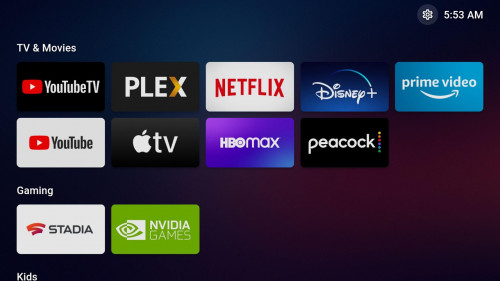  This post has been edited by SSJBen: Oct 20 2021, 04:44 PM juzmafia liked this post
|
|
|
Oct 20 2021, 04:46 PM
|

Senior Member
4,776 posts Joined: Jan 2003
|
QUOTE(SSJBen @ Oct 20 2021, 04:43 PM) Easy fix, just sideload FLauncher and be happier with your Shield. Nice. Thanks for the tip.I did mine: |
|
|
Oct 20 2021, 05:05 PM
|
 
Moderator
9,275 posts Joined: Jan 2005 From: KL. Best place in Malaysia. Nuff said 
|
QUOTE(SSJBen @ Oct 20 2021, 04:43 PM) Easy fix, just sideload FLauncher and be happier with your Shield. I should use this for my Chromecast with Google TV as well. Man I hate that new Google TV UI, especially since I can't hide any of the recommendationsI did mine: |
|
|
Oct 20 2021, 05:50 PM
|

Junior Member
33 posts Joined: Dec 2010
|
The Tube has 2GB/8GB of Ram/Storage vs 3GB/16GB in the Pro version. That difference is the cause of the 4K stuttering problem.
However, you may want to try your luck signing up to join Nvidia Shield beta program. I believe they are currently beta testing Android TV 11. [Link to Nvidia Shield Forum Beta Signup] QUOTE(Drian @ Oct 20 2021, 03:53 PM) yah i'm using the tube version. I thought Shield is using the most powerful cpu , still have this problem. |
|
|
Oct 20 2021, 06:23 PM
|

Junior Member
562 posts Joined: Oct 2012 From: Out of the world...
|
QUOTE(Drian @ Oct 20 2021, 11:06 AM) Anyone of you having problems with plex? I can't remember where i read this, there were some users getting better results using Just Player to play 4K Remux videos.I'm getting stuttering playing 4k videos from plex. If this improve your experience, you can use Kodi as media manager and configure it to use Just Player as external player. Clarification: Just Player is an open source application that use android's exoplayer and able to play DV(MKV, MP4) with HD audio https://play.google.com/store/apps/details?....brouken.player There was another tip by tweaking the total number of background app but this will reset after each reboot so it is not a permanent solution. QUOTE(cstan61 @ Oct 20 2021, 05:50 PM) The Tube has 2GB/8GB of Ram/Storage vs 3GB/16GB in the Pro version. That difference is the cause of the 4K stuttering problem. The beta program has been closed since few months back.However, you may want to try your luck signing up to join Nvidia Shield beta program. I believe they are currently beta testing Android TV 11. [Link to Nvidia Shield Forum Beta Signup] For us in Malaysia, it is not recommended to join the beta program especially if only have one Shield TV. The beta will have bunch of bugs and users need to actively provide feedback to Nvidia support. In some case they will require your Shield TV for futher debugging. Regarding to the stuttering issue, not just RAM but there's something 'else'. Nvidia is too quiet about this issue. This post has been edited by juzmafia: Oct 20 2021, 07:36 PM |
|
|
|
|
|
Oct 20 2021, 06:33 PM
|
|
Moderator
9,275 posts Joined: Jan 2005 From: KL. Best place in Malaysia. Nuff said
|
QUOTE(Drian @ Oct 20 2021, 11:06 AM) Anyone of you having problems with plex? Hi. I was wondering if you can install Tautulli for your Plex server. This will give you a better breakdown on how your Shield is playing the Plex file. I'm getting stuttering playing 4k videos from plex.  The important thing is usually what "Stream" shows. Some transcoding process can lead to stuttering. Alternatively you can also try the Plex add-on for Kodi QUOTE(juzmafia @ Oct 20 2021, 06:23 PM) I can't remember where i read this, there were some users getting better results using Just Player to play 4K Remux videos. Plex is an application that basically creates your own mini Netflix style library using your own files. It's not actually a player.If this improve your experience, you can use Kodi as media manager and configure it to use Just Player as external player. This post has been edited by linkinstreet: Oct 20 2021, 06:36 PM |
|
|
Oct 20 2021, 06:55 PM
|
|
Senior Member
4,522 posts Joined: Apr 2006
|
QUOTE(linkinstreet @ Oct 20 2021, 05:05 PM) I should use this for my Chromecast with Google TV as well. Man I hate that new Google TV UI, especially since I can't hide any of the recommendations Just know that the launcher is still very new, there are still some annoying bugs like pressing back may not exit an app or if you force shutdown an app, it may actually close the entire launcher itself. Just small niggly things, doesn't always happen but yeah otherwise it's an amazing no bs, no frills, clean launcher. |
|
|
Oct 20 2021, 07:20 PM
|
|
Junior Member
562 posts Joined: Oct 2012 From: Out of the world...
|
QUOTE(linkinstreet @ Oct 20 2021, 06:33 PM) Plex is an application that basically creates your own mini Netflix style library using your own files. It's not actually a player. » Click to show Spoiler - click again to hide... « Edit: I think you misunderstood the 'Kodi with Just Player' part. Actually, those are application not hardware. Here: https://play.google.com/store/apps/details?....brouken.player QUOTE(SSJBen @ Oct 20 2021, 06:55 PM) Just know that the launcher is still very new, there are still some annoying bugs like pressing back may not exit an app or if you force shutdown an app, it may actually close the entire launcher itself. Just small niggly things, doesn't always happen but yeah otherwise it's an amazing no bs, no frills, clean launcher. This was among one of the reason why i stop using the launcher..😄The launcher is really good but since the developer is doing this alone and only when he is free so bug fix and improvement will take time. This post has been edited by juzmafia: Oct 20 2021, 07:28 PM |
|
|
Oct 20 2021, 08:07 PM
|
|
Moderator
9,275 posts Joined: Jan 2005 From: KL. Best place in Malaysia. Nuff said
|
QUOTE(juzmafia @ Oct 20 2021, 07:20 PM) I think you misunderstood the 'Kodi with Just Player' part. Plex has an official Kodi plugin. Actually, those are application not hardware. Here: https://play.google.com/store/apps/details?....brouken.player This was among one of the reason why i stop using the launcher..😄 The launcher is really good but since the developer is doing this alone and only when he is free so bug fix and improvement will take time.  While Plex allows the app to trigger an external player, you will loose the ability to keep track of what you are playing, which is why people use Plex in the first place. So people either use the built in Plex player (also based on Exo Player). The issue is that Plex's native player usually have issues with subtitles that are not srt, and would try to "burn" in the subtitle into the video, hence some people who wants to avoid this live transcoding issue would use Plex for Kodi, since Kodi has better subttitle support, especially if you are watching animes This post has been edited by linkinstreet: Oct 20 2021, 08:08 PM |
|
|
Oct 21 2021, 02:36 AM
|
|
Junior Member
562 posts Joined: Oct 2012 From: Out of the world...
|
QUOTE(linkinstreet @ Oct 20 2021, 08:07 PM) Plex has an official Kodi plugin. While Plex allows the app to trigger an external player, you will loose the ability to keep track of what you are playing, which is why people use Plex in the first place. So people either use the built in Plex player (also based on Exo Player). I can't find the external player option on Android TV app or any article mentioning that feature available on Android TV app. It seems that for Android the feature is only available on mobile app. For tracking watch history, there is Trakt or SimKl. It is available on most media player app. On Kodi with external player, there is one downside that it won't have scrobbler(resume point) feature if video is stopped half way but it will mark the video as watched.(i assume this is what you meant) QUOTE The issue is that Plex's native player usually have issues with subtitles that are not srt, and would try to "burn" in the subtitle into the video, hence some people who wants to avoid this live transcoding issue would use Plex for Kodi, since Kodi has better subttitle support, especially if you are watching animes Actually at this part i'm a bit confused because the discussion is going to different issue..😅..and yeah the Plex subtitles transcoding issue is well known and annoying. Unless this is what you suspect @Drian is experiencing? Fyi, each media player that use Exoplayer are not the 'same'. There are forked version from Google's version. Each developer will do their own optimization to be integrate into their apps. This is why in my reply to @Drian, i suggested to try Just Player. If it worked then he can try to use Kodi+Just Player and can sync with Trakt/SimKL but without scrobbler feature. It's not perfect and in this case need to sacrifice something to gain something. Better solution would be get Shield TV Pro if possible. |
|
|
Oct 21 2021, 02:26 PM
|
|
Senior Member
4,776 posts Joined: Jan 2003
|
There are two Kodi add-ons for Plex, right? IIRC, they operate differently.
One is the official Plex add-on at https://kodi.wiki/view/Add-on:Plex. The other is PlexKodiConnect, at https://github.com/croneter/PlexKodiConnect. I'm using the 2nd one currently. |
|
|
Oct 21 2021, 02:57 PM
|
|
Junior Member
562 posts Joined: Oct 2012 From: Out of the world...
|
QUOTE(kmrdeva @ Oct 21 2021, 02:26 PM) There are two Kodi add-ons for Plex, right? IIRC, they operate differently. Yup, there's explanation on PKC's FAQ: One is the official Plex add-on at https://kodi.wiki/view/Add-on:Plex. The other is PlexKodiConnect, at https://github.com/croneter/PlexKodiConnect. I'm using the 2nd one currently. https://github.com/croneter/PlexKodiConnect...l-plex-for-kodi ..and there is Composite addon which is basic. This post has been edited by juzmafia: Oct 21 2021, 04:19 PM |
|
|
|
|
|
Oct 21 2021, 04:03 PM
|
|
Senior Member
4,776 posts Joined: Jan 2003
|
QUOTE(juzmafia @ Oct 21 2021, 02:57 PM) Yup, there's explanation on PKC's FAQ: https://github.com/croneter/PlexKodiConnect...f-my-disk-space Didn't know about Composite. Will check it out ..and there is Composite addon which is basic.  juzmafia liked this post
|
|
|
Oct 22 2021, 02:19 PM
|
|
Junior Member
562 posts Joined: Oct 2012 From: Out of the world...
|
If any of you experience audio dropout on Kodi with high bitrate TrueHD/Atmos, the issue has been fix.
Refer: https://github.com/xbmc/xbmc/pull/20339 The patch is available in Kodi's test build with 'fix-TrueHD-Matrix' label: http://mirrors.kodi.tv/test-builds/android/ If everything goes well, the fix will be available in official Kodi 19.3 build. The fix is also available in Maven's latest build: https://www.kodinerds.net/index.php/Thread/...C3%BCr-Android/ |
|
|
Oct 22 2021, 07:56 PM
|
|
Junior Member
33 posts Joined: Dec 2010
|
As these are unofficial releases, wouldn't they be buggy and may in some cases brick our hardware?
QUOTE(juzmafia @ Oct 22 2021, 02:19 PM) If any of you experience audio dropout on Kodi with high bitrate TrueHD/Atmos, the issue has been fix. Refer: https://github.com/xbmc/xbmc/pull/20339 The patch is available in Kodi's test build with 'fix-TrueHD-Matrix' label: http://mirrors.kodi.tv/test-builds/android/ If everything goes well, the fix will be available in official Kodi 19.3 build. The fix is also available in Maven's latest build: https://www.kodinerds.net/index.php/Thread/...C3%BCr-Android/ |
|
|
Oct 22 2021, 08:19 PM
|
|
Senior Member
4,776 posts Joined: Jan 2003
|
My shield tv UI changed back by itself to the old one. Yay. linkinstreet and juzmafia liked this post
|
|
|
Oct 22 2021, 08:27 PM
|
|
Junior Member
562 posts Joined: Oct 2012 From: Out of the world...
|
QUOTE(cstan61 @ Oct 22 2021, 07:56 PM) As these are unofficial releases, wouldn't they be buggy and may in some cases brick our hardware? This are test build based on stable version with specific fix by Team Kodi.In this case it has only one changes(fix) related to audio dropout. No, this won't brick your device because this is app not firmware. It doesn't affect kernel or system files. The Maven's Build is unofficial build with additional features(DV-MKV & BD-J) that Team Kodi can't or not interested to add it into the official Kodi build but still it won't brick the device. This post has been edited by juzmafia: Oct 22 2021, 08:37 PM |
|
|
Oct 22 2021, 08:45 PM
|
|
All Stars
10,859 posts Joined: Jan 2003 From: Sarawak
|
QUOTE(juzmafia @ Oct 22 2021, 08:27 PM) This are test build based on stable version with specific fix by Team Kodi. BD-J is to play bluray iso file? cos i downloaded spears munsil BD file but seems hard to open at shield TV tube lol.In this case it has only one changes(fix) related to audio dropout. No, this won't brick your device because this is app not firmware. It doesn't affect kernel or system files. The Maven's Build is unofficial build with additional features(DV-MKV & BD-J) that Team Kodi can't or not interested to add it into the official Kodi build but still it won't brick the device. |
|
|
Oct 23 2021, 01:39 AM
|
|
Junior Member
562 posts Joined: Oct 2012 From: Out of the world...
|
QUOTE(ben3003 @ Oct 22 2021, 08:45 PM) BD-J is to play bluray iso file? cos i downloaded spears munsil BD file but seems hard to open at shield TV tube lol. Not exactly. BD-J is the Blu-ray Disc Java which contains Blu-Ray Menu that requires JRE to read it. Also referred as "Full Blu-ray Menu".Official Kodi can play Blu-ray ISO but without the full menu means that it will directly go to the video and iirc this need some tweaking at Kodi settings first. With Maven's build, it will able to launch Full Blu-ray Menu just like playing it on Blu-Ray player thanks to JRE addon and modification done by Fandangos. In your case, the Spears & Munsil ISO contains BD-J Menu and Maven's build will able to show full menu. The ISO file will have 'BDJO' folder or files with '.bdjo' extension. I have shared demo previously with Fandangos build, can refer here: https://forum.lowyat.net/index.php?showtopi...ost&p=100510473 Fyi, the Fandangos build is no longer updated so better to use Maven's build. Some info on Kodi development for Android, since past one or two years there's no official Kodi Android maintainer so any bug related to Kodi for Android will take time to fix depends on Team Kodi availability or until community members submit the fix. They also have started to remove hacks/workarounds for specific SoC staring Kodi 19(or 18.5). Now everything depends on how well is the device firmware. ben3003 liked this post
|
| Change to: |  0.0298sec 0.0298sec
 0.41 0.41
 6 queries 6 queries
 GZIP Disabled GZIP Disabled
Time is now: 1st December 2025 - 07:16 PM |
 Quote
Quote