

Alright. Skip the update.
Guide Review & Setup - Xiaomi DaFang IP Cam
Guide Review & Setup - Xiaomi DaFang IP Cam
|
|
 Jul 23 2018, 11:54 AM Jul 23 2018, 11:54 AM
|
 
All Stars
17,018 posts Joined: Jan 2005  
|
Alright. Skip the update.
|
|
|
|
|
|
Jul 26 2018, 01:58 PM
|

Junior Member
58 posts Joined: Aug 2008
|
mine has solid blue light and voice says successfully connected but the mi home app says connection not successful
|
|
|
Aug 7 2018, 11:39 AM
|

Senior Member
3,705 posts Joined: Sep 2004 From: Malaysia  
|
can this dafang playback 1 minutes before recorded scene?
without setting motion alert |
|
|
Aug 9 2018, 04:28 PM
|

Senior Member
4,454 posts Joined: Apr 2006
|
Anyone know if you can use the camera in ap mode? Basically it doesn't need to connect to the internet/wifi to continuously recording
|
|
|
Aug 9 2018, 04:43 PM
|
|
All Stars
17,018 posts Joined: Jan 2005
|
QUOTE(alucard89 @ Aug 9 2018, 04:28 PM) Anyone know if you can use the camera in ap mode? Basically it doesn't need to connect to the internet/wifi to continuously recording Normally I setup the recording by time or day, than click start from the phone. Let it record itself. |
|
|
Aug 9 2018, 04:44 PM
|
|
All Stars
11,308 posts Joined: Feb 2008
|
QUOTE(alucard89 @ Aug 9 2018, 04:28 PM) Anyone know if you can use the camera in ap mode? Basically it doesn't need to connect to the internet/wifi to continuously recording i remember xiaofang can, but dafang cannotbut then again things changed so much, i dun even know got what now screenshot from xiaofang 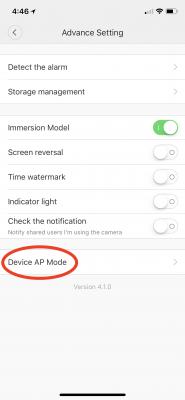
This post has been edited by idoblu: Aug 9 2018, 04:48 PM |
|
|
|
|
|
Aug 11 2018, 09:43 AM
|
|
All Stars
11,308 posts Joined: Feb 2008
|
QUOTE(Weretiger1 @ Aug 10 2018, 07:43 PM) No more notification upon detection.... why? yeah mine on old firmware 5.5.1.327 also cannot. what firmware is yours?all setting no changed, it was working 3/aug but till now...phone no notification and detection video also no history |
|
|
Aug 12 2018, 09:08 PM
Show posts by this member only | IPv6 | Post
#328
|

Senior Member
1,337 posts Joined: Apr 2011
|
current version is 5.5.1.353
|
|
|
Aug 13 2018, 08:06 AM
|
|
Senior Member
1,201 posts Joined: Jul 2013
|
2 of my unit is still on 5.5.1.327, works fine.
|
|
|
Aug 19 2018, 08:38 AM
|
|
All Stars
11,308 posts Joined: Feb 2008
|
QUOTE(ozak @ Jul 23 2018, 11:54 AM) Alright. Skip the update. Decided to update to the latest 5.5.1.353 and it seems to be able to send me notifications and I can view the motion detected video.I have two Dafang but only updated one but dunno why it shows both Dafangs now updated to latest firmware |
|
|
Aug 20 2018, 10:01 AM
|
|
All Stars
17,018 posts Joined: Jan 2005
|
QUOTE(idoblu @ Aug 19 2018, 08:38 AM) Decided to update to the latest 5.5.1.353 and it seems to be able to send me notifications and I can view the motion detected video. I still holding back. I have two Dafang but only updated one but dunno why it shows both Dafangs now updated to latest firmware So far no problem with online and timelapse using. Mostly use for monitor my solar charge battery and 3D print (long print). Lazy to discover others function till when want to use it. |
|
|
Sep 5 2018, 09:34 AM
|
|
All Stars
11,308 posts Joined: Feb 2008
|
QUOTE(alucard89 @ Aug 9 2018, 04:28 PM) Anyone know if you can use the camera in ap mode? Basically it doesn't need to connect to the internet/wifi to continuously recording I think I found the mode you are asking about - go to Advance Settings > Laboratory > Direct Mode |
|
|
Sep 5 2018, 09:34 AM
|
|
All Stars
11,308 posts Joined: Feb 2008
|
notifications and motion detected videos seems to be working again today
 |
|
|
|
|
|
Sep 5 2018, 09:54 AM
Show posts by this member only | IPv6 | Post
#334
|
|
Senior Member
4,454 posts Joined: Apr 2006
|
QUOTE(idoblu @ Sep 5 2018, 09:34 AM) I think I found the mode you are asking about - Wow, that's like deep in the settings.go to Advance Settings > Laboratory > Direct Mode Well try that out, thanks |
|
|
Sep 7 2018, 11:02 AM
|

Senior Member
1,253 posts Joined: Feb 2012
|
Hi guys. Just bought a dafang but still having issues on connecting it. Managed to get it all the way to qr code authentication, but the connection just ends with "bring device closer to router". Any suggestions? Edit: it's right beside the router...
This post has been edited by Yoshii-kun: Sep 7 2018, 11:02 AM Attached thumbnail(s) 

|
|
|
Sep 7 2018, 11:07 AM
|
|
All Stars
11,308 posts Joined: Feb 2008
|
QUOTE(Yoshii-kun @ Sep 7 2018, 11:02 AM) Hi guys. Just bought a dafang but still having issues on connecting it. Managed to get it all the way to qr code authentication, but the connection just ends with "bring device closer to router". Any suggestions? Edit: it's right beside the router... try more times and on different days |
|
|
Sep 7 2018, 11:13 AM
|

Senior Member
646 posts Joined: May 2006
|
it doesn't work with time.com :-(
|
|
|
Sep 7 2018, 11:26 AM
|
|
Senior Member
1,253 posts Joined: Feb 2012
|
QUOTE(idoblu @ Sep 7 2018, 11:07 AM) try more times and on different days Only on auspicious days can connect?  Funny part is I can hear successfully connect to router, and there's a solid blue led. Just not on a lucky day then? |
|
|
Sep 7 2018, 11:31 AM
|
|
All Stars
11,308 posts Joined: Feb 2008
|
QUOTE(pakdamek @ Sep 7 2018, 11:13 AM) it doesn't work with time.com :-( Time Broadband? I’m using TimeNo problem |
|
|
Sep 7 2018, 11:32 AM
|
|
All Stars
11,308 posts Joined: Feb 2008
|
QUOTE(Yoshii-kun @ Sep 7 2018, 11:26 AM) Only on auspicious days can connect? Gotta play around with it. Maybe it’s already connected but thinks it’s notFunny part is I can hear successfully connect to router, and there's a solid blue led. Just not on a lucky day then? This post has been edited by idoblu: Sep 7 2018, 11:32 AM |
| Change to: |  0.0175sec 0.0175sec
 0.38 0.38
 6 queries 6 queries
 GZIP Disabled GZIP Disabled
Time is now: 10th December 2025 - 06:31 PM |
 Quote
Quote