

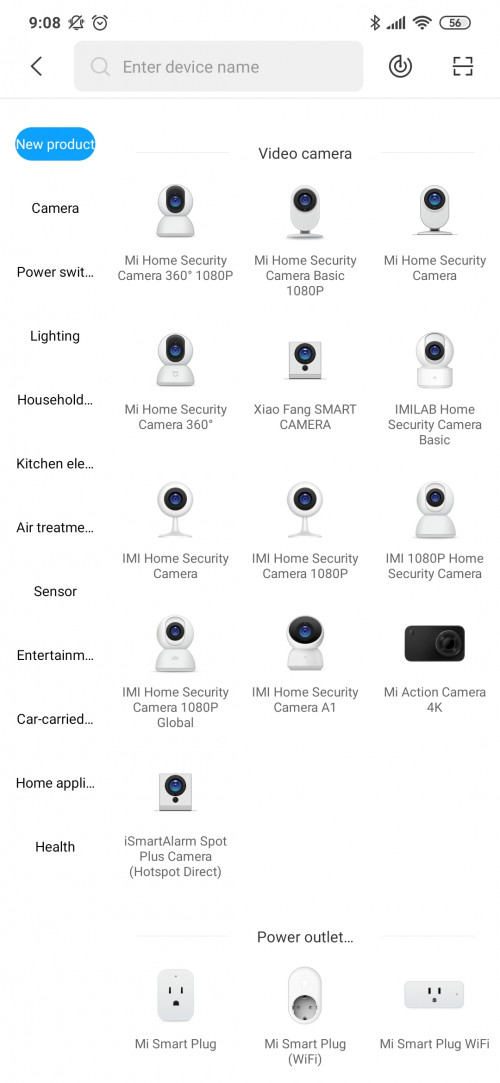
Guys I can't seem to find xiaomi dafang to add my device
For some reason my phone camera cannot scan the QR code on the back as well
Any advise?
Guide Review & Setup - Xiaomi DaFang IP Cam
|
|
 Mar 8 2020, 09:10 AM Mar 8 2020, 09:10 AM
Show posts by this member only | IPv6 | Post
#441
|
 
Senior Member
1,802 posts Joined: Oct 2015 
|
Guys I can't seem to find xiaomi dafang to add my device For some reason my phone camera cannot scan the QR code on the back as well Any advise? |
|
|
|
|
|
Mar 8 2020, 09:19 AM
Show posts by this member only | IPv6 | Post
#442
|

All Stars
11,308 posts Joined: Feb 2008
|
QUOTE(BacktoBasics @ Mar 8 2020, 09:10 AM) Guys I can't seem to find xiaomi dafang to add my device For some reason my phone camera cannot scan the QR code on the back as well Any advise?  Profile>Settings>Location |
|
|
Mar 8 2020, 09:48 AM
Show posts by this member only | IPv6 | Post
#443
|
|
Senior Member
1,802 posts Joined: Oct 2015
|
QUOTE(idoblu @ Mar 8 2020, 09:19 AM) change location to Mainland China Okay let me try . Thanks for the tipProfile>Settings>Location Thanks for the advise. It works This post has been edited by BacktoBasics: Mar 8 2020, 10:03 AM |
|
|
Mar 8 2020, 11:32 PM
|
 
Moderator
10,308 posts Joined: Jan 2003 From: Kuala Lumpur 
|
Just wondering, if my location already set to mainland china, can I still add cameras that are global version? Because currently I'm using a china set, planning to add a global set.
|
|
|
Mar 9 2020, 09:13 AM
Show posts by this member only | IPv6 | Post
#445
|
|
All Stars
11,308 posts Joined: Feb 2008
|
QUOTE(HMMaster @ Mar 8 2020, 11:32 PM) Just wondering, if my location already set to mainland china, can I still add cameras that are global version? Because currently I'm using a china set, planning to add a global set. dun think so can but i havent try it to confirm |
|
|
Mar 9 2020, 09:40 AM
|

All Stars
17,018 posts Joined: Jan 2005
|
QUOTE(HMMaster @ Mar 8 2020, 11:32 PM) Just wondering, if my location already set to mainland china, can I still add cameras that are global version? Because currently I'm using a china set, planning to add a global set. When you change to global, if that set is not available in globally, it will grey out. |
|
|
|
|
|
Mar 13 2020, 11:48 PM
|
|
Moderator
10,308 posts Joined: Jan 2003 From: Kuala Lumpur
|
QUOTE(ozak @ Mar 9 2020, 09:40 AM) When you change to global, if that set is not available in globally, it will grey out. so i need to switch back and forth to view both cameras? |
|
|
Mar 18 2020, 11:24 AM
|

Junior Member
541 posts Joined: Mar 2009 From: Technically not from Lebanon 
|
Anybody having trouble connecting to their existing Dafang/Xiaofang?
|
|
|
Mar 29 2020, 05:50 PM
|

Senior Member
912 posts Joined: Feb 2005
|
Is there anyway to use dafang as Webcam on Skype or zoom?
|
|
|
Apr 19 2020, 09:46 PM
Show posts by this member only | IPv6 | Post
#450
|

Junior Member
16 posts Joined: Jan 2016
|
If my Xiaomi Dafang is stolen can I still recover the cloud footage from the motion alarm?
|
|
|
May 4 2020, 02:49 PM
|

Newbie
10 posts Joined: Oct 2006
|
QUOTE(Aaronium @ Apr 19 2020, 09:46 PM) If my Xiaomi Dafang is stolen can I still recover the cloud footage from the motion alarm? I think not as your xiaomi app will connect to the camera HW first before you can view the content. If you previously have set to send alert to your phone, the video recording should be in Xiaomi cloud and can be downloaded to your phone (if the camera still intact). Not sure how you can retrieve these videos if the camera HW is not available to authenticate. Maybe other experienced users would be able to advise you on how to retrieve them. RGDs Max |
|
|
Aug 20 2020, 03:33 PM
|

Junior Member
504 posts Joined: Oct 2012 From: It's all relative
|
I just bought this camera. How do you record continuously 24/7? As in not record it by motion detection?
I see the Auto Record and recording mode options, and I've set it to uninterrupted video. But how do I initiate the recording? When I click the record on main screen, if I leave the app the camera will stop recording. Am I missing something here? Edit: nvm wrong device thread This post has been edited by amir.asyraf: Aug 20 2020, 03:38 PM |
|
|
Sep 15 2020, 09:38 AM
|

Senior Member
1,228 posts Joined: Nov 2017
|
Hi My Dafang ( 2 units) is giving me the "use only in mainland China" message. My apps region is set to Mainland China since day 1, It was working fine before for years. Must be some firmware upgraded .
How can i recover it? |
|
|
|
|
|
Sep 20 2020, 09:21 PM
|

Junior Member
82 posts Joined: Dec 2019 From: Florida
|
Is it supports still video cam?
|
|
|
Sep 23 2020, 10:47 AM
|
|
All Stars
11,308 posts Joined: Feb 2008
|
.
This post has been edited by idoblu: Oct 3 2020, 05:02 PM |
|
|
Sep 23 2020, 10:51 AM
|

Junior Member
83 posts Joined: May 2006 From: KL
|
Thanks. The voice instructions are in Chinese. Very difficult for non-Chinese speaking person like me.
|
|
|
Aug 30 2023, 03:29 PM
|
|
Junior Member
39 posts Joined: Oct 2005
|
Hello, I would like to change the Wi-Fi router that the camera connect to. Anyway to do it other than resetting the camera?
Tq |
|
|
Oct 9 2023, 10:02 PM
Show posts by this member only | IPv6 | Post
#458
|

Senior Member
1,081 posts Joined: Oct 2009
|
QUOTE(emfung @ Aug 30 2023, 03:29 PM) Hello, I would like to change the Wi-Fi router that the camera connect to. Anyway to do it other than resetting the camera? set the same SSID and password as your old router. Camera will connect back itself.Tq |
| Change to: |  0.0215sec 0.0215sec
 0.79 0.79
 6 queries 6 queries
 GZIP Disabled GZIP Disabled
Time is now: 9th December 2025 - 12:23 PM |
 Quote
Quote